

Python OpenCV实现测量图片物体宽度

发布时间:2026-10-13| 5人浏览过
本文介绍如何使用Python和OpenCV库通过阈值处理、边缘检测和轮廓提取来测量图片中物体的宽度。文章详细讲解了从加载图像、二值化、边缘检测到计算边界框坐标的完整实现过程,并提供了添加中文字符标注和显示结果的代码示例。
题目描述与思路
一、 题目描述
任务目标是测量给定图片中物体的高度,即上下边缘之间的垂直距离。
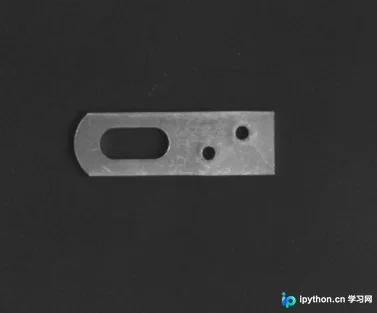
实现思路如下:
- 首先对图像进行阈值操作,生成二值化图像。
- 接着截取仅包含上下边框的区域,以便后续更准确地提取轮廓。
- 执行轮廓检测算法。
- 最终获取并输出测量结果。
代码实现详解
二、 实现过程
1. 用于给图片添加中文字符的功能实现
#用于给图片添加中文字符
def ImgText_CN(img, text, left, top, textColor=(0, 255, 0), textSize=20):
  if (isinstance(img, np.ndarray)): #判断是否为OpenCV图片类型
    img = Image.fromarray(cv2.cvtColor(img, cv2.COLOR_BGR2RGB))
  draw = ImageDraw.Draw(img)
  fontText = ImageFont.truetype(r'C:\Windows\Fonts\simsun.ttc', textSize, encoding="utf-8")     ##中文字体
  draw.text((left, top), text, textColor, font=fontText)   #写文字
  return cv2.cvtColor(np.asarray(img), cv2.COLOR_RGB2BGR)
2. 实现图片反色功能
#实现图片反色功能
def PointInvert(img):
  height, width = img.shape    #获取图片尺寸
  for i in range(height):
    for j in range(width):
      pi = img[i, j]
      img[i, j] = 255 - pi
  return img
3. 边缘检测步骤
# canny边缘检测
edges = cv2.Canny(th, 30, 70)
res=PointInvert(edges)              #颜色反转
#显示图片
cv2.imshow('original', th)            #显示二值化后的图,主题为白色,背景为黑色 更加容易找出轮廓
key = cv2.waitKey(0)
if key==27: #按esc键时,关闭所有窗口
  print(key)
  cv2.destroyAllWindows()
4. 轮廓操作细节
contours, hierarchy = cv2.findContours(th, cv2.RETR_EXTERNAL, cv2.CHAIN_APPROX_SIMPLE)    #得到轮廓

cnt = contours[0]        #取出轮廓

x, y, w, h = cv2.boundingRect(cnt)     #用一个矩形将轮廓包围

img_gray = cv2.cvtColor(res, cv2.COLOR_GRAY2BGR)        #将灰度转化为彩色图片方便画图

cv2.line(img_gray, (x, y), (x + w, y), (0,0,255), 2, 5)     #上边缘
cv2.line(img_gray, (x, y+h), (x + w, y+h), (0, 0, 255), 2, 5)  #下边缘

img1[80:230, 90:230] = img_gray     #用带有上下轮廓的图替换掉原图的对应部分
5. 图片显示方法
res1=ImgText_CN(img1, '宽度%d'%h, 25, 25, textColor=(0, 255, 0), textSize=30)  #绘制文字
#显示图片
cv2.imshow('original', res1)
key = cv2.waitKey(0)
if key==27: #按esc键时,关闭所有窗口
  print(key)
  cv2.destroyAllWindows()
6. 完整代码展示
import cv2
import numpy as np
from PIL import Image, ImageDraw, ImageFont

#用于给图片添加中文字符
def ImgText_CN(img, text, left, top, textColor=(0, 255, 0), textSize=20):
  if (isinstance(img, np.ndarray)): #判断是否为OpenCV图片类型
    img = Image.fromarray(cv2.cvtColor(img, cv2.COLOR_BGR2RGB))
  draw = ImageDraw.Draw(img)
  fontText = ImageFont.truetype(r'C:\Windows\Fonts\simsun.ttc', textSize, encoding="utf-8")     ##中文字体
  draw.text((left, top), text, textColor, font=fontText)   #写文字
  return cv2.cvtColor(np.asarray(img), cv2.COLOR_RGB2BGR)

#实现图片反色功能
def PointInvert(img):
  height, width = img.shape    #获取图片尺寸
  for i in range(height):
    for j in range(width):
      pi = img[i, j]
      img[i, j] = 255 - pi
  return img


img=cv2.imread("gongjian1.bmp",0)        #加载彩色图
img1=cv2.imread("gongjian1.bmp",1)        #加载灰度图

recimg = img[80:230, 90:230]          #截取需要的部分
img2 = img1[80:230, 90:230]           #截取需要的部分
ret, th = cv2.threshold(recimg, 90, 255, cv2.THRESH_BINARY)     #阈值操作二值化


# canny边缘检测
edges = cv2.Canny(th, 30, 70)
res=PointInvert(edges)              #颜色反转
#显示图片
cv2.imshow('original', th)            #显示二值化后的图,主题为白色,背景为黑色 更加容易找出轮廓
key = cv2.waitKey(0)
if key==27: #按esc键时,关闭所有窗口
  print(key)
  cv2.destroyAllWindows()

contours, hierarchy = cv2.findContours(th, cv2.RETR_EXTERNAL, cv2.CHAIN_APPROX_SIMPLE)    #得到轮廓

cnt = contours[0]        #取出轮廓

x, y, w, h = cv2.boundingRect(cnt)     #用一个矩形将轮廓包围

img_gray = cv2.cvtColor(res, cv2.COLOR_GRAY2BGR)        #将灰度转化为彩色图片方便画图

cv2.line(img_gray, (x, y), (x + w, y), (0,0,255), 2, 5)     #上边缘

cv2.line(img_gray, (x, y+h), (x + w, y+h), (0, 0, 255), 2, 5)  #下边缘
img1[80:230, 90:230] = img_gray                 #用带有上下轮廓的图替换掉原图的对应部分

res1=ImgText_CN(img1, '宽度%d'%h, 25, 25, textColor=(0, 255, 0), textSize=30)  #绘制文字
#显示图片
cv2.imshow('original', res1)
key = cv2.waitKey(0)
if key==27: #按esc键时,关闭所有窗口
  print(key)
  cv2.destroyAllWindows()
运行结果与问题排查
三、 运行结果(效果)
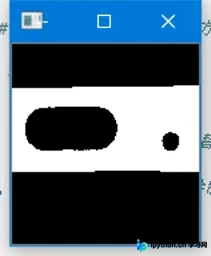
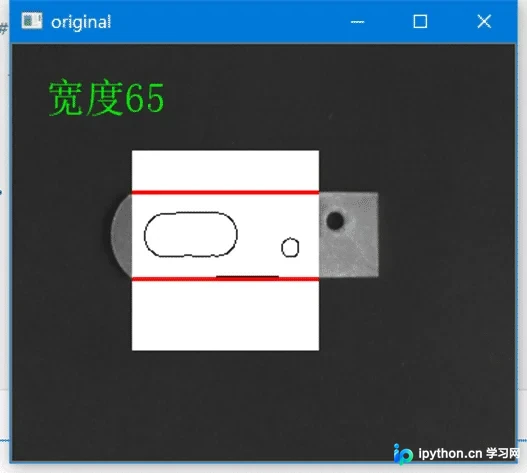
四、 问题及解决方法
遇到的问题是红色轮廓未能正常显示,解决方案是将灰度图转换为彩色图。
以上就是本文的全部内容,希望对大家的学习有所帮助,也希望大家多多支持本站。
免责声明:本文内容仅供参考,不代表本站观点。转载或引用请注明出处。









