

Python OpenCV生成任意形状凸包及轮廓特征详解

本文介绍如何使用Python和OpenCV生成任意形状的凸包图,并深入解析轮廓特征提取方法。内容涵盖图像矩计算质心与面积、轮廓近似算法、凸包检测与凸性缺陷分析,以及外接矩形、最小外接矩形、最小封闭圆、拟合椭圆和直线的具体实现代码与参数说明,帮助开发者掌握图像几何分析核心技能。
凸包生成效果图与代码实现
首先展示生成的凸包效果图。
在左侧图像中白色区域周围,绘制任意形状的凸包图。
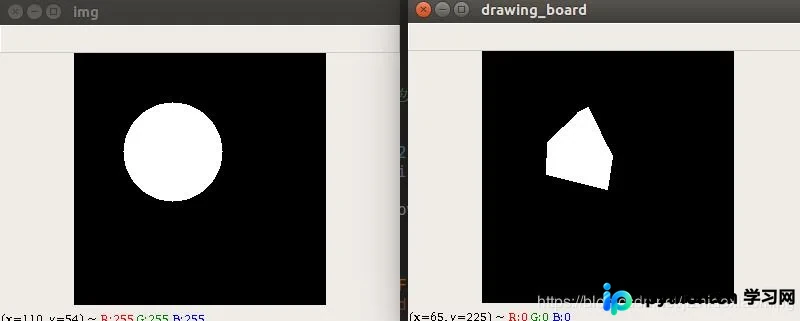
接下来提供实现该功能的完整代码。
import cv2
import numpy as np

def generate_poly(image, n, area_thresh):
 """
 随机生成凸包
 :param image: 二值图
 :param n: 顶点个数
 :param area_thresh: 删除小于此面积阈值的凸包
 :return: 凸包图
 """
 row, col = np.where(image[:, :, 0] == 255) # 行,列
 point_set = np.zeros((n, 1, 2), dtype=int)
 for j in range(n):
  index = np.random.randint(0, len(row))
  point_set[j, 0, 0] = col[index]
  point_set[j, 0, 1] = row[index]
 hull = []
 hull.append(cv2.convexHull(point_set, False))
 drawing_board = np.zeros(image.shape, dtype=np.uint8)
 cv2.drawContours(drawing_board, hull, -1, (255, 255, 255), -1)
 cv2.namedWindow('drawing_board', 0), cv2.imshow('drawing_board', drawing_board), cv2.waitKey()

 # 如果生成面积过小,重新生成
 if cv2.contourArea(hull[0]) < area_thresh:
  drawing_board = generate_poly(image, n, area_thresh)

 # 如果生成洞,重新生成
 is_hole = image[drawing_board == 255] == 255
 if is_hole.all() == True: # 洞,则drawing_board所有为255的地方,image也是255,all()即为所有位置
  drawing_board = generate_poly(image, n, area_thresh)
 return drawing_board


img = np.zeros((256, 256, 3), np.uint8)
cv2.circle(img, (100, 100), 50, (255, 255, 255), -1)
cv2.namedWindow('img', 0), cv2.imshow('img', img), cv2.waitKey()

img_hull = generate_poly(img, 8, 100)
cv2.namedWindow('img_hull', 0), cv2.imshow('img_hull', img_hull), cv2.waitKey()
OpenCV轮廓特征基础
补充相关OpenCV Python知识,包括轮廓特征、凸包、外接矩形、外接圆、拟合矩形、拟合直线及拟合圆的处理方法。
轮廓特征(Contour Features)
图像矩与质心计算
1. 图像的矩
使用cv2.moments()函数。
图像的矩可用于计算物体的某些几何特征,例如对象的质心和面积。
具体代码实现如下:
import cv2
import numpy as np

img = cv2.imread('img7.png',0)
ret,thresh = cv2.threshold(img,127,255,0)
im2,contours,hierarchy = cv2.findContours(thresh, 1, 2)

cnt = contours[0]
M = cv2.moments(cnt)
print( M )
运行后的输出结果。
{'m00': 283.0, 'm10': 8260.666666666666, 'm01': 34747.666666666664, 'm20': 251349.8333333333, 'm11': 1008063.0, 'm02': 4274513.166666666, 'm30': 7941981.4, 'm21': 30484543.9, 'm12': 123258620.46666667, 'm03': 526819846.70000005, 'mu20': 10223.989595602674, 'mu11': -6208.702394974302, 'mu02': 8080.874165684916, 'mu30': 8302.495426246896, 'mu21': -14552.154961312423, 'mu12': 11791.528133469663, 'mu03': -3268.923251092434, 'nu20': 0.12765785058625623, 'nu11': -0.07752253611575, 'nu02': 0.10089867729257346, 'nu30': 0.006162296011483629, 'nu21': -0.010800931752771139, 'nu12': 0.008751933371317017, 'nu03': -0.0024262672459139235}
通过上述计算,可以提取出面积、质心等有用数据。
质心的坐标由以下关系式给出:
cx = int(M['m10']/M['m00']) cy = int(M['m01']/M['m00'])
轮廓面积与周长
2. 轮廓面积
使用cv2.contourArea(contour[, oriented])函数。
3. 轮廓周长
使用cv2.arcLength(curve, closed)函数。
第二个参数用于指定形状是否为闭合轮廓。
轮廓近似算法
4. 轮廓近似
该功能根据指定的精度,将轮廓形状近似为具有较少顶点数的另一个形状,它是Douglas-Peucker算法的一种实现。
使用cv2.approxPolyDP(curve, epsilon, closed[, approxCurve])函数。
第二个参数epsilon表示从原始轮廓到近似轮廓的最大距离;第三个参数指定曲线是否闭合。
在第二幅图像中,绿线表示epsilon等于弧长10%时的近似曲线;第三幅图像显示epsilon等于弧长1%时的情况。
相关代码示例:
import cv2
import numpy as np

img = cv2.imread('img8.png')
cv2.imshow('src',img)
imgray = cv2.cvtColor(img, cv2.COLOR_BGR2GRAY)
ret, thresh = cv2.threshold(imgray, 127, 255, 0)
im2, contours, hierarchy = cv2.findContours(thresh, cv2.RETR_TREE, cv2.CHAIN_APPROX_SIMPLE)
cnt = contours[1]

epsilon = 0.1*cv2.arcLength(cnt,True)
approx = cv2.approxPolyDP(cnt,epsilon,True)
cv2.polylines(img, [approx], True, (0, 0, 255), 2)

cv2.imshow('show',img)
cv2.waitKey()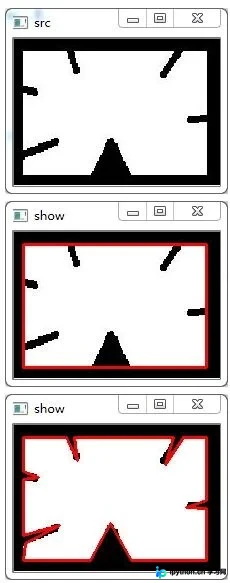
凸包检测与凸性分析
5. 凸包
凸包的处理结果类似于轮廓近似,但两者并不完全相同(在某些情况下可能提供相同的结果)。
使用convexHull(points[, hull[, clockwise[, returnPoints]]])函数检查曲线的凸性缺陷并进行修正。
points参数传入轮廓数据。
hull参数用于存储输出的凸包结果。
clockwise参数为方向标志,若设为True,则按顺时针方向输出凸包。
returnPoints参数默认为True,此时返回凸包点的坐标;若设为False,则返回与凸包点对应的轮廓点索引。
以下手形图像中,红线表示手的凸包,双面箭头标记显示了凸起的缺陷位置。
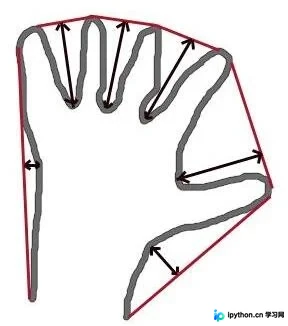
相关代码示例:
import cv2
import numpy as np

img = cv2.imread('img8.png')

imgray = cv2.cvtColor(img, cv2.COLOR_BGR2GRAY)
ret, thresh = cv2.threshold(imgray, 127, 255, 0)
im2, contours, hierarchy = cv2.findContours(thresh, cv2.RETR_TREE, cv2.CHAIN_APPROX_SIMPLE)
cnt = contours[1]

hull = cv2.convexHull(cnt)
当returnPoints设为True时,得到以下坐标值:
array([[[192, 135]],
  [[ 9, 135]],
  [[ 9, 12]],
  [[192, 12]]], dtype=int32)
若希望查找凸性缺陷,需传递returnPoints=False,得到以下结果:
array([[129],
  [ 67],
  [ 0],
  [142]], dtype=int32)
这些数值是轮廓中相应点的索引,检查第一个值:
cnt[129] Out[3]: array([[192, 135]], dtype=int32)
该结果与第一个示例中的坐标值相同。
凸性检查
6. 检查凸性
使用cv2.isContourConvex(contour)函数检查曲线是否凸。
外接矩形与最小外接矩形
7. 外接矩形
7.1 直边外接矩形
这是一种直边矩形,不考虑对象的旋转角度,因此边界矩形的面积并非最小。
使用cv2.boundingRect()函数。
设(x, y)为矩形的左上角坐标,(w, h)分别为宽度和高度。
相关代码示例:
import cv2
import numpy as np

img = cv2.imread('img7.png')

imgray = cv2.cvtColor(img, cv2.COLOR_BGR2GRAY)
ret, thresh = cv2.threshold(imgray, 127, 255, 0)
im2, contours, hierarchy = cv2.findContours(thresh, cv2.RETR_TREE, cv2.CHAIN_APPROX_SIMPLE)
cnt = contours[0]

x,y,w,h = cv2.boundingRect(cnt)
cv2.rectangle(img,(x,y),(x+w,y+h),(0,255,0),2)

cv2.imshow('show',img)
cv2.waitKey()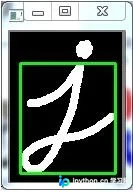
7.2 最小外接矩形
cv2.minAreaRect返回一个Box2D结构,包含以下详细信息:(center(x, y), (width, height), rotation angle)。
使用cv2.boxPoints绘制上述矩形。
相关代码示例:
rect = cv2.minAreaRect(cnt)
box = cv2.boxPoints(rect)
box = np.int0(box)
cv2.drawContours(img,[box],0,(0,0,255),2)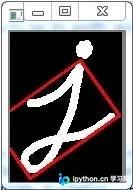
最小封闭圆与拟合椭圆
8. 最小封闭圆
(x,y),radius = cv2.minEnclosingCircle(cnt)
center = (int(x),int(y))
radius = int(radius)
cv2.circle(img,center,radius,(0,255,0),2)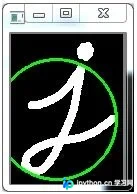
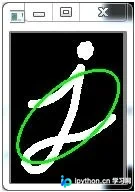
9. 拟合椭圆
ellipse = cv2.fitEllipse(cnt) cv2.ellipse(img,ellipse,(0,255,0),2)
拟合直线
10. 拟合直线
rows,cols = img.shape[:2]
[vx,vy,x,y] = cv2.fitLine(cnt, cv2.DIST_L2,0,0.01,0.01)
lefty = int((-x*vy/vx) + y)
righty = int(((cols-x)*vy/vx)+y)
cv2.line(img,(cols-1,righty),(0,lefty),(0,255,0),2)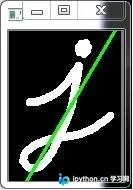
以上关于Python生成任意形状凸包图的代码及轮廓特征处理内容即为全部分享,希望能为大家提供参考,也希望大家多多支持本站。
免责声明:本文内容仅供参考,不代表本站观点。转载或引用请注明出处。









