

Python随机漫步图绘制实战:从基础到高级可视化

发布时间:2026-10-13| 5人浏览过
本文通过Python代码实例,详细讲解如何使用Matplotlib库绘制随机漫步图。内容涵盖从基础的5000点随机分布绘制,到包含起点终点高亮、颜色渐变及坐标轴隐藏的高级可视化技巧。通过对比不同实现版本,帮助读者掌握随机漫步算法逻辑及数据绘图的核心参数设置。
基础随机漫步代码实现
首先展示核心实现代码。
import matplotlib.pyplot as plt
from random import choice
class RandomWalk():
 def __init__(self,num_points=5000):
  self.num_points=num_points
  self.x_values=[0]
  self.y_values=[0]
 def fill_walk(self):
  while len(self.x_values)<self.num_points:
   x_direction=choice([1,-1])
   x_distance=choice([0,1,2,3,4])
   x_step=x_direction*x_distance
   y_direction=choice([1,-1])
   y_distance=choice([0,1,2,3,4])
   y_step=y_direction*y_distance
   if x_step==0 and y_step==0:
    continue
   next_x=self.x_values[-1]+x_step
   next_y=self.y_values[-1]+y_step
   self.x_values.append(next_x)
   self.y_values.append(next_y)
rw=RandomWalk()
rw.fill_walk()
plt.scatter(rw.x_values,rw.y_values,s=1)
plt.show()
生成的随机漫步图形效果如下。
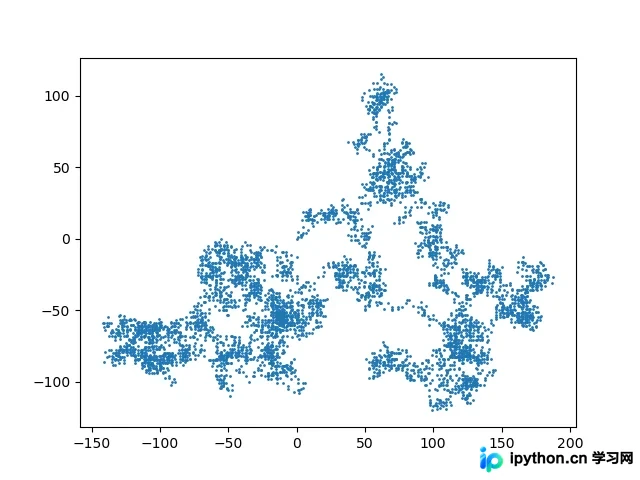
该代码片段生成了5000个数据点,其坐标分布完全基于随机算法。由于随机性的存在,每次执行脚本都会产生独特的路径轨迹。
高级可视化与扩展实例
此外,我们提供另一个扩展实例供参考。
from random import choice

class RandomWalk():
 """一个生成随机漫步数据的类"""

 def __init__(self,num_points=5000):
 """初始化随机漫步的属性"""
 self.num_points = num_points

 #所有随机漫步都始于(0,0)
 self.x_values = [0]
 self.y_values = [0]

 def fill_walk(self):
 """计算随机漫步包含的所有点"""

 #不断漫步,直到列表达到指定的长度
 while len(self.x_values) < self.num_points:
  # 决定前进方向以及沿这个方向前进的距离
  x_direction = choice([1,-1])
  x_distance = choice([0,1,2,3,4])
  x_step = x_direction * x_distance

  y_direction = choice([1,-1])
  y_distance = choice([0,1,2,3,4])
  y_step = y_direction * x_distance

  # 拒绝原地踏步
  if x_step == 0 and y_step == 0:
  continue

  #计算下一个点的x和y值
  next_x = self.x_values[-1] + x_step
  next_y = self.y_values[-1] + y_step

  self.x_values.append(next_x)
  self.y_values.append(next_y)
import matplotlib.pyplot as plt

from random_walk import RandomWalk

# 创建一个RandomWalk实例,并将其包含的点都绘制出来
rw = RandomWalk(50000)
rw.fill_walk()

# 设置绘图窗口的尺寸
plt.figure(dpi=80,figsize=(10,6))

# 设置点按先后顺序增加颜色深度
point_numbers = list(range(rw.num_points))
plt.scatter(rw.x_values,rw.y_values,c=point_numbers,cmap=plt.cm.Blues,
 edgecolor='none',s=1)

# 突出起点和终点,起点设置为绿色,终点设置为红色
plt.scatter(0,0,c='green',edgecolor='none',s=100)
plt.scatter(rw.x_values[-1],rw.y_values[-1],c='red',edgecolor='none',s=100)

# 隐藏坐标轴
plt.axes().get_xaxis().set_visible(False)
plt.axes().get_yaxis().set_visible(False)

plt.show()
第二个示例在逻辑上与前者相似,但基于Python 3.5环境编写,建议读者在本地环境中进行实际测试以加深理解。
以上就是关于利用Python绘制随机漫步图的完整教程。如需了解更多相关内容,欢迎查阅本站往期文章或继续阅读后续章节,感谢大家的支持。
免责声明:本文内容仅供参考,不代表本站观点。转载或引用请注明出处。









