

Python实现4x4拼图游戏:从设计到完整代码详解

本文介绍使用Python和Pygame库开发4x4拼图小游戏的完整过程。通过设计Settings和Picture类管理游戏配置与图像资源,利用二维列表存储数据并实现基于随机移动的打乱算法,确保拼图可解。文章详细解析按键响应、图像同步更新及胜利判定逻辑,提供可直接运行的完整源代码,适合Python初学者理解游戏循环与事件处理机制。
项目简介与代码说明
作为Python初学者,本文档中的程序由作者独立设计,目前仍存在诸多不足,部分算法也有优化空间。欢迎有经验的大佬提出建议与指正。
游戏效果展示
游戏运行效果展示
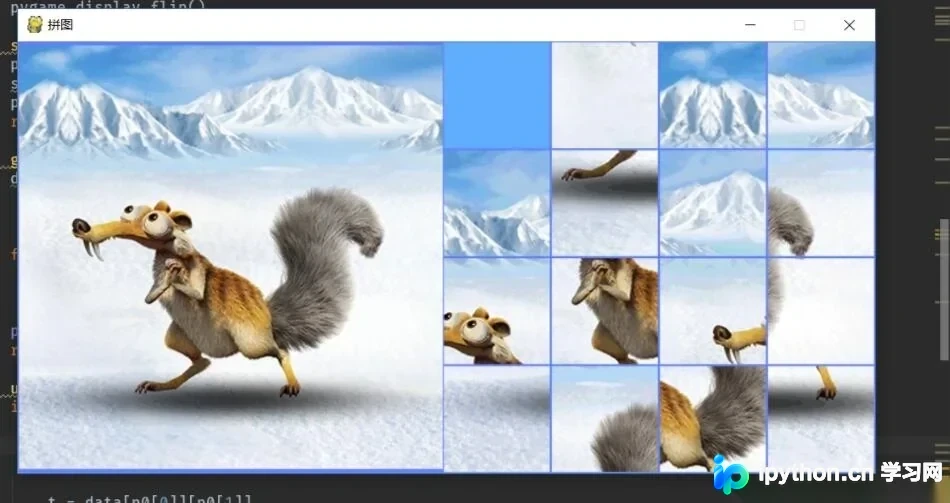
核心类设计与资源管理
首先创建设置类(Settings),用于集中存储游戏的基础配置数据。
虽然可以直接在程序中硬编码这些数值,但封装为类能显著提升代码的可读性,并方便后续对基础数据进行统一修改和维护。
class Settings:
 def __init__(self):
 self.picture_num = 4 # 每行图片数
 self.screen_width = 408 # 窗口宽度
 self.screen_length = 809 # 窗口长度
 self.picture_length = 100 # 每个正方形图片的长
 self.screen_bgcol = (96, 127, 255) # 背景颜色
 self.picture_bian = 1 # 每个图片的边缘宽度 ,便于分清每个照片
 self.picture_distance = 102 # 两个图片之间的距离
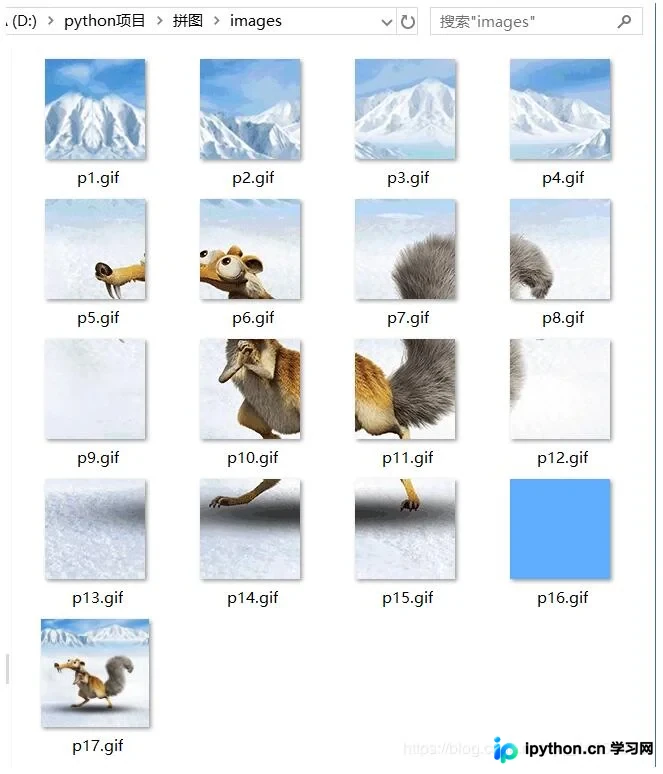
接着创建图片类(Picture),用于封装和管理游戏所需的图像资源。
在初始化阶段,将所有游戏所需的图片加载至内存中,并在渲染时直接调用图像对象列表,以提高显示效率。该类的构造函数接收一个数字参数,据此生成对应的图片路径和文件名(如picture_name),并加载相应的图像文件。建议初学者查阅Pygame的相关文档以熟悉其图像加载与显示方法。
class Picture:
 def __init__(self, num):
 self.picture_name = 'images/p{}.gif'.format(num)
 self.picture = pygame.image.load(self.picture_name) # 打开照片
 self.picture_rect = self.picture.get_rect() # 获得照片属性类
 def display_picture(self, screen, x, y): # 在屏幕上显示图片方法
 self.picture_rect.x = x
 self.picture_rect.y = y
 screen.blit(self.picture, self.picture_rect)
游戏初始化与数据打乱算法
初始化游戏数据并创建游戏窗口。
游戏状态通过两个4x4的二维列表来维护:一个列表存储图片的逻辑位置编号,另一个列表存储对应的图片对象。游戏开始时,图片顺序应当是打乱的。在打乱数据时,必须基于原始有序状态进行随机移动,否则可能导致生成的拼图状态无解,无法复原。
实现数据打乱的函数逻辑。
def data_begin(caozuoshu, p0, data):
 for i in caozuoshu:
 move(i, p0, data)

def move(i, p0, data):
 if i == 3 and p0[1] > 0:
 t = data[p0[0]][p0[1]]
 data[p0[0]][p0[1]] = data[p0[0]][p0[1]-1]
 data[p0[0]][p0[1]-1] = t
 p0[1] -= 1
 elif i == 4 and p0[1] < 3:
 t = data[p0[0]][p0[1]]
 data[p0[0]][p0[1]] = data[p0[0]][p0[1]+1]
 data[p0[0]][p0[1]+1] = t
 p0[1] += 1
 elif i == 1 and p0[0] > 0:
 t = data[p0[0]][p0[1]]
 data[p0[0]][p0[1]] = data[p0[0]-1][p0[1]]
 data[p0[0]-1][p0[1]] = t
 p0[0] -= 1
 elif i == 2 and p0[0] < 3:
 t = data[p0[0]][p0[1]]
 data[p0[0]][p0[1]] = data[p0[0]+1][p0[1]]
 data[p0[0]+1][p0[1]] = t
 p0[0] += 1

def create_caozuoshu():
 n = 30
 caozuo = [1, 2, 3, 4]
 caozuoshu = []
 for i in range(n):
 caozuoshu.append(random.choice(caozuo))
 return caozuoshu
执行上述逻辑后,对存储图片编号的data列表进行打乱处理。
根据打乱后的data列表,重新生成对应的picture图片对象列表,确保数据与图像同步。
def create_pictures(picture, data, set):
 for i in range(set.picture_num):
 for j in range(set.picture_num):
  p = Picture(data[i][j])
  picture[i][j] = p
窗口创建与主循环逻辑
封装创建游戏窗口的函数,初始化Pygame并设置窗口尺寸。
def screen_create(set):
 pygame.init()
 screen = pygame.display.set_mode((set.screen_length, set.screen_width))
 pygame.display.set_caption("拼图")
 return screen
程序的主函数入口,负责初始化设置、生成初始数据、创建窗口及启动主循环。
if __name__ == '__main__':
 set = Settings()
 # 初始数据
 data = [[9, 1, 3, 4],
  [2, 16, 14, 8],
  [6, 10, 5, 12],
  [13, 7, 11, 15]]
 p0 = [1, 1]
 caozuoshu = create_caozuoshu()
 data_begin(caozuoshu, p0, data)
 bushu = [0]
 # 创建图片
 picture = [[None, None, None, None],
  [None, None, None, None],
  [None, None, None, None],
  [None, None, None, None]]
 yuantu = Picture(17)
 create_pictures(picture, data, set) # 按照data生成相应顺序的picture列表
 # 创建窗口
 screen = screen_create(set)

 # 游戏主循环
 while True:
 check_events(picture, p0, data, bushu)
 screen_updata(picture, screen, set, yuantu)
按键响应与状态同步更新
实现按键事件响应逻辑,处理用户的键盘输入。
当用户按下方向键时,必须同步更新picture列表(图像位置)和data列表(逻辑状态)。data列表的变化用于实时判断拼图是否已完成。
根据用户按键产生的控制指令,执行相应的图像移动操作。
def check_events(picture, p0, data, bushu):
 for event in pygame.event.get():
 if event.type == pygame.QUIT:
  sys.exit()
 elif event.type == pygame.KEYDOWN and game_over(data, set, bushu):
  if event.key == pygame.K_DOWN and p0[0] > 0:
  xinhao = 1
  bushu[0] += 1
  updata(xinhao, picture, p0, data)
  elif event.key == pygame.K_UP and p0[0] < 3:
  xinhao = 2
  bushu[0] += 1
  updata(xinhao, picture, p0, data)
  elif event.key == pygame.K_RIGHT and p0[1] > 0:
  xinhao = 3
  bushu[0] += 1
  updata(xinhao, picture, p0, data)
  elif event.key == pygame.K_LEFT and p0[1] < 3:
  xinhao = 4
  bushu[0] += 1
  updata(xinhao, picture, p0, data)
依据控制指令,更新picture和data列表中的元素位置,并记录步数。
def updata(xinhao, picture, p0, data):
 if xinhao == 3:
 tmp = picture[p0[0]][p0[1]]
 picture[p0[0]][p0[1]] = picture[p0[0]][p0[1]-1]
 picture[p0[0]][p0[1]-1] = tmp

 t = data[p0[0]][p0[1]]
 data[p0[0]][p0[1]] = data[p0[0]][p0[1]-1]
 data[p0[0]][p0[1]-1] = t
 p0[1] -= 1

 elif xinhao == 4:
 tmp = picture[p0[0]][p0[1]]
 picture[p0[0]][p0[1]] = picture[p0[0]][p0[1] + 1]
 picture[p0[0]][p0[1] + 1] = tmp

 t = data[p0[0]][p0[1]]
 data[p0[0]][p0[1]] = data[p0[0]][p0[1]+1]
 data[p0[0]][p0[1]+1] = t
 p0[1] += 1
 elif xinhao == 1:
 tmp = picture[p0[0]][p0[1]]
 picture[p0[0]][p0[1]] = picture[p0[0] - 1][p0[1]]
 picture[p0[0] - 1][p0[1]] = tmp

 t = data[p0[0]][p0[1]]
 data[p0[0]][p0[1]] = data[p0[0]-1][p0[1]]
 data[p0[0]-1][p0[1]] = t
 p0[0] -= 1
 elif xinhao == 2:
 tmp = picture[p0[0]][p0[1]]
 picture[p0[0]][p0[1]] = picture[p0[0] + 1][p0[1]]
 picture[p0[0] + 1][p0[1]] = tmp

 t = data[p0[0]][p0[1]]
 data[p0[0]][p0[1]] = data[p0[0] + 1][p0[1]]
 data[p0[0] +1][p0[1]] = t
 p0[0] += 1
胜利判定与完整代码实现
实现判断拼图是否完成的逻辑函数。
def game_over(data, set,bushu):
 datao = [[1, 2, 3, 4],
  [5, 6, 7, 8],
  [9, 10, 11, 12],
  [13, 14, 15, 16]]
 for i in range(set.picture_num):
 for j in range(set.picture_num):
  if datao[i][j] != data[i][j]:
  return True
 print("牛逼!\n 游戏结束!\n 步数:{}".format(bushu[0]))
 return False
该函数需在每次按键响应后实时调用,用于监测当前状态是否达到拼图完成的目标。
以下是完整的Python程序代码。
import pygame
import random
import sys

class Settings:
 def __init__(self):
 self.picture_num = 4
 self.screen_width = 408
 self.screen_length = 809
 self.picture_length = 100
 self.screen_bgcol = (96, 127, 255)
 self.picture_speed = 5
 self.picture_bian = 1
 self.picture_distance = 102

class Picture:
 def __init__(self, num):
 self.picture_name = 'images/p{}.gif'.format(num)
 self.picture = pygame.image.load(self.picture_name)
 self.picture_rect = self.picture.get_rect()
 def display_picture(self, screen, x, y):
 self.picture_rect.x = x
 self.picture_rect.y = y
 screen.blit(self.picture, self.picture_rect)
'''def data_begin(data,p0):
 n = [1, 2, 3, 4, 5, 6, 7, 8, 9, 10, 11, 12, 13, 14, 15, 16]
 ns = 16
 for i in range(4):
 for j in range(4):
  num = random.randint(0, ns-1)
  ns -= 1
  data[i][j] = n.pop(num)
  if data[i][j] == 16:
  p0[0] = i
  p0[1] = j'''
def data_begin(caozuoshu, p0, data):
 for i in caozuoshu:
 move(i, p0, data)

def move(i, p0, data):
 if i == 3 and p0[1] > 0:
 t = data[p0[0]][p0[1]]
 data[p0[0]][p0[1]] = data[p0[0]][p0[1]-1]
 data[p0[0]][p0[1]-1] = t
 p0[1] -= 1
 elif i == 4 and p0[1] < 3:
 t = data[p0[0]][p0[1]]
 data[p0[0]][p0[1]] = data[p0[0]][p0[1]+1]
 data[p0[0]][p0[1]+1] = t
 p0[1] += 1
 elif i == 1 and p0[0] > 0:
 t = data[p0[0]][p0[1]]
 data[p0[0]][p0[1]] = data[p0[0]-1][p0[1]]
 data[p0[0]-1][p0[1]] = t
 p0[0] -= 1
 elif i == 2 and p0[0] < 3:
 t = data[p0[0]][p0[1]]
 data[p0[0]][p0[1]] = data[p0[0]+1][p0[1]]
 data[p0[0]+1][p0[1]] = t
 p0[0] += 1

def create_caozuoshu():
 n = 30
 caozuo = [1, 2, 3, 4]
 caozuoshu = []
 for i in range(n):
 caozuoshu.append(random.choice(caozuo))
 return caozuoshu

def create_pictures(picture, data, set):
 for i in range(set.picture_num):
 for j in range(set.picture_num):
  p = Picture(data[i][j])
  picture[i][j] = p

def screen_updata(picture, screen, set, yuantu):
 screen.fill(set.screen_bgcol)
 x, y = 402, set.picture_bian
 for i in range(set.picture_num):
 for j in range(set.picture_num):
  picture[i][j].display_picture(screen, x, y)
  x += set.picture_distance
 x = 402
 y += set.picture_distance
 yuantu.display_picture(screen, 1, 4)
 pygame.display.flip()

def screen_create(set):
 pygame.init()
 screen = pygame.display.set_mode((set.screen_length, set.screen_width))
 pygame.display.set_caption("拼图")
 return screen

def game_over(data, set,bushu):
 datao = [[1, 2, 3, 4],
  [5, 6, 7, 8],
  [9, 10, 11, 12],
  [13, 14, 15, 16]]
 for i in range(set.picture_num):
 for j in range(set.picture_num):
  if datao[i][j] != data[i][j]:
  return True
 print("牛逼!\n 游戏结束!\n 步数:{}".format(bushu[0]))
 return False

def updata(xinhao, picture, p0, data):
 if xinhao == 3:
 tmp = picture[p0[0]][p0[1]]
 picture[p0[0]][p0[1]] = picture[p0[0]][p0[1]-1]
 picture[p0[0]][p0[1]-1] = tmp

 t = data[p0[0]][p0[1]]
 data[p0[0]][p0[1]] = data[p0[0]][p0[1]-1]
 data[p0[0]][p0[1]-1] = t
 p0[1] -= 1

 elif xinhao == 4:
 tmp = picture[p0[0]][p0[1]]
 picture[p0[0]][p0[1]] = picture[p0[0]][p0[1] + 1]
 picture[p0[0]][p0[1] + 1] = tmp

 t = data[p0[0]][p0[1]]
 data[p0[0]][p0[1]] = data[p0[0]][p0[1]+1]
 data[p0[0]][p0[1]+1] = t
 p0[1] += 1
 elif xinhao == 1:
 tmp = picture[p0[0]][p0[1]]
 picture[p0[0]][p0[1]] = picture[p0[0] - 1][p0[1]]
 picture[p0[0] - 1][p0[1]] = tmp

 t = data[p0[0]][p0[1]]
 data[p0[0]][p0[1]] = data[p0[0]-1][p0[1]]
 data[p0[0]-1][p0[1]] = t
 p0[0] -= 1
 elif xinhao == 2:
 tmp = picture[p0[0]][p0[1]]
 picture[p0[0]][p0[1]] = picture[p0[0] + 1][p0[1]]
 picture[p0[0] + 1][p0[1]] = tmp

 t = data[p0[0]][p0[1]]
 data[p0[0]][p0[1]] = data[p0[0] + 1][p0[1]]
 data[p0[0] +1][p0[1]] = t
 p0[0] += 1
 #print(data)

def check_events(picture, p0, data, bushu):
 for event in pygame.event.get():
 if event.type == pygame.QUIT:
  sys.exit()
 elif event.type == pygame.KEYDOWN and game_over(data, set, bushu):
  if event.key == pygame.K_DOWN and p0[0] > 0:
  xinhao = 1
  bushu[0] += 1
  updata(xinhao, picture, p0, data)
  elif event.key == pygame.K_UP and p0[0] < 3:
  xinhao = 2
  bushu[0] += 1
  updata(xinhao, picture, p0, data)
  elif event.key == pygame.K_RIGHT and p0[1] > 0:
  xinhao = 3
  bushu[0] += 1
  updata(xinhao, picture, p0, data)
  elif event.key == pygame.K_LEFT and p0[1] < 3:
  xinhao = 4
  bushu[0] += 1
  updata(xinhao, picture, p0, data)

if __name__ == '__main__':
 set = Settings()
 # 初始数据
 data = [[9, 1, 3, 4],
  [2, 16, 14, 8],
  [6, 10, 5, 12],
  [13, 7, 11, 15]]
 p0 = [1, 1]
 caozuoshu = create_caozuoshu()
 data_begin(caozuoshu, p0, data)
 bushu = [0]
 # 创建图片
 picture = [[None, None, None, None],
  [None, None, None, None],
  [None, None, None, None],
  [None, None, None, None]]
 yuantu = Picture(17)
 create_pictures(picture, data, set)
 # 创建窗口
 screen = screen_create(set)

 # 游戏主循环
 while True:
 check_events(picture, p0, data, bushu)
 screen_updata(picture, screen, set, yuantu)
请注意,游戏所需的图片文件必须与程序中指定的路径和文件名保持一致,否则会导致加载错误。
以上就是本文的全部内容,希望能为读者的学习提供有益的帮助。欢迎大家继续支持本站,获取更多技术资源。
免责声明:本文内容仅供参考,不代表本站观点。转载或引用请注明出处。









