

Python Turtle库绘制滑稽脸完整代码与实现步骤

发布时间:2026-10-13| 5人浏览过
本文分享使用Python Turtle库绘制滑稽脸的完整代码与实现过程。内容涵盖Atom编辑器配置、Python 3.7环境及Windows PowerShell运行方式,详细解析圆形、弧线及填充颜色的绘制逻辑,旨在为初学者提供直观的Turtle库应用参考。
Python Turtle绘制滑稽脸环境配置与代码解析
本示例代码参考了网络上的相关实现,并针对原代码中存在的问题进行了约两小时的修正与优化,最终成功绘制出滑稽脸图案。此内容也是对近期学习Python Turtle绘图库的一点实践记录,若代码中存在疏漏,欢迎读者指正。
开发环境选用Atom作为代码编辑器。
使用的Python解释器版本为3.7。
程序在Windows PowerShell终端中运行。
import turtle
turtle.setup(600,600,200,200)

#fcae
turtle.penup()
turtle.goto(-210,0)
turtle.seth(-90)
turtle.pendown()
turtle.pencolor(‘orange')
turtle.pensize(4)
turtle.begin_fill()
turtle.circle(210,360)
turtle.fillcolor(‘yellow')
turtle.end_fill()
turtle.pencolor(‘black')

#mouth
turtle.pensize(5)
turtle.penup()
turtle.goto(-150,30)
turtle.pendown()
turtle.seth(-90)
turtle.circle(150,180)

#left eye
turtle.penup()
turtle.pensize(4)
turtle.goto(-180,90)
turtle.pendown()
turtle.seth(40)
turtle.begin_fill()
turtle.circle(-120,80)
turtle.penup()
turtle.goto(-180,90)
turtle.pendown()
turtle.seth(-130)
turtle.circle(15,110)
turtle.seth(40)
turtle.circle(-106,83)
turtle.seth(30)
turtle.circle(18,105)
turtle.fillcolor(‘white')
turtle.end_fill()

#right eye
turtle.penup()
turtle.goto(20,90)
turtle.pendown()
turtle.seth(40)
turtle.begin_fill()
turtle.circle(-120,80)
turtle.penup()
turtle.goto(20,90)
turtle.pendown()
turtle.seth(-130)
turtle.circle(15,110)
turtle.seth(40)
turtle.circle(-106,83)
turtle.seth(30)
turtle.circle(18,105)
turtle.fillcolor(‘white')
turtle.end_fill()

#Eyeball
turtle.pensize(2)
turtle.penup()
turtle.goto(50,95)
turtle.pendown()
turtle.begin_fill()
turtle.circle(8,360)
turtle.fillcolor(‘black')
turtle.end_fill()
turtle.penup()
turtle.goto(-150,95)
turtle.pendown()
turtle.begin_fill()
turtle.circle(8,360)
turtle.fillcolor(‘black')
turtle.end_fill()

#Blush
turtle.pensize(1)
turtle.pencolor(‘pink')
turtle.begin_fill()
turtle.penup()
turtle.goto(-160,50)
turtle.pendown()
turtle.seth(-90)
for i in range(2):
for j in range(10):
turtle.forward(j)
turtle.left(9)
for j in range(10,0,-1):
turtle.forward(j)
turtle.left(9)
turtle.fillcolor(‘pink')
turtle.end_fill()
turtle.pensize(1)
turtle.pencolor(‘pink')
turtle.begin_fill()
turtle.penup()
turtle.goto(40,50)
turtle.pendown()
turtle.seth(-90)
for i in range(2):
for j in range(10):
turtle.forward(j)
turtle.left(9)
for j in range(10,0,-1):
turtle.forward(j)
turtle.left(9)
turtle.fillcolor(‘pink')
turtle.end_fill()
turtle.hideturtle()

turtle.done()
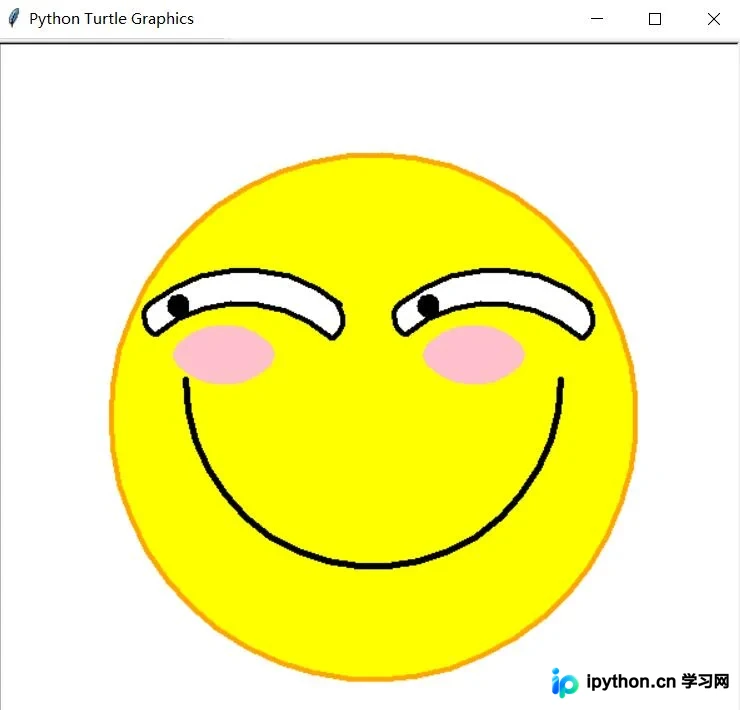
以上即为使用Python Turtle库绘制滑稽脸的完整分享,希望能为读者提供有效的参考,也感谢大家的支持。
免责声明:本文内容仅供参考,不代表本站观点。转载或引用请注明出处。









