

Python实现自定义单词词库:基于COCA与金山词霸数据爬取及SQLite存储

发布时间:2026-10-13| 4人浏览过
本文介绍使用Python构建个人单词词库的方法。通过爬取COCA两万单词表,利用requests和BeautifulSoup获取金山词霸的词性、释义及音频链接,并存储至SQLite数据库。程序支持自定义测试模式,包括中译英拼写与英译中选择释义,旨在提供灵活的背单词解决方案。
Python单词词库构建概述
本文分享了使用Python构建个人单词词库的具体实现代码,供读者参考学习。
核心思路是以COCA两万高频单词表为基础,利用Python脚本爬取金山词霸网站上的单词词性、中文释义及发音音频,并将这些数据分别存入SQLite数据库。在后续背单词过程中,用户可根据实际需求自定义数据筛选和测试方式。
程序运行效果如下所示:
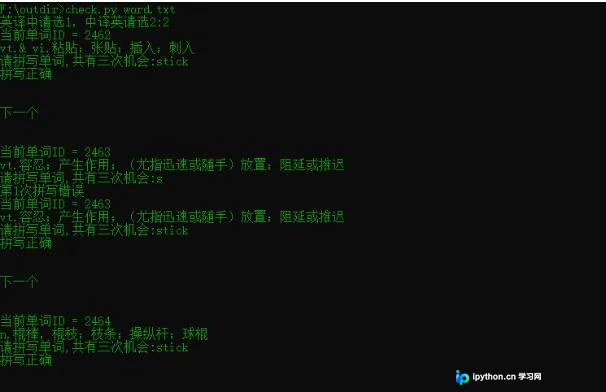
代码实现较为简略,敬请谅解。
SQLite数据库创建与结构
首先创建数据库表结构。
复制代码
相关代码如下:
cu.execute('create table test (id INTEGER PRIMARY KEY AUTOINCREMENT,dc varchar(20),cx varchar(20),cy varchar(50),mp3 varchar(50));')
以下是完整代码,虽然执行效率不高,但足以满足基本使用需求。
数据爬取实现代码
import requests
from bs4 import BeautifulSoup
import re
import traceback
import sqlite3
import time
import sys

def ycl(word):
 try:
 url = "http://www.iciba.com/{}".format(word)
 headers = { 'Host': 'www.iciba.com', 'User-Agent': 'Mozilla/5.0 (Windows NT 6.1; WOW64; rv:43.0) Gecko/20100101 Firefox/43.0', 'Accept': 'text/html,application/xhtml+xml,application/xml;q=0.9,*/*;q=0.8', 'Accept-Language': 'zh-CN,zh;q=0.8,en-US;q=0.5,en;q=0.3', 'Accept-Encoding': 'gzip, deflate', 'Referer': 'http://www.baidu.com', 'Connection': 'keep-alive', 'Cache-Control': 'max-age=0', }
 response = requests.get(url = url,headers = headers)
 soup = BeautifulSoup(response.text,"lxml")
 #输出单词词性
 cx = soup.find(class_='base-list switch_part')(class_='prop')
 #输出词性词义
 mp3 = soup.find_all(class_='new-speak-step')[1]
 pattern = re.compile(r'http://(?:[a-zA-Z]|[0-9]|[$-_@.&+]|[!*\(\),]|(?:%[0-9a-fA-F][0-9a-fA-F]))+.mp3')
 mp3url = re.findall(pattern,mp3['ms-on-mouseover'])
 mp3url = '.'.join(mp3url)
 r = requests.get(mp3url)
 #单词音频输出路径
 dress = "E:\\sound\\"
 mp3path = dress +word+".mp3"
 with open(mp3path, 'wb') as f:
  f.write(r.content)
 #获取词性个数
 meanings =soup.find_all(class_='prop')
 #实行每个词性的词义同行输出
 for i in range(len(meanings)):
  s = soup.find(class_='base-list switch_part')('li')[i]('span')
  c = cx[i].text
  a = ''
  for x in range(len(s)):
  b = s[x].text
  a = a + b
  print(word)
  print(c)
  print(a)
  # 存入数据库的方法
  conn = sqlite3.connect("word.db")
  cu = conn.cursor()
  sql =cu.execute("INSERT INTO test (id,dc,cx,cy,mp3)VALUES(NULL,'%s','%s','%s','%s');"%(word,c,a,mp3path))
  print(sql)
  conn.commit()
  print('\n')
 except Exception as e:
 print(e)
 print("error")
 with open("log.txt",'a') as f:
  f.write(word+'\n')
def duqudanci(file):
 wordcount = 0
 for line in open(file):
 word = line.strip('\n')
 wordcount += 1
 print(wordcount)
 ycl(word)

if __name__ == '__main__':
 conn = sqlite3.connect("word.db")
 cu = conn.cursor()
 word = ""
 #需要爬取的单词
 duqudanci(sys.argv[1])
 print('下载完成')
 conn.commit()
 conn.close()
自定义背单词功能:用户可将单词列表放入txt文件中进行测试。程序支持输出中文释义让用户拼写英文单词,或输出英文单词让用户选择对应中文释义。此外,还可以为每个单词的释义添加两个属性值,分别记录学习次数和答错次数,从而根据这两个指标智能筛选待复习单词。有兴趣的读者可以尝试扩展此功能。
背单词测试程序逻辑
import sqlite3
import random
import sys
from playsound import playsound
# 中译英
def CtoE():
 for j in list1:

 sql =cu.execute('select id,dc,cx,cy,mp3 from wordinfo where id = ?',(j,))
 for it in sql:
 # 返回的是元组,直接对元组查询
 c=0
 while c<3:
 print("当前单词ID = "+str(it[0]))
 print("释义:"+it[3])
 # 播放音频
 playsound(it[4])
 a = input("请拼写单词,共有三次机会:")
 if a == it[1]:
 print("拼写正确")
 break;
 c += 1
 print('第%d次拼写错误'%c)
 print('\n')
 print("下一个")
 print('\n')
# 英译中
def EtoC():
 for j in list1:
 sql =cu.execute('select id,dc,cx,cy,mp3 from wordinfo where id = ?',(j,))
 d =0
 for it in sql:
 # 返回的是元组,直接对元组查询
 c=0
 while c<3:
 # 释放list2
 list2 = []
 sql =cu.execute('select cy from wordinfo where id !=? order by random() limit 3',(j,))
 for t in sql:
 for o in range(len(t)):
 #将随机取出的数据放入列表
 list2.append(t[o])
 # 加入正确答案
 p = random.randint(0,3)
 list2.insert(p,it[3])
 print("当前单词ID = "+str(it[0]))
 print("选择单词的对应释义:----"+it[1])
 playsound(it[4])
 dict1 = {'A':list2[0],'B':list2[1],'C':list2[2],'D':list2[3]}
 print("A:"+dict1.get('A')+'\n')
 print("B:"+dict1.get('B')+'\n')
 print("C:"+dict1.get('C')+'\n')
 print("D:"+dict1.get('D')+'\n')
 answer1 = input("请选择,共有三次机会(大写):")
 if dict1.get(answer1)== it[3]:
 print("正确")
 break;
 c += 1
 print('第%d次拼写错误'%c)
 d += 1
 print('\n')
 print("下一个")
 print('\n')
def main(file):
 for line in open(file):
 word = line.strip('\n')
 sql =cu.execute('select id from wordinfo where dc = ?',(word,))
 for x in sql:
 list1.append(x[0])
 cho = input("英译中请选1,中译英请选2:")
 if cho =="1":
 EtoC()
 elif cho =="2":
 CtoE()
 else:
 print("错误,请重试")

if __name__ == '__main__':
 conn = sqlite3.connect("word.db")
 cu = conn.cursor()
 list1 = []
 word = ""
 main(sys.argv[1])
 conn.commit()
 conn.close()
以上就是本文的全部内容,希望对读者的学习有所帮助,也欢迎大家继续支持本站。
免责声明:本文内容仅供参考,不代表本站观点。转载或引用请注明出处。









