

TensorFlow实现简单的CNN的方法

本文介绍如何使用TensorFlow内建函数实现一个简单的卷积神经网络(CNN)来识别MNIST手写数字数据集。文章详细讲解了从数据加载、模型参数设置、占位符声明到网络结构定义的全过程,重点对比了固定学习率与指数下降学习率在训练效果上的差异,并通过调整超参数将准确率提升至97%以上。
TensorFlow CNN实现概述
本文将使用TensorFlow内置函数构建一个基础的卷积神经网络(CNN),并使用MNIST数据集进行验证测试。
环境准备与数据加载
第一步:导入必要的库并建立计算图会话。
import numpy as np
import tensorflow as tf
from tensorflow.contrib.learn.python.learn.datasets.mnist import read_data_sets
import matplotlib.pyplot as plt

#创建计算图会话
sess = tf.Session()
第二步:加载MNIST数据集。由于MNIST图像尺寸为28×28,需将其转换为对应的二维矩阵格式。
#数据集
data_dir = 'MNIST_data'
mnist = read_data_sets(data_dir)

train_xdata = np.array([np.reshape(x,[28,28]) for x in mnist.train.images] )
test_xdata = np.array([np.reshape(x,[28,28]) for x in mnist.test.images] )

train_labels = mnist.train.labels
test_labels = mnist.test.labels
模型参数配置与训练策略
第三步:配置模型相关参数。
采用随机批量训练策略,每10次迭代对测试集进行一次评估,总迭代次数设定为1500次。学习率采用指数衰减策略,初始值为0.1,每10次迭代后乘以0.9。为了进行对比分析,后续将展示固定学习率为0.01时的损失曲线和准确率曲线。
#设置模型参数

batch_size = 100 #批量训练图像张数
initial_learning_rate = 0.1 #学习率
global_step = tf.Variable(0, trainable=False) ;
learning_rate = tf.train.exponential_decay(initial_learning_rate,
                      global_step=global_step,
                      decay_steps=10,decay_rate=0.9)

evaluation_size = 500 #测试图像张数

image_width = 28 #图像的宽和高
image_height = 28

target_size = 10  #图像的目标为0~9共10个目标
num_channels = 1    #灰度图,颜色通道为1
generations = 1500  #迭代500次
evaluation_step = 10 #每训练十次进行一次测试

conv1_features = 25  #卷积层的特征个数
conv2_features = 50

max_pool_size1 = 2  #池化层大小
max_pool_size2 = 2

fully_connected_size = 100 #全连接层的神经元个数
网络结构定义与损失函数
第四步:定义占位符。需注意,目标标签y_target的数据类型应设置为int32整型。
#声明占位符

x_input_shape = [batch_size,image_width,image_height,num_channels]
x_input = tf.placeholder(tf.float32,shape=x_input_shape)
y_target = tf.placeholder(tf.int32,shape=[batch_size])

evaluation_input_shape = [evaluation_size,image_width,image_height,num_channels]
evaluation_input = tf.placeholder(tf.float32,shape=evaluation_input_shape)
evaluation_target = tf.placeholder(tf.int32,shape=[evaluation_size])
第五步:定义卷积层和全连接层的权重及偏置项。网络结构包含两层卷积层和一层隐含全连接层。
#声明卷积层的权重和偏置
#卷积层1
#采用滤波器为4X4滤波器,输入通道为1,输出通道为25
conv1_weight = tf.Variable(tf.truncated_normal([4,4,num_channels,conv1_features],stddev=0.1,dtype=tf.float32))
conv1_bias = tf.Variable(tf.truncated_normal([conv1_features],stddev=0.1,dtype=tf.float32))

#卷积层2
#采用滤波器为4X4滤波器,输入通道为25,输出通道为50
conv2_weight = tf.Variable(tf.truncated_normal([4,4,conv1_features,conv2_features],stddev=0.1,dtype=tf.float32))
conv2_bias = tf.Variable(tf.truncated_normal([conv2_features],stddev=0.1,dtype=tf.float32))

#声明全连接层权重和偏置

#卷积层过后图像的宽和高
conv_output_width = image_width // (max_pool_size1 * max_pool_size2) #//表示整除
conv_output_height = image_height // (max_pool_size1 * max_pool_size2)

#全连接层的输入大小
full1_input_size = conv_output_width * conv_output_height *conv2_features

full1_weight = tf.Variable(tf.truncated_normal([full1_input_size,fully_connected_size],stddev=0.1,dtype=tf.float32))
full1_bias = tf.Variable(tf.truncated_normal([fully_connected_size],stddev=0.1,dtype=tf.float32))

full2_weight = tf.Variable(tf.truncated_normal([fully_connected_size,target_size],stddev=0.1,dtype=tf.float32))
full2_bias = tf.Variable(tf.truncated_normal([target_size],stddev=0.1,dtype=tf.float32))
第六步:构建CNN模型主体。两层卷积层均遵循Conv-ReLU-MaxPool结构,卷积步长设置为[1,1,1,1],填充方式采用SAME。
全连接层的隐藏层神经元数量设置为100个,输出层神经元数量对应目标类别数10个。
def my_conv_net(input_data):

  #第一层:Conv-ReLU-MaxPool
  conv1 = tf.nn.conv2d(input_data,conv1_weight,strides=[1,1,1,1],padding='SAME')
  relu1 = tf.nn.relu(tf.nn.bias_add(conv1,conv1_bias))
  max_pool1 = tf.nn.max_pool(relu1,ksize=[1,max_pool_size1,max_pool_size1,1],strides=[1,max_pool_size1,max_pool_size1,1],padding='SAME')

  #第二层:Conv-ReLU-MaxPool
  conv2 = tf.nn.conv2d(max_pool1, conv2_weight, strides=[1, 1, 1, 1], padding='SAME')
  relu2 = tf.nn.relu(tf.nn.bias_add(conv2, conv2_bias))
  max_pool2 = tf.nn.max_pool(relu2, ksize=[1, max_pool_size2, max_pool_size2, 1],
                strides=[1, max_pool_size2, max_pool_size2, 1], padding='SAME')

  #全连接层
  #先将数据转化为1*N的形式
  #获取数据大小
  conv_output_shape = max_pool2.get_shape().as_list()
  #全连接层输入数据大小
  fully_input_size = conv_output_shape[1]*conv_output_shape[2]*conv_output_shape[3] #这三个shape就是图像的宽高和通道数
  full1_input_data = tf.reshape(max_pool2,[conv_output_shape[0],fully_input_size])  #转化为batch_size*fully_input_size二维矩阵
  #第一层全连接
  fully_connected1 = tf.nn.relu(tf.add(tf.matmul(full1_input_data,full1_weight),full1_bias))
  #第二层全连接输出
  model_output = tf.nn.relu(tf.add(tf.matmul(fully_connected1,full2_weight),full2_bias))#shape = [batch_size,target_size]

  return model_output

model_output = my_conv_net(x_input)
test_model_output = my_conv_net(evaluation_input)
第七步:定义损失函数,此处选用softmax函数作为损失计算依据。
#损失函数

loss = tf.reduce_mean(tf.nn.sparse_softmax_cross_entropy_with_logits(logits=model_output,labels=y_target))
第八步:建立预测与评估函数。对输出层应用softmax处理,随后利用np.argmax找出每行最大值的索引,并与真实目标值进行比对,从而统计分类准确率。
#预测与评估
prediction = tf.nn.softmax(model_output)
test_prediction = tf.nn.softmax(test_model_output)

def get_accuracy(logits,targets):
  batch_predictions = np.argmax(logits,axis=1)#返回每行最大的数所在位置
  num_correct = np.sum(np.equal(batch_predictions,targets))
  return 100*num_correct/batch_predictions.shape[0]
第九步:初始化模型变量并创建优化器。
#创建优化器
opt = tf.train.GradientDescentOptimizer(learning_rate=learning_rate)
train_step = opt.minimize(loss)

#初始化变量
init = tf.initialize_all_variables()
sess.run(init)
第十步:执行随机批量训练过程,并进行相关数据绘图展示。
#开始训练

train_loss = []
train_acc = []
test_acc = []
Learning_rate_vec = []
for i in range(generations):
  rand_index = np.random.choice(len(train_xdata),size=batch_size)
  rand_x = train_xdata[rand_index]
  rand_x = np.expand_dims(rand_x,3)
  rand_y = train_labels[rand_index]
  Learning_rate_vec.append(sess.run(learning_rate, feed_dict={global_step: i}))
  train_dict = {x_input:rand_x,y_target:rand_y}

  sess.run(train_step,feed_dict={x_input:rand_x,y_target:rand_y,global_step:i})
  temp_train_loss = sess.run(loss,feed_dict=train_dict)
  temp_train_prediction = sess.run(prediction,feed_dict=train_dict)
  temp_train_acc = get_accuracy(temp_train_prediction,rand_y)

  #测试集
  if (i+1)%evaluation_step ==0:
    eval_index = np.random.choice(len(test_xdata),size=evaluation_size)
    eval_x = test_xdata[eval_index]
    eval_x = np.expand_dims(eval_x,3)
    eval_y = test_labels[eval_index]


    test_dict = {evaluation_input:eval_x,evaluation_target:eval_y}
    temp_test_preds = sess.run(test_prediction,feed_dict=test_dict)
    temp_test_acc = get_accuracy(temp_test_preds,eval_y)

    test_acc.append(temp_test_acc)
  train_acc.append(temp_train_acc)
  train_loss.append(temp_train_loss)


#画损失曲线
fig = plt.figure()
ax = fig.add_subplot(111)
ax.plot(train_loss,'k-')
ax.set_xlabel('Generation')
ax.set_ylabel('Softmax Loss')
fig.suptitle('Softmax Loss per Generation')

#画准确度曲线
index = np.arange(start=1,stop=generations+1,step=evaluation_step)
fig2 = plt.figure()
ax2 = fig2.add_subplot(111)
ax2.plot(train_acc,'k-',label='Train Set Accuracy')
ax2.plot(index,test_acc,'r--',label='Test Set Accuracy')
ax2.set_xlabel('Generation')
ax2.set_ylabel('Accuracy')
fig2.suptitle('Train and Test Set Accuracy')


#画图
fig3 = plt.figure()
actuals = rand_y[0:6]
train_predictions = np.argmax(temp_train_prediction,axis=1)[0:6]
images = np.squeeze(rand_x[0:6])
Nrows = 2
Ncols =3

for i in range(6):
  ax3 = fig3.add_subplot(Nrows,Ncols,i+1)
  ax3.imshow(np.reshape(images[i],[28,28]),cmap='Greys_r')
  ax3.set_title('Actual: '+str(actuals[i]) +' pred: '+str(train_predictions[i]))


#画学习率
fig4 = plt.figure()
ax4 = fig4.add_subplot(111)
ax4.plot(Learning_rate_vec,'k-')
ax4.set_xlabel('step')
ax4.set_ylabel('Learning_rate')
fig4.suptitle('Learning_rate')


plt.show()
实验结果对比分析
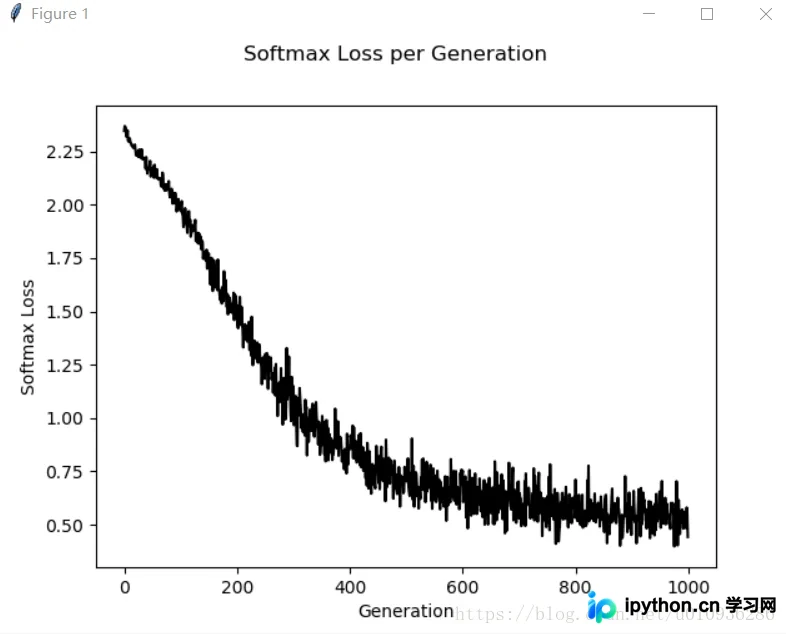
接下来展示固定学习率图像和学习率随迭代次数动态下降的对比图像:
首先展示固定学习率下的实验结果图像:
以下是损失函数的变化曲线:
以下是准确率的變化曲线:
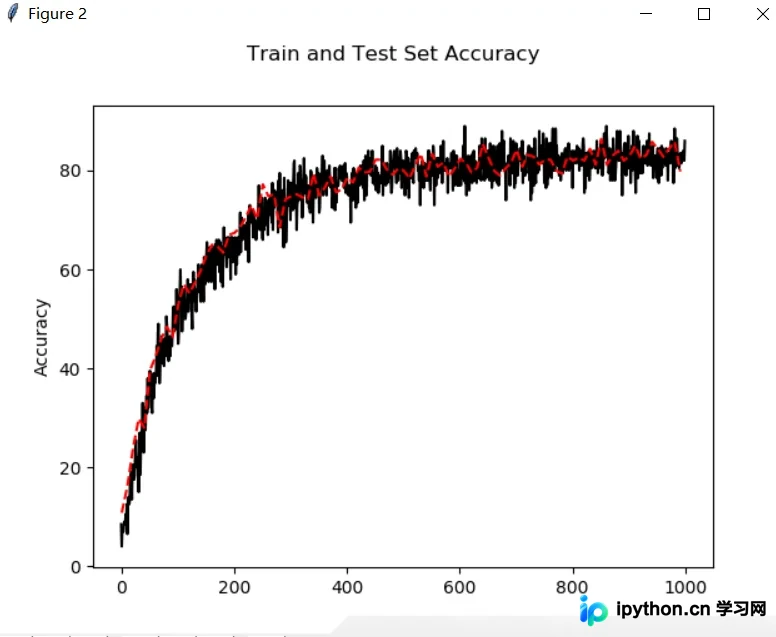
观察可知,固定学习率导致损失函数下降速度较慢,且最终准确率仅在80%至90%之间徘徊,难以进一步提升。
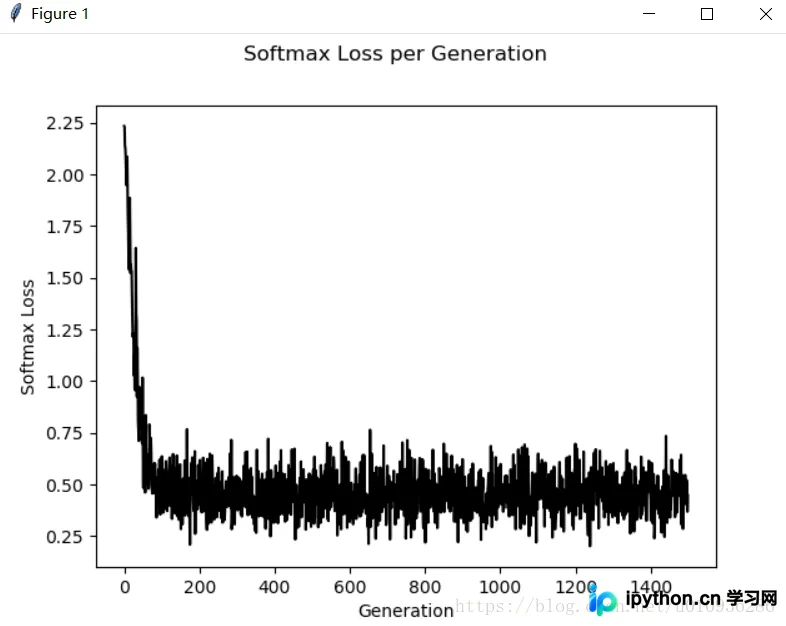
接下来展示学习率随迭代次数降低的实验曲线:
首先展示学习率衰减策略下的损失曲线:
随后展示相应的准确率曲线:
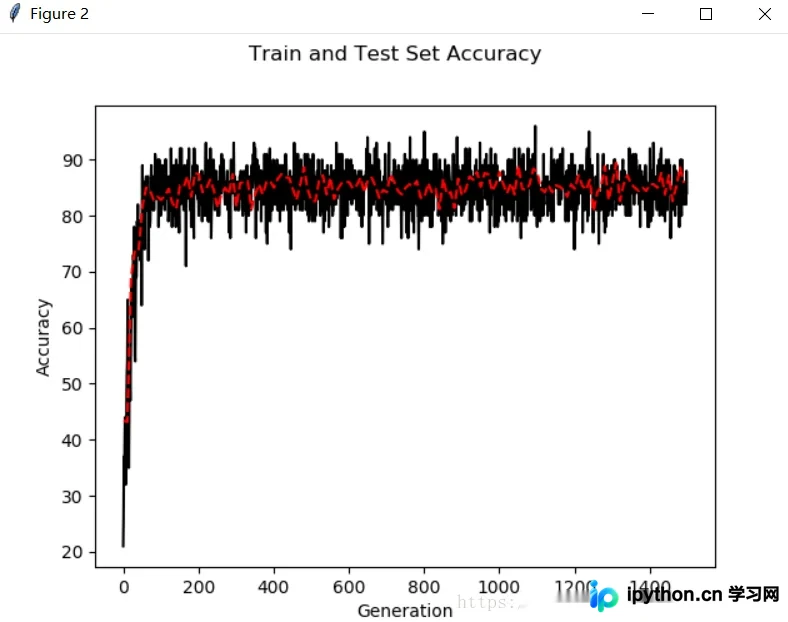
结果显示,采用动态学习率策略后,损失函数下降迅速,且模型准确率可提升至90%以上。
以下展示随机抽取部分图像的实际识别情况:
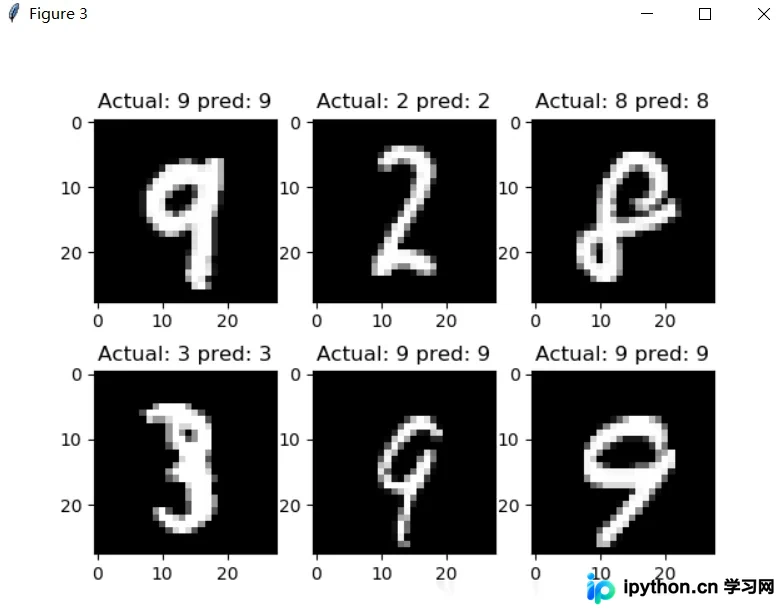
模型优化与总结
至此,我们已实现利用简单CNN完成MNIST手写数字识别。若需进一步提高准确率,可通过调整CNN网络参数实现,例如修改通道数、全连接层神经元数量、过滤器尺寸、学习率、训练迭代次数,或引入dropout层等;此外,增加CNN网络深度也是提升性能的有效手段。
以下提供一组优化后的参数配置:
初始学习率设置为:initial_learning_rate=0.05
迭代步长设置为:decay_steps=50,即每50步调整一次学习率。
以下是基于上述参数的仿真结果:
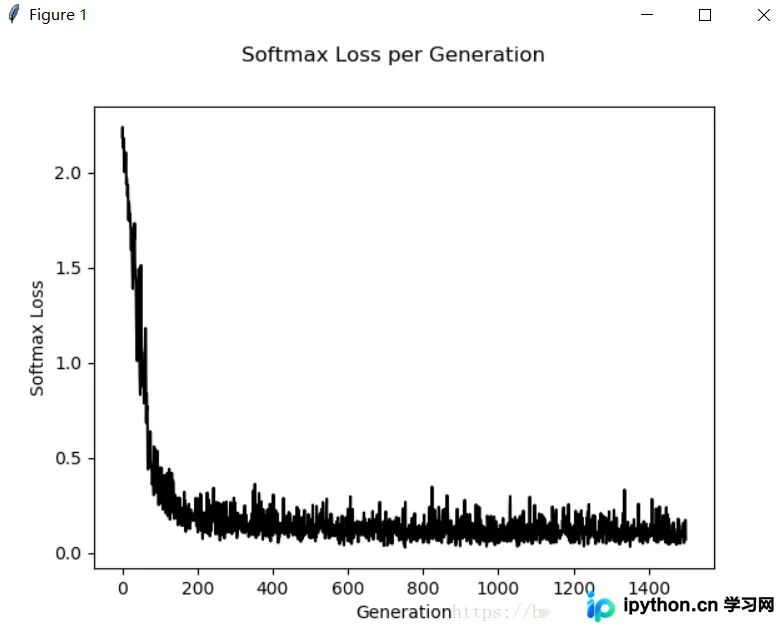
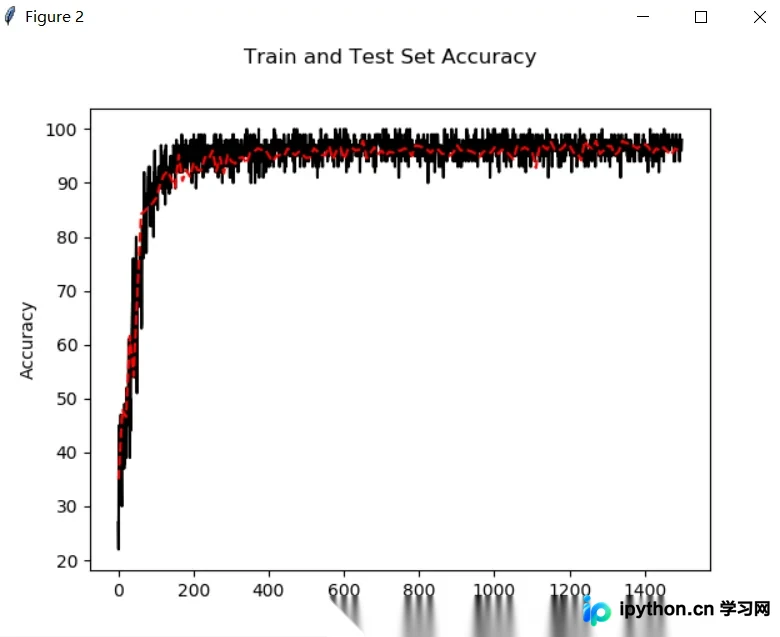
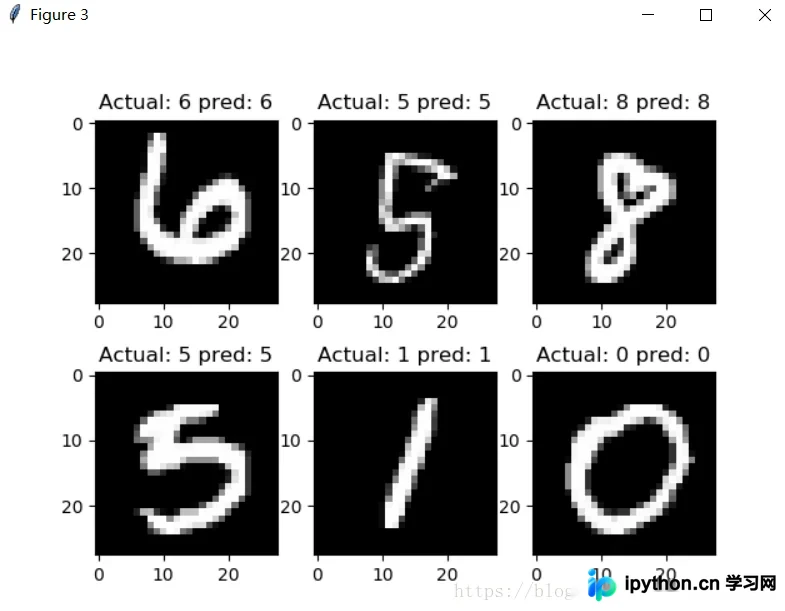
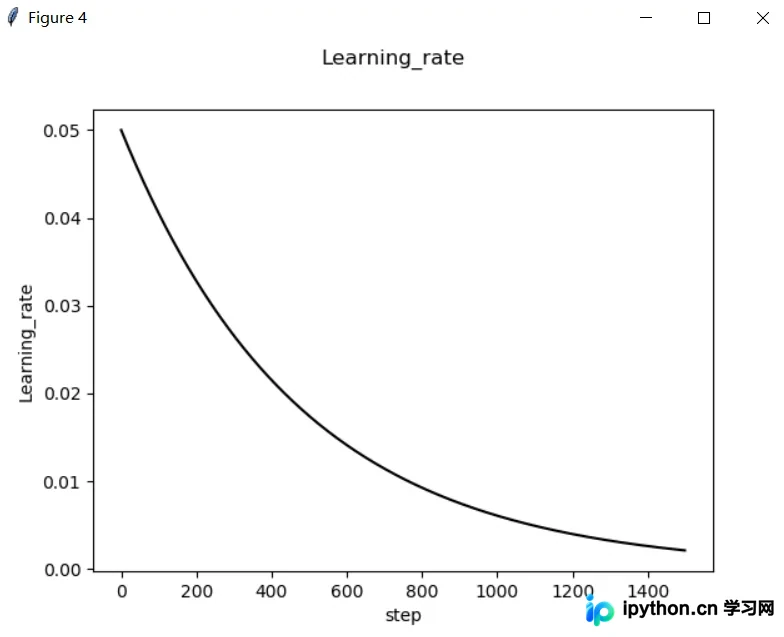
可以看出,通过调整超参数,模型既保持了损失函数的快速下降,又显著提高了预测准确率。在1500次训练的基础上,准确率已突破97%。
以上就是本文的全部内容,希望对各位的学习有所帮助,也欢迎大家继续支持本站。
免责声明:本文内容仅供参考,不代表本站观点。转载或引用请注明出处。









