

Python实现集中式病毒扫描功能详解

本文详解如何使用Python实现集中式病毒扫描管理。通过ClamdNetworkSocket建立与业务服务器的Socket连接,利用多线程技术对不同IP集群执行指定路径和模式的扫描。文章提供了完整的代码实现及无病毒和有病毒两种场景下的测试结果分析,帮助开发者掌握基于Clamd的自动化安全扫描方案。
Python集中式病毒扫描方案概述
本文详细介绍如何利用Python构建一个集中式的病毒扫描管理系统,供读者参考学习。
一、方案概述
本实践旨在实现一个集中式的病毒扫描管理平台,支持针对不同的业务环境定制扫描策略,包括扫描对象、模式、路径以及调度频率等。案例架构如下:业务服务器端需开启clamd服务并监听3310端口;管理服务器端则启用多线程机制,对指定的服务集群发起扫描请求。扫描模式与路径参数会传递给clamd,最终将扫描结果返回至管理服务器。
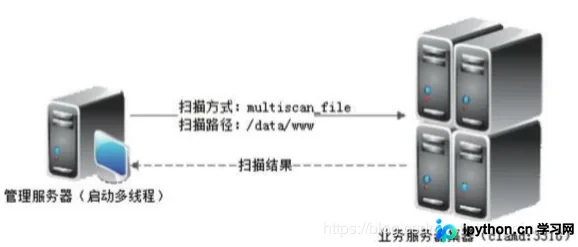
在实现过程中,通过调用ClamdNetworkSocket()方法建立与业务服务器的扫描Socket连接,随后启动不同的扫描方式执行病毒检测并获取结果。
核心代码实现
二、代码实现
#!/usr/bin/env python
# -*- coding: utf-8 -*-
import time
import pyclamd
from threading import Thread
class Scan(Thread):
  def __init__ (self,IP,scan_type,file):
    """构造方法"""
    Thread.__init__(self)
    self.IP = IP
    self.scan_type=scan_type
    self.file = file
    self.connstr=""
    self.scanresult=""
  def run(self):
    """多进程run方法"""
    try:
      cd = pyclamd.ClamdNetworkSocket(self.IP,3310)
      if cd.ping():
        self.connstr=self.IP+" connection [OK]"
        cd.reload()
        if self.scan_type=="contscan_file":
          self.scanresult="{0}\n".format(cd.contscan_file(self.file))
        elif self.scan_type=="multiscan_file":
          self.scanresult="{0}\n".format(cd.multiscan_file(self.file))
        elif self.scan_type=="scan_file":
          self.scanresult="{0}\n".format(cd.scan_file(self.file))
        time.sleep(1)
      else:
        self.connstr=self.IP+" ping error,exit"
        return
    except Exception,e:
      self.connstr=self.IP+" "+str(e)
IPs=['192.168.0.120']
scantype="multiscan_file"
scanfile="/data"
i=1
threadnum=2
scanlist = []
for ip in IPs:
  currp = Scan(ip,scantype,scanfile)
  scanlist.append(currp)
  if i%threadnum==0 or i==len(IPs):
    for task in scanlist:
      task.start()
    for task in scanlist:
      task.join()
      print task.connstr
      print task.scanresult
    scanlist = []
  i+=1
三、运行结果
扫描结果测试与分析
1. 无病毒情况下的扫描输出
E:\Python\python_auto_maintain\venv\Scripts\python.exe E:/Python/python_auto_maintain/4_1_2.py 192.168.0.120 connection [OK] None
2. 存在病毒情况下的扫描输出
2.1 制作病毒测试文件
X5O!P%@AP[4\PZX54(P^)7CC)7}$EICAR-STANDARD-ANTIVIRUS-TEST-FILE!$H+H*
2.2 扫描结果分析
E:\Python\python_auto_maintain\venv\Scripts\python.exe E:/Python/python_auto_maintain/4_1_2.py 192.168.0.120 connection [OK] {u'/data/EICAR': ('FOUND', 'Eicar-Test-Signature')}
如需了解更多信息,可查阅本站相关专题:《Python Socket编程技巧总结》、《Python进程与线程操作技巧总结》、《Python数据结构与算法教程》、《Python函数使用技巧总结》、《Python字符串操作技巧汇总》、《Python入门与进阶经典教程》及《Python文件与目录操作技巧汇总》。
希望本文所述内容能对大家的Python程序设计工作提供帮助。
免责声明:本文内容仅供参考,不代表本站观点。转载或引用请注明出处。









