

解决PyCharm中os.system执行命令返回中文乱码问题

本文介绍在PyCharm中使用os.system调用外部命令时出现中文乱码的解决方法。通过修改Global Encoding为GBK,使IDE控制台编码与Windows保持一致,从而正常显示命令执行结果。
PyCharm中os.system中文乱码问题及解决
问题现象如下所示:
source = ['C:\\Users\\admin\\Desktop\\pythonLearning']
target_dir = 'C:\\Users\\admin\\Desktop'

print(time.strftime('%Y%m%d%H%M%S'))

target = target_dir + os.sep + time.strftime('%Y%m%d%H%M%S') + '.zip'
if not os.path.exists(target_dir):
 os.mkdir(target_dir)

zip_command = 'HaoZipC a {0} {1}'.format(target, ' '.join(source))

type = sys.getfilesystemencoding()
print('类型为:', type)


print('Zip command is:')
print(zip_command)
print('Running:')
result = os.system(zip_command)
if result == 0:
 print('Successful backup to', target)
else:
 print('Backup FAILED')
控制台输出结果:
20170811100310
类型为: utf-8
Zip command is:
HaoZipC a C:\Users\admin\Desktop\20170811100310.zip C:\Users\admin\Desktop\pythonLearning
Running:
����ɨ���ļ�...
����ѹ���ĵ� C:\Users\admin\Desktop\20170811100310.zip
��ѹ���ļ���C:\Users\admin\Desktop\pythonLearning\byte-of-python-chinese-edition.pdf
��ѹ���ļ��� C:\Users\admin\Desktop\pythonLearning\byte-of-python.pdf
��ѹ���ļ��� C:\Users\admin\Desktop\pythonLearning\python�˹�����.png
解决方法:
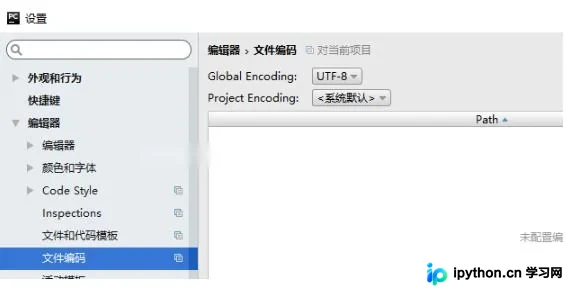
将Global Encoding设置为gbk,即可正常显示,如下:
20170811100615 类型为: utf-8 Zip command is: HaoZipC a C:\Users\admin\Desktop\20170811100615.zipC:\Users\admin\Desktop\pythonLearning Running: 正在扫描文件...
创建压缩文档 C:\Users\admin\Desktop\20170811100615.zip
正压缩文件:C:\Users\admin\Desktop\pythonLearning\byte-of-python-chinese-edition.pdf
原因据说是因为IDE编码不能设置为utf-8,需要设置为gbk,因为这个控制台的代码需要和windows保持一致。
以上这篇解决pycharm下os.system执行命令返回有中文乱码的问题就是小编分享给大家的全部内容了,希望能给大家一个参考,也希望大家多多支持本站。
免责声明:本文内容仅供参考,不代表本站观点。转载或引用请注明出处。









