

基于Flask实现RESTful风格的CRUD操作示例

发布时间:2026-10-13| 3人浏览过
本文通过Flask框架演示如何使用Python实现RESTful风格的增删改查(CRUD)操作。文章详细讲解了GET、POST、PUT和DELETE等HTTP方法的配置与处理,结合代码示例展示了消息列表的读取、删除、添加及更新流程,帮助开发者快速掌握Flask构建API的基础实践。
本文将通过操作HelloWorld消息,演示如何利用Flask框架实现RESTful架构下的增删改查(CRUD)功能。
概要信息
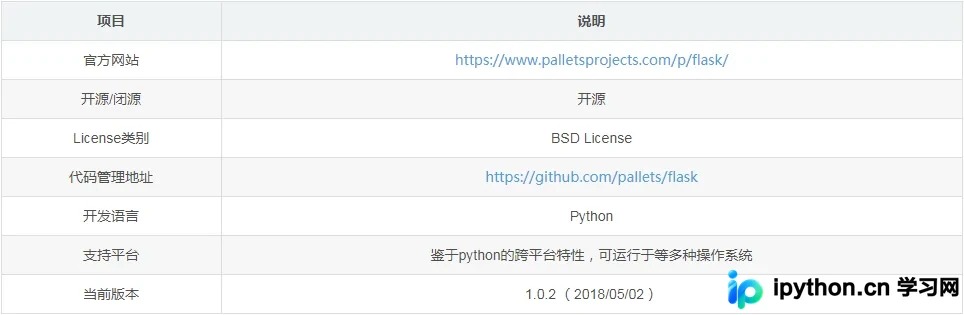
准备工作:确保已安装Flask环境。
liumiaocn:flask liumiao$ which flask
/usr/local/bin/flask
liumiaocn:flask liumiao$ flask --version
Flask 1.0.2
Python 2.7.10 (default, Jul 15 2017, 17:16:57)
[GCC 4.2.1 Compatible Apple LLVM 9.0.0 (clang-900.0.31)]
liumiaocn:flask liumiao$
代码示例:处理HTTP GET请求
Flask中的模板渲染机制类似于Angular的插值表达式在模板中的作用。即使不熟悉Angular,通过后续示例也能建立直观理解。
代码示例部分
liumiaocn:flask liumiao$ cat flask_4.py
#!/usr/bin/python
from flask import Flask
from flask import render_template
app = Flask(__name__)
greeting_messages=["Hello World", "Hello Python"]
@app.route("/api/messages",methods=['GET'])
def get_messages():
  return render_template("resttest.html",messages=greeting_messages)
if __name__ == "__main__":
  app.debug=True
  app.run(host='0.0.0.0',port=7000)
liumiaocn:flask liumiao$
模板文件内容
liumiaocn:flask liumiao$ cat templates/resttest.html
<!DOCTYPE html>
<html>
<head>
 <meta charset="utf-8">
 <title>Hello Restful</title>
</head>
<body>
    {% for message in messages %}
 <h1>{{ message }}</h1>
    {% endfor %}
</body>
</html>
liumiaocn:flask liumiao$
在app.route装饰器中指定HTTP谓词为GET,默认情况下GET可省略。若同一方法需处理多种谓词动作,可通过request.method进行区分,写法为methods=['GET','POST']。
执行与确认环节
liumiaocn:flask liumiao$ ./flask_4.py
 * Serving Flask app "flask_4" (lazy loading)
 * Environment: production
  WARNING: Do not use the development server in a production environment.
  Use a production WSGI server instead.
 * Debug mode: on
 * Running on http://0.0.0.0:7000/ (Press CTRL+C to quit)
 * Restarting with stat
 * Debugger is active!
 * Debugger PIN: 131-533-062
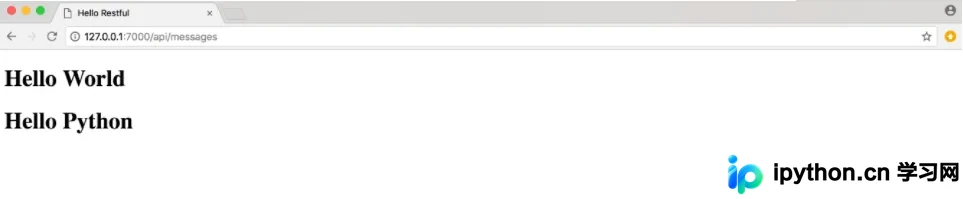
页面显示确认
代码示例:处理HTTP DELETE、PUT及POST请求
liumiaocn:flask liumiao$ cat flask_4.py
#!/usr/bin/python
from flask import Flask
from flask import render_template
from flask import request
import json
app = Flask(__name__)
greeting_messages=["Hello World", "Hello Python"]
#HTTP: GET: Retrieve operation
@app.route("/api/messages",methods=['GET'])
def get_messages():
  return render_template("resttest.html",messages=greeting_messages)
#HTTP: DELETE: Delete operation
@app.route("/api/messages/<messageid>",methods=['DELETE'])
def delete_message(messageid):
  global greeting_messages
  del greeting_messages[int(messageid)]
  return render_template("resttest.html",messages=greeting_messages)
#HTTP: PUT: Update operation
#HTTP: POST: Create operation
@app.route("/api/messages/<messageid>",methods=['PUT','POST'])
def update_message(messageid):
  global greeting_message
  msg_info=json.loads(request.get_data(True,True,False))
  #msg_info=request.args.get('message_info')
  #msg_info=request.form.get('message_info','default value')
  #msg_info=request.values.get('message_info','hello...')
  greeting_messages.append("Hello " + msg_info["message_info"])
  return render_template("resttest.html",messages=greeting_messages)
if __name__ == "__main__":
  app.debug=True
  app.run(host='0.0.0.0',port=7000)
liumiaocn:flask liumiao$
执行与结果确认环节
执行日志记录
liumiaocn:flask liumiao$ ./flask_4.py
 * Serving Flask app "flask_4" (lazy loading)
 * Environment: production
  WARNING: Do not use the development server in a production environment.
  Use a production WSGI server instead.
 * Debug mode: on
 * Running on http://0.0.0.0:7000/ (Press CTRL+C to quit)
 * Restarting with stat
 * Debugger is active!
 * Debugger PIN: 131-533-062
结果确认:执行DELETE操作
liumiaocn:flask liumiao$ curl -X DELETE http://localhost:7000/api/messages/1
<!DOCTYPE html>
<html>
<head>
  <meta charset="utf-8">
  <title>Hello Restful</title>
</head>
<body>
  <h1>Hello World</h1>
</body>
</html>liumiaocn:flask liumiao$
执行一次DELETE后,消息列表由两条减少至一条。随后使用POST方法再添加一条新消息。
liumiaocn:flask liumiao$ curl -X POST -d '{"message_info":"LiuMiaoPost"}' http://localhost:7000/api/messages/3
<!DOCTYPE html>
<html>
<head>
  <meta charset="utf-8">
  <title>Hello Restful</title>
</head>
<body>
  <h1>Hello World</h1>
  <h1>Hello LiuMiaoPost</h1>
</body>
</html>liumiaocn:flask liumiao$
再次执行PUT操作以更新数据
liumiaocn:flask liumiao$ curl -X PUT -d '{"message_info":"LiuMiaoPut"}' http://localhost:7000/api/messages/4
<!DOCTYPE html>
<html>
<head>
  <meta charset="utf-8">
  <title>Hello Restful</title>
</head>
<body>
  <h1>Hello World</h1>
  <h1>Hello LiuMiaoPost</h1>
  <h1>Hello LiuMiaoPut</h1>
</body>
</html>liumiaocn:flask liumiao$
小结
本文以极简方式在Flask中模拟了RESTful CRUD操作。实际开发中有多种实现方案,后续文章将介绍另一种常用工具flask-restful。
总结
以上是本文的全部内容,希望能为您的学习或工作提供参考。感谢支持,如需了解更多相关内容,请查阅相关链接。
免责声明:本文内容仅供参考,不代表本站观点。转载或引用请注明出处。









