

Python爬虫正则表达式实战:从基础匹配到高级提取

本文详解Python中re模块的核心用法,涵盖match与search的区别、贪婪与非贪婪匹配、分组提取及编译优化。通过HTML解析、字符串替换等实例,演示如何高效利用正则表达式进行数据抓取与处理,助力爬虫开发。
正则表达式的使用
re.match(pattern,string,flags=0)
re.match函数尝试从字符串的起始位置匹配一个模式,如果起始位置不匹配,则返回None。
参数介绍:
pattern:正则表达式字符串。
string:待匹配的目标字符串。
flags:匹配模式标志位。
正则表达式的匹配模式:
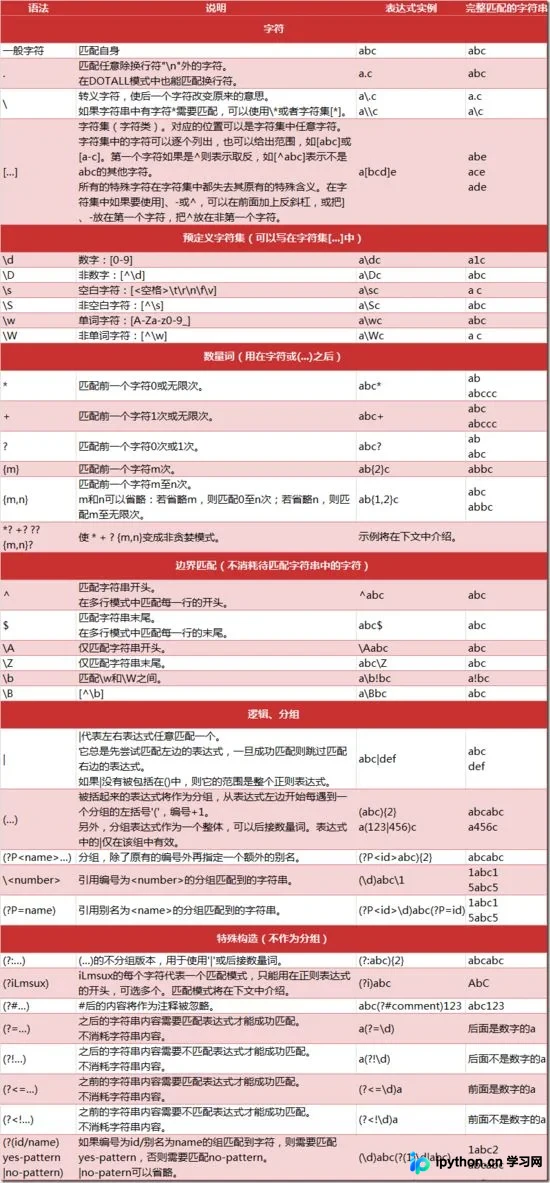
最常规的匹配方式。
import re
content ='hello 123456 World_This is a Regex Demo'
print(len(content))
result = re.match('^hello\s\d{6}\s\w{10}.*Demo$$',content)
print(result)
print(result.group()) #返回匹配结果
print(result.span()) #返回匹配结果的范围
结果运行如下:
39 <_sre.SRE_Match object; span=(0, 39), match='hello 123456 World_This is a Regex Demo'> hello 123456 World_This is a Regex Demo (0, 39)
泛匹配
使用(.*)可以匹配更多内容。
import re
content ='hello 123456 World_This is a Regex Demo'
result = re.match('^hello.*Demo$',content)
print(result)
print(result.group())
结果运行如下:
<_sre.SRE_Match object; span=(0, 39), match='hello 123456 World_This is a Regex Demo'> hello 123456 World_This is a Regex Demo
匹配目标
在正则表达式中使用()将需要获取的内容括起来。
使用group(1)获取第一处匹配内容,group(2)获取第二处,以此类推提取所需信息。
import re
content ='hello 123456 World_This is a Regex Demo'
result = re.match('^hello\s(\d{6})\s.*Demo$',content)
print(result)
print(result.group(1))#获取匹配目标
结果运行如下:
<_sre.SRE_Match object; span=(0, 39), match='hello 123456 World_This is a Regex Demo'> 123456
贪婪匹配
import re
content ='hello 123456 World_This is a Regex Demo'
result = re.match('^he.*(\d+).*Demo$',content)
print(result)
print(result.group(1))
注意:.*会尽可能多地匹配字符。
非贪婪匹配
import re
content ='hello 123456 World_This is a Regex Demo'
result = re.match('^he.*?(\d+).*Demo$',content)
print(result)
print(result.group(1))
注意:.*?会尽可能少地匹配字符。
使用匹配模式
在解析HTML代码时遇到换行,此时需使用re.S标志。
import re
content ='hello 123456 World_This ' \
'is a Regex Demo'
result = re.match('^he.*?(\d+).*?Demo$',content,re.S)
print(result)
print(result.group(1))
运行结果如下:
<_sre.SRE_Match object; span=(0, 39), match='hello 123456 World_This is a Regex Demo'> 123456
转义
在解析过程中遇到特殊字符,需要进行转义,例如$符号。
import re
content = 'price is $5.00'
result = re.match('^price.*\$5\.00',content)
print(result.group())
总结:尽量使用泛匹配,使用括号得到匹配目标,尽量使用非贪婪模式,有换行就用re.S。
re.search(pattern,string,flags=0)
re.search扫描整个字符串并返回第一个成功的匹配。
例如提取字符串中的123456,使用match方法无法提取,只能使用search方法。
import re
content ='hello 123456 World_This is a Regex Demo'
result = re.match('\d{6}',content)
print(result)
import re
content ='hello 123456 World_This is a Regex Demo'
result = re.search('\d{6}',content)
print(result)
print(result.group())
运行结果如下:
<_sre.SRE_Match object; span=(6, 12), match='123456'>
匹配演练
可以匹配代码里结构相同的部分,从而返回你需要的内容。
import re
content = '<a title="2009年中信出版社出版图书" href="/doc/2703035-2853985.html" rel="external nofollow" rel="external nofollow" rel="external nofollow" rel="external nofollow" target="_blank" data-log="old:2703035-2853885,new:2703035-2853985" data-cid="sense-list">2009年中信出版社出版图书</a>'
result = re.search('<a.*?new:\d{7}-\d{7}.*?>(.*?)</a>',content)
print(result.group(1))
2009年中信出版社出版图书
re.findall(pattern,string,flags=0)
搜索字符串,以列表形式返回全部能匹配的字串。
import re
html ='''
<li>
<a title="网络歌曲" href="/doc/2703035-2853927.html" rel="external nofollow" rel="external nofollow" rel="external nofollow" target="_blank" data-log="old:2703035-2853885,new:2703035-2853927" data-cid="sense-list">网络歌曲</a>
</li>
<li>
<a title="2009年中信出版社出版图书" href="/doc/2703035-2853985.html" rel="external nofollow" rel="external nofollow" rel="external nofollow" rel="external nofollow" target="_blank" data-log="old:2703035-2853885,new:2703035-2853985" data-cid="sense-list">2009年中信出版社出版图书</a>
</li>
'''
result = re.findall('<a.*?new:\d{7}-\d{7}.*?>(.*?)</a>',html,re.S)
count = 0
for list in result:
  print(result[count])
  count+=1
网络歌曲
2009年中信出版社出版图书
re.sub( pattern,repl,string,count,flags)
re.sub共有五个参数。
三个必选参数:pattern,repl,string。
两个可选参数:count,flags。
替换字符串中每一个匹配的字符串后得到替换后的字符串。
import re
content = 'hello 123456 World_This is a Regex Demo'
content = re.sub('\d+','',content)
print(content)
运行结果如下:
hello World_This is a Regex Demo import re content = 'hello 123456 World_This is a Regex Demo' content = re.sub('\d+','what',content) print(content)
运行结果如下:
hello what World_This is a Regex Demo import re content = 'hello 123456 World_This is a Regex Demo' content = re.sub('(\d+)',r'\1 789',content) print(content)
运行结果如下:
hello 123456 789 World_This is a Regex Demo
注意:这里\1代表前面匹配的123456。
演练
在这里我们替换li标签。
import re
html ='''
<li>
<a title="网络歌曲" href="/doc/2703035-2853927.html" rel="external nofollow" rel="external nofollow" rel="external nofollow" target="_blank" data-log="old:2703035-2853885,new:2703035-2853927" data-cid="sense-list">网络歌曲</a>
</li>
<li>
<a title="2009年中信出版社出版图书" href="/doc/2703035-2853985.html" rel="external nofollow" rel="external nofollow" rel="external nofollow" rel="external nofollow" target="_blank" data-log="old:2703035-2853885,new:2703035-2853985" data-cid="sense-list">2009年中信出版社出版图书</a>
</li>
'''
html = re.sub('<li>|</li>','',html)
print(html)
运行结果如下,里面就没有li标签。
<a title="网络歌曲" href="/doc/2703035-2853927.html" rel="external nofollow" rel="external nofollow" rel="external nofollow" target="_blank" data-log="old:2703035-2853885,new:2703035-2853927" data-cid="sense-list">网络歌曲</a>
<a title="2009年中信出版社出版图书" href="/doc/2703035-2853985.html" rel="external nofollow" rel="external nofollow" rel="external nofollow" rel="external nofollow" target="_blank" data-log="old:2703035-2853885,new:2703035-2853985" data-cid="sense-list">2009年中信出版社出版图书</a>
compile(pattern [, flags])
该函数根据包含的正则表达式的字符串创建模式对象,可以实现更有效率的匹配。
将正则表达式编译成正则表达式对象,以便于复用该匹配模式。
import re
content = 'hello 123456 ' \
'World_This is a Regex Demo'
pattern = re.compile('hello.*?Demo',re.S)
result = re.match(pattern,content)
print(result.group())
运行结果如下:
hello 123456 World_This is a Regex Demo
综合使用
import re
html = '''
<div class="slide-page" style="width: 700px;" data-index="1">
    <a class="item" target="_blank" href="https://movie.douban.com/subject/26725678/?tag=热门&from=gaia">
      <div class="cover-wp" data-isnew="false" data-id="26725678">
        <img src="https://img1.doubanio.com/view/photo/s_ratio_poster/public/p2525020357.jpg" alt="解除好友2:暗网" data-x="694" data-y="1000">
      </div>
      <p>
        解除好友2:暗网
          <strong>7.9</strong>
      </p>
    </a>
    <a class="item" target="_blank" href="https://movie.douban.com/subject/26916229/?tag=热门&from=gaia_video">
      <div class="cover-wp" data-isnew="false" data-id="26916229">
        <img src="https://img1.doubanio.com/view/photo/s_ratio_poster/public/p2532008868.jpg" alt="镰仓物语" data-x="2143" data-y="2993">
      </div>
      <p>
        镰仓物语
          <strong>6.9</strong>
      </p>
    </a>
    <a class="item" target="_blank" href="https://movie.douban.com/subject/26683421/?tag=热门&from=gaia">
      <div class="cover-wp" data-isnew="false" data-id="26683421">
        <img src="https://img3.doubanio.com/view/photo/s_ratio_poster/public/p2528281606.jpg" alt="特工" data-x="690" data-y="986">
      </div>
      <p>
        特工
          <strong>8.3</strong>
      </p>
    </a>
    <a class="item" target="_blank" href="https://movie.douban.com/subject/27072795/?tag=热门&from=gaia">
      <div class="cover-wp" data-isnew="false" data-id="27072795">
        <img src="https://img3.doubanio.com/view/photo/s_ratio_poster/public/p2521583093.jpg" alt="幸福的拉扎罗" data-x="640" data-y="914">
      </div>
      <p>
        幸福的拉扎罗
          <strong>8.6</strong>
      </p>
    </a>
    <a class="item" target="_blank" href="https://movie.douban.com/subject/27201353/?tag=热门&from=gaia_video">
      <div class="cover-wp" data-isnew="false" data-id="27201353">
        <img src="https://img1.doubanio.com/view/photo/s_ratio_poster/public/p2528842218.jpg" alt="大师兄" data-x="679" data-y="950">
      </div>
      <p>
        大师兄
          <strong>5.2</strong>
      </p>
    </a>
    <a class="item" target="_blank" href="https://movie.douban.com/subject/30146756/?tag=热门&from=gaia_video">
      <div class="cover-wp" data-isnew="false" data-id="30146756">
        <img src="https://img3.doubanio.com/view/photo/s_ratio_poster/public/p2530872223.jpg" alt="风语咒" data-x="1079" data-y="1685">
      </div>
      <p>
        风语咒
          <strong>6.9</strong>
      </p>
    </a>
    <a class="item" target="_blank" href="https://movie.douban.com/subject/26630714/?tag=热门&from=gaia">
      <div class="cover-wp" data-isnew="false" data-id="26630714">
        <img src="https://img3.doubanio.com/view/photo/s_ratio_poster/public/p2530591543.jpg" alt="精灵旅社3:疯狂假期" data-x="1063" data-y="1488">
      </div>
      <p>
        精灵旅社3:疯狂假期
          <strong>6.8</strong>
      </p>
    </a>
    <a class="item" target="_blank" href="https://movie.douban.com/subject/25882296/?tag=热门&from=gaia_video">
      <div class="cover-wp" data-isnew="false" data-id="25882296">
        <img src="https://img3.doubanio.com/view/photo/s_ratio_poster/public/p2526405034.jpg" alt="狄仁杰之四大天王" data-x="2500" data-y="3500">
      </div>
      <p>
        狄仁杰之四大天王
          <strong>6.2</strong>
      </p>
    </a>
    <a class="item" target="_blank" href="https://movie.douban.com/subject/26804147/?tag=热门&from=gaia_video">
      <div class="cover-wp" data-isnew="false" data-id="26804147">
        <img src="https://img3.doubanio.com/view/photo/s_ratio_poster/public/p2527484082.jpg" alt="摩天营救" data-x="1371" data-y="1920">
      </div>
      <p>
        摩天营救
          <strong>6.4</strong>
      </p>
    </a>
    <a class="item" target="_blank" href="https://movie.douban.com/subject/24773958/?tag=热门&from=gaia_video">
      <div class="cover-wp" data-isnew="false" data-id="24773958">
        <img src="https://img3.doubanio.com/view/photo/s_ratio_poster/public/p2517753454.jpg" alt="复仇者联盟3:无限战争" data-x="1968" data-y="2756">
      </div>
      <p>
        复仇者联盟3:无限战争
          <strong>8.1</strong>
      </p>
    </a>
  </div>
'''
count = 0
for list in result:
  print(result[count])
  count+=1
运行结果如下:
('解除好友2:暗网', '7.9') ('镰仓物语', '6.9') ('特工', '8.3') ('幸福的拉扎罗', '8.6') ('大师兄', '5.2') ('风语咒', '6.9') ('精灵旅社3:疯狂假期', '6.8') ('狄仁杰之四大天王', '6.2') ('摩天营救', '6.4') ('复仇者联盟3:无限战争', '8.1')
总结
以上所述是小编给大家介绍的Python爬虫之正则表达式的使用教程,希望对大家有所帮助,如果大家有任何疑问请给我留言,小编会及时回复大家的。在此也非常感谢大家对本站网站的支持!
免责声明:本文内容仅供参考,不代表本站观点。转载或引用请注明出处。









