

Python 3 中 str 与 Bytes 的核心区别及转换详解

本文详细解析了 Python 3 中 str 和 bytes 的区别,涵盖与 Python 2 的对比、编码转换方法及文件读写注意事项。通过具体代码示例,阐明文本与二进制数据的处理差异,帮助开发者避免常见错误。
Python 2 的字符串类型包含 str 和 Unicode 两种,而 Python 3 则引入了 str 和 Bytes 两种字符串类型。在 Python 2 中,str 的功能大致对应于 Python 3 中的 Bytes,而 Unicode 则对应于 Python 3 中的 str。
在 Python 2 中,str 和 Unicode 类型可以混合使用。当处理纯英文字母时,str 和 Unicode 之间没有明显区别。
Python 3 严格区分了文本(str)和二进制数据(Bytes)。文本始终使用 Unicode 编码,通过 str 类型表示;而二进制数据则通过 Bytes 类型表示。这种严格的区分使得开发者能够更清晰地理解和使用这两种类型,这是一个显著的优点。
Python 2 与 Python 3 的区别
通过以下代码示例,我们可以了解 Python 2 和 Python 3 中字符串混合使用的情况:
# Python2中:In [1]: 'a' == u'a'Out[1]: True

In [2]: 'a' in u'a'Out[2]: True

In [3]: '编程' == u'编程'/usr/local/bin/ipython:1: UnicodeWarning: Unicode equal comparison failed to convert both arguments to Unicode - interpreting them as being unequal#!/usr/bin/pythonOut[3]: False

In [4]: '编程' in u'编程'---------------------------------------------------------------------------UnicodeDecodeError Traceback (most recent call last)
<ipython-input-4-7b677a923254> in <module>()
----> 1 '编程' in u'编程'

UnicodeDecodeError: 'ascii' codec can't decode byte 0xe7 in position 0: ordinal not in range(128)

# Python3中:

In [1]: 'a' == b'a'Out[1]: False

In [2]: 'a' in b'a'---------------------------------------------------------------------------TypeError Traceback (most recent call last)
<ipython-input-10-ca907fd8856f> in <module>()
----> 1 'a' in b'a'

TypeError: a bytes-like object is required, not 'str'
从上述代码可以看出,在 Python 2 中,当 str 和 Unicode 都处理 ASCII 码时,混合使用没有区别,因为 Unicode 的 ASCII 区域值与 str 的 ASCII 值相同。然而,对于非 ASCII 区域(如中文),两者的表现则不同。
上述代码展示了 Python 2 抛出的 Unicode Decode Error 异常,这是许多人在处理文本时经常遇到的错误。例如,'编程' 在 str 类型下的长度为 6,而在 Unicode 类型下长度为 2。不同字符的不同表现使得 Python 2 中的 str 和 Unicode 显得复杂难懂。
在 Python 3 中,str 和 Bytes 被严格区分,混合操作时会抛出 TypeError 异常。
上述示例阐述了 Python 2 和 Python 3 中字符串的不同之处,接下来主要介绍 Python 3 中的字符串处理。
str 和 bytes 之间的转换
一图胜千言:
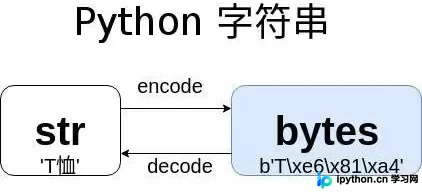
str 和 bytes 的相互转换
str.encode(‘encoding') -> bytes
bytes.decode(‘encoding') -> str
Encoding 指的是具体的编码规则名称,对于中文来说,可能的编码值包括 'utf-8'、'gb2312'、'gbk'、'big5' 等。
你是否注意到上图中 str 矩形比 Bytes 矩形短?这表示相同内容下,str 的长度小于或等于 Bytes 的长度。你可以思考一下原因(参考 Unicode 和 UTF-8 的编码规则)。
下面通过具体代码来理解 str 和 Bytes 的相互转换:
In [16]: a = 'T恤'In [17]: a
Out[17]: 'T恤'In [18]: len(a)
Out[18]: 2In [19]: b = a.encode('utf8')

In [20]: b
Out[20]: b'T\xe6\x81\xa4'In [21]: a == b
Out[21]: FalseIn [22]: c = a.encode('gbk')

In [23]: c
Out[23]: b'T\xd0\xf4'In [24]: b == c
Out[24]: FalseIn [25]: a == c
Out[25]: False
上述 str 和 Bytes 之间的转换针对的是文本内容。如果是其他二进制内容(如图片),Bytes 无法直接 decode 为 str,请看以下代码中的异常:
In [29]: img = open('str-bytes.jpg', 'rb').read()

In [30]: type(img)
Out[30]: bytes

In [31]: img.decode('utf8')
---------------------------------------------------------------------------
UnicodeDecodeError Traceback (most recent call last)
<ipython-input-31-c9e28f45be95> in <module>()----> 1 img.decode('utf8')UnicodeDecodeError: 'utf-8' codec can't decode byte 0xff in position 0: invalid start byte
这是因为图片中的二进制数据不符合文本数据的 UTF-8 编码规则。
在获取图片数据时,我们使用了 open() 函数来读取文件。文件存储的内容无非是文本和二进制两种格式,因此在读写文件时也需要明确编码方式:
In [32]: open('z.txt', 'w').write('T恤')
Out[32]: 2In [33]: open('z.txt', 'w').write(img)
---------------------------------------------------------------------------
TypeError Traceback (most recent call last)
<ipython-input-33-4a88980b3a54> in <module>()
----> 1 open('z.txt', 'w').write(img)

TypeError: write() argument must be str, not bytes

In [34]: open('z.txt', 'wb').write(img)
Out[34]: 12147
读写二进制数据(如图片)时,需要添加 'rb' 参数,其中 'b' 代表 Binary(二进制)。读写文本数据时,一般添加 'r' 参数,open() 会自动将 Bytes 转换为 str。
总结一下
在 Python 3 中,str 用于内存中的文本数据处理,而 Bytes 用于二进制数据处理。
str 可以 encode 为 Bytes,但 Bytes 不一定能 decode 为 str。实际上,Bytes.decode(‘latin1') 可以称为 str,也就是说,decode 使用的编码决定了 decode() 的成功与否。同样,使用 UTF-8 编码的 Bytes 字符串用 GBK 去 decode() 也会出错。
Bytes 通常来自网络读取的数据、从二进制文件(如图片)读取的数据,或以二进制模式读取的文本文件(.txt、.html、.py、.cpp 等)。
总结
以上介绍了 Python 3 中 str 和 Bytes 的区别,希望对大家有所帮助。如果大家有任何疑问,欢迎留言,我们会及时回复大家!
免责声明:本文内容仅供参考,不代表本站观点。转载或引用请注明出处。









