

Python wxPython MessageDialog消息对话框用法详解

本文介绍Python wxPython库中MessageDialog消息对话框的用法。详细解析其构造函数参数及ShowModal()阻塞特性,列举wxID_YES等返回值与wxOK等样式选项,并提供完整的Python示例代码演示如何创建带确认按钮的对话框并处理用户交互。
本文详细介绍Python wxPython库中消息对话框MessageDialog的具体使用方法,供读者参考学习。
消息对话框通常被称为Messagebox。参考wxWidgets中的原型定义(C++风格),其与Python风格的差异主要在于前缀wx与后续名称直接相连,例如wxMessageDialog。在wxPython中使用该类时,对应为wx.MessageDialog。
wxMessageDialog(wxWindow* parent, const wxString& message, const wxString& caption = "Message box", long style = wxOK | wxCANCEL, const wxPoint& pos = wxDefaultPosition)
此处对各参数不做过多赘述,重点介绍ShowModal()方法。该方法在对话框关闭前会阻塞应用程序,使其无法响应其他窗口的用户事件,并返回一个整数。该整数的可能取值包括:
wx.ID_YES, wx.ID_NO, wx.ID_CANCEL, wx.ID_OK。
此外,style参数的常用取值主要有以下几种:
| wxOK | Show an OK button. |
| wxCANCEL | Show a Cancel button. |
| wxYES_NO | Show Yes and No buttons. |
| wxYES_DEFAULT | Used with wxYES_NO, makes Yes button the default - which is the default behaviour. |
| wxNO_DEFAULT | Used with wxYES_NO, makes No button the default. |
| wxICON_EXCLAMATION | Shows an exclamation mark icon. |
| wxICON_HAND | Shows an error icon. |
| wxICON_ERROR | Shows an error icon - the same as wxICON_HAND. |
| wxICON_QUESTION | Shows a question mark icon. |
| wxICON_INFORMATION | Shows an information (i) icon. |
| wxSTAY_ON_TOP | The message box stays on top of all other window, even those of the other applications (Windows only). |
通过以下示例进行说明:
具体代码如下:
#!/usr/bin/env python
# -*- coding: utf-8 -*-
import wx
class MyFrame(wx.Frame):
 def __init__(self, parent, id):
  wx.Frame.__init__(self, parent, id, u'测试面板Panel', size = (600, 300))
  #创建面板
  panel = wx.Panel(self)
  #在Panel上添加Button
  button = wx.Button(panel, label = u'关闭', pos = (150, 60), size = (100, 60))
  #绑定单击事件
  self.Bind(wx.EVT_BUTTON, self.OnCloseMe, button)
 def OnCloseMe(self, event):
  dlg = wx.MessageDialog(None, u"消息对话框测试", u"标题信息", wx.YES_NO | wx.ICON_QUESTION)
  if dlg.ShowModal() == wx.ID_YES:
   self.Close(True)
  dlg.Destroy()
if __name__ == '__main__':
 app = wx.PySimpleApp()
 frame = MyFrame(parent = None, id = -1)
 frame.Show()
 app.MainLoop()
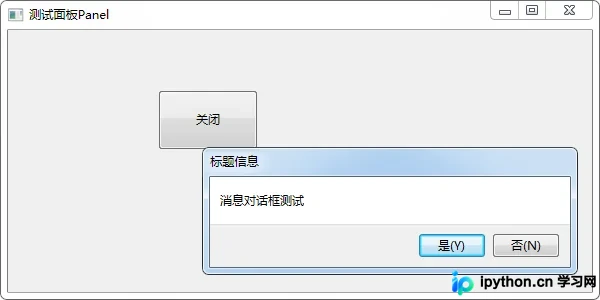
测试运行结果如下:
如需了解更多Python相关内容,可参考本站专题:《Python数据结构与算法教程》、《Python Socket编程技巧总结》、《Python函数使用技巧总结》、《Python字符串操作技巧汇总》、《Python入门与进阶经典教程》及《Python文件与目录操作技巧汇总》。
希望本文所述内容能对读者的Python程序设计工作提供帮助。
免责声明:本文内容仅供参考,不代表本站观点。转载或引用请注明出处。









