

Python实现Markdown转HTML简易转换器:从正则处理到本地预览

发布时间:2026-10-13| 6人浏览过
本文介绍如何使用Python编写一个简易的Markdown转HTML转换器。通过正则表达式处理行内代码、加粗、斜体、链接及图片,并逐行解析列表、引用等块级语法。代码包含自定义CSS样式以优化复选框和表格显示,最终利用webbrowser模块在本地Chrome浏览器中打开生成的HTML文件,实现Markdown内容的快速预览。
近期突发灵感,编写了一个将Markdown格式转换为HTML的简易工具。
import os, re,webbrowser text = ''' # TextHeader ## Header1 List - 1 - 2 - 3 > **quote** 》 quote2 ## Header2 1. *斜体* 2. [@以茄之名](https://www.jb51.net/people/e4f87c3476a926c1e2ef51b4fcd18fa3) 3、  ## Header3 `*[文章地址](https://zhuanlan.zhihu.com/p/39742445)*` ·**code1**· - [x]是否点赞 '''
程序初始阶段优先处理行内语法元素,例如代码片段、加粗文本及斜体文本等,直接利用正则表达式进行替换操作:
text = re.sub(re.compile('([\`·])([^`·]+)[\`·]'), r'<code>\2</code>', text)
text = re.sub(re.compile('\*\*([^\*]+)\*\*'), r'<strong>\1</strong>', text)
text = re.sub(re.compile('([^\*])\*([^\*]+)\*'), r'\1<i>\2</i>', text)
随后处理结构相对复杂的图片插入与超链接功能:
text = re.sub(re.compile('([^\!])\[([^\]]+)\]\(([^)]+)\)'),
    r'\1<a href="\3" rel="external nofollow" target="_blank">\2</a>', text)
text = re.sub(re.compile('\!\[([^\]]*)\]\(([^)]+)\)'),
    r'<img src="\2" >', text)
接下来处理其余语法部分,首先将文本内容按行进行分割:
lines = text.split('\n')
html = ''
list_flag = ''
针对列表项及待办事项(Checkbox)进行特定逻辑处理:
for line in lines:
 line = line.strip(' ')
 if re.match('- \[[ x]\]', line):
  print('matched')
  p_html = ''
  if re.match('- \[x\]', line):
   p_html = ' checked="checked"'
  line = re.sub('- \[[ x]\]', '', line)
  html += '''<label class="cssCheckbox">
  <input type="checkbox" %s />
  <span></span>%s
  </label>''' % (p_html, line)
由于有序列表与无序列表在生成的HTML标签中分别对应ol和ul,因此需要引入list_flag变量来标识当前的列表状态:
elif re.match('[\+\-\*] ', line):
 if list_flag == '':
  html += '<ul>\n'
  list_flag = 'ul'
 line = re.sub('[\+\-\*] ', '', line)
 html += '<li>%s</li>\n' % (line)
elif re.match('[\d]+[.、] ', line):
 if list_flag == '':
  list_flag = 'ol'
  html += '<ol>\n'
 line = re.sub('[\d]+[.、] ', '', line)
 html += '<li>%s</li>\n' % (line)
完成列表处理后,继续解析其他剩余的语法元素:
else:
  if list_flag != '':
   html += '</%s>\n' % list_flag
   list_flag = ''
  if re.match('\#+', line):
   well = re.match('\#+', line).group().count('#')
   line = re.sub('\#+', '', line)
   html += '<h%i>%s</h%i>\n' % (well, line, well)
  elif re.match('[>》 ]', line):
   line = re.sub('^\s*[>》 ]', '', line)
   html += '<blockquote>%s</blockquote>\n' % (line)

  # elif re.match('[>》 ]', line):
  #  line = re.sub('^\s*[>》 ]', '', line)
  #  html += '<blockquote>%s</blockquote>\n' % (line)
  else:
   html += line
此处进行了微调,使得大于号(>)和中文书名号(》)均能转换为引用块,主要是为了降低中英文标点切换带来的适配难度。
随后注入CSS样式,参考并修改了马克飞象的部分样式,因其引用块的视觉效果较为出色:
with open('markdown.html', 'w', encoding='utf-8')as f:
 f.write('''
<html>
<head>
 <meta http-equiv="Content-Type" content="text/html; charset=utf-8" />
<style>body{
 margin: 0 auto;
 font-family: "ubuntu", "Tahoma", "Microsoft YaHei", arial,sans-serif;
 color: #444444;
 line-height: 1;
 padding: 30px;
}
input[type='checkbox']+span::before {
 content:' ';/*不换行空格*/
 display: inline-block;
 vertical-align: 0.2em;
 width:0.8em;
 height:0.8em;
 margin-right: .2em;
 border-radius:.2em;
 background: silver;/*复选框的背景色*/
 text-indent:0.15em;
 line-height: 0.65;
}
input[type='checkbox'] {
 /*隐藏掉原先实际的 checkbox 框,之所以没用 display:none; 这种简单直接的方式,是因为这种方法会把它从键盘 tab 键切换焦点的队列中完全删除*/

 position: absolute;
 clip:rect(0,0,0,0);
}
input[type='checkbox']:checked+span::before {
 content:'\u221a'; /*对号的 Unicode字符*/
 background: yellowgreen;/*对号的颜色*/
}
img {
 max-width: 100%;
}
@media screen and (min-width: 1000px) {
 body {
  width: 842px;
  margin: 10px auto;
 }


}
h1, h2, h3, h4 {
 color: #111111;
 font-weight: 400;
 margin-top: 1em;
}

h1, h2, h3, h4, h5 {
 font-family: Georgia, Palatino, serif;
}
h1, h2, h3, h4, h5, dl{
 margin-bottom: 16px;
 padding: 0;
}

p {
 margin-top: 8px;
 margin-bottom: 3px;
}
h1 {
 font-size: 48px;
 line-height: 54px;
}
h2 {
 font-size: 36px;
 line-height: 42px;
}
h1, h2 {
 border-bottom: 1px solid #EFEAEA;
 padding-bottom: 10px;
}
h3 {
 font-size: 24px;
 line-height: 30px;
}
h4 {
 font-size: 21px;
 line-height: 26px;
}
h5 {
 font-size: 18px;
 line-height: 23px;
}
a {
 color: #0099ff;
 margin: 0 2px;
 padding: 0;
 vertical-align: baseline;
 text-decoration: none;
}
a:hover {
 text-decoration: none;
 color: #ff6600;
}
a:visited {
 /*color: purple;*/
}
ul, ol {
 padding: 0;
 padding-left: 18px;
 margin: 0;
}
li {
 line-height: 24px;
}
p, ul, ol {
 font-size: 16px;
 line-height: 24px;
}

ol ol, ul ol {
 list-style-type: lower-roman;
}

code, pre {
 font-family: Consolas, Monaco, Andale Mono, monospace;
 background-color:#f7f7f7;
 color: inherit;
}

code {
 font-family: Consolas, Monaco, Andale Mono, monospace;
 margin: 0 2px;
}

pre {
 font-family: Consolas, Monaco, Andale Mono, monospace;
 line-height: 1.7em;
 overflow: auto;
 padding: 6px 10px;
 border-left: 5px solid #6CE26C;
}

pre > code {
 font-family: Consolas, Monaco, Andale Mono, monospace;
 border: 0;
 display: inline;
 max-width: initial;
 padding: 0;
 margin: 0;
 overflow: initial;
 line-height: 1.6em;
 font-size: .95em;
 white-space: pre;
 background: 0 0;

}

code {
 color: #666555;
}

aside {
 display: block;
 float: right;
 width: 390px;
}
blockquote {
 border-left-width: 10px;
 background-color: rgba(102,128,153,0.05);
 border-top-right-radius: 5px;
 border-bottom-right-radius: 5px;
 padding: 15px 20px;
}
blockquote cite {
 font-size:14px;
 line-height:20px;
 color:#bfbfbf;
}
blockquote cite:before {
 content: '\2014 \00A0';
}

blockquote p {
 color: #666;
}
hr {
 text-align: left;
 color: #999;
 height: 2px;
 padding: 0;
 margin: 16px 0;
 background-color: #e7e7e7;
 border: 0 none;
}

dl {
 padding: 0;
}

dl dt {
 padding: 10px 0;
 margin-top: 16px;
 font-size: 1em;
 font-style: italic;
 font-weight: bold;
}

dl dd {
 padding: 0 16px;
 margin-bottom: 16px;
}

dd {
 margin-left: 0;
}

table {
 *border-collapse: collapse; /* IE7 and lower */
 border-spacing: 0;
 width: 100%;
}
table {
 border: solid #ccc 1px;
}

table thead {
 background: #f7f7f7;
}

table thead tr:hover {
 background: #f7f7f7
}
table tr:hover {
 background: #fbf8e9;
 -o-transition: all 0.1s ease-in-out;
 -webkit-transition: all 0.1s ease-in-out;
 -moz-transition: all 0.1s ease-in-out;
 -ms-transition: all 0.1s ease-in-out;
 transition: all 0.1s ease-in-out;
}
table td, .table th {
 border-left: 1px solid #ccc;
 border-top: 1px solid #ccc;
 padding: 10px;
 text-align: left;
}

table th {
 border-top: none;
 text-shadow: 0 1px 0 rgba(255,255,255,.5);
 padding: 5px;
 border-left: 1px solid #ccc;
}

table td:first-child, table th:first-child {
 border-left: none;
}</style></head>''')
 f.write(html)
 f.write('</html>')
最后通过Chrome浏览器打开生成的网页文件:
webbrowser.get('C:/Program Files (x86)/CentBrowser/Application/chrome.exe %s').open(
 'file:///'+os.getcwd()+'/markdown.html')
值得注意的是,此处存在一个兼容性问题:系统自带的Edge浏览器一直无法成功打开文件,即使尝试通过注册表指定Chrome路径也未能生效,最终需借助外部网络资源寻找解决方案。
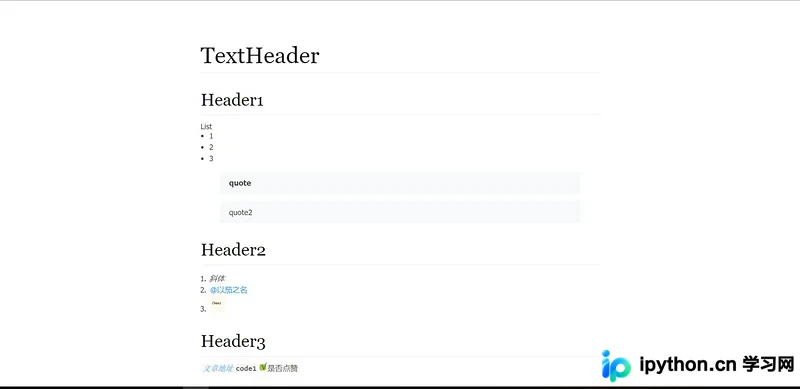
最终生成的转换效果如下:
以上就是本文的全部内容,希望对大家的学习有所帮助,也希望大家多多支持本站。
免责声明:本文内容仅供参考,不代表本站观点。转载或引用请注明出处。









