

Python程序内存泄漏排查与调试实战指南

本文记录Python程序内存持续增长的排查过程。通过psutil监控进程内存,利用pmap分析堆内存,结合gc.collect强制垃圾回收,并使用memory_profiler定位高消耗代码行。最后借助guppy库深入分析对象占用,发现95%内存被列表占用,为定位逻辑导致的内存泄漏提供完整解决方案。
问题描述
在调试Python程序时,可以使用特定代码获取进程占用的系统内存值。让程序运行一段时间后,即可绘制出进程内存占用的变化曲线。
def memory_usage_psutil():
 # return the memory usage in MB
 import psutil,os
 process = psutil.Process(os.getpid())
 mem = process.memory_info()[0] / float(2 ** 20)
 return mem
观察发现进程内存占用持续上升,从逻辑层面看这并不正常,因此推测程序可能存在Memory Leak(内存泄漏)。
Python程序的Mem Leak
Python程序不会像C/C++那样出现malloc后未free导致的内存泄漏。但可能会遇到“逻辑上未释放”的情况,如下代码所示。
def foo(a=[]):
 a.append(time.time())
 return a
参数a作为可迭代对象,若处理不当,其大小会迅速增长。简而言之,Python的Memory Leak表现为“进程占用内存莫名其妙地持续升高”。当进程内存增长与逻辑预期不符时,即可判定发生了Memory Leak。
以下面程序为例说明Memory Leak调试的过程:
def memory_usage_psutil():
 # return the memory usage in MB
 import psutil,os
 process = psutil.Process(os.getpid())
 mem = process.memory_info()[0] / float(2 ** 20)
 return mem

def get_current_obj(a=[]):
 a.append([0]*1000)
 return a

def main():
 obj = []
 for i in range(10000):
 obj = get_current_obj(obj)
 if(i%100==0):
  print(memory_usage_psutil())

if __name__=='__main__':
 main()
调试过程
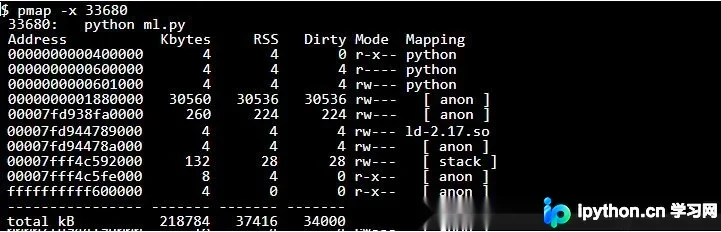
使用pmap -x [pid]命令查看进程占用的堆内存大小
首先怀疑上述使用的memory_usage_psutil函数统计是否存在错误。
先运行程序,再通过pmap查看,发现进程内存占用确实很高。多次执行该命令也可观察到内存持续升高。
强制执行GC(gc.collect())
在需要执行垃圾回收的地方添加gc.collect()。
def main():
 obj = []
 for i in range(10000):
 obj = get_current_obj(obj)
 import gc;gc.collect()
 if(i%100==0):
  print(memory_usage_psutil())
可以看到,强制GC后程序执行速度变慢,但内存依然不断升高。
使用memory_profiler查看
安装memory_profiler
pip install -U memory_profiler
使用@profile修饰需要查看内存的函数
@profile
def main():
 obj = []
 for i in range(10000):
 obj = get_current_obj(obj)
 if(i%100==0):
  print(memory_usage_psutil())
使用如下命令运行程序
python -m memory_profiler main.py
可以看到程序执行完成后,输出结果如下
Line # Mem usage Increment Line Contents
================================================
 12 28.570 MiB 0.000 MiB @profile
 13    def main():
 14 28.570 MiB 0.000 MiB obj = []
 15 106.203 MiB 77.633 MiB for i in range(10000):
 16 106.203 MiB 0.000 MiB  obj = get_current_obj(obj)
 17 106.203 MiB 0.000 MiB  if(i%100==0):
 18 105.445 MiB -0.758 MiB  print(memory_usage_psutil())
这样就能看到导致内存上涨最快的那几行代码。
用guppy查看python对象占用的堆内存大小
将main修改如下,即可查看python对堆内存的占用量。
def main():
 obj = []
 for i in range(10000):
 obj = get_current_obj(obj)
 if(i%100==0):
  print(memory_usage_psutil())
  from guppy import hpy;hxx = hpy();heap = hxx.heap()
  print(heap)
下面就是输出结果,python程序中各个对象对内存的占用从大到小排列。
 Index Count % Size % Cumulative % Kind (class / dict of class)
 0 10124 22 81944416 95 81944416 95 list
 1 16056 34 1325464 2 83269880 96 str
 2 9147 20 745616 1 84015496 97 tuple
 3 102 0 366480 0 84381976 98 dict of module
 4 287 1 313448 0 84695424 98 dict of type
 5 2426 5 310528 0 85005952 98 types.CodeType
 6 2364 5 283680 0 85289632 99 function
 7 287 1 256960 0 85546592 99 type
 8 169 0 192088 0 85738680 99 dict (no owner)
 9 123 0 142728 0 85881408 99 dict of class
可以从结果中看到,95%的进程内存,都被一个list占用。
还可以通过下面这种方式,查看这个占内存最大的list中的数据类型。
from guppy import hpy;hxx = hpy();byrcs = hxx.heap().byrcs; byrcs[0].byid
关于guppy的详细用法,可以看这里(http://smira.ru/wp-content/uploads/2011/08/heapy.html)。
以上这篇对python程序内存泄漏调试的记录就是小编分享给大家的全部内容了,希望能给大家一个参考,也希望大家多多支持本站。
免责声明:本文内容仅供参考,不代表本站观点。转载或引用请注明出处。









