

Django中加载本地HTML并传递数据的方法

发布时间:2026-10-13| 5人浏览过
本文介绍在Django框架中如何加载本地HTML文件,并通过视图函数向模板传递数据。通过定义Python对象和字典,利用render_to_response将标题、用户信息及列表内容传递给HTML模板,实现动态数据展示。
在Django项目中实现加载本地HTML文件的功能。
from django.shortcuts import render
from django.http import HttpResponse
from django.shortcuts import render,render_to_response
# Create your views here.
def hello(request):
 return render_to_response("hello.html")
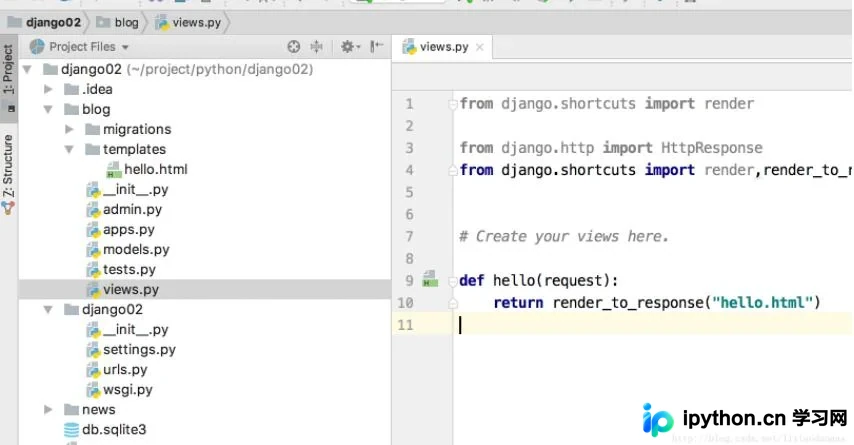
接下来演示如何将数据传递到HTML模板中。
对应的Python视图代码实现如下:
# Create your views here.
# http://weibo.com/lixiaodaoaaa
class Person(object):
 def __init__(self, name, age, sex):
  self.name = name
  self.age = age
  self.sex = sex
 def say(self):
  return self.name
def hello(request):
 u_user = Person("dog", 18, "male")
 myList = ["sendList to the html files", "god", "god02"]
 u_content_dic = {"u_title": "Title Is Here", "u_user": u_user,"u_test_str":myList}
 ##传递一个字典作为Content_type
 return render_to_response("hello.html", u_content_dic)
在HTML模板中获取并显示传递的数据:
<!DOCTYPE HTML PUBLIC "-//W3C//DTD HTML 4.01 Transitional//EN"
  "http://www.w3.org/TR/html4/loose.dtd">
<html>
<head>
 <title>{{ u_title }}</title>
 <h1>{{ u_user.age }}</h1>
 <h1>{{ u_user.name }}</h1>
 <h1>{{ u_user.sex}}</h1>
 <h1>{{ u_test_str.0}}</h1>
 <h1>{{ u_test_str.1}}</h1>
 <br/>
 <h1>{{ u_user.say}}</h1>
</head>
<body>
</body>
</html>
以上内容分享了Django加载本地HTML及相关数据传递的方法,希望能为读者提供参考与帮助,感谢支持。
免责声明:本文内容仅供参考,不代表本站观点。转载或引用请注明出处。









