

Python结合SLIC分割与Color Map实现抽象画风

发布时间:2026-10-13| 1人浏览过
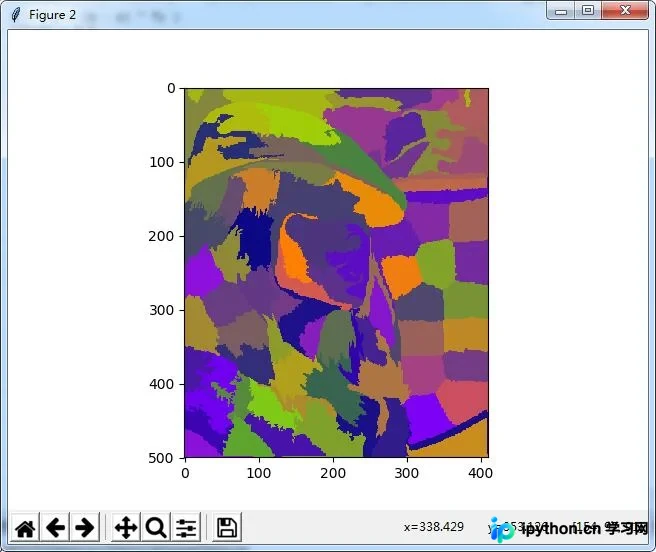
本文介绍一种利用Python实现PS风格抽象画效果的算法。核心思路是生成渐变色图(Color Map),使用SLIC算法对原图进行分割,随后从Color Map中随机采样像素值并赋予各分割区域,从而生成具有抽象艺术感的图像特效。
本文详细介绍一种使用Python实现Photoshop风格抽象画效果的具体方法,供读者参考学习。
该特效基于图像分割技术与Color Map(色图)随机采样相结合。具体流程为:首先构建一张颜色渐变的Color Map图;接着对目标图像进行分割,本文采用SLIC分割算法;最后从生成的Color Map中随机选取像素颜色,并将这些采样得到的颜色值赋给图像分割后的各个区域,从而完成抽象画风的转换。
# -*- coding: utf-8 -*-
"""
Created on Sun Aug 20 08:31:04 2017
@author: shiyi
"""
import numpy as np
import matplotlib.pyplot as plt
from skimage import io
from skimage.segmentation import slic
import numpy.matlib
import random
file_name='D:/Visual Effects/PS Algorithm/9.jpg';
img=io.imread(file_name)
row, col, channel = img.shape
# define the colormap
color_map = img.copy()
rNW = 0.5
rNE = 1.0
rSW = 0.0
rSE = 0.5
gNW = 0.0
gNE = 0.5
gSW = 0.0
gSE = 1.0
bNW = 1.0
bNE = 0.0
bSW = 0.5
bSE = 0.0
xx = np.arange (col)
yy = np.arange (row)
x_mask = numpy.matlib.repmat (xx, row, 1)
y_mask = numpy.matlib.repmat (yy, col, 1)
y_mask = np.transpose(y_mask)
fx = x_mask * 1.0 / col
fy = y_mask * 1.0 / row
p = rNW + (rNE - rNW) * fx
q = rSW + (rSE - rSW) * fx
r = ( p + (q - p) * fy )
r[r<0] = 0
r[r>1] =1
p = gNW + (gNE - gNW) * fx
q = gSW + (gSE - gSW) * fx
g = ( p + (q - p) * fy )
g[g<0] = 0
g[g>1] =1
p = bNW + (bNE - bNW) * fx
q = bSW + (bSE - bSW) * fx
b = ( p + (q - p) * fy )
b[b<0] = 0.0
b[b>1] = 1.0
color_map[:, :, 0] = r * 255
color_map[:, :, 1] = g * 255
color_map[:, :, 2] = b * 255
# segment the image
N_block = 100
segments = slic(img, n_segments=N_block, compactness=10)
# plt.imshow(segments, plt.cm.gray)
seg_img = img.copy()
T_mask = img.copy()
for i in range(N_block):
 mask = (segments == i)
 T_mask[:, :, 0] = mask
 T_mask[:, :, 1] = mask
 T_mask[:, :, 2] = mask
 x_ind = int(random.random() * (col-1))
 y_ind = int(random.random() * (row-1))
 color = color_map[y_ind, x_ind, :]
 T_img = seg_img * T_mask
 T_img = color
 seg_img = seg_img * (1-T_mask) + T_img * T_mask
plt.figure(2)
plt.imshow(seg_img)
plt.show()
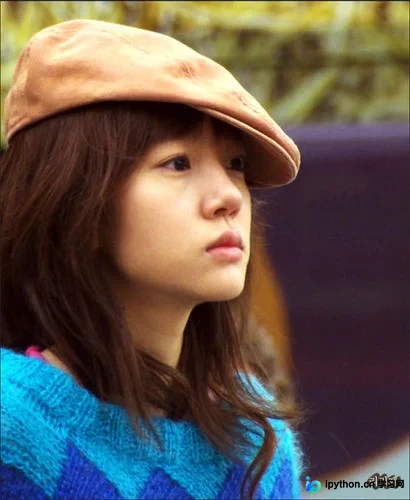
处理前的原始图像如下:
经过算法处理后的抽象画效果如下:
如需了解更多Python相关技术,可参考本站专题:《Python图片操作技巧总结》、《Python数据结构与算法教程》、《Python Socket编程技巧总结》、《Python函数使用技巧总结》、《Python字符串操作技巧汇总》、《Python入门与进阶经典教程》及《Python文件与目录操作技巧汇总》。
希望上述内容能对读者的Python编程实践提供有益帮助。
免责声明:本文内容仅供参考,不代表本站观点。转载或引用请注明出处。









