

基于TensorFlow复现AlexNet:从模型构建到图像分类实战

本文详细解析如何使用TensorFlow复现经典的AlexNet模型。重点还原了论文中双GPU并行的原始网络结构,而非常见的单GPU合并版本。文章涵盖模型定义、参数加载及测试流程,通过具体代码示例展示如何对渣土车等常见物体进行图像分类识别,适合希望深入理解AlexNet架构及熟悉TensorFlow操作的开发者参考。
AlexNet作为2012年ImageNet大规模视觉识别挑战赛(ILSVRC)的冠军模型,尽管问世已久,仍是深度学习领域的经典之作。它不仅蕴含了众多现代深度学习的关键技巧,更是提升开发者使用深度学习框架熟练度的极佳练习对象。对于刚入门深度学习的初学者而言,这是一个熟悉TensorFlow操作、快速上手的理想项目。
完整实现代码已开源,地址为:https://github.com/hjptriplebee/AlexNet_with_tensorflow
运行代码前,请查阅该链接README文件中列出的详细环境配置要求。本文假设读者已具备基础的TensorFlow知识,因此不会展开讲解过于底层的细节。
模型结构
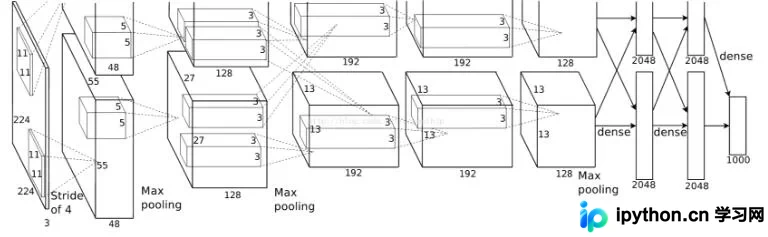
关于AlexNet的网络结构,网络上已有大量文献资料,此处不再赘述,具体实现逻辑将在后续代码注释中详细说明。
值得注意的是,原始AlexNet论文将网络结构划分为上下两个部分。这两部分结构完全一致,唯一的区别在于它们被部署在不同的GPU上进行训练。由于除全连接层外,各层的特征图(feature map)相互独立,这种设计旨在提升训练速度。许多复现版本为了适配单GPU环境,将上下两部分合并。尽管本实现也在单GPU上运行,但为了忠实还原原始网络结构,代码中依然保持了上下两部分的分离设计。
模型定义
def maxPoolLayer(x, kHeight, kWidth, strideX, strideY, name, padding = "SAME"):
  """max-pooling"""
  return tf.nn.max_pool(x, ksize = [1, kHeight, kWidth, 1],
             strides = [1, strideX, strideY, 1], padding = padding, name = name)

def dropout(x, keepPro, name = None):
  """dropout"""
  return tf.nn.dropout(x, keepPro, name)

def LRN(x, R, alpha, beta, name = None, bias = 1.0):
  """LRN"""
  return tf.nn.local_response_normalization(x, depth_radius = R, alpha = alpha,
                       beta = beta, bias = bias, name = name)

def fcLayer(x, inputD, outputD, reluFlag, name):
  """fully-connect"""
  with tf.variable_scope(name) as scope:
    w = tf.get_variable("w", shape = [inputD, outputD], dtype = "float")
    b = tf.get_variable("b", [outputD], dtype = "float")
    out = tf.nn.xw_plus_b(x, w, b, name = scope.name)
    if reluFlag:
      return tf.nn.relu(out)
    else:
      return out

def convLayer(x, kHeight, kWidth, strideX, strideY,
       featureNum, name, padding = "SAME", groups = 1):#group为2时等于AlexNet中分上下两部分
  """convlutional"""
  channel = int(x.get_shape()[-1])#获取channel
  conv = lambda a, b: tf.nn.conv2d(a, b, strides = [1, strideY, strideX, 1], padding = padding)#定义卷积的匿名函数
  with tf.variable_scope(name) as scope:
    w = tf.get_variable("w", shape = [kHeight, kWidth, channel/groups, featureNum])
    b = tf.get_variable("b", shape = [featureNum])

    xNew = tf.split(value = x, num_or_size_splits = groups, axis = 3)#划分后的输入和权重
    wNew = tf.split(value = w, num_or_size_splits = groups, axis = 3)

    featureMap = [conv(t1, t2) for t1, t2 in zip(xNew, wNew)] #分别提取feature map
    mergeFeatureMap = tf.concat(axis = 3, values = featureMap) #feature map整合
    # print mergeFeatureMap.shape
    out = tf.nn.bias_add(mergeFeatureMap, b)
    return tf.nn.relu(tf.reshape(out, mergeFeatureMap.get_shape().as_list()), name = scope.name) #relu后的结果
代码中定义了卷积、最大池化(pooling)、局部响应归一化(LRN)、Dropout以及全连接五个核心模块。其中,卷积模块因需处理网络上下两部分的分离逻辑,实现相对复杂。在此基础上,进一步构建了完整的AlexNet类。
class alexNet(object):
  """alexNet model"""
  def __init__(self, x, keepPro, classNum, skip, modelPath = "bvlc_alexnet.npy"):
    self.X = x
    self.KEEPPRO = keepPro
    self.CLASSNUM = classNum
    self.SKIP = skip
    self.MODELPATH = modelPath
    #build CNN
    self.buildCNN()

  def buildCNN(self):
    """build model"""
    conv1 = convLayer(self.X, 11, 11, 4, 4, 96, "conv1", "VALID")
    pool1 = maxPoolLayer(conv1, 3, 3, 2, 2, "pool1", "VALID")
    lrn1 = LRN(pool1, 2, 2e-05, 0.75, "norm1")

    conv2 = convLayer(lrn1, 5, 5, 1, 1, 256, "conv2", groups = 2)
    pool2 = maxPoolLayer(conv2, 3, 3, 2, 2, "pool2", "VALID")
    lrn2 = LRN(pool2, 2, 2e-05, 0.75, "lrn2")

    conv3 = convLayer(lrn2, 3, 3, 1, 1, 384, "conv3")

    conv4 = convLayer(conv3, 3, 3, 1, 1, 384, "conv4", groups = 2)

    conv5 = convLayer(conv4, 3, 3, 1, 1, 256, "conv5", groups = 2)
    pool5 = maxPoolLayer(conv5, 3, 3, 2, 2, "pool5", "VALID")

    fcIn = tf.reshape(pool5, [-1, 256 * 6 * 6])
    fc1 = fcLayer(fcIn, 256 * 6 * 6, 4096, True, "fc6")
    dropout1 = dropout(fc1, self.KEEPPRO)

    fc2 = fcLayer(dropout1, 4096, 4096, True, "fc7")
    dropout2 = dropout(fc2, self.KEEPPRO)

    self.fc3 = fcLayer(dropout2, 4096, self.CLASSNUM, True, "fc8")

  def loadModel(self, sess):
    """load model"""
    wDict = np.load(self.MODELPATH, encoding = "bytes").item()
    #for layers in model
    for name in wDict:
      if name not in self.SKIP:
        with tf.variable_scope(name, reuse = True):
          for p in wDict[name]:
            if len(p.shape) == 1:
              #bias 只有一维
              sess.run(tf.get_variable('b', trainable = False).assign(p))
            else:
              #weights
              sess.run(tf.get_variable('w', trainable = False).assign(p))
buildCNN函数严格按照AlexNet的原始结构搭建网络层。loadModel函数负责从指定的模型文件中读取预训练参数,具体模型文件获取方式详见GitHub仓库的README说明。至此,模型定义部分完成,接下来进入测试环节。
模型测试
在ImageNet数据集上训练好的AlexNet涵盖了数千个类别,几乎包含所有常见物体。因此,我们可以从网络随机选取图片进行验证。例如,这里直接使用之前项目中拍摄的渣土车图片作为测试样本:
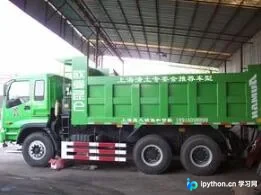
随后编写相应的测试代码:
#some params
dropoutPro = 1
classNum = 1000
skip = []
#get testImage
testPath = "testModel"
testImg = []
for f in os.listdir(testPath):
  testImg.append(cv2.imread(testPath + "/" + f))

imgMean = np.array([104, 117, 124], np.float)
x = tf.placeholder("float", [1, 227, 227, 3])

model = alexnet.alexNet(x, dropoutPro, classNum, skip)
score = model.fc3
softmax = tf.nn.softmax(score)

with tf.Session() as sess:
  sess.run(tf.global_variables_initializer())
  model.loadModel(sess) #加载模型

  for i, img in enumerate(testImg):
    #img preprocess
    test = cv2.resize(img.astype(np.float), (227, 227)) #resize成网络输入大小
    test -= imgMean #去均值
    test = test.reshape((1, 227, 227, 3)) #拉成tensor
    maxx = np.argmax(sess.run(softmax, feed_dict = {x: test}))
    res = caffe_classes.class_names[maxx] #取概率最大类的下标
    #print(res)
    font = cv2.FONT_HERSHEY_SIMPLEX
    cv2.putText(img, res, (int(img.shape[0]/3), int(img.shape[1]/3)), font, 1, (0, 255, 0), 2)#绘制类的名字
    cv2.imshow("demo", img)
    cv2.waitKey(5000) #显示5秒
如上述代码所示,测试流程首先设置相关参数,接着读取指定路径下的测试图像,对模型进行初始化,最后执行实际的分类预测。测试结果如下:
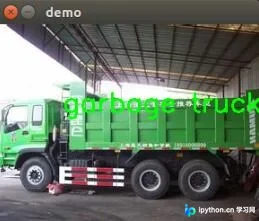
以上即为本文的全部内容,希望能为各位的学习提供有益帮助,也欢迎大家继续支持本站。
免责声明:本文内容仅供参考,不代表本站观点。转载或引用请注明出处。









