

Python利用itchat与matplotlib实现微信好友信息爬取及可视化

发布时间:2026-10-13| 3人浏览过
本文介绍如何使用Python的itchat库登录微信并获取好友信息,结合matplotlib库进行数据可视化。通过实例代码展示如何统计好友的性别比例并绘制柱状图与饼图,同时按省份分类排序并生成省份分布图。最后提供将数据保存为CSV文件的方法,供Excel查看。
此前曾阅读过一篇关于使用Python爬取微信好友信息的文章,主要利用itchat库获取昵称、性别和地理位置等数据,并进行统计绘图。原文章详细讲解了itchat的使用,但代码以图片形式呈现,且绘图部分使用了R语言包。为了复现并优化这一过程,我完成了绘图代码的编写,改用matplotlib库进行可视化,并将完整代码整理分享,以便后续直接使用。
安装itchat库时,建议配置清华大学镜像源以加速下载:pip install -i https://pypi.tuna.tsinghua.edu.cn/simple itchat
接下来,通过itchat获取微信好友列表,并统计男女比例。
import itchat

itchat.login()
friends=itchat.get_friends(update=True)[0:]
male=female=other=0
for i in friends[1:]:
 sex=i['Sex']
 if sex==1:
  male+=1
 elif sex==2:
  female+=1
 else:
  other+=1

total=len(friends[1:])
malecol=round(float(male)/total*100,2)
femalecol=round(float(female)/total*100,2)
othercol=round(float(other)/total*100,2)
print('男性朋友:%.2f%%' %(malecol)+'\n'+
'女性朋友:%.2f%%' % (femalecol)+'\n'+
'性别不明的好友:%.2f%%' %(othercol))
print("显示图如下:")
利用matplotlib绘制柱状图和饼状图,展示性别分布情况,具体效果如下图所示:
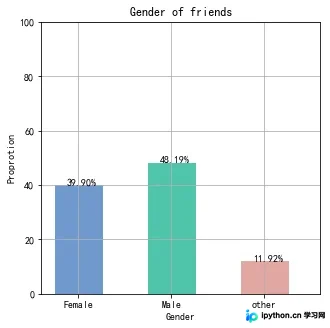
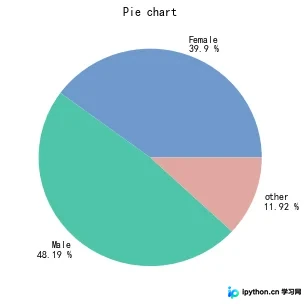
import numpy as np
import matplotlib.pyplot as plt
import matplotlib as mpl
#解决中文乱码不显示问题
mpl.rcParams['font.sans-serif'] = ['SimHei'] #指定默认字体
mpl.rcParams['axes.unicode_minus'] = False #解决保存图像是负号'-'显示为方块的问题

map = {
 'Female': (malecol, '#7199cf'),
 'Male': (femalecol, '#4fc4aa'),
 'other': (othercol, '#e1a7a2')
}

fig = plt.figure(figsize=(5,5))# 整体图的标题
ax = fig.add_subplot(111)#添加一个子图
ax.set_title('Gender of friends')

xticks = np.arange(3)+0.15# 生成x轴每个元素的位置
bar_width = 0.5# 定义柱状图每个柱的宽度
names = map.keys()#获得x轴的值
values = [x[0] for x in map.values()]# y轴的值
colors = [x[1] for x in map.values()]# 对应颜色

bars = ax.bar(xticks, values, width=bar_width, edgecolor='none')# 画柱状图,横轴是x的位置,纵轴是y,定义柱的宽度,同时设置柱的边缘为透明
ax.set_ylabel('Proprotion')# 设置标题
ax.set_xlabel('Gender')
ax.grid()#打开网格
ax.set_xticks(xticks)# x轴每个标签的具体位置
ax.set_xticklabels(names)# 设置每个标签的名字
ax.set_xlim([bar_width/2-0.5, 3-bar_width/2])# 设置x轴的范围
ax.set_ylim([0, 100])# 设置y轴的范围
for bar, color in zip(bars, colors):
 bar.set_color(color)# 给每个bar分配指定的颜色
 height=bar.get_height()#获得高度并且让字居上一点
 plt.text(bar.get_x()+bar.get_width()/4.,height,'%.2f%%' %float(height))#写值
plt.show()
#画饼状图
fig1 = plt.figure(figsize=(5,5))# 整体图的标题
ax = fig1.add_subplot(111)
ax.set_title('Pie chart')
labels = ['{}\n{} %'.format(name, value) for name, value in zip(names, values)]
ax.pie(values, labels=labels, colors=colors)#并指定标签和对应颜色
plt.show()
进一步提取其他字段,如省份信息,进行去重、计数并排序。
#用来爬去各个变量
def get_var(var):
 variable=[]
 for i in friends:
  value=i[var]
  variable.append(value)
 return variable

#调用函数得到各个变量,并把数据存到csv文件中,保存到桌面
NickName=get_var('NickName')
Sex=get_var('Sex')
Province=get_var('Province')
City=get_var('City')
Signature=get_var('Signature')

pros=set(Province)#去重
prosarray=[]
for item in pros:
 prosarray.append((item,Province.count(item)))#获取个数
def by_num(p):
 return p[1]
prosdsored=sorted(prosarray,key=by_num,reverse=True)#根据个数排序
根据排序后的省份数据绘制分布图:
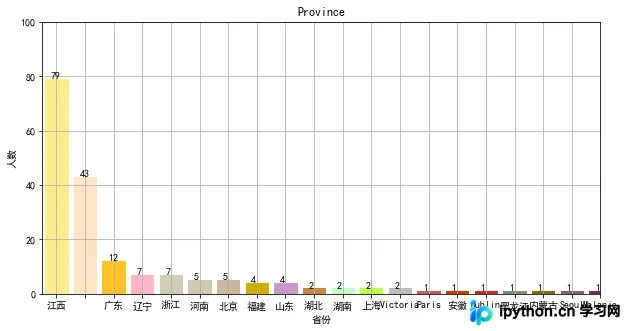
#画图
figpro = plt.figure(figsize=(10,5))# 整体图的标题
axpro = figpro.add_subplot(111)#添加一个子图
axpro.set_title('Province')
xticks = np.linspace(0.5,20,20)# 生成x轴每个元素的位置
bar_width = 0.8# 定义柱状图每个柱的宽度
pros=[]
values = []
count=0
for item in prosdsored:
 pros.append(item[0])
 values.append(item[1])
 count=count+1
 if count>=20:
  break

colors = ['#FFEC8B','#FFE4C4','#FFC125','#FFB6C1','#CDCDB4','#CDC8B1','#CDB79E','#CDAD00','#CD96CD','#CD853F','#C1FFC1','#C0FF3E','#BEBEBE','#CD5C5C','#CD3700','#CD2626','#8B8970','#8B6914','#8B5F65','#8B2252']# 对应颜色

bars = axpro.bar(xticks, values, width=bar_width, edgecolor='none')
axpro.set_ylabel('人数')# 设置标题
axpro.set_xlabel('省份')
axpro.grid()#打开网格
axpro.set_xticks(xticks)# x轴每个标签的具体位置
axpro.set_xticklabels(pros)# 设置每个标签的名字
axpro.set_xlim(0,20)# 设置x轴的范围
axpro.set_ylim([0, 100])# 设置y轴的范围

for bar, color in zip(bars, colors):
 bar.set_color(color)# 给每个bar分配指定的颜色
 height=bar.get_height()#获得高度并且让字居上一点
 plt.text(bar.get_x()+bar.get_width()/4.,height,'%.d' %float(height))#写值

plt.show()
此外,可以将爬取的数据保存为文件,方便使用Excel打开查看。
#保存数据
from pandas import DataFrame
data={'NickName':NickName,'Sex':Sex,'Province':Province,'City':City,'Signature':Signature}
frame=DataFrame(data)

frame.to_csv('data.csv',index=True)
以上即为结合itchat与matplotlib爬取并可视化微信信息的完整示例,希望能为读者提供参考,欢迎支持。
免责声明:本文内容仅供参考,不代表本站观点。转载或引用请注明出处。









