

Python命令行贪吃蛇实现:基于msvcrt的手动控制版本

本文介绍在Python 3.6.1及Win10环境下,利用msvcrt模块实现命令行贪吃蛇游戏的完整代码。由于Python缺乏C语言的kbhit()函数,本版本采用wsad键手动控制蛇的移动方向,而非自动运行。文章详细解析了Board、Snake和Game三个核心类的逻辑,并总结了Python中字典模拟Switch、引用复制与深拷贝的区别以及self关键字的使用要点,适合Python初学者练习基础语法与面向对象编程。
近期正在学习Python,为了巩固所学知识并练习基础语法,决定动手编写一个项目。虽然命令行贪吃蛇通常是C语言初学者的经典练习项目,但在没有找到其他合适练手项目的情况下,决定先通过实现一个简单的贪吃蛇游戏来熟悉Python的基本语法结构。
在Python中监听键盘输入相对复杂,因为标准库中没有像C语言那样便捷的kbhit()函数。因此,这个版本的贪吃蛇游戏不具备自动移动功能,需要用户通过按键控制。具体的运行效果如下所示:
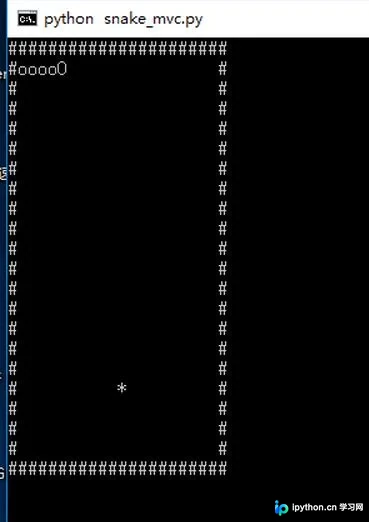
游戏规则设定如下:使用字符#绘制游戏边框,用*表示随机生成的食物,小写o代表蛇身,大写O代表蛇头。玩家需通过键盘输入w、s、a、d四个方向键来控制蛇的移动方向。
开发所使用的Python版本为3.6.1。
测试运行的系统环境为Windows 10。
代码主要包含以下类结构:
board类:负责管理棋盘,即游戏的主要显示区域。
snake类:负责管理贪吃蛇的状态,通过记录蛇身体每个节点的位置坐标来维护蛇的当前形态。
game类:负责整个游戏的逻辑控制与流程调度。
原本计划单独创建一个food类,但考虑到食物仅需存储一个坐标位置以及生成逻辑,直接使用列表(list)存储坐标并在game类中处理生成逻辑更为简洁,从架构逻辑上看并未产生明显问题。
以下是完整的源代码实现:
# Write By Guobao
# 2017/4//7
#
# 贪吃蛇
# 用#做边界,*做食物,o做身体和头部
# python 3.6.1

import copy
import random
import os
import msvcrt

# the board class, used to put everything
class board:

 __points =[]

 def __init__(self):
 self.__points.clear()
 for i in range(22):
 line = []
 if i == 0 or i == 21:
 for j in range(22):
  line.append('#')
 else:
 line.append('#')
 for j in range(20):
  line.append(' ')
 line.append('#')
 self.__points.append(line)

 def getPoint(self, location):
 return self.__points[location[0]][location[1]]

 def clear(self):
 self.__points.clear()
 for i in range(22):
 line = []
 if i == 0 or i == 21:
 for j in range(22):
  line.append('#')
 else:
 line.append('#')
 for j in range(20):
  line.append(' ')
 line.append('#')
 self.__points.append(line)

 def put_snake(self, snake_locations):
 # clear the board
 self.clear()

 # put the snake points
 for x in snake_locations:
 self.__points[x[0]][x[1]] = 'o'

 # the head
 x = snake_locations[len(snake_locations) - 1]
 self.__points[x[0]][x[1]] = 'O'

 def put_food(self, food_location):
 self.__points[food_location[0]][food_location[1]] = '*'

 def show(self):
 os.system("cls")
 for i in range(22):
 for j in range(22):
 print(self.__points[i][j], end='')
 print()

# the snake class
class snake:
 __points = []

 def __init__(self):
 for i in range(1, 6):
 self.__points.append([1, i])

 def getPoints(self):
 return self.__points

 # move to the next position
 # give the next head
 def move(self, next_head):
 self.__points.pop(0)
 self.__points.append(next_head)

 # eat the food
 # give the next head
 def eat(self, next_head):
 self.__points.append(next_head)

 # calc the next state
 # and return the direction
 def next_head(self, direction='default'):

 # need to change the value, so copy it
 head = copy.deepcopy(self.__points[len(self.__points) - 1])

 # calc the "default" direction
 if direction == 'default':
 neck = self.__points[len(self.__points) - 2]
 if neck[0] > head[0]:
 direction = 'up'
 elif neck[0] < head[0]:
 direction = 'down'
 elif neck[1] > head[1]:
 direction = 'left'
 elif neck[1] < head[1]:
 direction = 'right'

 if direction == 'up':
 head[0] = head[0] - 1
 elif direction == 'down':
 head[0] = head[0] + 1
 elif direction == 'left':
 head[1] = head[1] - 1
 elif direction == 'right':
 head[1] = head[1] + 1
 return head

# the game
class game:

 board = board()
 snake = snake()
 food = []
 count = 0

 def __init__(self):
 self.new_food()
 self.board.clear()
 self.board.put_snake(self.snake.getPoints())
 self.board.put_food(self.food)

 def new_food(self):
 while 1:
 line = random.randint(1, 20)
 column = random.randint(1, 20)
 if self.board.getPoint([column, line]) == ' ':
 self.food = [column, line]
 return

 def show(self):
 self.board.clear()
 self.board.put_snake(self.snake.getPoints())
 self.board.put_food(self.food)
 self.board.show()


 def run(self):
 self.board.show()

 # the 'w a s d' are the directions
 operation_dict = {b'w': 'up', b'W': 'up', b's': 'down', b'S': 'down', b'a': 'left', b'A': 'left', b'd': 'right', b'D': 'right'}
 op = msvcrt.getch()

 while op != b'q':
 if op not in operation_dict:
 op = msvcrt.getch()
 else:
 new_head = self.snake.next_head(operation_dict[op])

 # get the food
 if self.board.getPoint(new_head) == '*':
  self.snake.eat(new_head)
  self.count = self.count + 1
  if self.count >= 15:
  self.show()
  print("Good Job")
  break
  else:
  self.new_food()
  self.show()

 # 反向一Q日神仙
 elif new_head == self.snake.getPoints()[len(self.snake.getPoints()) - 2]:
  pass

 # rush the wall
 elif self.board.getPoint(new_head) == '#' or self.board.getPoint(new_head) == 'o':
  print('GG')
  break

 # normal move
 else:
  self.snake.move(new_head)
  self.show()
 op = msvcrt.getch()

game().run()
在编写过程中记录了一些关键的技术笔记:
第一,Python语言标准语法中不包含Switch case语句,在实际开发中可以利用字典(dictionary)结构来模拟实现Switch case的功能。
第二,Python中的赋值运算符=执行的是引用复制而非值复制。若需要进行深拷贝,必须调用copy模块中的deepcopy()函数来实现。
第三,在类的成员函数内部访问成员变量时,必须显式使用self关键字进行引用,这与C++和Java等语言的处理方式存在显著差异。
如果您对Python游戏开发感兴趣,欢迎点击查看以下相关专题内容:
Python俄罗斯方块游戏代码合集
Python经典小游戏代码汇总
Python微信跳一跳游戏实现合集
更多有趣的经典小游戏实现专题,分享给大家参考:
C++经典小游戏代码汇总
JavaScript经典游戏代码合集
Java经典小游戏代码汇总
JavaScript经典小游戏代码合集
以上就是本文的全部内容,希望这些代码和解析能对各位的学习有所帮助。如果大家觉得有用,欢迎多多支持本站。
免责声明:本文内容仅供参考,不代表本站观点。转载或引用请注明出处。









