

C# Socket编程实战:TCP与UDP通信原理及代码实现

C# Socket编程是构建高性能网络应用的基石。借助 System.Net.Sockets 命名空间提供的丰富类库,开发者可以灵活实现可靠的 TCP 或高效的 UDP 通信。本文将梳理 Socket 的基础概念、工作流程,并展示如何在 C# 控制台中构建完整的客户端与服务端。
Socket 基础概念与架构
Socket(套接字)起源于 Unix 系统,在网络编程中被视为一种特殊的文件描述符。在 Windows 平台上,它提供了一个标准化的 API 接口,使程序员无需直接操作底层网卡驱动,即可轻松完成数据的网络收发。微软在 .NET Framework 中提供了 System.Net.Sockets 命名空间,其中包含了核心的 Socket 类。
要实现稳定的网络访问,必须满足两个前置条件:
- IP 地址与端口绑定:Socket 需要与特定的本地 IP 和端口关联,才能准确识别数据源和目标。
- 通信协议选择:最常见的两种协议是面向连接的 TCP 和面向无连接的 UDP。
通信建立的基本流程
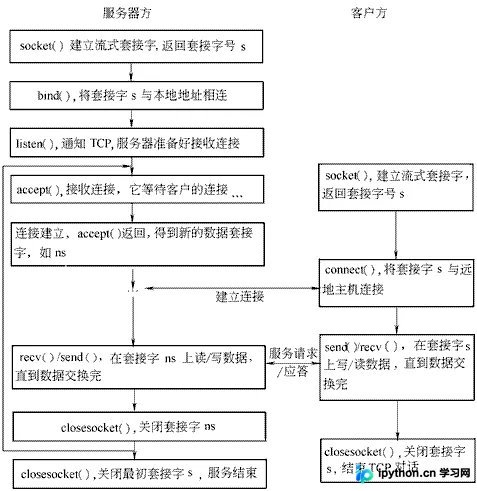
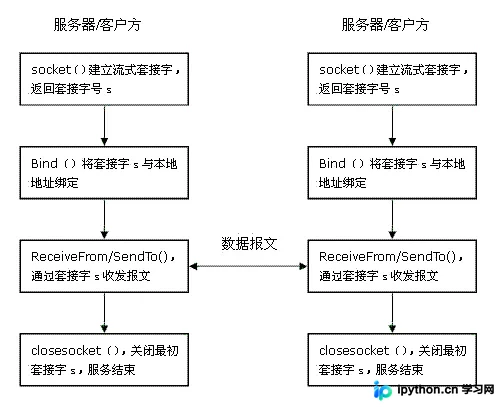
Socket 的使用通常遵循一套严谨的操作顺序。根据协议的不同,具体步骤有所区别:
第1步:建立 Socket 实例
通过指定地址家族(通常为 AddressFamily.InterNetwork)、套接字类型和数据协议来初始化对象。例如使用流式传输对应 SocketType.Stream (TCP),数据报传输对应 SocketType.Dgram (UDP)。
第2步:绑定本地终结点
服务器端程序必须将 Socket 与本地的 IPEndPoint(IP地址+端口)绑定。这一步确保了其他设备能通过网络找到该服务。
第3步:监听与接受连接(TCP专用)
TCP 是面向连接的协议,服务端需调用 Listen() 方法设置监听队列大小,并配合 Accept() 方法来获取新接入的连接请求。一旦建立连接,即获得了用于双向通信的独立 Socket 通道。
第4步:数据的发送与接收
- TCP:已建立的连接中直接使用
Send()和Receive()方法。 - UDP:由于无需预先握手,发送时需明确目标节点,使用
SendTo();接收时同样使用ReceiveFrom()以同时获取数据和源地址信息。
以下是典型的系统调用时序逻辑,展示了从创建到关闭的全过程:
C# 代码实现指南
为了便于理解,以下提供两组最基础的同步控制台应用程序示例。请确保在实际项目中处理线程阻塞问题,并根据需要添加异常捕获逻辑。
TCP 服务端:Server.cs
此代码演示了如何绑定端口、监听连接以及回显收到的数据。
using System;
using System.Net;
using System.Net.Sockets;
using System.Text;

namespace tcpserver
{
    class Server
    {
        static void Main(string[] args)
        {
            int recv; // 存储接收到的字节数
            byte[] data = new byte[1024]; // 缓存区

            // 绑定本机任意IP和端口9050
            IPEndPoint ipep = new IPEndPoint(IPAddress.Any, 9050);
            Socket newsock = new Socket(AddressFamily.InterNetwork, SocketType.Stream, ProtocolType.Tcp);

            newsock.Bind(ipep);
            newsock.Listen(10); // 监听队列最大长度为10
            Console.WriteLine("Waiting for a client...");

            // 阻塞等待直到有客户端连接
            Socket client = newsock.Accept();
            IPEndPoint clientip = (IPEndPoint)client.RemoteEndPoint;
            Console.WriteLine("Connect with client: " + clientip.Address + " at port: " + clientip.Port);

            string welcome = "Welcome here!";
            data = Encoding.ASCII.GetBytes(welcome);
            // 发送欢迎消息
            client.Send(data, data.Length, SocketFlags.None);

            while (true)
            {
                data = new byte[1024];
                recv = client.Receive(data); // 从缓冲区读取数据,实际长度存入recv
                Console.WriteLine("Recv: " + recv);

                if (recv == 0) // 客户端断开连接信号
                    break;

                Console.WriteLine(Encoding.ASCII.GetString(data, 0, recv));
                // 回显消息
                client.Send(data, recv, SocketFlags.None);
            }

            Console.WriteLine("Disconnected from " + clientip.Address);
            client.Close();
            newsock.Close();
        }
    }
}
TCP 客户端:Client.cs
演示了如何输入服务器地址发起连接,并进行简单的交互。
using System;
using System.Net;
using System.Net.Sockets;
using System.Text;

namespace tcpclient
{
    class Client
    {
        static void Main(string[] args)
        {
            byte[] data = new byte[1024];
            Socket newclient = new Socket(AddressFamily.InterNetwork, SocketType.Stream, ProtocolType.Tcp);

            Console.Write("Please input the server ip:");
            string ipadd = Console.ReadLine();
            Console.Write("Please input the server port:");
            int port = Convert.ToInt32(Console.ReadLine());

            // 服务器终结点
            IPEndPoint ie = new IPEndPoint(IPAddress.Parse(ipadd), port);

            try
            {
                newclient.Connect(ie); // 尝试建立连接
            }
            catch (SocketException e)
            {
                Console.WriteLine("Unable to connect to server.");
                Console.WriteLine(e.ToString());
                return;
            }

            // 接收服务器的欢迎消息
            int recv = newclient.Receive(data);
            string stringData = Encoding.ASCII.GetString(data, 0, recv);
            Console.WriteLine(stringData);

            while (true)
            {
                string input = Console.ReadLine();
                if (input == "exit")
                    break;

                // 发送用户输入
                newclient.Send(Encoding.ASCII.GetBytes(input));

                data = new byte[1024];
                recv = newclient.Receive(data);
                stringData = Encoding.ASCII.GetString(data, 0, recv);
                Console.WriteLine(stringData);
            }

            Console.WriteLine("Disconnect from server");
            newclient.Shutdown(SocketShutdown.Both);
            newclient.Close();
        }
    }
}
UDP 服务端:UdpServer.cs
UDP 服务端无需建立持久连接,主要通过 ReceiveFrom 获取发件人并回复。
using System;
using System.Net;
using System.Net.Sockets;
using System.Text;

namespace SimpleUdpSrvr
{
    class Program
    {
        static void Main(string[] args)
        {
            int recv;
            byte[] data = new byte[1024];
            IPEndPoint ipep = new IPEndPoint(IPAddress.Any, 9050);
            // UDP使用Datagram类型
            Socket newsock = new Socket(AddressFamily.InterNetwork, SocketType.Dgram, ProtocolType.Udp);

            newsock.Bind(ipep);
            Console.WriteLine("Waiting for a client..");

            // 用于接收端点信息的容器
            IPEndPoint sender = new IPEndPoint(IPAddress.Any, 0);
            EndPoint Remote = (EndPoint)sender;

            // 阻塞直到收到数据,同时填充Remote变量
            recv = newsock.ReceiveFrom(data, ref Remote);
            Console.WriteLine("Message received from {0}:", Remote.ToString());
            Console.WriteLine(Encoding.ASCII.GetString(data, 0, recv));

            string welcome = "Welcome to my test server!";
            data = Encoding.ASCII.GetBytes(welcome);
            // 向对方发送数据
            newsock.SendTo(data, data.Length, SocketFlags.None, Remote);

            while (true)
            {
                data = new byte[1024];
                recv = newsock.ReceiveFrom(data, ref Remote);
                Console.WriteLine(Encoding.ASCII.GetString(data, 0, recv));
                newsock.SendTo(data, recv, SocketFlags.None, Remote);
            }
        }
    }
}
UDP 客户端:UdpClient.cs
客户端直接向特定目标发送数据包并监听反馈。
using System;
using System.Net;
using System.Net.Sockets;
using System.Text;

namespace SimpleUdpClient
{
    class Program
    {
        static void Main(string[] args)
        {
            byte[] data = new byte[1024];
            string input, stringData;

            // 指向服务器地址
            IPEndPoint ipep = new IPEndPoint(IPAddress.Parse("127.0.0.1"), 9050);
            Socket server = new Socket(AddressFamily.InterNetwork, SocketType.Dgram, ProtocolType.Udp);

            string hello = "Hello, are you there?";
            data = Encoding.ASCII.GetBytes(hello);
            server.SendTo(data, data.Length, SocketFlags.None, ipep);

            IPEndPoint sender = new IPEndPoint(IPAddress.Any, 0);
            EndPoint Remote = (EndPoint)sender;
            data = new byte[1024];

            // 等待服务器响应
            int recv = server.ReceiveFrom(data, ref Remote);
            Console.WriteLine("Message received from {0}:", Remote.ToString());
            Console.WriteLine(Encoding.ASCII.GetString(data, 0, recv));

            while (true)
            {
                input = Console.ReadLine();
                if (input == "exit") // 终止循环
                    break;

                server.SendTo(Encoding.ASCII.GetBytes(input), Remote);
                data = new byte[1024];
                recv = server.ReceiveFrom(data, ref Remote);
                stringData = Encoding.ASCII.GetString(data, 0, recv);
                Console.WriteLine(stringData);
            }
            Console.WriteLine("Stopping client");
            server.Close();
        }
    }
}
总结
Socket 编程虽然提供了极高的灵活性,但在实际应用中,微软还提供了一系列高级助手类如 TcpClient、TcpListener 和 UdpClient,它们封装了繁琐的地址解析和网络状态检查过程。对于大多数应用层开发而言,优先考虑这些类会显著提高开发效率。当然,如果你正在开发对延迟极度敏感(优先选用 UDP)或对可靠性要求极高(优先选用 TCP)的系统,或者需要处理组播等复杂场景,底层的 Socket 操作则是不可或缺的。
以上就是 C# Socket 编程实战的详细解读,更多关于 .NET 网络开发的资料请关注本站其它相关文章!
免责声明:本文内容仅供参考,不代表本站观点。转载或引用请注明出处。









