

PHP操作MySQL实现用户注册与CRUD完整流程

发布时间:2026-10-14| 5人浏览过
本文详解如何利用 PHP 和 MySQL 构建一个基础的 Web 应用,完成用户数据的录入与管理工作。内容涵盖从建立数据库连接到实现注册页面、后台数据列表展示、修改以及删除功能的完整步骤,包含核心代码逻辑与操作流程。
结果或目标
最终目标是建立一个简易的用户管理系统,具备以下功能:
- 注册(Create):前端表单收集用户信息并写入数据库。
- 查询(Read):在后台以表格形式列出所有注册用户。
- 修改(Update):点击编辑后回显当前数据,保存更改至数据库。
- 删除(Delete):根据 ID 移除指定用户的记录。
准备条件
开发环境需支持 PHP 运行并连接 MySQL 数据库。为了演示清晰,本例使用经典的 mysql_ 系列函数进行演示(注:实际生产环境中强烈建议使用 PDO 或 mysqli),主要涉及文件如下:
connect.php:封装数据库连接逻辑。index.php:用户注册入口页面。add.php:接收注册请求的处理脚本。hello.php:后台数据显示与管理页面。update1.php:显示修改界面的脚本。update.php:执行数据库更新操作的脚本。delete.php:执行数据库删除操作的脚本。
第1步:建立数据库连接
目的:统一数据库配置,避免在后续多个文件中重复书写连接代码。
- 操作:创建
connect.php文件,定义主机、端口、用户名和密码。
<?php
 // 本地测试配置
 $host = '127.0.0.1';
 $port = 3306;
 $user = "root";
 $pwd = "";
 // @符号抑制错误提示,true表示允许连接失败不中断
 $link = @mysql_connect("{$host}:{$port}",$user,$pwd,true);
 if(!$link) {
  die("Connect Server Failed: " . mysql_error());
 }
 // 选择操作的数据库名,假设名为 my_db
 mysql_select_db("my_db");
 // 设置字符编码为 utf8,防止中文乱码
 mysql_set_charset('utf8');
?>
第2步:设计注册页面 (HTML)
目的:提供用户输入信息的 UI 界面。
- 入口:创建首页
index.php或直接使用 HTML 文件。 - 动作:编写 HTML 表单,使用
method='post'将数据发送至add.php。
<!DOCTYPE html PUBLIC "-//W3C//DTD XHTML 1.0 Transitional//EN" "http://www.w3.org/TR/xhtml1/DTD/xhtml1-transitional.dtd">
<html xmlns="http://www.w3.org/1999/xhtml" xml:lang="en">
<head>
 <meta http-equiv="Content-Type" content="text/html;charset=UTF-8" />
 <title>注册页面</title>
</head>
<body>
<h3>用户注册</h3>
 <form action="add.php" method='post'>
  <table border='1' cellpadding='0' cellspacing='0' width='80%' bgcolor='#ABCDEF'>
   <tr>
    <td align='right'>用户名</td>
    <td><input type="text" name="username" />以小写字母开始,长度5~10</td>
   </tr>
   <tr>
    <td align='right'>密码</td>
    <td><input type="password" name="password" />密码不能为空</td>
   </tr>
   <tr>
    <td align='right'>邮箱</td>
    <td><input type="text" name="email" /></td>
   </tr>
   <tr>
    <td align='right'>性别</td>
    <td>
     <input type="radio" name="sex" value='1' />男
     <input type="radio" name="sex" value='2' />女
     <input type="radio" name="sex" value='3' />保密
    </td>
   </tr>
   <tr>
    <td align='right'>个人简介</td>
    <td>
     <textarea name="txt" cols="50" rows="10"></textarea>
    </td>
   </tr>
   <tr>
    <td colspan='2'><input type="submit" name='act' value='注册' /></td>
   </tr>
  </table>
 </form>
</body>
</html>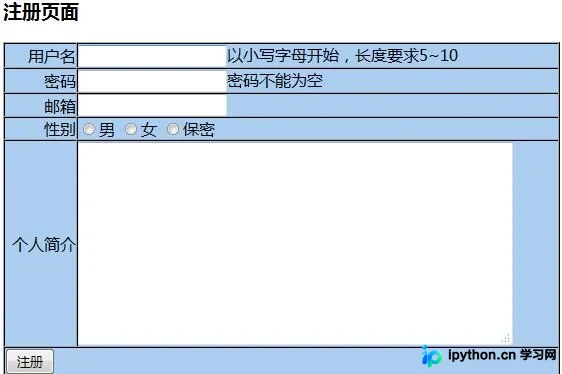
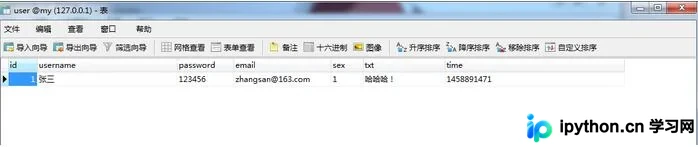
第3步:处理注册并提交数据 (Create)
目的:接收表单数据并将其插入到 MySQL 数据库中。
- 入口:
add.php。 - 重要参数:
$_POST数组获取前端传来的字段值。 - 完成状态:返回后台列表页
hello.php。
<?php
header("Content-type:text/html; charset=utf-8");
include_once "connect.php";

// 获取当前时间戳
$time=time();
// 拼接 INSERT 语句
$sql="insert into user (username,password,email,sex,txt,time)
      value('{$_POST['username']}',
            '{$_POST['password']}',
            '{$_POST['email']}',
            '{$_POST['sex']}',
            '{$_POST['txt']}',
            '{$time}')";
$res=mysql_query($sql);

if($res){
 header("location:hello.php");
} else {
 echo "注册失败";
}
?>
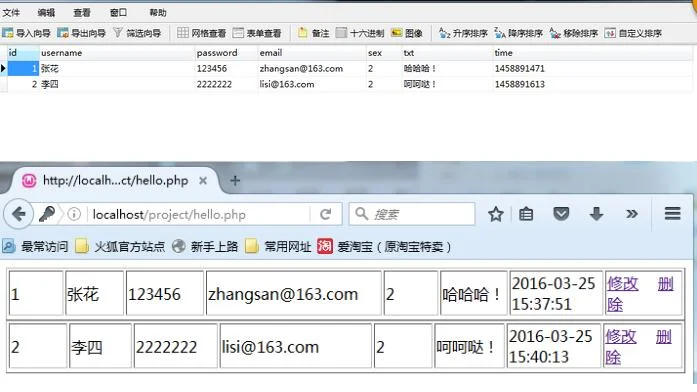
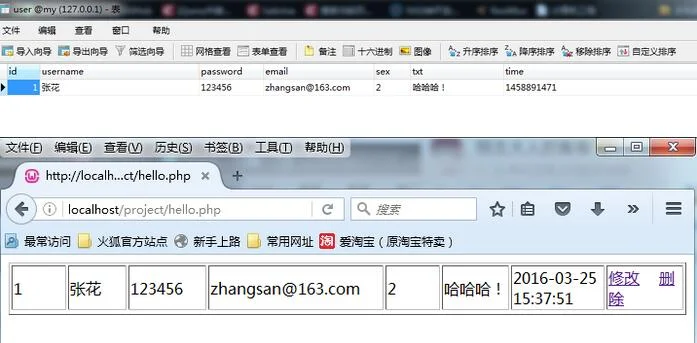
第4步:后台列表展示 (Read)
目的:查询数据库并循环输出数据表格。
- 入口:
hello.php。 - 动作:执行 SELECT 查询,自定义函数将资源转换为数组,遍历打印 HTML 表格。
<?php
header("Content-type:text/html; charset=utf-8");
include_once "connect.php";

// 查询所有用户
$query="select * from user";
$result=mysql_query($query);
if(!$result){
 die("could not to the database<br/>".mysql_error());
}

// 辅助函数:将查询结果转为二维数组
function result2Arr($result){
 while($result_row=mysql_fetch_assoc($result)){
  $arr[] = $result_row;
 }
 return isset($arr) ? $arr : [];
}
$arr = result2Arr($result);

foreach($arr as $key=>$value){
 echo "<table border='1px' style='width:100%;border-collapse:collapse;'>";
 echo "<tr> ";
 echo "<td width='100px'>".$value['id']."</td>";
 echo "<td width='100px'>".$value['username']."</td>";
 echo "<td width='100px'>".$value['password']."</td>";
 echo "<td width='200px'>".$value['email']."</td>";
 echo "<td width='100px'>".$value['sex']."</td>";
 echo "<td width='100px'>".$value['txt']."</td>";
 echo "<td width='100px'>".date('Y-m-d H:i:s',$value['time'])."</td>";
 // 生成修改和删除链接
 echo "<td width='100px'>";
 echo "<a href='update1.php?id=$value[id]'>修改</a> ";
 echo "<a href='delete.php?id=$value[id]' onclick='return confirm("确认删除吗?")'>删除</a>";
 echo "</td>";
 echo "</tr>";
 echo "</table>";
}
?>
第5步:修改数据 - 回显表单
目的:根据 URL 参数 ID 查出该用户当前信息,填充到修改表单中供用户调整。
- 入口:
update1.php。 - 关键操作:通过
$_GET['id']查询单条记录,并在 HTML 标签的value属性中回显。
<!DOCTYPE html PUBLIC "-//W3C//DTD XHTML 1.0 Transitional//EN" "http://www.w3.org/TR/xhtml1/DTD/xhtml1-transitional.dtd">
<html xmlns="http://www.w3.org/1999/xhtml">
<head>
<meta http-equiv="Content-Type" content="text/html;charset=UTF-8" />
<title>修改用户信息</title>
</head>
<body>
<?php
 include_once "connect.php";
 $uid = $_GET['id'];
 $sql="select * from user where id='$uid'";
 $result=mysql_query($sql);
 $row = mysql_fetch_assoc($result); // 直接获取一行关联数组更简便
?>

 <h3>修改用户信息</h3>
 <form action="update.php" method='post'>
  <!-- 隐藏域传递 ID -->
  <input type="hidden" name="id" value="<?php echo $row['id'];?>"/>
  <table border='1' cellpadding='0' cellspacing='0' width='80%' bgcolor='#ABCDEF'>
   <tr>
    <td align='right'>用户名</td>
    <td><input type="text" name="username" value="<?php echo $row['username'];?>" /></td>
   </tr>
   <tr>
    <td align='right'>密码</td>
    <td><input type="password" name="password" value="<?php echo $row['password'];?>" /></td>
   </tr>
   <tr>
    <td align='right'>邮箱</td>
    <td><input type="text" name="email" value="<?php echo $row['email'];?>" /></td>
   </tr>
   <tr>
    <td align='right'>性别</td>
    <td>
     <input type="radio" name="sex" value='1'  />男
     <input type="radio" name="sex" value='2'  />女
     <input type="radio" name="sex" value='3'  />保密
    </td>
   </tr>
   <tr>
    <td align='right'>个人简介</td>
    <td>
     <textarea name="txt" cols="50" rows="10"><?php echo $row['txt'];?></textarea>
    </td>
   </tr>
   <tr>
    <td colspan='2'><input type="submit" name='act' value='修改' /></td>
   </tr>
  </table>
 </form>
</body>
</html>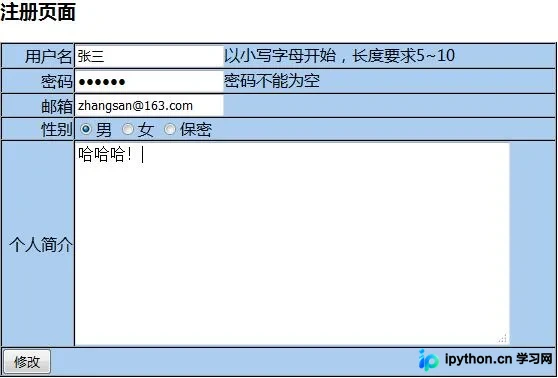
第6步:执行修改操作 (Update)
目的:将用户提交的最新数据更新至数据库对应 ID 的记录。
- 入口:
update.php。 - 动作:获取 POST 数据,拼接 UPDATE SQL 语句并执行。
<?php
header("Content-type:text/html; charset=utf-8");
$data = $_POST;
include_once "connect.php";

// 注意:实际应用中务必对数据进行转义以防 SQL 注入
$id = mysql_real_escape_string($data['id']);
$user = mysql_real_escape_string($data['username']);
$pass = mysql_real_escape_string($data['password']);
$email = mysql_real_escape_string($data['email']);
$sex = mysql_real_escape_string($data['sex']);
$txt = mysql_real_escape_string($data['txt']);

$sql = "UPDATE `user` SET username='$user', password='$pass', email='$email', sex='$sex', txt='$txt' WHERE id='$id'";

$res = mysql_query($sql);
if($res){
 header("Location:hello.php");
} else {
 header("Location:update1.php?id=$id");
}
?>
第7步:删除数据 (Delete)
目的:根据传入的 ID 永久删除数据库中的记录。
- 风险提醒:此操作不可逆,建议在触发前加入确认提示。
- 入口:
delete.php,通过 GET 方式接收 ID。
<?php
header("Content-type:text/html; charset=utf-8");
include_once 'connect.php';

$delId = $_GET['id'];
// 建议增加防注入处理
$sus=mysql_query("delete from user where id='$delId'");

if($sus){
 header("location:hello.php");
}else{
 echo "删除失败";
}
?>
通过以上七个步骤,我们完成了基于 PHP 和 MySQL 最基础的 CRUD(增删改查)闭环。在实际项目中,请务必将 mysql_ 相关函数替换为安全的 PDO 预处理机制,并增加完善的表单验证与错误处理机制。
以上就是PHP连接数据库实现用户注册与增删改查的详细过程,更多关于PHP与MySQL交互开发的资料请关注本站其它相关文章!
免责声明:本文内容仅供参考,不代表本站观点。转载或引用请注明出处。









