

PHP 实现点击式(Click)验证码类及用法详解

发布时间:2026-10-14| 6人浏览过
针对传统文本验证码在移动设备中输入不便的问题,本文提供一套基于 PHP 和 JavaScript 的点击式(Click Captcha)验证码解决方案。该方案通过引导用户点击特定图形区域完成验证,降低了输入门槛。
需求背景
常见的表单验证码要求用户识别并输入字符,这对手机等触摸设备用户来说体验较差。点击式验证码通过将“输入”转化为“点击”,显著提升了移动端的操作便利性。
实现原理
验证过程分为三个步骤:
- 服务端绘图:PHP
imagecreate创建图像,绘制多个不完整的圆弧作为干扰项,以及一个完整的圆作为验证目标。系统记录完整圆的圆心坐标与半径并存入 Session。 - 前端定位:用户在浏览器点击验证码图片时,JavaScript 计算并记录点击位置相对于图片左上角的坐标。
- 逻辑校验:将用户提交的坐标与服务端 Session 中保存的目标圆心坐标进行比对,利用数学公式判断点击点是否在圆的范围内。
第 1 步:准备验证码类文件
该类封装了图像的生成、坐标存储及验证逻辑,支持自定义样式参数。
<?php
class ClickCaptcha {
  public $sess_name = 'm_captcha'; // Session 键名
  public $width = 500;
  public $height = 200;
  public $icon = 5;                // 干扰圆数量
  public $iconColor = array(255, 255, 0); // 圆圈颜色 (RGB)
  public $backgroundColor = array(0, 0, 0);    // 背景颜色 (RGB)
  public $iconSize = 56;           // 圆圈直径
  private $_img_res = null;

  public function __construct($sess_name='') {
    if(session_id() == ''){
      session_start();
    }
    if($sess_name!='') {
      $this->sess_name = $sess_name;
    }
  }

  /** 创建验证码图片 */
  public function create(){
    $this->_img_res = imagecreate($this->width, $this->height);
    ImageColorAllocate($this->_img_res, $this->backgroundColor[0], $this->backgroundColor[1], $this->backgroundColor[2]);
    $col_ellipse = imagecolorallocate($this->_img_res, $this->iconColor[0], $this->iconColor[1], $this->iconColor[2]);

    $minArea = $this->iconSize/2+3;

    // 绘制干扰圆 (不完整)
    for($i=0; $i<$this->icon; $i++){
      $x = mt_rand($minArea, $this->width-$minArea);
      $y = mt_rand($minArea, $this->height-$minArea);
      $s = mt_rand(0, 360);
      $e = $s + 330;
      imagearc($this->_img_res, $x, $y, $this->iconSize, $this->iconSize, $s, $e, $col_ellipse);
    }

    // 绘制验证圆 (完整)
    $x = mt_rand($minArea, $this->width-$minArea);
    $y = mt_rand($minArea, $this->height-$minArea);
    $r = $this->iconSize/2;
    imagearc($this->_img_res, $x, $y, $this->iconSize, $this->iconSize, 0, 360, $col_ellipse);

    // 记录目标信息到 Session
    $this->captcha_session($this->sess_name, array($x, $y, $r));

    // 输出图像
    Header("Content-type: image/PNG");
    ImagePNG($this->_img_res);
    ImageDestroy($this->_img_res);
    exit();
  }

  /** 检查用户点击坐标是否合法 */
  public function check($captcha, $flag=1){
    if(trim($captcha)==''){ return false; }
    if(!is_array($this->captcha_session($this->sess_name))){ return false; }

    list($px, $py) = explode(',', $captcha);
    list($cx, $cy, $cr) = $this->captcha_session($this->sess_name);

    // 验证数值合法性并计算距离
    if(isset($px) && is_numeric($px) && isset($py) && is_numeric($py) &&
      isset($cx) && is_numeric($cx) && isset($cy) && is_numeric($cy) && isset($cr) && is_numeric($cr)){
      if($this->pointInArea($px,$py,$cx,$cy,$cr)){
        if($flag==1){
          $this->captcha_session($this->sess_name,'');
        }
        return true;
      }
    }
    return false;
  }

  /** 计算点到圆心的距离 */
  private function pointInArea($px, $py, $cx, $cy, $cr){
    $x = $cx-$px;
    $y = $cy-$py;
    return round(sqrt($x*$x + $y*$y))<$cr;
  }

  /** Session 存取辅助方法 */
  private function captcha_session($name,$value=null){
    if(isset($value)){
      if($value!==''){
        $_SESSION[$name] = $value;
      }else{
        unset($_SESSION[$name]);
      }
    }else{
      return isset($_SESSION[$name])? $_SESSION[$name] : '';
    }
  }
}
?
第 2 步:编写调用演示程序
结合 HTML、CSS 和 jQuery,构建表单并提交点击坐标给 PHP 处理。
<?php
session_start();
require('ClickCaptcha.class.php');

// 如果是 AJAX 请求获取图片
if(isset($_GET['get_captcha'])){
  $obj = new ClickCaptcha();
  $obj->create();
  exit();
}

// 处理表单提交
if(isset($_POST['send']) && $_POST['send']=='true'){
  $name = isset($_POST['name'])? trim($_POST['name']) : '';
  $captcha = isset($_POST['captcha'])? trim($_POST['captcha']) : '';

  $obj = new ClickCaptcha();
  if($obj->check($captcha)){
    echo 'your name is:'.$name;
  }else{
    echo 'captcha not match';
  }
  echo ' <a href="demo.php">back</a>';
}else { ?>
<!DOCTYPE HTML PUBLIC "-//W3C//DTD HTML 4.01 Transitional//EN" "http://www.w3.org/TR/html4/loose.dtd">
<html>
 <head>
 <meta http-equiv="content-type" content="text/html; charset=utf-8">
 <title> Click Captcha Demo </title>
 <script type="text/javascript" src="jquery-1.6.2.min.js"></script>
 <script type="text/javascript">
  $(function(){
    // 点击图片记录相对于图片左上角的坐标
    $('#captcha_img').click(function(e){
      var x = e.pageX - $(this).offset().left;
      var y = e.pageY - $(this).offset().top;
      $('#captcha').val(x+','+y);
    })

    $('#btn').click(function(e){
      if($.trim($('#name').val())==''){
        alert('Please input name!');
        return false;
      }
      if($.trim($('#captcha').val())==''){
        alert('Please click captcha!');
        return false;
      }
      $('#form1')[0].submit();
    })
  })
 </script>
 </head>
 <body>
  <form name="form1" id="form1" method="post" action="demo.php" onsubmit="return false">
  <p>name:<input type="text" name="name" id="name"></p>
  <p>Captcha:Please click full circle<br>
  <!-- 图片地址需加上时间戳防止缓存 -->
  <img id="captcha_img" src="demo.php?get_captcha=1&t=<?=time() ?>" style="cursor:pointer">
  </p>
  <p><input type="submit" id="btn" value="submit"></p>
  <input type="hidden" name="send" value="true">
  <input type="hidden" name="captcha" id="captcha">
  </form>
 </body>
</html>
<?php } ?>
第 3 步:运行效果测试
访问页面后,在生成的验证码图片上点击黄色实心圆位置。系统将自动填入隐藏的坐标字段并提交验证。
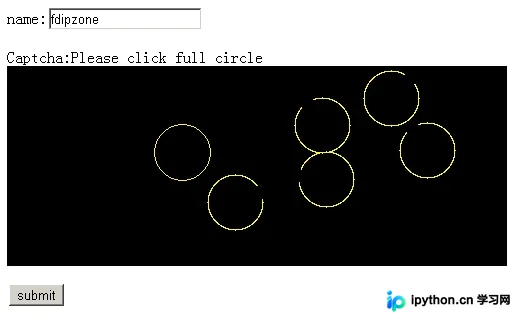
以上就是 PHP 实现的 Click Captcha 点击验证码类的详细内容,更多关于 PHP 验证码开发的资料请关注本站其它相关文章!
免责声明:本文内容仅供参考,不代表本站观点。转载或引用请注明出处。









