

R语言散点图绘制线性回归及添加公式与置信区间方法

在数据分析和科学绘图中,展示变量间的线性关系至关重要。本文将介绍如何在 R 语言中利用 lm() 建立线性回归模型,并通过 base plot 和 ggplot2 包将回归线、拟合公式(含 R-squared)以及 95% 置信区间添加到散点图中,提供从基础统计到高级可视化的完整解决方案。
1. 基础线性回归与公式解析
第1步:构建 lm 模型对象
lm(y ~ x) 是 R 中用于拟合线性模型的核心函数。其基本语法遵循公式形式 y = kx + b,其中 k 为斜率,b 为截距。
- 常规拟合:
lm(y ~ x)会自动估计截距。 - 无截距拟合:
lm(y ~ x - 1)强制回归线经过原点,不对截距进行估计。
# 使用内置 mtcars 数据集示例
model <- lm(mtcars$wt ~ mtcars$mpg)
print(model)
# 输出系数估算值
第2步:提取关键统计指标
拟合完成后,通常需获取决定系数(R-squared)以评估拟合优度。可以通过 summary() 函数提取这些值:
s <- summary(model)
# 提取 R-squared
s$r.squared
# 提取 Adjusted R-squared (自由度调整后)
s$adj.r.squared
# 提取具体系数 (截距和斜率)
s$coefficients[, 'Estimate']
2. 使用 Base R 绘图添加回归线与 CI
第3步:绘制基础散点与回归线
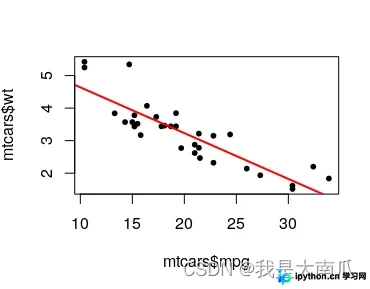
利用 plot() 生成散点后,使用 abline() 直接将回归模型转化为直线叠加在图上:
# 基础散点图
plot(mtcars$mpg, mtcars$wt, pch=20, cex=2)
# 叠加红色回归线
abline(model, col="red", lwd=2)
第4步:计算并绘制 95% 置信区间
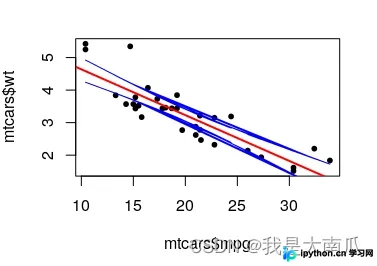
若需在散点图中展示预测值的置信区间(Confidence Interval, CI),可通过手动计算上下界并使用 lines() 绘制。需注意:predict(..., se.fit=TRUE) 返回的是标准误(Standard Error),需结合 qt() 分布临界值转换为置信区间宽度。
test <- data.frame(x = mtcars$mpg, y = mtcars$wt)
model <- lm(y ~ x, test)

# 获取预测值和标准误
pred <- predict(model, newdata = test, se.fit = TRUE)
test$predicted <- pred$fit
test$se <- pred$se.fit

# 计算 95% CI (双侧 t 分布)
# qt(1 - (1-0.95)/2, df) 为 t 值
alpha <- 0.05
t_val <- qt(1 - alpha/2, nrow(test))
test$CI_width <- test$se * t_val

test$upper <- test$predicted + test$CI_width
test$lower <- test$predicted - test$CI_width

# 绘图
plot(test$x, test$y, pch=20, cex=1, main="Scatter with Regression & CI")
abline(model, col="red", lwd=2)
lines(test$x, test$upper, col="blue", lty=2)
lines(test$x, test$lower, col="blue", lty=2)
注意:如果 X 轴数据包含重复值,上述折线图方式可能会导致线条乱序或自交。对于此类情况,建议使用对 X 排序后的数据进行拟合,或使用 type="b" 观察原始趋势。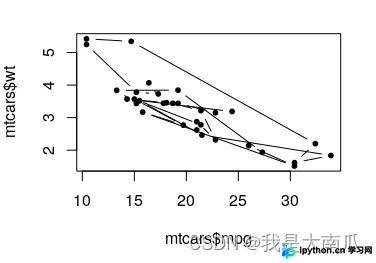
3. 使用 ggplot2 自动化添加公式与统计量
第5步:安装必要扩展库
为了在图表中自动显示回归方程和 R-squared,推荐安装 ggpmisc 包:
install.packages("ggpmisc")
library(ggplot2)
library(ggpmisc)
第6步:绘制带公式和置信带的散点图
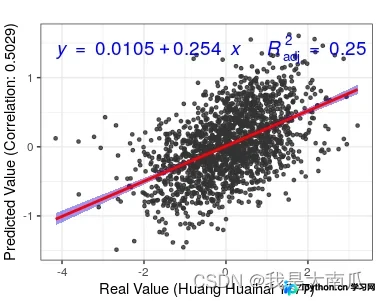
geom_smooth() 负责绘制回归线及默认的半透明置信区间带,stat_poly_eq() 则用于自动计算并在图例区域渲染 LaTeX 格式的数学公式。
p <- ggplot(data = mtcars, aes(x = mpg, y = wt)) +
  geom_point(color = "grey20", size = 1, alpha = 0.8) +
  # 添加回归线和阴影置信区间 (level默认0.95)
  geom_smooth(method = "lm", color = "red", fill = "blue", fullrange = FALSE) +
  # 添加公式标签
  stat_poly_eq(
    formula = y ~ x,
    aes(label = paste(..eq.label.., ~~ R^2 == ..adj.rr.label.., sep = "~~~")),
    parse = TRUE,
    size = 5, label.x = 0.05, label.y = 0.95,
    color = "black"
  ) +
  theme_bw()
print(p)
第7步:自定义置信区间边界线
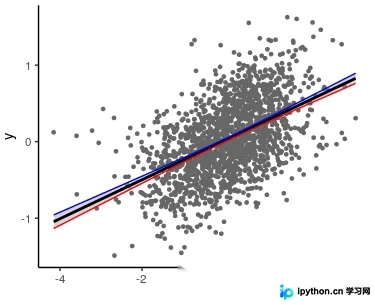
如果不喜欢默认的阴影带,可以手动计算预测值,并将其作为 geom_line() 的边界传入,配合 ggplot2 的数据框结构实现:
# 准备带有预测值和CI的数据框
df_pred <- as.data.frame(predict(model, newdata = test, se.fit = TRUE))
df_pred$mpg <- test$x
df_pred$wt_high <- df_pred$fit + df_pred$se.fit * qt(1-0.025, nrow(test))
df_pred$wt_low <- df_pred$fit - df_pred$se.fit * qt(1-0.025, nrow(test))

base_plot <- ggplot(test, aes(x = mpg, y = wt)) +
  geom_point(size = 1, colour="grey40") +
  geom_smooth(method = "lm", color = "black", se = FALSE) +
  theme_classic()

base_plot +
  geom_line(data = df_pred, aes(x = mpg, y = wt_high), color = "blue", linetype = "dashed") +
  geom_line(data = df_pred, aes(x = mpg, y = wt_low), color = "red", linetype = "dashed")
总结
以上关于在 R 语言散点图中应用 lm 线性回归模型、手动处理置信区间以及利用 ggplot2 自动标注统计公式的详细操作到此结束。更多关于 R 语言统计建模和数据可视化的技巧请继续关注后续更新!
免责声明:本文内容仅供参考,不代表本站观点。转载或引用请注明出处。









