

Python数字图像处理:边缘轮廓检测方法与实操

发布时间:2026-10-12| 2人浏览过
本文介绍如何使用Python的scikit-image库进行数字图像的边缘轮廓检测,包括find_contours函数和多项式逼近算法,提供代码示例和结果分析。
轮廓检测基础
在数字图像处理中,边缘轮廓检测用于识别图像中物体的边界,常用于分割和特征提取。scikit-image的measure模块提供了多种工具,其中find_contours适用于二值图像,而approximate_polygon可对复杂轮廓进行简化。
第1步:使用find_contours检测二值图像轮廓
目的:从二值图像中提取所有闭合或开放轮廓。
入口:调用skimage.measure.find_contours()函数。
动作:将灰度图像转换为二值数组后,传入level参数设定阈值,函数返回轮廓坐标列表。
参数:array为输入的二值图像数组,level为轮廓检测阈值(通常设为0.5)。
完成状态:成功获取contours集合,每个元素包含轮廓的(x, y)坐标序列,可通过循环绘制验证。
以下示例演示基本用法:
import numpy as np
import matplotlib.pyplot as plt
from skimage import measure, draw

# 生成二值测试图像
img = np.zeros([100, 100])
img[20:40, 60:80] = 1  # 矩形
rr, cc = draw.circle(60, 60, 10)  # 小圆
rr1, cc1 = draw.circle(20, 30, 15)  # 大圆
img[rr, cc] = 1
img[rr1, cc1] = 1

# 检测所有图形的轮廓
contours = measure.find_contours(img, 0.5)

# 绘制轮廓
fig, (ax0, ax1) = plt.subplots(1, 2, figsize=(8, 8))
ax0.imshow(img, cmap='gray')
ax1.imshow(img, cmap='gray')
for n, contour in enumerate(contours):
    ax1.plot(contour[:, 1], contour[:, 0], linewidth=2)
ax1.axis('image')
ax1.set_xticks([])
ax1.set_yticks([])
plt.show()
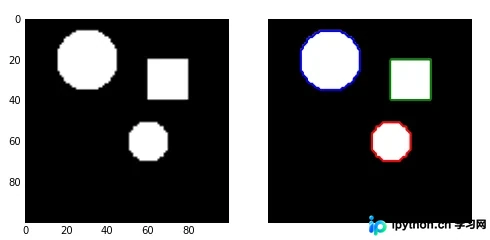
第2步:通过approximate_polygon简化多边形曲线
目的:对提取的复杂轮廓进行降采样,减少冗余点,提高后续处理效率。
入口:使用skimage.measure.approximate_polygon()函数。
动作:基于Douglas-Peucker算法,输入原始坐标点和容忍值,返回简化后的多边形坐标序列。
参数:coords为轮廓坐标点数组,tolerance为近似容忍度(越小越精确)。
完成状态:获得更少的坐标点表示同一轮廓,便于存储和分析。
以下示例展示与subdivide_polygon配合使用的流程:
import numpy as np
import matplotlib.pyplot as plt
from skimage import measure

# 定义手形轮廓坐标
hand = np.array([[1.64516129, 1.16145833],
                 [1.64516129, 1.59375],
                 [1.35080645, 1.921875],
                 [1.375, 2.18229167],
                 [1.68548387, 1.9375],
                 [1.60887097, 2.55208333],
                 [1.68548387, 2.69791667],
                 [1.76209677, 2.56770833],
                 [1.83064516, 1.97395833],
                 [1.89516129, 2.75],
                 [1.9516129, 2.84895833],
                 [2.01209677, 2.76041667],
                 [1.99193548, 1.99479167],
                 [2.11290323, 2.63020833],
                 [2.2016129, 2.734375],
                 [2.25403226, 2.60416667],
                 [2.14919355, 1.953125],
                 [2.30645161, 2.36979167],
                 [2.39112903, 2.36979167],
                 [2.41532258, 2.1875],
                 [2.1733871, 1.703125],
                 [2.07782258, 1.16666667]])

# 细分多边形(模拟B样条平滑)
new_hand = hand.copy()
for _ in range(5):
    new_hand = measure.subdivide_polygon(new_hand, degree=2)

# 近似简化多边形
appr_hand = measure.approximate_polygon(new_hand, tolerance=0.02)
print("Number of coordinates:", len(hand), len(new_hand), len(appr_hand))

# 绘制对比
fig, axes = plt.subplots(2, 2, figsize=(9, 8))
ax0, ax1, ax2, ax3 = axes.ravel()
ax0.plot(hand[:, 0], hand[:, 1], 'r', label='original')
ax0.set_title('Original Hand')
ax1.plot(new_hand[:, 0], new_hand[:, 1], 'g', label='subdivided')
ax1.set_title('Subdivided Polygon')
ax2.plot(appr_hand[:, 0], appr_hand[:, 1], 'b', label='approximated')
ax2.set_title('Approximated Polygon')
ax3.plot(hand[:, 0], hand[:, 1], 'r', new_hand[:, 0], new_hand[:, 1], 'g', appr_hand[:, 0], appr_hand[:, 1], 'b')
ax3.legend()
ax3.set_title('All Contours Overlay')
plt.tight_layout()
plt.show()
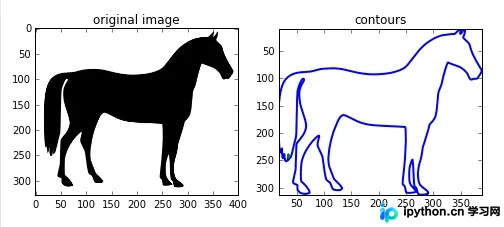
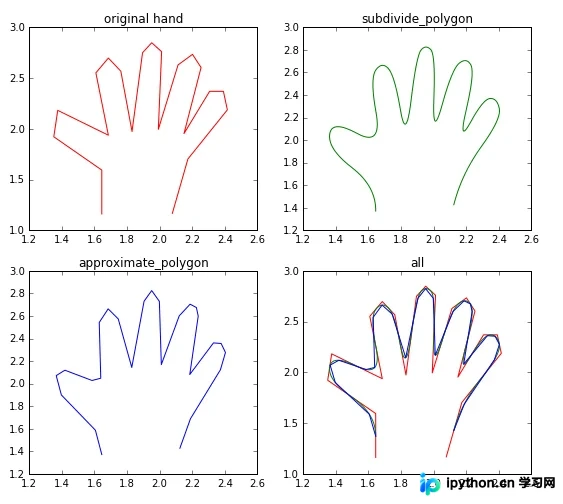
以上就是Python数字图像处理中边缘轮廓检测的详细内容,更多关于Python图像轮廓提取的资料请关注本站其它相关文章!
免责声明:本文内容仅供参考,不代表本站观点。转载或引用请注明出处。









