

Python skimage自动阈值分割算法详解与实现

本文详解Python skimage库中多种自动阈值分割方法,包括threshold_otsu、threshold_yen、threshold_li、threshold_isodata及threshold_adaptive。通过具体代码示例展示各算法参数设置与分割效果,帮助开发者根据图像特性选择最优阈值策略。
引言
图像阈值分割是一项应用广泛的图像处理技术。其核心思想是利用目标区域与背景区域在灰度值上的显著差异,将图像视为由不同灰度级构成的两类区域(即目标与背景)的组合。通过选取一个合理的阈值,对图像中每个像素点进行判断,确定其归属于目标还是背景,最终生成对应的二值图像。
在Python的skimage库中,阈值分割功能主要集成在filters模块中。
用户既可以通过手动指定阈值来实现分割,也可以利用系统自动计算的阈值。下文将重点介绍几种常用的自动阈值生成方法。
1、threshold_otsu
Otsu阈值分割法是一种常用的全局阈值算法,其函数调用格式如下:
skimage.filters.threshold_otsu(image, nbins=256)
其中,参数image代表输入的灰度图像,函数执行后返回计算得到的阈值。
from skimage import data,filters
import matplotlib.pyplot as plt
image = data.camera()
thresh = filters.threshold_otsu(image)   #返回一个阈值
dst =(image <= thresh)*1.0   #根据阈值进行分割
plt.figure('thresh',figsize=(8,8))
plt.subplot(121)
plt.title('original image')
plt.imshow(image,plt.cm.gray)
plt.subplot(122)
plt.title('binary image')
plt.imshow(dst,plt.cm.gray)
plt.show()
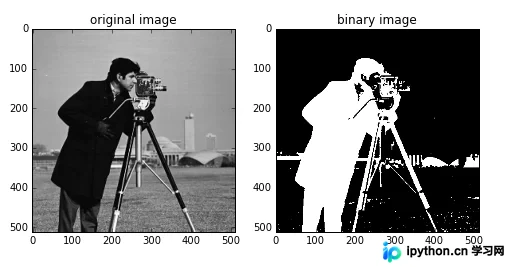
以示例图像为例,该函数返回的阈值为87。依据此阈值进行分割,结果如下图所示:
2、threshold_yen
该函数的使用方式与前述方法一致:
thresh = filters.threshold_yen(image)
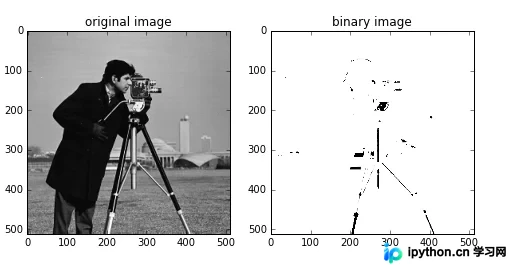
计算得到的阈值为198,分割效果展示如下:
3、threshold_li
调用方式同上:
thresh = filters.threshold_li(image)
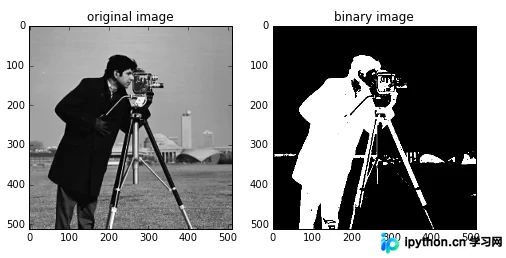
该算法返回的阈值为64.5,对应的分割图像如下:
4、threshold_isodata
该方法的阈值计算逻辑为:
threshold = (image[image <= threshold].mean() +image[image > threshold].mean()) / 2.0
具体调用方式与其他方法相同:
thresh = filters.threshold_isodata(image)
实验结果显示,该算法返回的阈值为87,因此其分割效果与threshold_otsu的结果一致。
5、threshold_adaptive
该函数的调用格式为:
skimage.filters.threshold_adaptive(image, block_size, method='gaussian')
block_size参数定义块大小,即当前像素的邻域范围,通常建议设置为奇数(如3、5、7等)。
method参数用于指定自适应阈值的具体计算方法,可选值包括'mean'、'generic'、'gaussian'和'median'。
若省略该参数,默认使用'gaussian'方法。
需要注意的是,该函数直接返回经过阈值处理后的图像,而非阈值数值本身。
from skimage import data,filters
import matplotlib.pyplot as plt
image = data.camera()
dst =filters.threshold_adaptive(image, 15) #返回一个阈值图像
plt.figure('thresh',figsize=(8,8))
plt.subplot(121)
plt.title('original image')
plt.imshow(image,plt.cm.gray)
plt.subplot(122)
plt.title('binary image')
plt.imshow(dst,plt.cm.gray)
plt.show()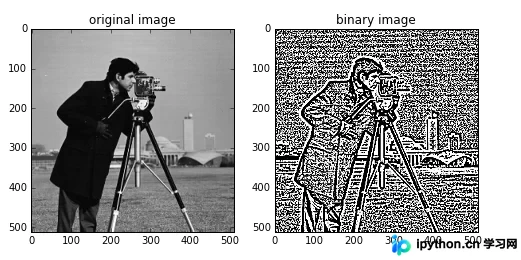
读者可以通过调整block_size的大小以及更改method的值,来观察不同的分割效果。例如:
dst1 =filters.threshold_adaptive(image,31,'mean')
dst2 =filters.threshold_adaptive(image,5,'median')
两种不同参数配置下的分割效果对比如下:
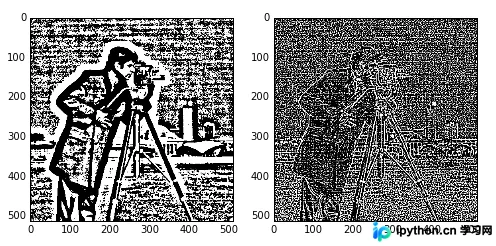
以上即为Python skimage库中图像自动阈值分割的完整示例与解析,更多关于Python数字图像自动阈值分割的技术资料,欢迎持续关注本站后续文章!
免责声明:本文内容仅供参考,不代表本站观点。转载或引用请注明出处。









