

Java实现生成自定义时长WAV静音音频详解

在Java后端开发或音频处理组件中,有时需要无缝插入静音片段以调整时序或填充空档。本文详细演示了如何通过Java代码手动构建符合WAV标准的二进制文件:包括计算特定采样率下的静音数据长度、组装RIFF头部信息(Header),以及将全零PCM数据写入文件。该方法不依赖庞大的第三方转码库,适合轻量级集成。
准备条件与依赖
若要直接使用文中提供的封装工具类,需在项目的Maven配置中添加以下依赖。这些库主要用于处理字节数组操作及部分音频标签校验,虽然核心生成逻辑为手写,但引入Guava可简化集合转换。
<dependency>
    <groupId>org</groupId>
    <artifactId>jaudiotagger</artifactId>
    <version>2.0.1</version>
</dependency>
<dependency>
    <groupId>com.google.guava</groupId>
    <artifactId>guava</artifactId>
    <version>30.1.1-jre</version>
</dependency>
核心实现逻辑与参数
WAV文件由两部分组成:44字节的文件头(Header)和后接的PCM音频数据体。生成静音音频的本质,是计算出目标时长内产生的全零数据块大小,并正确填充Header中的元数据字段。
第一步:构建WAV Header头文件
Header记录了音频的各项参数,确保播放器能正确解码。以下方法根据传入的数据长度、采样率、声道数和位深,自动计算并按Little-Endian顺序填充字节数组。
public static byte[] buildWavHeader(int dataLength, int srate, int channel, int format)
    throws IOException {
  byte[] header = new byte[44];

  // 计算文件大小字段,需包含Header本身
  long totalDataLen = dataLength + 36;
  long bitrate = srate * channel * format;

  // RIFF标识
  header[0] = 'R'; header[1] = 'I'; header[2] = 'F'; header[3] = 'F';
  // 文件大小 (little-endian)
  header[4] = (byte) (totalDataLen & 0xff);
  header[5] = (byte) ((totalDataLen >> 8) & 0xff);
  header[6] = (byte) ((totalDataLen >> 16) & 0xff);
  header[7] = (byte) ((totalDataLen >> 24) & 0xff);

  // WAVE标识
  header[8] = 'W'; header[9] = 'A'; header[10] = 'V'; header[11] = 'E';

  // fmt chunk
  header[12] = 'f'; header[13] = 'm'; header[14] = 't'; header[15] = ' ';
  header[16] = (byte) format; header[17] = 0; header[18] = 0; header[19] = 0;
  header[20] = 1; header[21] = 0; // PCM格式
  header[22] = (byte) channel;
  header[23] = 0;
  // 采样率
  header[24] = (byte) (srate & 0xff);
  header[25] = (byte) ((srate >> 8) & 0xff);
  header[26] = (byte) ((srate >> 16) & 0xff);
  header[27] = (byte) ((srate >> 24) & 0xff);
  // 比特率/秒
  header[28] = (byte) ((bitrate / 8) & 0xff);
  header[29] = (byte) (((bitrate / 8) >> 8) & 0xff);
  header[30] = (byte) (((bitrate / 8) >> 16) & 0xff);
  header[31] = (byte) (((bitrate / 8) >> 24) & 0xff);
  // 数据块对齐
  header[32] = (byte) ((channel * format) / 8);
  header[33] = 0;
  // 位深
  header[34] = 16; header[35] = 0;

  // data chunk
  header[36] = 'd'; header[37] = 'a'; header[38] = 't'; header[39] = 'a';
  // 数据长度 (little-endian)
  header[40] = (byte) (dataLength & 0xff);
  header[41] = (byte) ((dataLength >> 8) & 0xff);
  header[42] = (byte) ((dataLength >> 16) & 0xff);
  header[43] = (byte) ((dataLength >> 24) & 0xff);

  return header;
}
第二步:计算静音数据量并写入文件
静音在PCM层表现为数值为0的二进制字节。关键在于理解每毫秒产生多少个字节的静音数据,公式如下:
- 每秒字节数 = (采样率 × 声道数 × 位深) / 8
- 每毫秒字节数 = 每秒字节数 / 1000
默认配置示例(16kHz, 单声道, 16bit):每毫秒字节数 = (16000 × 1 × 16) / 8 / 1000 = 32字节。
以下代码展示了如何将生成的Header和对应时长的全零字节流写入本地文件:
import com.google.common.primitives.Bytes;

import java.io.BufferedOutputStream;
import java.io.FileOutputStream;
import java.io.IOException;
import java.util.ArrayList;
import java.util.List;
import java.util.stream.IntStream;

public class SilenceAudioUtils {

  public static boolean writeToFile(String filePath, byte[] pcmData) {
    BufferedOutputStream bos = null;
    try {
      bos = new BufferedOutputStream(new FileOutputStream(filePath));
      // 此处使用默认参数:16000Hz, 1声道, 16bit
      byte[] header = buildWavHeader(pcmData.length, 16000, 1, 16);
      bos.write(header, 0, 44);
      bos.write(pcmData);
      bos.close();
      return true;
    } catch (Exception e) {
      e.printStackTrace();
    } finally {
      if (bos != null) {
        try {
          bos.close();
        } catch (IOException e) {
          e.printStackTrace();
        }
      }
    }
    return false;
  }

  /**
   * 生成静音音频入口方法
   * @param filePath 输出路径
   * @param duration 时长(毫秒)
   */
  public static void makeSilenceWav(String filePath, Long duration) {
    List<Byte> oldBytes = new ArrayList<>();
    // 默认按16k/1ch/16bit计算:每毫秒32个字节
    IntStream.range(0, (int) (duration * 32))
        .forEach(x -> oldBytes.add((byte) 0));
    writeToFile(filePath, Bytes.toArray(oldBytes));
  }

  public static void main(String[] args) {
    // 生成5秒(5000ms)静音.wav
    makeSilenceWav("/path/to/output/silence.wav", 5000L);
  }
}
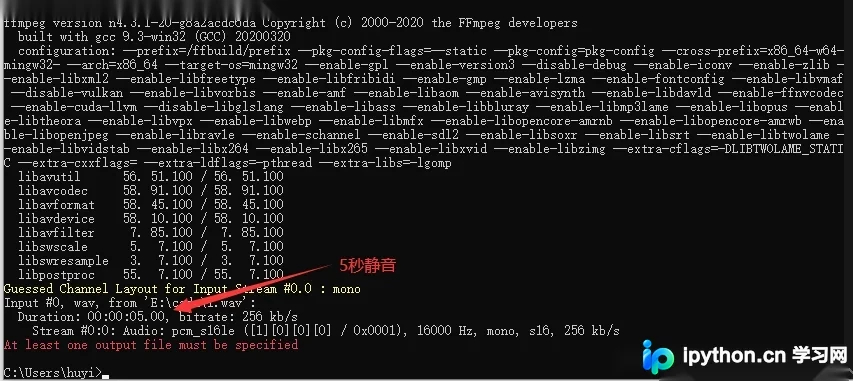
运行上述代码后,可使用 ffmpeg 验证生成的文件属性是否符合预期:
自定义参数适配指南
当业务场景需要不同的采样率、声道或位深时,必须同步修改数据生成数量与Header参数,否则会导致播放时间错误或格式损坏。
计算公式应用
假设需求变更为:32kHz采样率,双声道,16bit位深。
- 原逻辑中的倍数因子
32需重新计算: - 每毫秒字节数 = (32000 × 2 × 16) / 8 / 1000 = 128 字节。
代码调整步骤
1. 调整数据生成循环中的乘数:
// 原: IntStream.range(0, (int) (duration * 32))...
// 改: 对应 32kHz/立体声/16bit
IntStream.range(0, (int) (duration * 128)).forEach(x -> oldBytes.add((byte) 0));
2. 调整Header构建时的参数声明:
// 原: buildWavHeader(pcmData.length, 16000, 1, 16)
// 改: 对应 32kHz/立体声/16bit
byte[] header = buildWavHeader(pcmData.length, 32000, 2, 16);
完成这两处修改后,生成的WAV文件将严格匹配指定的音频参数。此过程验证了在工程化项目中,仅通过拼接原始数据包即可实现精确的静音插入:

总结
虽然Linux下可以使用 sox 等命令行工具一行生成静音(例如:sox -n -r 16000 -b 16 -c 1 -L silence.wav trim 0.0 5.000),但在Java服务端集成时,手写二进制构建逻辑具有更高的可控性与兼容性。只要掌握“计算字节流 -> 封装Header -> 写入磁盘”这一核心流程,即可灵活应对各种音频拼接与时长调整需求。
以上就是Java实现生成自定义时长静音音频的详细内容,更多关于Java WAV音频处理与二进制流操作的资料请关注本站其它相关文章!
免责声明:本文内容仅供参考,不代表本站观点。转载或引用请注明出处。









