

Python turtle 库绘制皮卡丘实战教程

本文介绍如何使用 Python 内置的 turtle 图形库编写代码,在屏幕上逐步绘制皮卡丘轮廓。通过面向对象结构封装绘图逻辑,设置画笔参数并调用坐标移动与填充指令,即可一键生成卡通图像,适合初学者掌握基础语法与几何绘图方法。
使用 Python turtle 库绘制皮卡丘
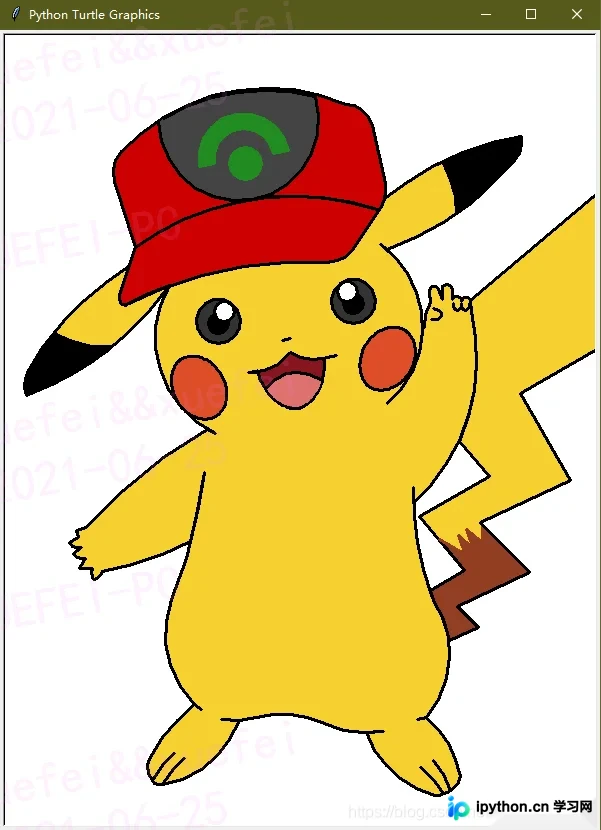
Python 标准库自带的 turtle 模块提供了一种直观的命令行绘图接口,非常适合用来进行图形化编程练习。借助该库内置的坐标系统、角度控制与自动填充功能,无需第三方依赖即可完成复杂卡通形象的绘制。下面将以皮卡丘为例,演示从环境确认到代码执行的完整流程。
第1步:检查运行环境
turtle 随 Python 解释器一同分发,无需通过 pip 另行安装。请确保本地已安装 Python 3.x 版本。打开终端或集成开发环境(IDE),直接创建新文件用于存放脚本。
第2步:配置绘图参数与代码
完整的绘图逻辑采用面向对象设计,将耳朵、眼睛、身体、尾巴等部件拆分为独立方法,最后通过主循环组合输出。将下方代码整体复制至文本编辑器,保存为 pikachu.py。脚本初始阶段会实例化画布与画笔对象,设定绘图速度、笔触粗细及背景样式:
import turtle


def getPosition(x, y):
    turtle.setx(x)
    turtle.sety(y)
    print(x, y)


class Pikachu:

    def __init__(self):
        self.t = turtle.Turtle()
        t = self.t
        t.pensize(3)
        t.speed(9)
        t.ondrag(getPosition)

    def noTrace_goto(self, x, y):
        self.t.penup()
        self.t.goto(x, y)
        self.t.pendown()

    def leftEye(self, x, y):
        self.noTrace_goto(x, y)
        t = self.t
        t.seth(0)
        t.fillcolor('#333333')
        t.begin_fill()
        t.circle(22)
        t.end_fill()

        self.noTrace_goto(x, y + 10)
        t.fillcolor('#000000')
        t.begin_fill()
        t.circle(10)
        t.end_fill()

        self.noTrace_goto(x + 6, y + 22)
        t.fillcolor('#ffffff')
        t.begin_fill()
        t.circle(10)
        t.end_fill()

    def rightEye(self, x, y):
        self.noTrace_goto(x, y)
        t = self.t
        t.seth(0)
        t.fillcolor('#333333')
        t.begin_fill()
        t.circle(22)
        t.end_fill()

        self.noTrace_goto(x, y + 10)
        t.fillcolor('#000000')
        t.begin_fill()
        t.circle(10)
        t.end_fill()

        self.noTrace_goto(x - 6, y + 22)
        t.fillcolor('#ffffff')
        t.begin_fill()
        t.circle(10)
        t.end_fill()

    def mouth(self, x, y):
        self.noTrace_goto(x, y)
        t = self.t

        t.fillcolor('#88141D')
        t.begin_fill()

        # Lower Lip
        l1 = []
        l2 = []
        t.seth(190)
        a = 0.7
        for i in range(28):
            a += 0.1
            t.right(3)
            t.fd(a)
            l1.append(t.position())

        self.noTrace_goto(x, y)

        t.seth(10)
        a = 0.7
        for i in range(28):
            a += 0.1
            t.left(3)
            t.fd(a)
            l2.append(t.position())

        # Upper Lip
        t.seth(10)
        t.circle(50, 15)
        t.left(180)
        t.circle(-50, 15)

        t.circle(-50, 40)
        t.seth(233)
        t.circle(-50, 55)
        t.left(180)
        t.circle(50, 12.1)
        t.end_fill()

        # Tongue
        self.noTrace_goto(17, 54)
        t.fillcolor('#DD716F')
        t.begin_fill()
        t.seth(145)
        t.circle(40, 86)
        t.penup()
        for pos in reversed(l1[:20]):
            t.goto(pos[0], pos[1] + 1.5)
        for pos in l2[:20]:
            t.goto(pos[0], pos[1] + 1.5)
        t.pendown()
        t.end_fill()

        # Nose
        self.noTrace_goto(-17, 94)
        t.seth(8)
        t.fd(4)
        t.back(8)

    # Red Cheeks
    def leftCheek(self, x, y):
        turtle.tracer(False)
        t = self.t
        self.noTrace_goto(x, y)
        t.seth(300)
        t.fillcolor('#DD4D28')
        t.begin_fill()
        a = 2.3
        for i in range(120):
            if 0 <= i < 30 or 60 <= i < 90:
                a -= 0.05
                t.lt(3)
                t.fd(a)
            else:
                a += 0.05
                t.lt(3)
                t.fd(a)
        t.end_fill()
        turtle.tracer(True)

    def rightCheek(self, x, y):
        t = self.t
        turtle.tracer(False)
        self.noTrace_goto(x, y)
        t.seth(60)
        t.fillcolor('#DD4D28')
        t.begin_fill()
        a = 2.3
        for i in range(120):
            if 0 <= i < 30 or 60 <= i < 90:
                a -= 0.05
                t.lt(3)
                t.fd(a)
            else:
                a += 0.05
                t.lt(3)
                t.fd(a)
        t.end_fill()
        turtle.tracer(True)

    def colorLeftEar(self, x, y):
        t = self.t
        self.noTrace_goto(x, y)
        t.fillcolor('#000000')
        t.begin_fill()
        t.seth(330)
        t.circle(100, 35)
        t.seth(219)
        t.circle(-300, 19)
        t.seth(110)
        t.circle(-30, 50)
        t.circle(-300, 10)
        t.end_fill()

    def colorRightEar(self, x, y):
        t = self.t
        self.noTrace_goto(x, y)
        t.fillcolor('#000000')
        t.begin_fill()
        t.seth(300)
        t.circle(-100, 30)
        t.seth(35)
        t.circle(300, 15)
        t.circle(30, 50)
        t.seth(190)
        t.circle(300, 17)
        t.end_fill()

    def body(self):
        t = self.t

        t.fillcolor('#F6D02F')
        t.begin_fill()
        # Right face contour
        t.penup()
        t.circle(130, 40)
        t.pendown()
        t.circle(100, 105)
        t.left(180)
        t.circle(-100, 5)

        # Right ear
        t.seth(20)
        t.circle(300, 30)
        t.circle(30, 50)
        t.seth(190)
        t.circle(300, 36)

        # Upper profile
        t.seth(150)
        t.circle(150, 70)

        # Left ear
        t.seth(200)
        t.circle(300, 40)
        t.circle(30, 50)
        t.seth(20)
        t.circle(300, 35)
        #print(t.pos())

        # Left face contour
        t.seth(240)
        t.circle(105, 95)
        t.left(180)
        t.circle(-105, 5)

        # Left hand
        t.seth(210)
        t.circle(500, 18)
        t.seth(200)
        t.fd(10)
        t.seth(280)
        t.fd(7)
        t.seth(210)
        t.fd(10)
        t.seth(300)
        t.circle(10, 80)
        t.seth(220)
        t.fd(10)
        t.seth(300)
        t.circle(10, 80)
        t.seth(240)
        t.fd(12)
        t.seth(0)
        t.fd(13)
        t.seth(240)
        t.circle(10, 70)
        t.seth(10)
        t.circle(10, 70)
        t.seth(10)
        t.circle(300, 18)

        t.seth(75)
        t.circle(500, 8)
        t.left(180)
        t.circle(-500, 15)
        t.seth(250)
        t.circle(100, 65)

        # Left foot
        t.seth(320)
        t.circle(100, 5)
        t.left(180)
        t.circle(-100, 5)
        t.seth(220)
        t.circle(200, 20)
        t.circle(20, 70)

        t.seth(60)
        t.circle(-100, 20)
        t.left(180)
        t.circle(100, 20)
        t.seth(300)
        t.circle(10, 70)

        t.seth(60)
        t.circle(-100, 20)
        t.left(180)
        t.circle(100, 20)
        t.seth(10)
        t.circle(100, 60)

        # Horizontal
        t.seth(180)
        t.circle(-100, 10)
        t.left(180)
        t.circle(100, 10)
        t.seth(5)
        t.circle(100, 10)
        t.circle(-100, 40)
        t.circle(100, 35)
        t.left(180)
        t.circle(-100, 10)

        # Right foot
        t.seth(290)
        t.circle(100, 55)
        t.circle(10, 50)

        t.seth(120)
        t.circle(100, 20)
        t.left(180)
        t.circle(-100, 20)

        t.seth(0)
        t.circle(10, 50)

        t.seth(110)
        t.circle(100, 20)
        t.left(180)
        t.circle(-100, 20)

        t.seth(30)
        t.circle(20, 50)

        t.seth(100)
        t.circle(100, 40)

        # Right body contour
        t.seth(200)
        t.circle(-100, 5)
        t.left(180)
        t.circle(100, 5)
        t.left(30)
        t.circle(100, 75)
        t.right(15)
        t.circle(-300, 21)
        t.left(180)
        t.circle(300, 3)

        # Right hand
        t.seth(43)
        t.circle(200, 60)

        t.right(10)
        t.fd(10)

        t.circle(5, 160)
        t.seth(90)
        t.circle(5, 160)
        t.seth(90)

        t.fd(10)
        t.seth(90)
        t.circle(5, 180)
        t.fd(10)

        t.left(180)
        t.left(20)
        t.fd(10)
        t.circle(5, 170)
        t.fd(10)
        t.seth(240)
        t.circle(50, 30)

        t.end_fill()
        self.noTrace_goto(130, 125)
        t.seth(-20)
        t.fd(5)
        t.circle(-5, 160)
        t.fd(5)

        # Fingers
        self.noTrace_goto(166, 130)
        t.seth(-90)
        t.fd(3)
        t.circle(-4, 180)
        t.fd(3)
        t.seth(-90)
        t.fd(3)
        t.circle(-4, 180)
        t.fd(3)

        # Tail
        self.noTrace_goto(168, 134)
        t.fillcolor('#F6D02F')
        t.begin_fill()
        t.seth(40)
        t.fd(200)
        t.seth(-80)
        t.fd(150)
        t.seth(210)
        t.fd(150)
        t.left(90)
        t.fd(100)
        t.right(95)
        t.fd(100)
        t.left(110)
        t.fd(70)
        t.right(110)
        t.fd(80)
        t.left(110)
        t.fd(30)
        t.right(110)
        t.fd(32)

        t.right(106)
        t.circle(100, 25)
        t.right(15)
        t.circle(-300, 2)
        #print(t.pos())
        t.seth(30)
        t.fd(40)
        t.left(100)
        t.fd(70)
        t.right(100)
        t.fd(80)
        t.left(100)
        t.fd(46)
        t.seth(66)
        t.circle(200, 38)
        t.right(10)
        t.fd(10)
        t.end_fill()

        # Tail Pattern
        t.fillcolor('#923E24')
        self.noTrace_goto(126.82, -156.84)
        t.begin_fill()

        t.seth(30)
        t.fd(40)
        t.left(100)
        t.fd(40)
        t.pencolor('#923e24')
        t.seth(-30)
        t.fd(30)
        t.left(140)
        t.fd(20)
        t.right(150)
        t.fd(20)
        t.left(150)
        t.fd(20)
        t.right(150)
        t.fd(20)
        t.left(130)
        t.fd(18)
        t.pencolor('#000000')
        t.seth(-45)
        t.fd(67)
        t.right(110)
        t.fd(80)
        t.left(110)
        t.fd(30)
        t.right(110)
        t.fd(32)
        t.right(106)
        t.circle(100, 25)
        t.right(15)
        t.circle(-300, 2)
        t.end_fill()

        # Hat, Eye, Mouth, Cheek
        self.cap(-134.07, 147.81)
        self.mouth(-5, 25)
        self.leftCheek(-126, 32)
        self.rightCheek(107, 63)
        self.colorLeftEar(-250, 100)
        self.colorRightEar(140, 270)
        self.leftEye(-85, 90)
        self.rightEye(50, 110)
        t.hideturtle()

    def cap(self, x, y):
        self.noTrace_goto(x, y)
        t = self.t
        t.fillcolor('#CD0000')
        t.begin_fill()
        t.seth(200)
        t.circle(400, 7)
        t.left(180)
        t.circle(-400, 30)
        t.circle(30, 60)
        t.fd(50)
        t.circle(30, 45)
        t.fd(60)
        t.left(5)
        t.circle(30, 70)
        t.right(20)
        t.circle(200, 70)
        t.circle(30, 60)
        t.fd(70)
        #print(t.pos())
        t.right(35)
        t.fd(50)
        t.circle(8, 100)
        t.end_fill()
        self.noTrace_goto(-168.47, 185.52)
        t.seth(36)
        t.circle(-270, 54)
        t.left(180)
        t.circle(270, 27)
        t.circle(-80, 98)

        t.fillcolor('#444444')
        t.begin_fill()
        t.left(180)
        t.circle(80, 197)
        t.left(58)
        t.circle(200, 45)
        t.end_fill()

        self.noTrace_goto(-58, 270)
        t.pencolor('#228B22')
        t.dot(35)

        self.noTrace_goto(-30, 280)
        t.fillcolor('#228B22')
        t.begin_fill()
        t.seth(100)
        t.circle(30, 180)
        t.seth(190)
        t.fd(15)
        t.seth(100)
        t.circle(-45, 180)
        t.right(90)
        t.fd(15)
        t.end_fill()
        t.pencolor('#000000')

    def start(self):
        self.body()


def main():
    print('Painting the Pikachu... ')
    wn = turtle.Screen()
    wn.setup(width=600, height=800)
    pikachu = Pikachu()
    pikachu.start()
    turtle.mainloop()


if __name__ == '__main__':
    main()
代码中重点调用了 begin_fill() 与 end_fill() 控制区域着色,使用 circle() 结合方向角绘制弧线轮廓,并通过 goto(x, y) 精确控制起笔位置。鼠标拖动画笔可触发 ondrag 事件,便于实时核对当前位置。
第3步:执行脚本并观察输出
在终端进入代码所在目录,运行:python pikachu.py
等待控制台打印进度提示后,系统将弹出独立绘图窗口,自动逐行渲染皮卡丘各部位。绘制过程中画笔会自动抬起与落下以避免连接无关线段,最终闭合轮廓并完成上色。
完成判断与排错指南
当屏幕中央稳定显示黄色主体、黑色耳尖、红色脸颊且尾部呈现锯齿状纹路的卡通形象时,即为绘制完成。若遇到窗口未弹出、画面严重拉伸或代码报错,可参考以下排查方向:
- 黑屏或无响应:检查是否遗漏
turtle.mainloop(),该语句负责维持 GUI 消息循环,缺失会导致窗口立即关闭。 - 比例失调:脚本内坐标与弧线半径均为固定参数,默认适配 600×800 基础视口。若需在宽屏设备查看,请按视觉偏差等比例放大
goto()与circle()中的数值。 - 颜色覆盖异常:部分形状因
tracer(False)被批量渲染,属正常优化机制,绘制结束前不会闪烁。
以上就是使用 Python turtle 库绘制皮卡丘的详细内容,更多关于 Python 基础图形编程的资料请关注本站其它相关文章!
免责声明:本文内容仅供参考,不代表本站观点。转载或引用请注明出处。









