

Python 使用 FFmpeg 给图片添加文字或 Logo 水印

本文介绍如何使用 Python 结合 ffmpy 库和 FFmpeg 工具,为图片添加文字或 Logo 水印。通过封装 image_add_text 和 image_add_logo 两个核心方法,支持自定义字体、颜色、坐标及背景等参数。文中提供了完整代码示例及 Windows 路径转义注意事项,帮助开发者快速实现图片个性化处理。
前言
本文分享一个基于 Python 的图片处理工具,支持为图片添加文字或 Logo 水印,帮助用户轻松打造具有个人标识的图片。
环境依赖
使用前需确保系统中已安装 FFmpeg,并在 Python 环境中安装 ffmpy 库。安装命令如下:
pip install ffmpy -i https://pypi.douban.com/simple
代码
以下是实现水印添加的核心代码。
#!/user/bin/env python
# coding=utf-8
"""
@project : csdn
@author  : 剑客阿良_ALiang
@file   : image_add_watermark_tool.py
@ide    : PyCharm
@time   : 2021-11-20 14:18:13
"""
import os
import uuid
from ffmpy import FFmpeg


# 图片加文字水印
def image_add_text(
        image_path: str,
        output_dir: str,
        text: str,
        font_name: str,
        font_size=100,
        position=(0, 0),
        font_color='blue',
        box=1,
        box_color='white'):
    ext = _check_format(image_path)
    result = os.path.join(output_dir, '{}.{}'.format(uuid.uuid4(), ext))
    ff = FFmpeg(
        inputs={
            image_path: None},
        outputs={
            result: '-vf drawtext=\"fontsize={}:fontfile={}:text=\'{}\':x={}:y={}:fontcolor={}:box={}:boxcolor={}\"'.format(
                font_size,
                font_name,
                text,
                position[0],
                position[1],
                font_color,
                box,
                box_color)})
    print(ff.cmd)
    ff.run()
    return result


# 图片添加logo
def image_add_logo(
        image_path: str,
        output_dir: str,
        logo_path: str,
        position=(0, 0)):
    ext = _check_format(image_path)
    result = os.path.join(output_dir, '{}.{}'.format(uuid.uuid4(), ext))
    filter_cmd = '-vf \"movie=\'{}\' [wm];[in] [wm]overlay={}:{} [out]\"'
    ff = FFmpeg(
        inputs={
            image_path: None}, outputs={
            result: filter_cmd.format(logo_path, position[0], position[1])})
    print(ff.cmd)
    ff.run()
    return result


def _check_format(image_path: str):
    ext = os.path.basename(image_path).strip().split('.')[-1]
    if ext not in ['png', 'jpg']:
        raise Exception('format error')
    return ext
代码说明
1、image_add_text 方法用于给图片添加文字水印。其关键参数包括:图片路径、输出目录、
水印文字内容、字体名称、字体大小(默认值为 100)、文字左上角坐标(默认为 0, 0)、文字颜色(默认为蓝色)、是否显示背景(默认为 1,即需要;0 为不需要)以及背景色(默认为白色)。
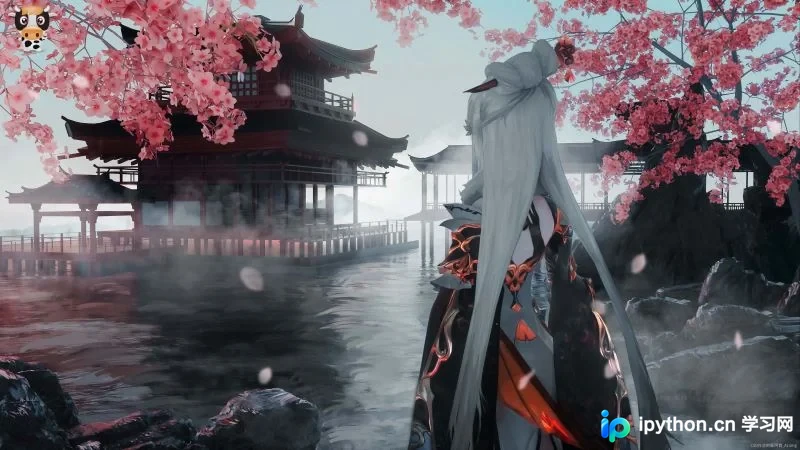
2、image_add_logo 方法用于给图片添加 Logo 图片。主要参数包括:图片路径、输出目录、Logo 图片地址以及文字左上角坐标(默认为 0, 0)。
3、请注意,如果 Logo 地址包含类似 C:/ 这样的 Windows 盘符路径,必须对冒号“:”进行转义处理。后续验证代码中展示了具体的参数写法。
4、为避免生成文件重名,代码中使用 uuid 生成随机文件名。
5、代码中包含对图片后缀格式的校验,目前仅支持两种格式,用户可根据实际需求进行扩展。
验证一下
准备测试素材,分别包含一张普通图片与一张 Logo 图片。
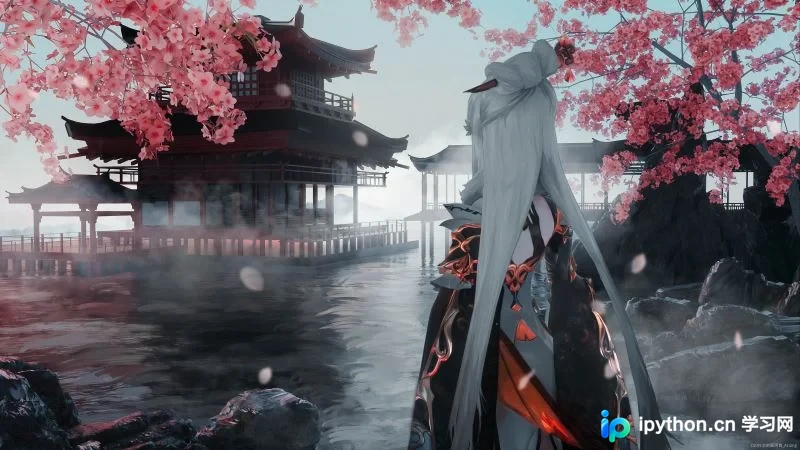
验证代码
if __name__ == '__main__':
    print(
        image_add_text(
            'C:/Users/huyi/Desktop/1.jpg',
            'C:/Users/huyi/Desktop/', '剑客阿良_ALiang', '微软雅黑', box=0))
    print(
        image_add_logo(
            'C:/Users/huyi/Desktop/1.jpg',
            'C:/Users/huyi/Desktop/', 'C\\:/Users/huyi/Desktop/logo.png', (30, 10)))
请注意观察代码中给出的 Logo 地址路径格式,特别是转义部分。
执行结果
PyDev console: starting.
Python 3.6.13 |Anaconda, Inc.| (default, Mar 16 2021, 11:37:27) [MSC v.1916 64 bit (AMD64)] on win32
runfile('D:/spyder/csdn/image_add_watermark_tool.py', wdir='D:/spyder/csdn')
ffmpeg -i C:/Users/huyi/Desktop/1.jpg -vf drawtext=fontsize=100:fontfile=微软雅黑:text='剑客阿良_ALiang':x=0:y=0:fontcolor=blue:box=0:boxcolor=white C:/Users/huyi/Desktop/2226d7e0-5166-4ffd-ba95-9ca7d9d6f72d.jpg
ffmpeg version n4.3.1-20-g8a2acdc6da Copyright (c) 2000-2020 the FFmpeg developers
  built with gcc 9.3-win32 (GCC) 20200320
  configuration: --prefix=/ffbuild/prefix --pkg-config-flags=--static --pkg-config=pkg-config --cross-prefix=x86_64-w64-mingw32- --arch=x86_64 --target-os=mingw32 --enable-gpl --enable-version3 --disable-debug --enable-iconv --enable-zlib --enable-libxml2 --enable-libfreetype --enable-libfribidi --enable-gmp --enable-lzma --enable-fontconfig --enable-libvmaf --disable-vulkan --enable-libvorbis --enable-amf --enable-libaom --enable-avisynth --enable-libdav1d --enable-ffnvcodec --enable-cuda-llvm --disable-libglslang --enable-libass --enable-libbluray --enable-libmp3lame --enable-libopus --enable-libtheora --enable-libvpx --enable-libwebp --enable-libmfx --enable-libopencore-amrnb --enable-libopencore-amrwb --enable-libopenjpeg --enable-librav1e --enable-schannel --enable-sdl2 --enable-libsoxr --enable-libsrt --enable-libtwolame --enable-libvidstab --enable-libx264 --enable-libx265 --enable-libxvid --enable-libzimg --extra-cflags=-DLIBTWOLAME_STATIC --extra-cxxflags= --extra-ldflags=-pthread --extra-libs=-lgomp
  libavutil      56. 51.100 / 56. 51.100
  libavcodec     58. 91.100 / 58. 91.100
  libavformat    58. 45.100 / 58. 45.100
  libavdevice    58. 10.100 / 58. 10.100
  libavfilter     7. 85.100 /  7. 85.100
  libswscale      5.  7.100 /  5.  7.100
  libswresample   3.  7.100 /  3.  7.100
  libpostproc    55.  7.100 / 55.  7.100
Input #0, image2, from 'C:/Users/huyi/Desktop/1.jpg':
  Duration: 00:00:00.04, start: 0.000000, bitrate: 181106 kb/s
    Stream #0:0: Video: mjpeg (Progressive), yuvj444p(pc, bt470bg/unknown/unknown), 3840x2160, 25 tbr, 25 tbn, 25 tbc
Stream mapping:
  Stream #0:0 -> #0:0 (mjpeg (native) -> mjpeg (native))
Press [q] to stop, [?] for help
Fontconfig error: Cannot load default config file
[Parsed_drawtext_0 @ 0000014152ea5400] Using "C:/Windows/fonts/msyh.ttc"
Output #0, image2, to 'C:/Users/huyi/Desktop/2226d7e0-5166-4ffd-ba95-9ca7d9d6f72d.jpg':
  Metadata:
    encoder         : Lavf58.45.100
    Stream #0:0: Video: mjpeg, yuvj444p(pc), 3840x2160, q=2-31, 200 kb/s, 25 fps, 25 tbn, 25 tbc
    Metadata:
      encoder         : Lavc58.91.100 mjpeg
    Side data:
      cpb: bitrate max/min/avg: 0/0/200000 buffer size: 0 vbv_delay: N/A
frame=    1 fps=0.0 q=11.5 Lsize=N/A time=00:00:00.04 bitrate=N/A speed=0.158x
video:634kB audio:0kB subtitle:0kB other streams:0kB global headers:0kB muxing overhead: unknown
C:/Users/huyi/Desktop/2226d7e0-5166-4ffd-ba95-9ca7d9d6f72d.jpg
ffmpeg -i C:/Users/huyi/Desktop/1.jpg -vf "movie='C\:/Users/huyi/Desktop/logo.png' [wm];[in] [wm]overlay=30:10 [out]" C:/Users/huyi/Desktop/c626411e-531f-4dab-9a78-8103d92bbf1d.jpg
ffmpeg version n4.3.1-20-g8a2acdc6da Copyright (c) 2000-2020 the FFmpeg developers
  built with gcc 9.3-win32 (GCC) 20200320
  configuration: --prefix=/ffbuild/prefix --pkg-config-flags=--static --pkg-config=pkg-config --cross-prefix=x86_64-w64-mingw32- --arch=x86_64 --target-os=mingw32 --enable-gpl --enable-version3 --disable-debug --enable-iconv --enable-zlib --enable-libxml2 --enable-libfreetype --enable-libfribidi --enable-gmp --enable-lzma --enable-fontconfig --enable-libvmaf --disable-vulkan --enable-libvorbis --enable-amf --enable-libaom --enable-avisynth --enable-libdav1d --enable-ffnvcodec --enable-cuda-llvm --disable-libglslang --enable-libass --enable-libbluray --enable-libmp3lame --enable-libopus --enable-libtheora --enable-libvpx --enable-libwebp --enable-libmfx --enable-libopencore-amrnb --enable-libopencore-amrwb --enable-libopenjpeg --enable-librav1e --enable-schannel --enable-sdl2 --enable-libsoxr --enable-libsrt --enable-libtwolame --enable-libvidstab --enable-libx264 --enable-libx265 --enable-libxvid --enable-libzimg --extra-cflags=-DLIBTWOLAME_STATIC --extra-cxxflags= --extra-ldflags=-pthread --extra-libs=-lgomp
  libavutil      56. 51.100 / 56. 51.100
  libavcodec     58. 91.100 / 58. 91.100
  libavformat    58. 45.100 / 58. 45.100
  libavdevice    58. 10.100 / 58. 10.100
  libavfilter     7. 85.100 /  7. 85.100
  libswscale      5.  7.100 /  5.  7.100
  libswresample   3.  7.100 /  3.  7.100
  libpostproc    55.  7.100 / 55.  7.100
Input #0, image2, from 'C:/Users/huyi/Desktop/1.jpg':
  Duration: 00:00:00.04, start: 0.000000, bitrate: 181106 kb/s
    Stream #0:0: Video: mjpeg (Progressive), yuvj444p(pc, bt470bg/unknown/unknown), 3840x2160, 25 tbr, 25 tbn, 25 tbc
Stream mapping:
  Stream #0:0 -> #0:0 (mjpeg (native) -> mjpeg (native))
Press [q] to stop, [?] for help
[swscaler @ 000001d6cc29ad80] deprecated pixel format used, make sure you did set range correctly
Output #0, image2, to 'C:/Users/huyi/Desktop/c626411e-531f-4dab-9a78-8103d92bbf1d.jpg':
  Metadata:
    encoder         : Lavf58.45.100
    Stream #0:0: Video: mjpeg, yuvj420p(pc), 3840x2160, q=2-31, 200 kb/s, 25 fps, 25 tbn, 25 tbc
    Metadata:
      encoder         : Lavc58.91.100 mjpeg
    Side data:
      cpb: bitrate max/min/avg: 0/0/200000 buffer size: 0 vbv_delay: N/A
[Parsed_movie_0 @ 000001d6cc40bd80] EOF timestamp not reliable
frame=    1 fps=0.0 q=11.4 Lsize=N/A time=00:00:00.04 bitrate=N/A speed=0.176x
video:455kB audio:0kB subtitle:0kB other streams:0kB global headers:0kB muxing overhead: unknown
C:/Users/huyi/Desktop/c626411e-531f-4dab-9a78-8103d92bbf1d.jpg
添加文字水印后的效果
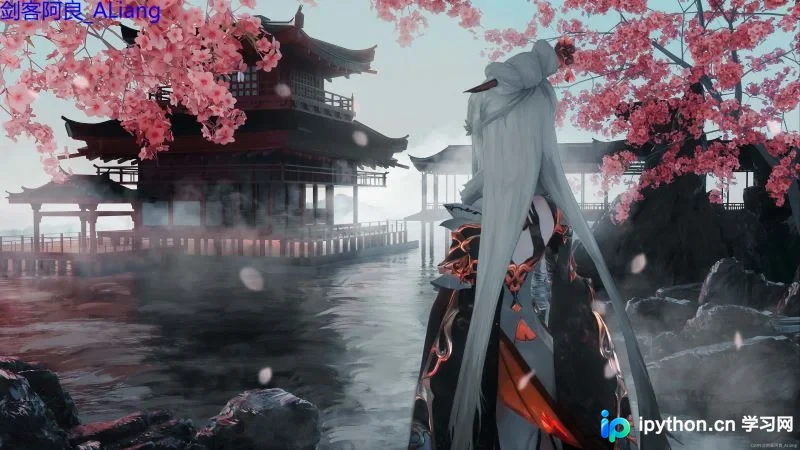
添加 Logo 后的效果
以上就是 Python 实现给图片加文字或 logo 水印的详细内容,更多关于 Python 图片水印的资料请关注本站其它相关文章!
免责声明:本文内容仅供参考,不代表本站观点。转载或引用请注明出处。









