

Python实现URL可用性监控与异常即时推送方案

发布时间:2026-10-12| 2人浏览过
本文介绍使用Python编写URL可用性监控脚本的方法。通过requests库检测HTTP状态及响应超时,利用云推API将异常信息即时推送至邮箱、钉钉或企业微信。结合CentOS系统的Crond定时任务,实现每分钟自动巡检,确保服务状态实时可控。
原理
该方案利用Python的requests库向目标URL发起HTTP请求,以验证其响应状态码及是否发生超时。一旦检测到HTTP状态非200或请求超时,系统即调用聚合云推的消息推送API,将包含详细错误信息的预警消息发送至预设的接收端,如邮箱、钉钉机器人、企业微信机器人或微信公众号。服务端通过配置crontab定时任务(设定为每分钟执行一次)运行该脚本,从而实现对目标URL状态的动态、持续监测。
环境
操作系统: CentOS 7.x
Python版本: 3.6
消息推送服务: tui.juhe.cn
代码
#!/usr/bin/python3
import requests
import time
import json

# 监测URL是否正常响应
def url_check(url):
    # 当前时间
    check_time = time.strftime("%Y-%m-%d %H:%M:%S", time.localtime())
    print("开始监测:%s -- %s" % (url, check_time))
    try:
        # 请求URL, 设置3s超时
        r = requests.get(url, timeout=3)
        if r.status_code != 200:
            # 请求响应状态异常
            msg = "监控的URL:%s%sHttp状态异常:%s%s监测时间:%s" % (url, "\n\n", r.status_code, "\n\n", check_time)
            print("监测结果:异常(Http状态异常:%s) -- %s" % (r.status_code, check_time))
            # 通过云推推送消息
            yuntui_push(msg)
        else:
            # 请求响应正常
            print("监测结果:正常 -- %s" % check_time)
    except requests.exceptions.ConnectTimeout:
        # 请求响应超时
        msg = "监控的URL:%s%s请求异常:%s%s监测时间:%s" % (url, "\n\n", "请求超时", "\n\n", check_time)
        print("监测结果:超时 -- %s" % check_time)
        # 通过云推推送消息
        yuntui_push(msg)

# 将预警消息通过云推推送
def yuntui_push(content):
    # 当前时间
    push_time = time.strftime("%Y-%m-%d %H:%M:%S", time.localtime())
    # 云推接口的信息配置,可以通过 https://tui.juhe.cn 自行注册创建
    # (可以配置邮件、钉钉机器人、微信公众号等接收方式)
    token = "*****************"
    service_id = "******"
    title = "URL可用性监控预警"
    doc_type = "markdown"
    body = {"token": token, "service_id": service_id, "title": title, "content": content, "doc_type": doc_type}
    try:
        r = requests.post("https://tui.juhe.cn/api/plus/pushApi", data=body, timeout=15)
        push_res = json.loads(r.content)
        code = push_res['code']
        if code == 200:
            print("推送结果:成功 -- %s" % push_time)
        else:
            print("推送结果:失败(%s) -- %s" % (push_res['reason'], push_time))
    except requests.exceptions.ConnectTimeout:
        print("推送结果:超时 -- %s" % push_time)

# 执行URL可用性监测
if __name__ == '__main__':
    # 监控URL可用性
    # url_check("https://www.test.com")
    url_check("https://www.baidu.com/")
若环境中未安装requests库,可执行以下命令进行安装:
pip3 install requests
crontab计划任务配置
在命令行中输入crontab -e进入计划任务编辑界面。
# 每分钟执行一次
*/1 * * * * /usr/bin/python3 /data/check_url/main.py >> /data/log.txt
查看日志
cat /data/log.txt
开始监测:https://www.baidu.com/ -- 2021-11-16 15:04:01
监测结果:正常 -- 2021-11-16 15:04:01
开始监测:https://www.baidu.com/ -- 2021-11-16 15:05:02
监测结果:正常 -- 2021-11-16 15:05:02
开始监测:https://www.baidu.com/ -- 2021-11-16 15:06:01
监测结果:正常 -- 2021-11-16 15:06:01
开始监测:https://www.baidu.com/ -- 2021-11-16 15:07:01
监测结果:正常 -- 2021-11-16 15:07:01
开始监测:https://www.baidu.com/ -- 2021-11-16 15:08:01
监测结果:正常 -- 2021-11-16 15:08:01
开始监测:https://www.test.com -- 2021-11-16 15:11:01
监测结果:超时 -- 2021-11-16 15:11:01
推送结果:成功 -- 2021-11-16 15:11:04
开始监测:https://www.test.com -- 2021-11-16 15:12:01
监测结果:超时 -- 2021-11-16 15:12:01
推送结果:成功 -- 2021-11-16 15:12:04
预警消息效果
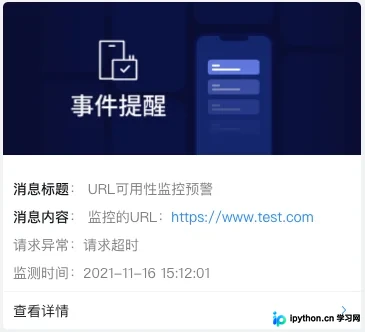
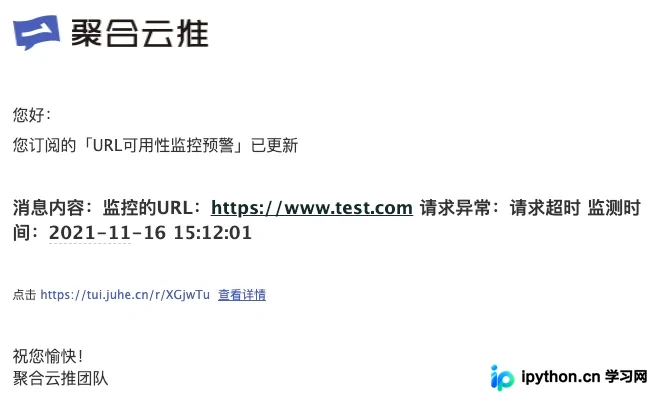
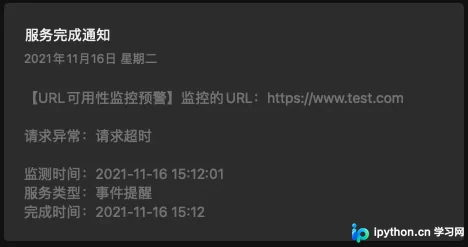
当监测到URL访问异常时,您在云推后台配置的各类接收终端将收到相应的通知,效果示例如下:
钉钉群机器人:
邮件:
微信公众号:
总结
以上就是本文关于Python URL监控与推送的全部内容,希望能为您提供帮助。欢迎持续关注本站以获取更多精彩内容!
免责声明:本文内容仅供参考,不代表本站观点。转载或引用请注明出处。









