

使用Python搭建HTTP服务器的WSGI原理与实践

本文深入解析Python搭建HTTP服务器的核心机制,重点介绍WSGI标准及其在Gunicorn、Flask等工具中的应用。通过对比原始WSGI、WebOb和Werkzeug三种代码实现方式,详细演示如何编写可调用对象。同时梳理了从直接调用到反向代理的四种主流部署架构,帮助开发者根据性能与扩展性需求选择合适的方案。
Python HTTP服务器的核心:WSGI标准
在Python生态中,Web服务器网关接口(WSGI,PEP 333)已成为构建HTTP服务的标准规范。它通过定义中间层,极大地提高了Python网络服务的可移植性。WSGI应用程序本质上是一个可调用对象(Callable),其核心接口包含两个输入参数:
- environ:接收一个字典,包含CGI环境集合的拓展信息。
- start_response:用于声明响应头信息的回调函数。
理解这一基础是掌握后续各种服务器部署模式的前提。无论是直接使用Python内置库,还是借助Gunicorn、Flask等流行框架,底层均遵循此调用规范。
代码实现:从原始WSGI到高级框架
为了直观展示WSGI的工作机制,我们可以从最底层的规范实现开始,逐步过渡到使用WebOb和Werkzeug等库的简化写法。
1. 基于原始WSGI规范的实现
直接使用Python标准库中的 wsgiref.simple_server 可以搭建最基础的HTTP服务。以下代码演示了如何编写一个符合WSGI规范的简单应用,它接收请求并返回当前的WSGI环境字典:
# 用WSGI应用形式编写的简单HTTP服务。
#!/usr/bin/env python3
# A simple HTTP service built directly against the low-level WSGI spec.
from pprint import pformat
from wsgiref.simple_server import make_server
def app(environ, start_response):
 headers = {'Content-Type': 'text/plain; charset=utf-8'}
 start_response('200 OK', list(headers.items()))
 yield 'Here is the WSGI environment:
'.encode('utf-8')
 yield pformat(environ).encode('utf-8')
if __name__ == '__main__':
 httpd = make_server('', 8000, app)
 host, port = httpd.socket.getsockname()
 print('Serving on', host, port)
 httpd.serve_forever()
若需处理更复杂的逻辑(如路径解析、状态码控制),可参考以下增强版原始WSGI实现:
#!/usr/bin/env python3
# A simple HTTP service built directly against the low-level WSGI spec.
import time
def app(environ, start_response):
  host = environ.get('HTTP_HOST', '127.0.0.1')
  path = environ.get('PATH_INFO', '/')
  if ':' in host:
    host, port = host.split(':', 1)
  if '?' in path:
    path, query = path.split('?', 1)
  headers = [('Content-Type', 'text/plain; charset=utf-8')]
  if environ['REQUEST_METHOD'] != 'GET':
    start_response('01 Not Implemented', headers)
    yield b'01 Not Implemented'
  elif host != '127.0.0.1' or path != '/':
    start_response('404 Not Found', headers)
    yield b'404 Not Found'
  else:
    start_response('200 OK', headers)
    yield time.ctime().encode('ascii')
2. 使用WebOb简化开发
原始WSGI编写繁琐,WebOb库通过封装请求和响应对象,显著简化了代码。以下是使用WebOb实现的等效逻辑:
#!/usr/bin/env python3
# A WSGI callable built using webob.
import time, webob
def app(environ, start_response):
  request = webob.Request(environ)
  if environ['REQUEST_METHOD'] != 'GET':
    response = webob.Response('501 Not Implemented', status=501)
  elif request.domain != '127.0.0.1' or request.path != '/':
    response = webob.Response('404 Not Found', status=501)
  else:
    response = webob.Response(time.ctime())
  return response(environ, start_response)
3. 基于Werkzeug与Flask的实现
Werkzeug是Flask框架的基础,它提供了更优雅的装饰器语法。通过 @Request.application 装饰器,开发者可以直接处理请求对象,无需手动处理 start_response:
#!/usr/bin/env python3
# A WSGI callable built using Werkzeug.
import time
from werkzeug.wrappers import Request, Response
@Request.application
def app(request):
  host = request.host
  if ':' in host:
    host, port = host.split(':', 1)
  if request.method != 'GET':
    return Response('501 Not Implemented', status=501)
  elif host != '127.0.0.1' or request.path != '/':
    return Response('404 Not Found', status=504)
  else:
    return Response(time.ctime())
Python HTTP服务的四种部署模式
在实际生产环境中,直接运行Python服务器往往无法满足性能要求。Python社区形成了四种基本的HTTP服务部署模式,主要基于CPython的三个运行时特性:解释器占用内存大、运行速度相对较慢,以及全局解释器锁(GIL)限制了多线程并发执行Python字节码的能力。
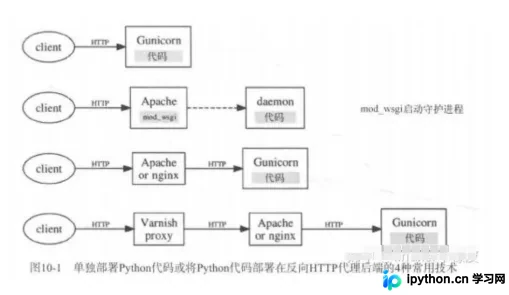
模式一:直接调用WSGI接口
这是最简单的模式,直接运行Python服务器。目前最流行的服务器是 Gunicorn,它通过多进程或异步方式处理请求,适合中小型应用。
模式二:配置mod_wsgi并运行Apache
在Apache中配置 mod_wsgi,Python代码在独立的 WSFIDaemonProcess 中运行。这种模式利用了Apache成熟的并发处理能力,适合已有Apache基础设施的团队。
模式三:后端Python服务器 + 前端反向代理
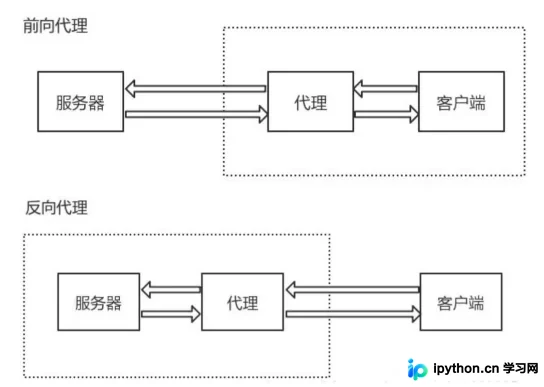
这是目前最推荐的架构。前端运行Web服务器(如Nginx或Apache),负责返回静态文件并反向代理动态资源;后端运行Python HTTP服务器(如Gunicorn)。前端Web服务器需能高效处理静态内容,并将动态请求转发给后端。
模式四:三层架构(纯反向代理 + Web服务器 + Python)
在最前端运行纯反向代理(如Varnish),中间层运行Apache或Nginx,最后端运行Python HTTP服务器。反向代理可分布在不同地理位置以缓存资源。这种架构复杂度高,但能实现极高的性能和可扩展性。
PaaS与静态资源处理
对于希望简化运维的开发者,平台即服务(PaaS)提供了另一种选择。使用PaaS(如Heroku或Docker)只需关心如何打包应用程序,提供商会自动解决服务器IP、负载均衡等复杂问题。但需注意,大多数PaaS提供商对静态内容的支持有限,通常需要在Python应用中实现静态内容支持,或额外配置Apache/Nginx来处理静态资源。架构师通常倾向于将静态资源和动态页面放在同一名字空间,以简化配置。
以上就是使用Python搭建HTTP服务器的详细内容,更多关于Python网络编程、WSGI规范及服务器部署的资料请关注本站其它相关文章!
免责声明:本文内容仅供参考,不代表本站观点。转载或引用请注明出处。









