

Matplotlib 双Y轴绘制与图例合并详解

发布时间:2026-10-16| 3人浏览过
本文介绍如何使用Matplotlib库绘制双Y轴图表并合并图例。通过twinx()函数创建共享X轴的第二个Y轴,利用Figure.legend()或合并句柄列表实现图例统一显示,解决多轴图表图例重叠问题,适用于气象、能源等多变量数据可视化场景。
Matplotlib 是 Python 中广泛使用的绘图库,它能够以简洁的方式将数据转化为图形,并支持多种输出格式。
借助 Matplotlib,用户可以创建静态、动态以及交互式的各类图表,满足不同的可视化需求。
作为一个功能强大的 Python 绘图工具,Matplotlib 能够将复杂的数据通过直观的图表形式展示出来。
该库支持绘制线图、散点图、等高线图、条形图、柱状图、3D 图形以及图形动画等多种图表类型。
接下来介绍如何使用 Matplotlib 绘制双 Y 轴图表,并实现图例的合并显示。
1. 双 Y 轴绘制 关键函数:
# -*- coding: utf-8 -*-
 import numpy as np
 import matplotlib.pyplot as plt
 from matplotlib import rc
 rc('mathtext', default='regular')

 time = np.arange(10)
 temp = np.random.random(10)*30
 Swdown = np.random.random(10)*100-10
 Rn = np.random.random(10)*100-10

 fig = plt.figure()
 ax = fig.add_subplot(111)
 ax.plot(time, Swdown, '-', label = 'Swdown')
 ax.plot(time, Rn, '-', label = 'Rn')
 ax2 = ax.twinx()
 ax2.plot(time, temp, '-r', label = 'temp')
 ax.legend(loc=0)
 ax.grid()
 ax.set_xlabel("Time (h)")
 ax.set_ylabel(r"Radiation ($MJ\,m^{-2}\,d^{-1}$)")
 ax2.set_ylabel(r"Temperature ($^circ$C)")
 ax2.set_ylim(0, 35)
 ax.set_ylim(-20,100)
 ax2.legend(loc=0)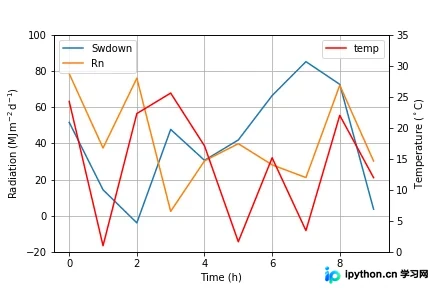
2. 合并图例
# -*- coding: utf-8 -*-
 import numpy as np
 import matplotlib.pyplot as plt
 from matplotlib import rc
 rc('mathtext', default='regular')

 time = np.arange(10)
 temp = np.random.random(10)*30
 Swdown = np.random.random(10)*100-10
 Rn = np.random.random(10)*100-10


 fig = plt.figure()
 ax = fig.add_subplot(111)

 lns1 = ax.plot(time, Swdown, '-', label = 'Swdown')
 lns2 = ax.plot(time, Rn, '-', label = 'Rn')
 ax2 = ax.twinx()
 lns3 = ax2.plot(time, temp, '-r', label = 'temp')


 # added these three lines
 lns = lns1+lns2+lns3
 labs = [l.get_label() for l in lns]
 ax.legend(lns, labs, loc=0)


 ax.grid()
 ax.set_xlabel("Time (h)")
 ax.set_ylabel(r"Radiation ($MJ\,m^{-2}\,d^{-1}$)")
 ax2.set_ylabel(r"Temperature ($^circ$C)")
 ax2.set_ylim(0, 35)
 ax.set_ylim(-20,100)
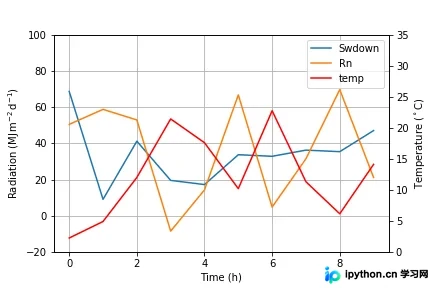
3. 使用
# -*- coding: utf-8 -*-
 import numpy as np
 import matplotlib.pyplot as plt

 x = np.linspace(0,10)
 y = np.linspace(0,10)
 z = np.sin(x/3)**2*98

 fig = plt.figure()
 ax = fig.add_subplot(111)
 ax.plot(x,y, '-', label = 'Quantity 1')

 ax2 = ax.twinx()
 ax2.plot(x,z, '-r', label = 'Quantity 2')
 fig.legend(loc=1, bbox_to_anchor=(1,1), bbox_transform=ax.transAxes)


 ax.set_xlabel("x [units]")
 ax.set_ylabel(r"Quantity 1")
 ax2.set_ylabel(r"Quantity 2")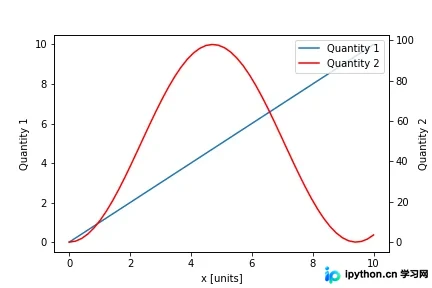
至此,关于 Matplotlib 双 Y 轴绘制及合并图例的介绍已完成。如需了解更多相关内容,可查阅本站过往文章或继续浏览后续内容,感谢支持!
免责声明:本文内容仅供参考,不代表本站观点。转载或引用请注明出处。









