

Python时间处理全解:datetime、time、Calendar与dateutil模块实战

发布时间:2026-10-16| 3人浏览过
本文系统总结Python中处理日期与时间的核心模块。详细讲解datetime模块中date、time、datetime及timedelta类的用法,涵盖当前时间获取、字符串转换、时间戳处理及日期加减计算。同时介绍time标准库的时间元组与程序睡眠,Calendar模块的日历打印与闰年判断,以及dateutil库在复杂日期运算中的应用。
1 前言
在软件开发过程中,经常需要进行日期查询、时间获取、时间戳转换或日期比较等操作。为了便于后续查阅与使用,本文将对Python中处理时间的各类操作进行系统性总结。
时间戳是指以整数或浮点数形式表示的时间间隔,单位为秒。其基准起点为1970年1月1日零点(即Unix纪元)。
2 datetime 模块
该模块主要包含四个常用类:date、time、datetime 和 timedelta。
导入方式如下:
from datetime import *2.1 date类
获取当前日期:
from datetime import *

dt = date.today()
print(dt)		# 输出:2022-09-07

print(dt.year)          # 2022
print(dt.month)
print(dt.day)

# 返回星期几  星期一 = 0
print(dt.weekday())             # 输出:2
# 返回星期几  星期一 = 1
print(dt.isoweekday())          # 0001-01-01

# 返回 ctime() 样式字符串
print(dt.ctime())               # Wed Sep  7 00:00:00 2022
# 修改 年、月、日
print(dt.replace(year=2023))    # 输出:2023-09-07
# 打印最大/最小日期
print(dt.max)                   # 9999-12-31
print(dt.min)                   # 0001-01-01
通过调用date类的构造函数来初始化变量。
d = date(2022, 9, 6)
print(d)			# 输出:2022-09-06
将字符串转换为date对象:
d = date.fromisoformat("2022-09-06")
print(d)        # 2022-09-06
print(type(d))  # <class 'datetime.date'>
将时间戳转换为date对象:
d = date.fromtimestamp(1662451516)
print(d)    	# 2022-09-06
将date对象转换为字符串:
d = date.today()
str_date = d.isoformat()
print(str_date)          # 2022-09-06 字符串
2.2 time类
from datetime import time

t1 = time(10, 20, 32)
print(t1)   # 输出:10:20:32

# 打印时分秒
print(t1.hour)
print(t1.minute)
print(t1.second)

# 将对象转为字符串
res = time.isoformat(t1)
# print(t1.isoformat()) # 方式2
print(res)              # 输出:10:20:32
print(type(res))        # 输出:<class 'str'>
2.3 datetime类
from datetime import datetime

# datetime(year, month, day[, hour[, minute[, second[, microsecond[,tzinfo]]]]])
t = datetime(2022, 9, 7, 20, 32, 20)
print(t)

# 打印 年月日 时分秒
print(t.year)
print(t.month)
print(t.day)
print(t.hour)
print(t.minute)
print(t.second)

# 获取当前时间
today = datetime.now()
print(today)

# 字符串转为datetime
d = datetime.fromisoformat("2022-09-10 12:25:36")
print(type(d))	# <class 'datetime.datetime'>
2.4 timedelta类
timedelta类主要用于计算日期差异或执行相关的日期运算操作。
2.4.1 时间增加
from datetime import datetime, timedelta

now = datetime.now()
print(now)

# 加2天
# def __new__(cls, days=0, seconds=0, microseconds=0, milliseconds=0, minutes=0, hours=0, weeks=0)
new_time = now + timedelta(days=2)
print(new_time.strftime("%Y-%m-%d %H:%M:%S"))

# 加1周
new_time = now + timedelta(weeks=1)
print(new_time.strftime("%Y-%m-%d %H:%M:%S"))
2.4.2 计算时间差
from datetime import datetime, date

# 计算时间差
now = datetime.now()
# 将字符串转为<class 'datetime.datetime'>
d = datetime.fromisoformat("2022-09-10 12:25:36")
res = d - now
print(res)
print(res.days)
print(res.seconds)
2.5 datetime格式化
from datetime import datetime, date

now = datetime.now()
print(now)
print(now.strftime("%Y-%m-%d %H:%M:%S"))
print(now.strftime("%y-%m-%d %H:%M:%S %A"))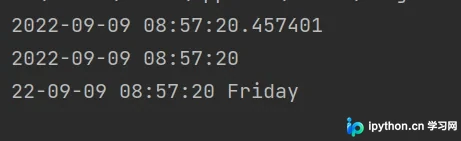
| 符号 | 描述 |
|---|---|
| %y | 两位数的年份表示(00-99) |
| %Y | 四位数的年份表示(0000-9999) |
| %m | 月份(01-12) |
| %d | 月内的天(0-31) |
| %H | 24h值小时数(0-23) |
| %I | 12小时小时数 |
| %M | 分钟数(00-59) |
| %S | 秒(00-59) |
| %a | 本地简化星期名称 |
| %A | 本地完整星期名称 |
| %b | 本地简化月份名称 |
| %B | 本地完整月份名称 |
| %c | 本地相应的日期表示和时间表示 |
| %j | 年内的一天(001-366) |
| %p | 本地A.M.或P.M.的等价符 |
| %U | 一年中的星期数(00-53)星期天为星期的开始 |
| %w | 星期(0-6),星期天为星期的开始 |
| %W | 一年中的星期数(0-53)星期一位星期的开始 |
| %x | 本地相应的日期表示 |
| %X | 本地相应的事假表示 |
| %Z | 当前时区的名称 |
| %% | %号本身 |
3 time 标准库
时间元组表示法:使用Python的数据结构表示,共包含9个字段。
| 属性 | 描述 |
|---|---|
| tm_year | 年 |
| tm_mon | 月(1-12) |
| tm_mday | 日(1-31) |
| tm_hour | 时(0-23) |
| tm_min | 分(0-59) |
| tm_sec | 秒(0-59) |
| tm_wday | 0-6(0表示周日) |
| tm_yday | 1-366(一年中的第几天) |
| tm_isdst | 默认为-1(是否为夏令时) |
3.1 时间操作
import time

# 当前timestamp
timestamp = time.time()
print(timestamp)

# 时间戳 转 时间元组
# 方式1:time.struct_time(tm_year=2022, tm_mon=9, tm_mday=10, tm_hour=16, tm_min=11, tm_sec=30, tm_wday=3, tm_yday=251, tm_isdst=0)
time_tuple1 = time.localtime()
# 方式2
time_tuple2 = time.localtime(timestamp)
print(time_tuple1)
print(time_tuple2)

# 时间元组 转 时间戳
timestamp2 = time.mktime(time_tuple1)
print(timestamp2)  # 1662624690.0

# 时间元组 格式化为 时间
strftime1 = time.strftime("%Y-%m-%d %H:%M:%S", time_tuple1)
print(strftime1)
# 时间 格式化为 时间元组
time_tuple3 = time.strptime("2022-09-10 16:14:18", "%Y-%m-%d %H:%M:%S")
print(time_tuple3)

# 返回一个可读的时间字符串
print(time.ctime())               # Thu Sep  10 16:17:40 2022
print(time.ctime(time.time()))    # Thu Sep  10 16:17:40 2022

print(time.asctime())
print(time.asctime(time.localtime()))
3.2 程序睡眠
实现程序暂停或睡眠:
# 程序暂停/睡眠3s
time.sleep(3)
4 Calendar 日历模块
打印日历:
import calendar

cal = calendar.month(2022,9)
print(cal)  # str
"""
   September 2022
Mo Tu We Th Fr Sa Su
          1  2  3  4
 5  6  7  8  9 10 11
12 13 14 15 16 17 18
19 20 21 22 23 24 25
26 27 28 29 30
"""
闰年相关操作:
import calendar

# 判断是否为闰年
print(calendar.isleap(2000))  # True
print(calendar.isleap(2022))  # False

# 查看2个年份之间的闰年总和
print(calendar.leapdays(2008, 2060))  # 13
5 dateuil 日期模块
安装方法:
pip install dateutilsfrom datetime import datetime, date
from dateutil.relativedelta import relativedelta, MO, TU, WE, TH, FR, SA, SU
now = datetime.now()
today = date.today()
print(now)
print(today)
"""
时间增加
dt1=None, dt2=None,
years=0, months=0, days=0, leapdays=0, weeks=0,
hours=0, minutes=0, seconds=0, microseconds=0,
year=None, month=None, day=None, weekday=None,
yearday=None, nlyearday=None,
hour=None, minute=None, second=None, microsecond=None
"""
# 下个月
next_month = now + relativedelta(months=1)
print(next_month)
# 一年后 前一个月
next_year_prev_month = now + relativedelta(years=1, months=-1)
print(next_year_prev_month)
# 下周五(前提是今天为周六、周天)
next_fr = now + relativedelta(weekday=FR)
print(next_fr)
# 计算两个日期差
res = relativedelta(date(2060, 6, 20), today)
print(res) # relativedelta(years=+37, months=+9, days=+12)
print(res.years) # 37至此,关于Python日期与时间模块(datetime、time、Calendar、dateutil)的使用讲解已完成。如需了解更多Python时间模块相关内容,请搜索本站历史文章或继续浏览后续文章。感谢大家的支持!
免责声明:本文内容仅供参考,不代表本站观点。转载或引用请注明出处。









