

OpenCV实现图片亮度增强或减弱

发布时间:2026-10-15| 5人浏览过
本文介绍了使用OpenCV和Python对图像进行亮度调节的具体方法。通过遍历像素点并同步调整RGB三通道数值,同时限制数值在0-255范围内,实现图片亮度的增强或减弱。文章提供了详细的代码示例和运行结果展示,适用于需要手动控制图像亮度的开发场景。
OpenCV图像亮度调节原理与实现
本文分享了利用OpenCV库调整图片亮度的具体代码实现,供读者参考学习。
核心逻辑是对图像中每个像素点的红、绿、蓝(RGB)三个通道数值进行同步放大或缩小,并确保处理后的通道值始终保持在0到255的有效区间内。
在计算过程中,若调整后的像素值超出0-255的范围,则将其截断并赋值为该区间的边界值(即最小值0或最大值255),以保证数据合法性。
图片亮度增强代码示例
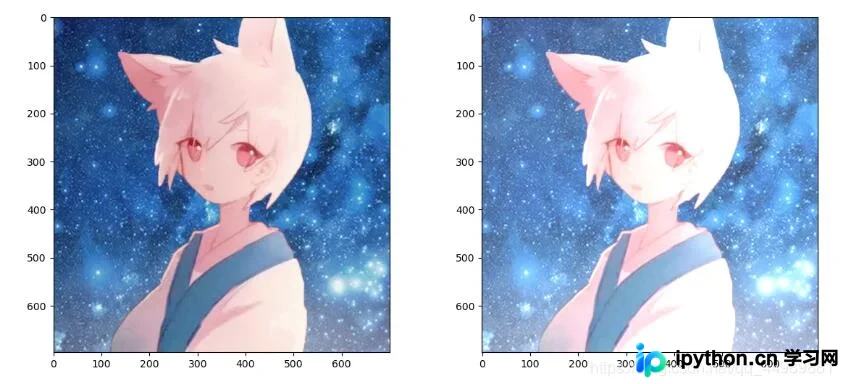
以下是图片亮度增强的具体实现代码及效果。
import cv2
import numpy as np
import matplotlib.pyplot as plt

img = cv2.imread('1.png', 1)
height, width = img.shape[:2]

dst = np.zeros((height, width, 3), np.uint8)
for i in range(0, height):
    for j in range(0, width):
        (b, g, r) = img[i, j]
        bb = int(b) + 50
        gg = int(g) + 50
        rr = int(r) + 50
        if bb > 255:
            bb = 255
        if gg > 255:
            gg = 255
        if rr > 255:
            rr = 255
        dst[i, j] = (bb, gg, rr)

img = cv2.cvtColor(img, cv2.COLOR_BGR2RGB)
dst = cv2.cvtColor(dst, cv2.COLOR_BGR2RGB)
plt.figure(figsize=(14, 6), dpi=100)  # 设置绘图区域的大小和像素
plt.subplot(121)
plt.imshow(img)
plt.subplot(122)
plt.imshow(dst)
plt.show()
亮度增强后的运行结果如下所示。
import cv2
import numpy as np
import matplotlib.pyplot as plt

img = cv2.imread('1.png', 1)
height, width = img.shape[:2]

dst = np.zeros((height, width, 3), np.uint8)
for i in range(0, height):
    for j in range(0, width):
        (b, g, r) = img[i, j]
        bb = int(b * 1.3) + 10
        gg = int(g * 1.2) + 15
        if bb > 255:
            bb = 255
        if gg > 255:
            gg = 255
        dst[i, j] = (bb, gg, r)

img = cv2.cvtColor(img, cv2.COLOR_BGR2RGB)
dst = cv2.cvtColor(dst, cv2.COLOR_BGR2RGB)
plt.figure(figsize=(14, 6), dpi=100)  # 设置绘图区域的大小和像素
plt.subplot(121)
plt.imshow(img)
plt.subplot(122)
plt.imshow(dst)
plt.show()
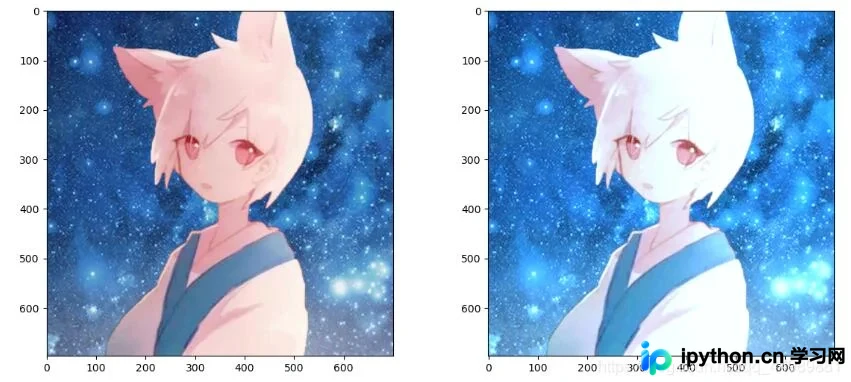
另一种亮度增强策略的运行结果对比。
图片亮度减弱代码示例
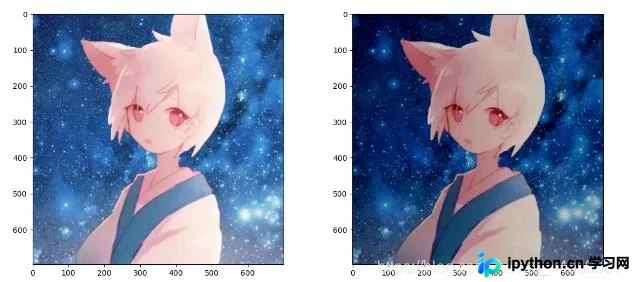
接下来展示图片亮度减弱的实现代码及效果。
import cv2
import numpy as np
import matplotlib.pyplot as plt

img = cv2.imread('1.png', 1)
height, width = img.shape[:2]

dst = np.zeros((height, width, 3), np.uint8)
for i in range(0, height):
    for j in range(0, width):
        (b, g, r) = img[i, j]
        bb = int(b) - 50
        gg = int(g) - 50
        rr = int(r) - 50
        if bb < 0:
            bb = 0
        if gg < 0:
            gg = 0
        if rr < 0:
            rr = 0
        dst[i, j] = (bb, gg, rr)

img = cv2.cvtColor(img, cv2.COLOR_BGR2RGB)
dst = cv2.cvtColor(dst, cv2.COLOR_BGR2RGB)
plt.figure(figsize=(14, 6), dpi=100)  # 设置绘图区域的大小和像素
plt.subplot(121)
plt.imshow(img)
plt.subplot(122)
plt.imshow(dst)
plt.show()
亮度减弱后的运行结果如下所示。
以上就是本文的全部内容,希望对读者的学习和实践有所帮助,欢迎继续支持本站获取更多技术资源。
免责声明:本文内容仅供参考,不代表本站观点。转载或引用请注明出处。









