

Python使用Turtle库实现中国象棋游戏绘制与逻辑

发布时间:2026-10-15| 4人浏览过
本文介绍了使用Python标准库Turtle实现中国象棋游戏的方法。通过定义棋盘尺寸与画笔速度,利用循环语句绘制纵横网格、九宫格斜线及河界楚河汉字区域。代码详细展示了红黑双方棋子的坐标定位与名称渲染逻辑,包括车马炮卒士象将的初始布局,为Python游戏开发提供完整参考。
Python象棋游戏实现概述
本文分享了使用Python语言开发中国象棋游戏的具体实现方案,主要涉及棋盘绘制与棋子布局的核心代码,供开发者参考学习。
棋盘网格与九宫格绘制逻辑
import math
from turtle import *

speed(0)   #调整画的速度 1-10,数字越大,速度越快
width=50
hideturtle()     #隐藏画笔的形状a

#绘制棋盘
for i in range(5):
    forward(8*width)
    penup()
    goto(0,(i+1)*width)
    pendown()
left(90)
for i in range(9):
    penup()
    goto(i*width,0)
    pendown()
    forward(4*width)

for i in range(9):
    penup()
    goto(i*width,-width)
    pendown()
    forward(-4*width)
left(270)
for i in range(5):
    penup()
    goto(0,-width*(i+1))
    pendown()
    forward(8*width)

penup()
goto(-10,4*width+10)
pendown()
right(90)
for i in range(2):
    forward(9*width+20)
    left(90)
    forward(8*width+20)
    left(90)

#田线
penup()
goto(3*width,4*width)
pendown()
left(45)
fd(2*math.sqrt(5000))
penup()
goto(3*width,2*width)
pendown()
left(90)
fd(2*math.sqrt(5000))

penup()
goto(3*width,-5*width)
pendown()
fd(2*math.sqrt(5000))
penup()
goto(3*width,-3*width)
pendown()
right(90)
fd(2*math.sqrt(5000))


#绘制炮兵标记
def fun(x,y):
    penup()
    home()
    goto(x*width,y*width+3)
    fd(-6)
    pendown()
    for i in range(4):
        fd(3)
        left(90)
        fd(3)
        penup()
        right(90)
        fd(6)
        pendown()
        right(90)
for i in range(5):
    fun(i*2,1)
for i in range(5):
    fun(i*2,-2)
fun(1,2)
fun(7,2)
fun(1,-3)
fun(7,-3)

def write_chees(str,color1):  #棋字
    color(color1)
    write(str,font=('隶书',width//2,'normal'))
def drawcircle(radius):   #画圆
    pensize(3)
    begin_fill()
    fillcolor('white')
    circle(radius)
    end_fill()

def chees(x,y,str,color):  #绘制棋子
    penup()
    home()
    goto(x*width,y*width)
    right(90)
    fd(1/3*width)
    left(90)
    pendown()
    pencolor(color)
    drawcircle(1/3*width)
    penup()
    fd(-1/3*width)
    pendown()
    write_chees(str,color)

red='red'
black='black'
#红棋子
for i in range(5):
    chees(i*2,1,'兵','red')
chees(1,2,'炮',red)
chees(7,2,'炮',red)
chees(0,4,'車',red)
chees(1,4,'馬',red)
chees(2,4,'相',red)
chees(3,4,'仕',red)
chees(4,4,'帅',red)
chees(5,4,'仕',red)
chees(6,4,'相',red)
chees(7,4,'馬',red)
chees(8,4,'車',red)
#黑棋子
for i in range(5):
    chees(i*2,-2,'卒','black')
chees(1,-3,'炮',black)
chees(7,-3,'炮',black)
chees(0,-5,'車',black)
chees(1,-5,'馬',black)
chees(2,-5,'象',black)
chees(3,-5,'士',black)
chees(4,-5,'将',black)
chees(5,-5,'士',black)
chees(6,-5,'象',black)
chees(7,-5,'馬',black)
chees(8,-5,'車',black)
done()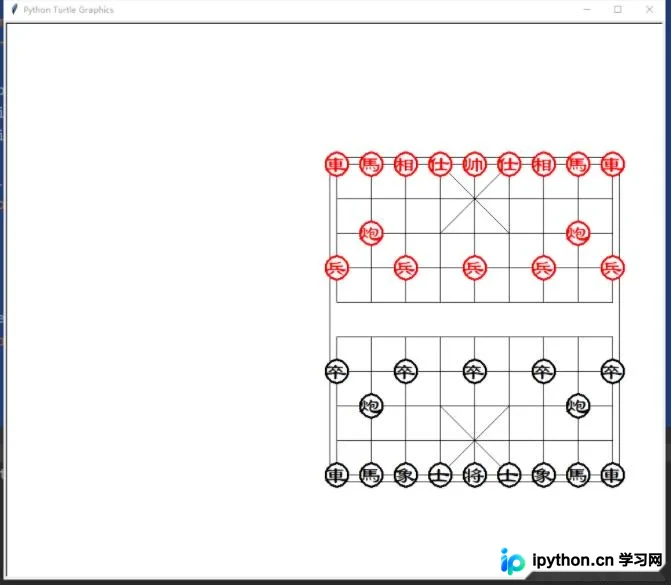
总结与支持
以上内容为Python实现象棋游戏的全部代码解析,旨在帮助读者掌握相关编程技巧。如果内容对您有帮助,欢迎继续支持本站获取更多技术资源。
免责声明:本文内容仅供参考,不代表本站观点。转载或引用请注明出处。









