

Python实现遗传算法图像拟合:从原理到完整代码

本文详解如何使用Python实现基于遗传算法的图片拟合。通过将图像分解为三角形基因片段,利用交叉、变异和自然选择机制,逐步进化出与目标图像高度相似的结果。文章涵盖算法原理、核心代码实现及完整类封装,适合对进化计算和图像处理感兴趣的开发者。
引言
算法思路
设想一个生物群体,其每个个体的基因由若干三角形构成,每个三角形仅包含三个顶点坐标及颜色信息。个体的表型表现为这些三角形的叠加效果。若将一张目标图片视为该环境下的最优性状,则个体与目标图片越相似,其适应度越高,越容易被保留;反之,差异较大的个体则面临淘汰。
在自然繁衍过程中,子代个体的基因来自父母双方,并经历交叉互换与变异。变异操作包括增加或减少基因片段数量,以及调整不同位置基因片段的顺序,从而引入多样性。
由于环境资源有限,群体规模不能无限扩张。因此,在生成足够多的后代后,需将其与现有群体混合并进行竞争淘汰。通过持续的优胜劣汰,群体整体逐渐逼近目标图片的形状与颜色分布。这便是该遗传算法的核心逻辑。
流程图
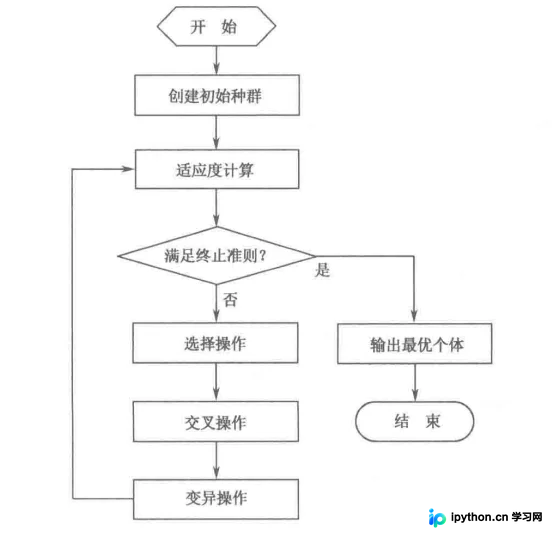
接下来展示具体实现过程。为便于理解,文中使用Python编写类似伪代码的函数进行说明,这些代码不可直接运行。如需完整可执行代码,请参考文末封装好的类文件。
预备知识及准备工作
打开图片
使用imageio库的imread函数加载图片。为简化后续处理,定义OpenImg函数,返回处理后的图片数组(img)、文件扩展名(用于保存)以及图片的行数(row)和列数(col),后者用于绘图时的坐标计算。
from imageio import imread

def OpenImg(imgPath):
	img = imread(imgPath)
    row, col = img.shape[0], img.shape[1]
    return img, imgPath.split(".")[-1], row, col
随机生成生物族群
设定群体最大个体数max_group,用groups列表存储所有个体。每个个体g由若干随机生成的三角形基因片段组成,通过随机数生成初始种群。
from random import choice

for i in range(max_group):
	g = []
    for j in range(features):
	    tmp = [[choice(np.linspace(0, row, features)), choice(np.linspace(0, col, features))] for x in range(3)]
        tmp.append("#" + ''.join(choice('0123456789ABCDEF') for x in range(6)))

    g.append(tmp.copy())
    groups.append(g.copy())
按照生物性状画图
利用PIL库进行图像绘制。首先创建空白画布,随后将个体中的每个三角形(包括顶点坐标和颜色)绘制到画布上,生成该个体的视觉表现。
from PIL import Image, ImageDraw

def to_image(g):
	array = np.ndarray((img.shape[0], img.shape[1], img.shape[2]), np.uint8)
	array[:, :, 0] = 255
	array[:, :, 1] = 255
	array[:, :, 2] = 255
	newIm1 = Image.fromarray(array)
	draw = ImageDraw.Draw(newIm1)
	for d in g:
		draw.polygon((d[0][0], d[0][1], d[1][0], d[1][1], d[2][0], d[2][1]), d[3])

	return newIm1
对比生物个体和目标图片的相似度
使用skimage.metrics中的structural_similarity函数计算两个数组类型图片的结构相似度。该指标能更准确地反映图像间的视觉差异。
from skimage.metrics import structural_similarity

def getSimilar(g) -> float:
	newIm1 = to_image(g)
    ssim = structural_similarity(np.array(img), np.array(newIm1), multichannel=True)
    return ssim
保存图片
调用之前定义的to_image函数将个体基因转换为图像对象,然后使用save方法将图片保存至指定路径,便于观察进化过程。
def draw_image(g, cur, imgtype):
    image1 = to_image(g)
    image1.save(os.path.join(str(cur) + "." + imgtype))
算法主体
交叉互换
考虑到基因片段的动态增减,交叉操作分为两部分:重合区域的交换和尾部片段的交换。根据随机率random_rate和最小定位长度min_locate确定交换位数,使用sample函数选取若干位置进行互换。交换完成后,再对剩余尾部片段进行互换处理。
random_rate = random()

def exchange(father, mother)->[]:
	# 交换
	# 随机生成互换个数
	min_locate = min(len(father), len(mother))
	n = randint(0, int(random_rate * min_locate))
	# 随机选出多个位置
	selected = sample(range(0, min_locate), n)
	# 交换内部
	for s in selected:
		father[s], mother[s] = mother[s], father[s]

  	# 交换尾部
	locat = randint(0, min_locate)
	fhead = father[:locat].copy()
	mhead = mother[:locat].copy()

	ftail = father[locat:].copy()
	mtail = mother[locat:].copy()

	# print(fhead, ftail, mhead, mtail)
	fhead.extend(mtail)
	father = fhead
	mhead.extend(ftail)
	mother = mhead
	return [father, mother]
基因突变
突变机制与交叉类似,旨在增加多样性。具体操作是随机选择某些基因片段,并重新生成其顶点坐标和颜色信息,视为一次突变事件。
random_rate = random()

def mutation(gen):
	# 突变
	# 随机生成变异个数
	n = int(randint(1, 100) / 1000 * len(gen))
	selected = sample(range(0, len(gen)), n)

	for s in selected:
		tmp = [[choice(np.linspace(0, row, 100)), choice(np.linspace(0, col, 100))] for x in	range(3)]
		tmp.append("#" + ''.join(choice('0123456789ABCDEF') for x in range(6)))
		gen[s] = tmp

	return gen
基因片段易位
在个体基因组内部,随机选择两个基因片段并交换它们的位置,以此改变基因排列顺序,增加搜索空间的探索能力。
def move(gen):
	# 易位
	exchage = int(randint(1, 100) / 1000 * len(gen))
	for e in range(exchage):
		sec1 = randint(0, len(gen) - 1)
		sec2 = randint(0, len(gen) - 1)

		gen[sec1], gen[sec2] = gen[sec2], gen[sec1]

	return gen
增加基因片段
直接在个体基因组末尾添加随机生成的新三角形基因片段,以增加图像的复杂度与细节表现力。
features = 100
def add(gen):
	# 增加
	n = int(randint(1, 100) / 1000 * len(gen))
	for s in range(n):
		tmp = [[choice(np.linspace(0, row,features)),choice(np.linspace(0, col, features))] for x in range(3)]
		tmp.append("#" + ''.join(choice('0123456789ABCDEF') for x in range(6)))
		gen.append(tmp)

	return gen
减少基因片段
随机选择个体中的若干基因片段并将其移除,简化图像结构,防止过拟合或计算冗余。
def cut(self, gen):
    # 减少
	n = int(randint(1, 100) / 1000 * len(gen))
	selected = sample(range(0, len(gen)), n)

	g = []
	for gp in range(len(gen)):
		if gp not in selected:
			g.append(gen[gp])

    return g
变异
综合上述四种操作(突变、易位、增加、减少),生成多种变异状态的基因片段,为下一轮进化提供丰富的候选个体。
 def variation(gen):
	# 变异
	gen = mutation(gen.copy())
	gen1 = move(gen.copy())
	gen2 = add(gen1.copy())
	gen3 = cut(gen2.copy())
	return [gen, gen1, gen2, gen3]
繁殖
繁殖过程包括交叉互换和变异操作,直接调用之前定义的exchange和variation函数即可生成子代群体。
def breeds(father, mother):
	new1, new2 = exchange(father.copy(), mother.copy())
	# 变异
	new3, new4, new5, new6 = variation(father.copy())
	new7, new8, new9, new10 = variation(mother.copy())

	return [new1, new2, new3, new4, new5, new6, new7, new8, new9, new10]
淘汰
建立个体与其目标相似度之间的映射关系,按相似度从高到低排序。移除相似度较低的个体,直至剩余个体数量等于max_group。该函数同时返回最优个体的相似度值,用于监控进化进度。
def eliminated(groups):
	group_dict = dict()
	for gp in range(len(groups)):
		group_dict[gp] = getSimilar(groups[gp])

	group_dict = {key: value for key, value in sorted(group_dict.items(), key=lambda item: item[1], reverse=True)}
	g = []
	for key in list(group_dict.keys())[:max_group]:
		g.append(groups[key].copy())

	groups = g.copy()
	return groups, list(group_dict.values())[0]
拟合
拟合过程包含多次繁殖迭代。为保证每次繁殖的个体数量,规定至少进行最大个体数一半次数的繁殖操作。繁殖后的子代加入原种群,共同经历淘汰过程。通过这种机制,每一轮迭代都会剔除与目标差距最大的个体,逐步逼近最优解。
def breeds(father, mother):
	new1, new2 = exchange(father.copy(), mother.copy())
	# 变异
	new3, new4, new5, new6 = variation(father.copy())
	new7, new8, new9, new10 = variation(mother.copy())

	return [new1, new2, new3, new4, new5, new6, new7, new8, new9, new10]
示例展示
拟合时建议选择分辨率较低的图片。若使用高分辨率图片,可使用以下代码降低图片分辨率以加速计算。
降低图片分辨率
from imageio import imread
from PIL import Image

imgPath = input("输入图片路径")
img = imread(imgPath)
img = img[::2, ::2, :]
img = Image.fromarray(img)
img.save(imgPath)
原图
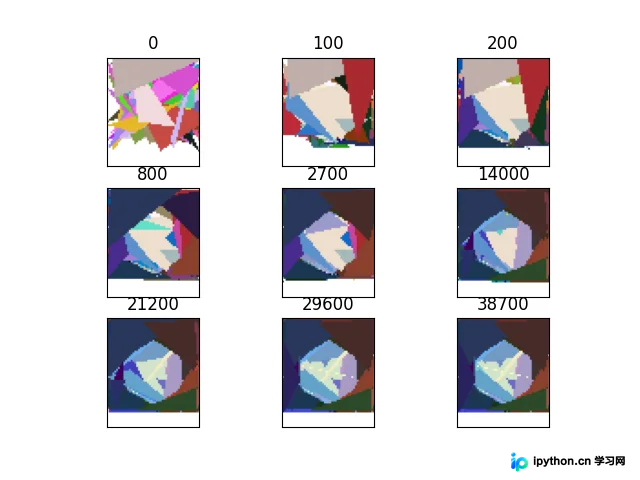
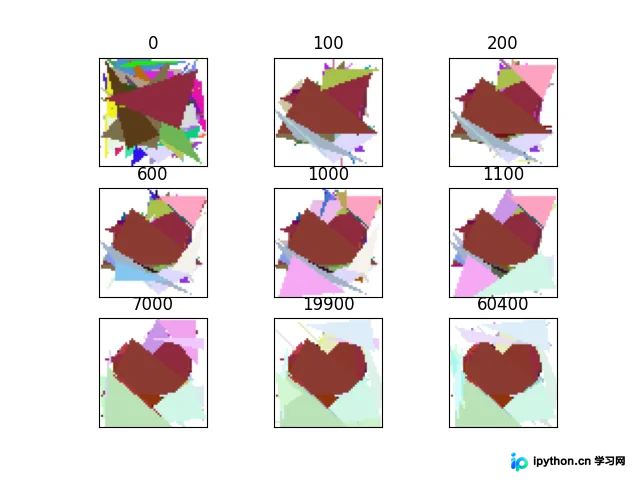
以拟合一个小蓝鸟图标和一个心形图案为例,展示整个进化过程。


拟合过程展示
代码实现(这里已经事先将重复图片删除了)
import os
import math
import matplotlib.pyplot as plt
import matplotlib.image as image

path = "./xl"
length = len(os.listdir(path))
row = col = math.ceil(math.sqrt(length))
x = 1


lst = []
for d in os.listdir(path):
    lst.append(int(d.split('.')[0]))
lst = sorted(lst)

for l in lst:
    img = image.imread(os.path.join(path, str(l)+'.png'))
    plt.xticks([])
    plt.yticks([])
    plt.subplot(row, col, x)
    plt.imshow(img)
    plt.xticks([])
    plt.yticks([])
    plt.title(str(l))
    x += 1


plt.savefig(path)
plt.show()
效果
完整代码下载(已封装成类)
GitHub下载地址(推荐): https://github.com/AiXing-w/Python-Intelligent-Optimization-Algorithms
到此这篇关于python实现使用遗传算法进行图片拟合的文章就介绍到这了,更多相关python 图片拟合内容请搜索本站以前的文章或继续浏览下面的相关文章希望大家以后多多支持本站!
免责声明:本文内容仅供参考,不代表本站观点。转载或引用请注明出处。









