

Python Tkinter实现简单计算器完整代码与解析
发布时间:2026-10-15| 6人浏览过
本文详细介绍使用Python Tkinter库开发图形界面计算器的方法。通过列表存储按键状态,结合eval函数解析字符串表达式,实现了基础的加减乘除及小数运算功能。文章提供了完整的窗口布局代码、按钮事件处理逻辑及界面样式设置,适合Python初学者参考学习。
Python计算器开发概述
本文分享了一个使用Python实现的简单计算器具体代码示例,供读者参考学习。
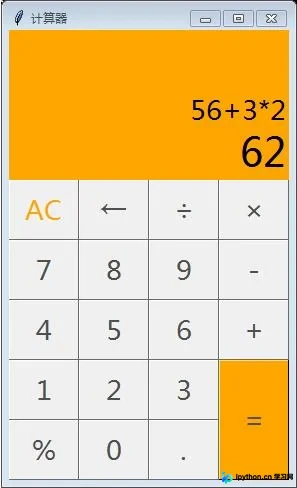
界面效果展示
运行效果如下图所示:
核心逻辑与实现思路
核心实现思路如下:
程序使用列表来保存用户按下的按键序列。当用户点击等于号时,将列表内容转换为字符串,并利用Python内置的eval函数计算该字符串表达式的值。
完整代码实现
具体实现代码如下:
from tkinter import *

W = 280 #窗口宽度
H = 460 #窗口高度
process_H = 110 #显示运算过程的标签高度
result_H = 50   #显示运算结果的标签高度
msFont = '微软雅黑' #字体
fontSize = 20 #字体大小

btnBoderWidth = 0.5 #边框宽度
btnColor = '#4F4F4F' #按钮颜色
btnWidth = 70 #按钮宽度
btnHeight = 60 #按钮高度

mainWindows = Tk()
mainWindows.title('计算器')
mainWindows.minsize(W,H)

str_process = StringVar()
str_process.set("")
str_result = StringVar()
str_result.set("0")

process = Label(mainWindows,font=(msFont,fontSize),bg='orange',anchor='se',wraplength='280',textvariable=str_process)
process.place(width=W,height=process_H) #显示运算过程的标签
result = Label(mainWindows,font=(msFont,fontSize+10),bg='orange',anchor='se',textvariable=str_result)
result.place(y=process_H,width=W,height=result_H) #显示运算结果的标签

button_AC = Button(mainWindows,font=(msFont,fontSize),text='AC',fg='orange',bd=btnBoderWidth,command=lambda :clickAC())
button_AC.place(x=0,y=process_H+result_H,width=btnWidth,height=btnHeight)
button_back = Button(mainWindows,font=(msFont,fontSize),text='←',fg=btnColor,bd=btnBoderWidth,command=lambda :clickBack())
button_back.place(x=btnWidth,y=process_H+result_H,width=btnWidth,height=btnHeight)
button_div = Button(mainWindows,font=(msFont,fontSize),text='÷',fg=btnColor,bd=btnBoderWidth,command=lambda :clickOper('/'))
button_div.place(x=btnWidth*2,y=process_H+result_H,width=btnWidth,height=btnHeight)
button_mul = Button(mainWindows,font=(msFont,fontSize),text='×',fg=btnColor,bd=btnBoderWidth,command=lambda :clickOper('*'))
button_mul.place(x=btnWidth*3,y=process_H+result_H,width=btnWidth,height=btnHeight)

button_7 = Button(mainWindows,font=(msFont,fontSize),text='7',fg=btnColor,bd=btnBoderWidth,command=lambda :clickNum('7'))
button_7.place(x=0,y=process_H+result_H+btnHeight,width=btnWidth,height=btnHeight)
button_8 = Button(mainWindows,font=(msFont,fontSize),text='8',fg=btnColor,bd=btnBoderWidth,command=lambda :clickNum('8'))
button_8.place(x=btnWidth,y=process_H+result_H+btnHeight,width=btnWidth,height=btnHeight)
button_9 = Button(mainWindows,font=(msFont,fontSize),text='9',fg=btnColor,bd=btnBoderWidth,command=lambda :clickNum('9'))
button_9.place(x=btnWidth*2,y=process_H+result_H+btnHeight,width=btnWidth,height=btnHeight)
button_minus = Button(mainWindows,font=(msFont,fontSize),text='-',fg=btnColor,bd=btnBoderWidth,command=lambda :clickOper('-'))
button_minus.place(x=btnWidth*3,y=process_H+result_H+btnHeight,width=btnWidth,height=btnHeight)

button_4 = Button(mainWindows,font=(msFont,fontSize),text='4',fg=btnColor,bd=btnBoderWidth,command=lambda :clickNum('4'))
button_4.place(x=0,y=process_H+result_H+btnHeight*2,width=btnWidth,height=btnHeight)
button_5 = Button(mainWindows,font=(msFont,fontSize),text='5',fg=btnColor,bd=btnBoderWidth,command=lambda :clickNum('5'))
button_5.place(x=btnWidth,y=process_H+result_H+btnHeight*2,width=btnWidth,height=btnHeight)
button_6 = Button(mainWindows,font=(msFont,fontSize),text='6',fg=btnColor,bd=btnBoderWidth,command=lambda :clickNum('6'))
button_6.place(x=btnWidth*2,y=process_H+result_H+btnHeight*2,width=btnWidth,height=btnHeight)
button_add = Button(mainWindows,font=(msFont,fontSize),text='+',fg=btnColor,bd=btnBoderWidth,command=lambda :clickOper('+'))
button_add.place(x=btnWidth*3,y=process_H+result_H+btnHeight*2,width=btnWidth,height=btnHeight)

button_1 = Button(mainWindows,font=(msFont,fontSize),text='1',fg=btnColor,bd=btnBoderWidth,command=lambda :clickNum('1'))
button_1.place(x=0,y=process_H+result_H+btnHeight*3,width=btnWidth,height=btnHeight)
button_2 = Button(mainWindows,font=(msFont,fontSize),text='2',fg=btnColor,bd=btnBoderWidth,command=lambda :clickNum('2'))
button_2.place(x=btnWidth,y=process_H+result_H+btnHeight*3,width=btnWidth,height=btnHeight)
button_3 = Button(mainWindows,font=(msFont,fontSize),text='3',fg=btnColor,bd=btnBoderWidth,command=lambda :clickNum('3'))
button_3.place(x=btnWidth*2,y=process_H+result_H+btnHeight*3,width=btnWidth,height=btnHeight)
button_equal = Button(mainWindows,font=(msFont,fontSize),text='=',bg='orange',fg=btnColor,bd=btnBoderWidth,command=lambda :clickEqual())
button_equal.place(x=btnWidth*3,y=process_H+result_H+btnHeight*3,width=btnWidth,height=btnHeight*2)

button_percent = Button(mainWindows,font=(msFont,fontSize),text='%',fg=btnColor,bd=btnBoderWidth,command=lambda :clickOper("%"))
button_percent.place(x=0,y=process_H+result_H+btnHeight*4,width=btnWidth,height=btnHeight)
button_0 = Button(mainWindows,font=(msFont,fontSize),text='0',fg=btnColor,bd=btnBoderWidth,command=lambda :clickNum('0'))
button_0.place(x=btnWidth,y=process_H+result_H+btnHeight*4,width=btnWidth,height=btnHeight)
button_point = Button(mainWindows,font=(msFont,fontSize),text='.',fg=btnColor,bd=btnBoderWidth,command=lambda :clickPoint())
button_point.place(x=btnWidth*2,y=process_H+result_H+btnHeight*4,width=btnWidth,height=btnHeight)

process_list = []
s_result = ""
isNum = [False] #上一位按下的是否是数字
point = [True] #小数点使用情况
def clickNum(num):  #按下数字
    isNum.append(True)
    point.append(point[-1]) #按下数字,小数点的标志不变
    process_list.append(num)
    s_process = "".join(process_list)
    str_process.set(s_process)

def clickOper(sign):#按下运算符
    global isNum,point
    if isNum[-1]:
        process_list.append(sign)
        isNum.append(False)
        point.append(True) #按下运算符,小数点标志为可以按下小数点
    else:
        process_list.pop()
        process_list.append(sign)
    s_process = "".join(process_list)
    str_process.set(s_process)

def clickEqual():#按下等于
    global s_result
    s_process = "".join(process_list)
    s_result = eval(s_process)
    s_result = str(s_result)[0:11] #结果只显示11位
    str_process.set(s_process)
    str_result.set(s_result)

def clickAC():#按下清除
    global s_result,isNum,point
    s_result = "0"
    isNum = [False]  #状态回到初始时候
    point = [True]
    process_list.clear()
    str_result.set(s_result)
    str_process.set("")
def clickBack(): #按下退格键
    global point, isNum
    if len(process_list) > 0:
        isNum.pop(-1) #删除最后一位的状态
        point.pop(-1)
        process_list.pop()
        s_process = "".join(process_list)
        str_process.set(s_process)

def clickPoint():#按下小数点
    global point,isNum
    if isNum[-1] and point[-1]:
        process_list.append(".")
        s_process = "".join(process_list)
        str_process.set(s_process)
        isNum.append(False)
        point.append(False)

mainWindows.mainloop()
以上就是本文的全部内容,希望能为读者的学习提供一定帮助,同时也欢迎大家对本站给予支持。
免责声明:本文内容仅供参考,不代表本站观点。转载或引用请注明出处。









