

Python利用Cartopy绘制IGS站点全球分布图

发布时间:2026-10-15| 4人浏览过
本文介绍如何使用Python结合Cartopy库,根据给定的站点列表文件和SNX坐标文件,绘制IGS站点的全球分布图。内容涵盖数据准备、XYZ转经纬度算法实现及绘图代码示例,帮助开发者快速生成站点可视化图表。
数据准备与输入说明
本文演示如何根据站点列表绘制站点坐标的全球分布图。所需输入包括站点列表文件(可手动创建,示例如下)以及SNX格式的IGS全球站点坐标文件。
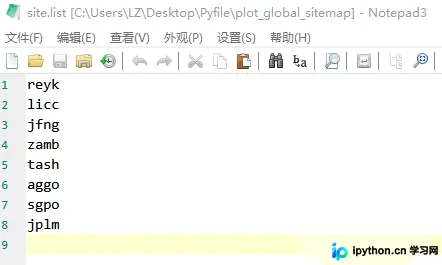
SNX全球站点坐标文件的下载地址格式为:ftp://igs.gnsswhu.cn/pub/whu/pub/gps/products/YYYY/igsyyPwwww.snx.Z。最终输出结果为站点分布图。
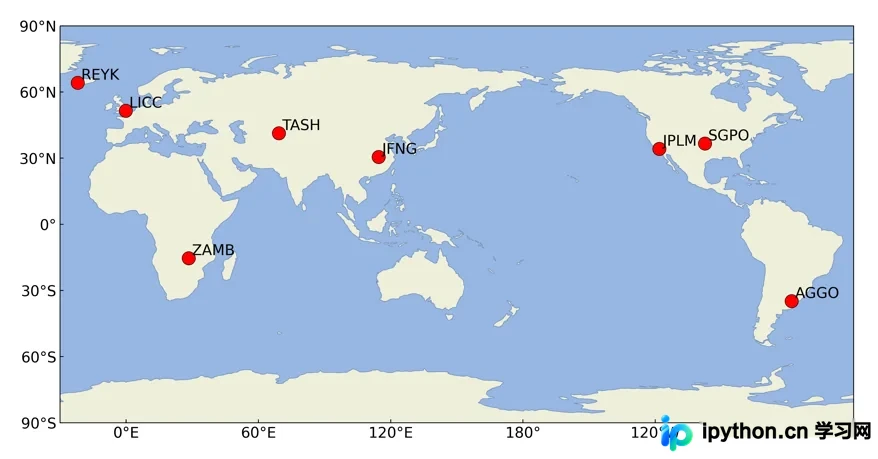
Python绘图代码实现
具体实现代码如下:
# coding=utf-8
# !/usr/bin/env python
'''
 Program:plot_global_sitemap.py
 Function:根据站点列表绘制站坐标全球分布图
 Author:LZ_CUMT
 Version:1.0
 Date:2021/12/10
 '''
from math import pi, sqrt, atan, atan2, sin, cos
import matplotlib.pyplot as plt
import matplotlib as mpl
import cartopy.crs as ccrs
import cartopy.feature as cfeature
from cartopy.mpl.ticker import LongitudeFormatter, LatitudeFormatter

# xyz转换为llh(经纬度)
def xyz2llh(ecef, site):
    aell = 6378137.0
    fell = 1.0 / 298.257223563
    deg = pi / 180
    u = ecef[0]
    v = ecef[1]
    w = ecef[2]
    esq = 2*fell-fell*fell
    lat = 0
    N = 0
    if w == 0:
        lat = 0
    else:
        lat0 = atan(w/(1-esq)*sqrt(u*u+v*v))
        j = 0
        delta = 10 ^ 6
        limit = 0.000001/3600*deg
        while delta > limit:
            N = aell / sqrt(1 - esq * sin(lat0)*sin(lat0))
            lat = atan((w / sqrt(u*u + v*v)) * (1 + (esq * N * sin(lat0) / w)))
            delta = abs(lat0 - lat)
            lat0 = lat
            j = j + 1
            if j > 10:
                break
    long = atan2(v, u)
    h = (sqrt(u*u+v*v)/cos(lat))-N
    llh = [site, long * 180 / pi, lat * 180 / pi, h]
    return llh

# 由站点文件获取站点列表存入sitelist
def getSite(listfile):
    sitelist = []
    f = open(listfile)
    ln = f.readline()
    while ln:
        sitelist.append(ln[0:4].upper())
        ln = f.readline()
    return sitelist

# 根据站点名在snx文件中搜索XYZ坐标转化为经纬度并输出
def getBLH_single(site,snxlines):
    xyz = [0, 0, 0]
    for ln in snxlines:
        if site in ln:
            if 'STAX   ' in ln:
                xyz[0] = float(ln[47:68])
            if 'STAY   ' in ln:
                xyz[1] = float(ln[47:68])
            if 'STAZ   ' in ln:
                xyz[2] = float(ln[47:68])
    blh = xyz2llh(xyz, site)
    if len(blh) != 4:
        print('[INFO] Sitecrd for', site, 'is not found in the snxfile')
    return blh

def getBLH(listfile, snxfile):
    siteBLH = []
    sitelist = getSite(listfile)
    f = open(snxfile)
    lns = f.readlines()
    for site in sitelist:
        siteBLH.append(getBLH_single(site, lns))
    return siteBLH

def plotsite(siteBLH):
    # mpl.rcParams['font.sans-serif'] = ['Helvetical']
    mpl.rcParams['axes.unicode_minus'] = False
    mpl.rc('xtick', labelsize=9)
    mpl.rc('ytick', labelsize=9)
    mpl.rcParams['xtick.direction'] = 'in'
    mpl.rcParams['ytick.direction'] = 'in'

    fig = plt.figure(figsize=(14, 7))
    ax = plt.axes(projection=ccrs.PlateCarree(central_longitude=150))
    ax.set_extent([-180, 180, -90, 90], crs=ccrs.PlateCarree())
    ax.set_xticks([0, 60, 120, 180, 240, 300, 360], crs=ccrs.PlateCarree())
    ax.set_yticks([-90, -60, -30, 0, 30, 60, 90], crs=ccrs.PlateCarree())
    ax.add_feature(cfeature.LAND)
    ax.add_feature(cfeature.OCEAN)
    ax.add_feature(cfeature.COASTLINE, linewidth=0.1)

    for site in siteBLH:
        ax.plot(site[1], site[2], 'o', color='r', mec='k', mew=0.5, transform=ccrs.Geodetic(), ms=13.0)
        plt.text(site[1] + 1.5, site[2] + 1.5, site[0], transform=ccrs.Geodetic(),fontsize='x-large')  # 添加站名标注
    plt.xticks(fontsize='x-large')
    plt.yticks(fontsize='x-large')
    lon_formatter = LongitudeFormatter(zero_direction_label=True)
    lat_formatter = LatitudeFormatter()
    ax.xaxis.set_major_formatter(lon_formatter)
    ax.yaxis.set_major_formatter(lat_formatter)

    fig.savefig('global_sitemap.png', bbox_inches='tight', dpi=400)
    plt.show()


if __name__ == '__main__':
    listfile = r'site.info'               # 输入要画的站点列表文件
    snxfile = r'igs21P2177.snx'              # 输入IGS站坐标文件
    siteBLH = getBLH(listfile, snxfile)   # 获取所有站点的经纬度
    plotsite(siteBLH)           # 画图
    print('[INFO] Plot complete!')        # 完成
关于使用Python绘制IGS站点全球分布图的示例介绍完毕。如需了解更多相关Python绘图技巧,可查阅本站往期文章或继续浏览后续内容,感谢支持。
免责声明:本文内容仅供参考,不代表本站观点。转载或引用请注明出处。









