

Python calendar模块详解:类结构与常用方法实战

发布时间:2026-10-15| 3人浏览过
本文详细介绍Python标准库中的calendar模块,涵盖其基于datetime的计算机制、首周设置及三大核心类(Calendar、TextCalendar、HTMLCalendar)的结构。通过具体代码示例,演示如何生成年历、月历及HTML格式日历,帮助开发者高效处理日期集合与日历展示需求。
回顾之前的内容:
Python在时间日期操作方面提供了丰富的方法,此前我们已经学习了两个相关模块:
- 受限于Unix时间戳范围(1970年至2038年)的time模块,用于处理具体时间戳;
- 包含六个类、提供更人性化时间日期处理的datetime模块;
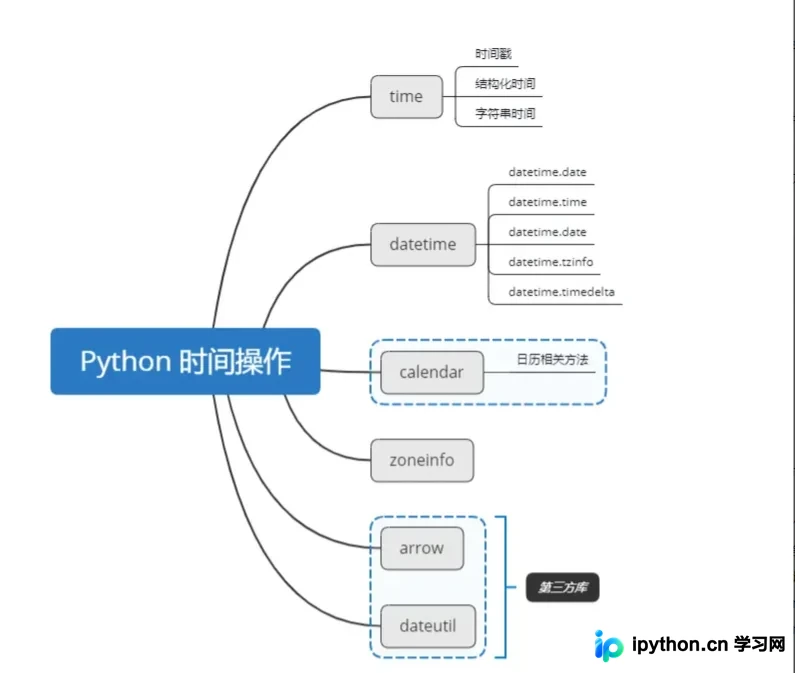
在日常工作和生活中,除了对单一时间及日期的处理Python外,若需处理日期的集合,应使用哪个模块呢?
Python专门提供了calendar模块来处理日历相关操作。接下来,我们将学习calendar模块的相关方法及属性。
1. calendar 模块概述
calendar 模块提供了一系列与日历相关的实用函数,旨在帮助用户获取日历相关信息。
1.1 calendar 特点
calendar模块基于datetime.date.weekday()来计算每周的周数;calendar默认将星期一作为每周的第一天,星期日作为每周的最后一天;calendar提供了calendar.setfirstweeksday()函数,允许用户更改指定星期几作为一周的第一天;
1.2 calendar 类结构
- 我们可以查看
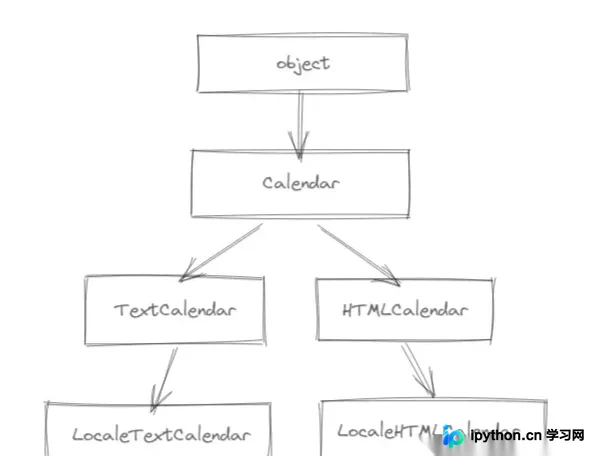
Python内置库中的-calendar.py文件; calendar主要提供三大类:Calendar、TextCalendar以及HTMLCalendar;- 其中,
calendar是TextCalendar和HTMLCalendar的基类;
1.3 calendar 使用步骤
calendar作为内置库,可直接使用import语句进行导入;
import calendar
2. calendar 相关方法
2.2 calendar 模块相关方法
| 方法 | 说明 |
|---|---|
| calendar.firstweekday() | 设置每星期的第一天数值 |
| calendar.isleap(year) | 判断是闰年,则返回Ture |
| calendar.leapdays(y1,y2) | 计算要y1与y2的闰年数 |
| calendar.weekday(year,month,day) | 返回某日是星期几 |
| calendar.weekheader(n) | 星期几的缩写名的头 |
| calendar.mothrange(year,month) | 计算出指定年份的某月第一天是星期几和天数 |
| calendar.prmonth(theyear,themonth,w=0,1=0) | 格式化打印指定年的某月的日历 |
| calendar.month(theyear,themonth,w=0,1=0) | 使用TextCalendar类formation()以多行字符串形式返回月份日历 |
| calendar.prcal(year,w=1,1=0,c=6,m=3) | 格式化打印出整年的日历 |
| calendar.calendar(year,w=1,1=0,c=6,m=3) | 以整年3列的日历多行字符串的形式的日历 |
2.3 calendar 模块属性
| 方法 | 说明 |
|---|---|
| calendar.day_name | 当前语言环境下星期几的数组 |
| calendar.day_abbr | 当前语言环境下星期几的缩写 |
| calendar.month_name | 当前语言下一年的月份数组 |
| calendar.month_abbr | 当前语言下一年的月份缩写 |
2.4 calendar 模块提供5个类
| 类方法 | 说明 |
|---|---|
| calendar.Calendar(firstweekday=0) | 创建Calendar对象,默认周一为第一天 |
| calendar.TextCalendar(firstweekday=0) | 生成纯文本日历对象 |
| calendar.HTMLCalendar(firstweekday=0) | 生成HTML日志对象 |
| calendar.LocaleTextCalenda(firstweekday=0,locale=None) | 语言环境名称 |
| calendar.LocaleHTMLCalendar(firstweekday=0,locale=None) | 语言环境名称 |
2.5 calendar.Calendar类实例相关方法
| 方法 | 说明 |
|---|---|
| cal.itermonthdates(year,month) | 返回一个year年month月的日期的迭代器 |
| cal.iterweekdats() | 返回为一星期的数字的迭代器 |
| cal.itermonthdays(year,month) | 返回的日期为当月每一天的日期对应的天数,对于不在当月的日期,会显示0 |
| cal.itermonthdays2(year,month) | 返回一个由日期和代表星期几的数字组成的元组 |
| cal.itermonthdays3(year,month) | 返回一个由年月日组成的元组 |
| cal.itermonthdays4(year,month) | 返回一个由年月日和星期几的数字组成的元组 |
| cal.monthdatescalendar(year,month) | 返回一个由datetime.date对象组成的年月的周列表 |
| cal.monthdays2calendar(year,month) | 返回一个由日期数字和周几的数字的二元元组 |
| cal.monthdayscalendar(year,month) | 返回一个由七个日期数字的组成周列表 |
| cal.yeardatescalendar(year,width=3) | 返回可以用来格式化的指定年月的数据列表 |
| cal.yeardays2calendar(year,width=3) | 返回用来模式化的指定年月的数据。在这个月的日期为0,周列表由日期和星期数组成的元组 |
| cal.yeardayscalendar(year,width=3) | 返回一个周列表是日期数字组成可以用来模式化的指定年月的数据 |
2.6 calendar.TextCalendar类实例相关方法
| 方法 | 说明 |
|---|---|
| tc.formatmonth(theyear,themonth,w=0,1=0) | 以多行字符串来表示指定年月的日历 |
| tc.prmonth(theyear,themonth,w=0,1=0) | 格式化打印一个月的日历 |
| tc.formatyear(theyear,w=0,1=1,c=6,m=3) | 返回一个m列的日历 |
| tc.pryear(theyear,w=0,1=1,c=6,m=3) | 格式化打印一整年的日历 |
2.7 calendar.HTMLCalendar类实例相关方法
| 方法 | 说明 |
|---|---|
| htl.formatmonth(theyear,themonth,withyear=True) | 返回一个HTML表格的指定的年月日历 |
| htl.formatyear(theyear,width=3) | 返回HTML指定年份的日历 |
| htl.formatyearpage(theyear,width=3,css='calendar.css',encoding=None) | 返回一个完整的HTML页面作为指定的年份日历 |
2.8 calendar.HTMLCalendar类实例相关属性
| 方法 | 说明 |
|---|---|
| htl.cssclasses | 星期一到星期天的CSS class 列表 |
| htl.cssclass_noday | 工作日的CSS类在上个月或下个月发生 |
| htl.cssclasses_weekday_head | 用于标题行中工作日名称的css列表 |
| htl.cssclass_month_head | 月份的CSS列表标题 |
| htl.cssclass_month | 某个月的月历CSS类 |
| htl.cssclass_year | 某个年的年历CSS类 |
| htl.cssclasses_year_head | 年历的CSS列表标题 |
3. 实操
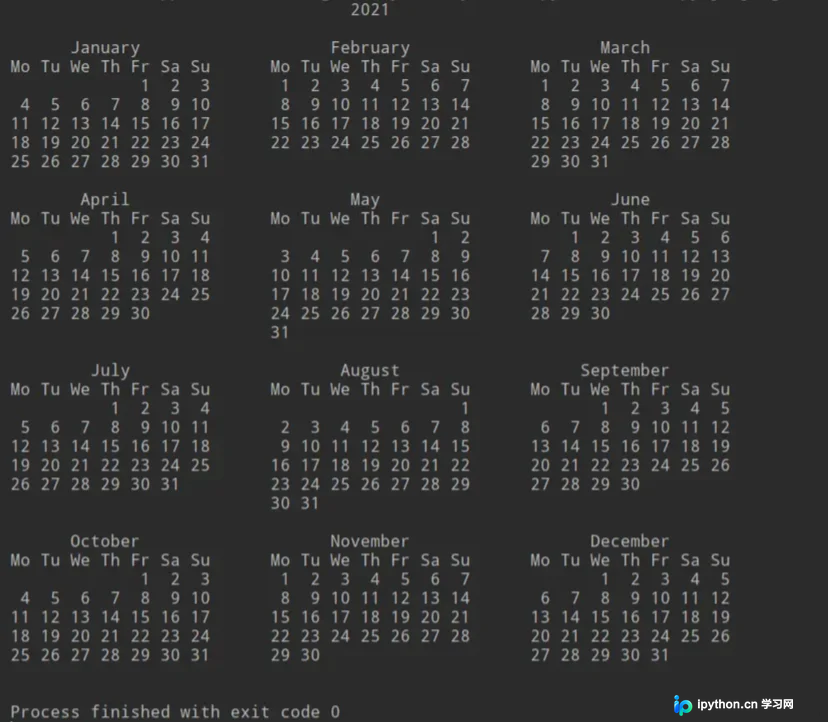
打印2021年年历
import calendar

# 打印2021年历

print(calendar.calendar(2021))
打印指定某年的月历
print(calendar.month(2021,11))
4、总结
通过对calendar模块日历相关方法的学习,可知该模块主要提供Calendar、TextCalendar和HTMLCalendar三个核心类。利用这些类,我们可以更好地以字符串或HTML形式打印出指定的日历。
到此这篇关于Python calendar模块详情的文章就介绍到这了,更多相关Python calendar模块内容请搜索本站以前的文章或继续浏览下面的相关文章,希望大家以后多多支持本站!
免责声明:本文内容仅供参考,不代表本站观点。转载或引用请注明出处。









