

Python基于三层全连接神经网络的手写数字识别实战

本文详细解析如何使用Python从零搭建一个包含三个全连接层、ReLU激活函数及Softmax损失层的神经网络,用于MNIST手写数字分类。文章涵盖模型构建、前向传播与反向传播代码实现,并针对numpy高版本导致的allow_pickle报错提供两种具体解决方案,帮助开发者顺利完成模型训练与推断。
前言
本文旨在通过构建一个三层神经网络来实现手写数字的分类任务。神经网络的设计是开发复杂深度学习应用的基础,本文将重点介绍如何利用Python高级编程语言搭建神经网络的训练与推断框架,从而完成手写数字的分类模型构建与应用。
本文实验文档下载
一、神经网络组成
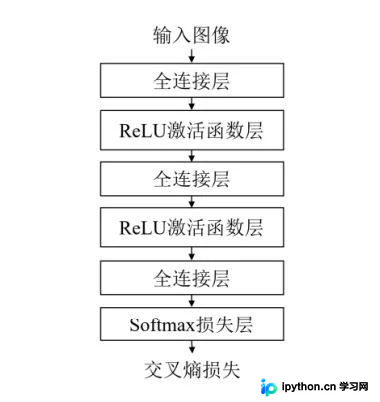
完整的神经网络通常由多个基本网络层堆叠而成。本实验采用的三层全连接神经网络包含三个全连接层,在相邻的全连接层之间插入了ReLU激活函数以引入非线性变换,最后通过Softmax层计算交叉熵损失,结构如图所示。因此,本实验涉及的基本单元包括全连接层、ReLU激活函数以及Softmax损失函数。
二、代码实现
1.引入库
import numpy as np
import struct
import os
2.导入数据集
MNIST_DIR = "mnist_data"
TRAIN_DATA = "train-images-idx3-ubyte"
TRAIN_LABEL = "train-labels-idx1-ubyte"
TEST_DATA = "t10k-images-idx3-ubyte"
TEST_LABEL = "t10k-labels-idx1-ubyte"
数据集链接
下载数据集后请务必进行解压操作。
3.全连接层
class FullyConnectedLayer(object):
    def __init__(self, num_input, num_output):  # 全连接层初始化
        self.num_input = num_input
        self.num_output = num_output
    def init_param(self, std=0.01):  # 参数初始化
        self.weight = np.random.normal(loc=0, scale=std, size=(self.num_input, self.num_output))
        self.bias = np.zeros([1, self.num_output])
    def forward(self, input):  # 前向传播计算
        self.input = input
        self.output = np.dot(self.input,self.weight)+self.bias
        return self.output
    def backward(self, top_diff):  # 反向传播的计算
        self.d_weight =np.dot(self.input.T,top_diff)
        self.d_bias = top_diff #
        bottom_diff = np.dot(top_diff,self.weight.T)
        return bottom_diff
    def update_param(self, lr):  # 参数更新
        self.weight = self.weight - lr * self.d_weight
        self.bias = self.bias - lr * self.d_bias
    def load_param(self, weight, bias):  # 参数加载
        assert self.weight.shape == weight.shape
        assert self.bias.shape == bias.shape
        self.weight = weight
        self.bias = bias
    def save_param(self):  # 参数保存
        return self.weight, self.bias
4.ReLU激活函数层
class ReLULayer(object):
    def forward(self, input):  # 前向传播的计算
        self.input = input
        output = np.maximum(self.input,0)
        return output
    def backward(self, top_diff):  # 反向传播的计算
        b = self.input
        b[b>0] =1
        b[b<0] = 0
        bottom_diff = np.multiply(b,top_diff)
        return bottom_diff
5.Softmax损失层
class SoftmaxLossLayer(object):
    def forward(self, input):  # 前向传播的计算
        input_max = np.max(input, axis=1, keepdims=True)
        input_exp = np.exp(input- input_max)#(64,10)
        partsum = np.sum(input_exp,axis=1)
        sum = np.tile(partsum,(10,1))
        self.prob = input_exp / sum.T
        return self.prob
    def get_loss(self, label):   # 计算损失
        self.batch_size = self.prob.shape[0]
        self.label_onehot = np.zeros_like(self.prob)
        self.label_onehot[np.arange(self.batch_size), label] = 1.0
        loss = -np.sum(self.label_onehot*np.log(self.prob)) / self.batch_size
        return loss
    def backward(self):  # 反向传播的计算
        bottom_diff = (self.prob - self.label_onehot)/self.batch_size
        return bottom_diff
6.网络训练与推断模块
class MNIST_MLP(object):
    def __init__(self, batch_size=64, input_size=784, hidden1=32, hidden2=16, out_classes=10, lr=0.01, max_epoch=1,print_iter=100):
        self.batch_size = batch_size
        self.input_size = input_size
        self.hidden1 = hidden1
        self.hidden2 = hidden2
        self.out_classes = out_classes
        self.lr = lr
        self.max_epoch = max_epoch
        self.print_iter = print_iter

    def shuffle_data(self):
        np.random.shuffle(self.train_data)

    def build_model(self):  # 建立网络结构
        self.fc1 = FullyConnectedLayer(self.input_size, self.hidden1)
        self.relu1 = ReLULayer()
        self.fc2 = FullyConnectedLayer(self.hidden1, self.hidden2)
        self.relu2 = ReLULayer()
        self.fc3 = FullyConnectedLayer(self.hidden2, self.out_classes)
        self.softmax = SoftmaxLossLayer()
        self.update_layer_list = [self.fc1, self.fc2, self.fc3]

    def init_model(self):
        for layer in self.update_layer_list:
            layer.init_param()

    def forward(self, input):  # 神经网络的前向传播
        h1 = self.fc1.forward(input)
        h1 = self.relu1.forward(h1)
        h2 = self.fc2.forward(h1)
        h2 = self.relu2.forward(h2)
        h3 = self.fc3.forward(h2)
        self.prob = self.softmax.forward(h3)
        return self.prob

    def backward(self):  # 神经网络的反向传播
        dloss = self.softmax.backward()
        dh2 = self.fc3.backward(dloss)
        dh2 = self.relu2.backward(dh2)
        dh1 = self.fc2.backward(dh2)
        dh1 = self.relu1.backward(dh1)
        dh1 = self.fc1.backward(dh1)

    def update(self, lr):
        for layer in self.update_layer_list:
            layer.update_param(lr)

    def load_mnist(self, file_dir, is_images='True'):
        bin_file = open(file_dir, 'rb')
        bin_data = bin_file.read()
        bin_file.close()
        if is_images:
            fmt_header = '>iiii'
            magic, num_images, num_rows, num_cols = struct.unpack_from(fmt_header, bin_data, 0)
        else:
            fmt_header = '>ii'
            magic, num_images = struct.unpack_from(fmt_header, bin_data, 0)
            num_rows, num_cols = 1, 1
        data_size = num_images * num_rows * num_cols
        mat_data = struct.unpack_from('>' + str(data_size) + 'B', bin_data, struct.calcsize(fmt_header))
        mat_data = np.reshape(mat_data, [num_images, num_rows * num_cols])
        return mat_data

    def load_data(self):
        train_images = self.load_mnist(os.path.join(MNIST_DIR, TRAIN_DATA), True)
        train_labels = self.load_mnist(os.path.join(MNIST_DIR, TRAIN_LABEL), False)
        test_images = self.load_mnist(os.path.join(MNIST_DIR, TEST_DATA), True)
        test_labels = self.load_mnist(os.path.join(MNIST_DIR, TEST_LABEL), False)
        self.train_data = np.append(train_images, train_labels, axis=1)
        self.test_data = np.append(test_images, test_labels, axis=1)


    def load_model(self, param_dir):
        params = np.load(param_dir).item()
        self.fc1.load_param(params['w1'], params['b1'])
        self.fc2.load_param(params['w2'], params['b2'])
        self.fc3.load_param(params['w3'], params['b3'])

    def save_model(self, param_dir):
        params = {}
        params['w1'], params['b1'] = self.fc1.save_param()
        params['w2'], params['b2'] = self.fc2.save_param()
        params['w3'], params['b3'] = self.fc3.save_param()
        np.save(param_dir, params)

    def train(self):
        max_batch_1 = self.train_data.shape[0] / self.batch_size
        max_batch = int(max_batch_1)
        for idx_epoch in range(self.max_epoch):
            mlp.shuffle_data()
            for idx_batch in range(max_batch):
                batch_images = self.train_data[idx_batch * self.batch_size:(idx_batch + 1) * self.batch_size, :-1]
                batch_labels = self.train_data[idx_batch * self.batch_size:(idx_batch + 1) * self.batch_size, -1]
                prob = self.forward(batch_images)
                loss = self.softmax.get_loss(batch_labels)
                self.backward()
                self.update(self.lr)
                if idx_batch % self.print_iter == 0:
                    print('Epoch %d, iter %d, loss: %.6f' % (idx_epoch, idx_batch, loss))

    def evaluate(self):
        pred_results = np.zeros([self.test_data.shape[0]])
        for idx in range(int(self.test_data.shape[0] / self.batch_size)):
            batch_images = self.test_data[idx * self.batch_size:(idx + 1) * self.batch_size, :-1]
            prob = self.forward(batch_images)
            pred_labels = np.argmax(prob, axis=1)
            pred_results[idx * self.batch_size:(idx + 1) * self.batch_size] = pred_labels
        accuracy = np.mean(pred_results == self.test_data[:, -1])
        print('Accuracy in test set: %f' % accuracy)
7.完整流程
if __name__ == '__main__':
    h1, h2, e = 128, 64, 20
    mlp = MNIST_MLP(hidden1=h1, hidden2=h2,max_epoch=e)
    mlp.load_data()
    mlp.build_model()
    mlp.init_model()
    mlp.train()
    mlp.save_model('mlp-%d-%d-%depoch.npy' % (h1,h2,e))
    mlp.load_model('mlp-%d-%d-%depoch.npy' % (h1, h2, e))
    mlp.evaluate()
三、代码debug
PyCharm在初次运行时,会在以下代码处报错:
mlp.load_model('mlp-%d-%d-%depoch.npy' % (h1, h2, e))
ValueError: Object arrays cannot be loaded when allow_pickle=False
经查阅资料发现,该问题由numpy版本过高引起。
解决方法:
点击报错位置进入源代码(.py文件),注释掉第693行代码:
#if not allow_pickle:
    #raise ValueError("Object arrays cannot be loaded when "
                   #  "allow_pickle=False")

    # Now read the actual data.
    if dtype.hasobject:
        # The array contained Python objects. We need to unpickle the data.
        #if not allow_pickle:
            #raise ValueError("Object arrays cannot be loaded when "
                           #  "allow_pickle=False")
        if pickle_kwargs is None:
            pickle_kwargs = {}
        try:
            array = pickle.load(fp, **pickle_kwargs)
        except UnicodeError as err:
            if sys.version_info[0] >= 3:
                # Friendlier error message
四、结果展示
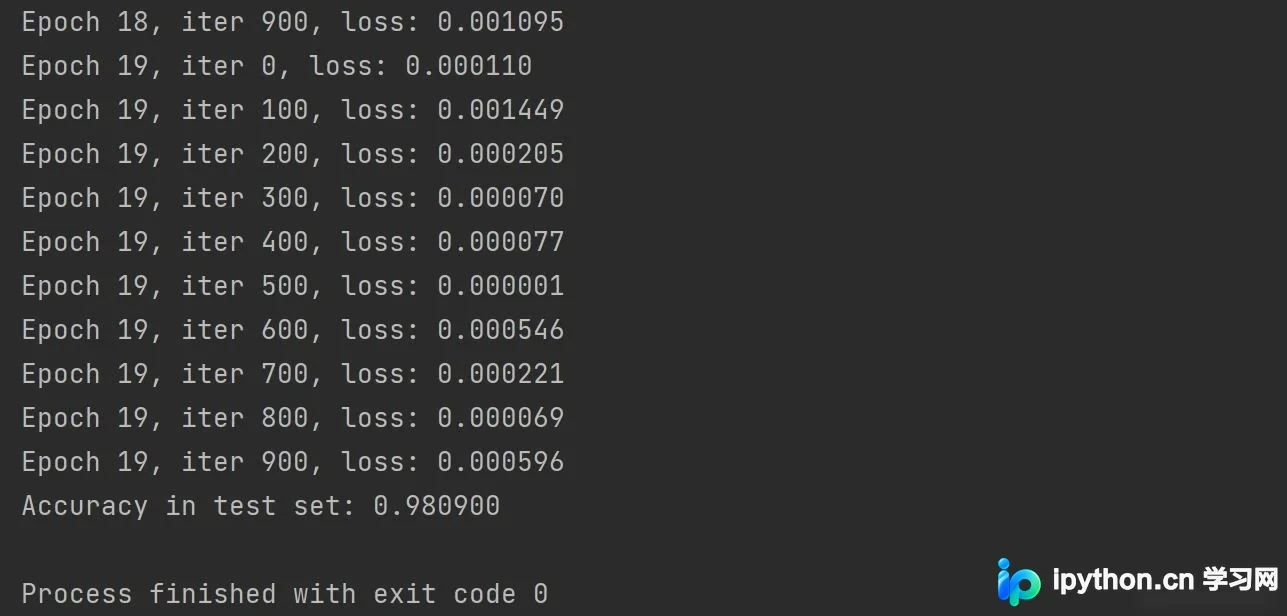
在保持网络结构不变的前提下,通过自行调节参数主要体现在:
if __name__ == '__main__':
    h1, h2, e = 128, 64, 20
class MNIST_MLP(object):
    def __init__(self, batch_size=64, input_size=784, hidden1=32, hidden2=16, out_classes=10, lr=0.01, max_epoch=1,print_iter=100):
为提高准确率,您也可以尝试其他修改方式,以下是得出的输出结果:
补充
ValueError: Object arrays cannot be loaded when allow_pickle=False解决方案
在读取.npz文件时出现以下错误:
population_data=np.load("./data/populations.npz")
print(population_data.files)#里面有两个数组   data  feature_names
data=population_data['data']
print(data)
print(population_data['feature_names'])
报错信息:
['data', 'feature_names']
Traceback (most recent call last):
  File "E:/pycharm file/使用scikit-learn构建模型/构建一元线性模型.py", line 32, in <module>
    data=population_data['data']
  File "E:\pycharm file\venv\lib\site-packages\numpy\lib\npyio.py", line 262, in __getitem__
    pickle_kwargs=self.pickle_kwargs)
  File "E:\pycharm file\venv\lib\site-packages\numpy\lib\format.py", line 692, in read_array
    raise ValueError("Object arrays cannot be loaded when "
ValueError: Object arrays cannot be loaded when allow_pickle=False
报错原因是numpy版本过高,当前使用的是1.16.3版本,建议降级为1.16.2版本。
两种解决方案:
Numpy 1.16.3于几天前发布,发行说明指出:“函数np.load()和np.lib.format.read_array()现在默认采用allow_pickle关键字,且默认为False,以响应CVE-2019-6446(nvd.nist.gov/vuln/detail/CVE-2019-6446)”。降级至1.16.2对我有效,因为错误发生在某些库内部。
第一种方法:点击报错处进入源代码(.py文件),注释掉第693行代码:
#if not allow_pickle:
    #raise ValueError("Object arrays cannot be loaded when "
                   #  "allow_pickle=False")

    # Now read the actual data.
    if dtype.hasobject:
        # The array contained Python objects. We need to unpickle the data.
        #if not allow_pickle:
            #raise ValueError("Object arrays cannot be loaded when "
                           #  "allow_pickle=False")
        if pickle_kwargs is None:
            pickle_kwargs = {}
        try:
            array = pickle.load(fp, **pickle_kwargs)
        except UnicodeError as err:
            if sys.version_info[0] >= 3:
                # Friendlier error message
修改后成功解决问题,但修改源码可能存在潜在后遗症。
第二种方法:降级numpy版本
pip install numpy==1.16.2
上述两种方法均可成功解决该报错问题。
以上就是Python利用三层神经网络实现手写数字分类详解的详细内容,更多关于Python的资料请关注本站其它相关文章!
免责声明:本文内容仅供参考,不代表本站观点。转载或引用请注明出处。









