

Python实现Excel表格S型彩色填充与样式设置

发布时间:2026-10-15| 4人浏览过
本文介绍如何使用Python的openpyxl库实现Excel表格的彩色填充。通过S型数组遍历算法,程序能够按特定逻辑为不同区域分配颜色。文章提供了完整的代码示例,展示如何设置单元格背景色、边框及保存文件,适合需要自动化生成格式化Excel报表的开发者参考。
需求:

需求看似简单,但最后部分的遍历逻辑颇具趣味:采用S型数组赋值方式,需综合考虑下标变化,属于基础编程题。
先实现一个大致符合要求的版本。
m = 5
cols = 9
rows = 4
nums = [0, 1]
array = [[-1 for _ in range(9)] for _ in range(4)]
i, j = 0, 0
t = 0
index = -1
while t < cols * rows:
    if i % rows == 0 and i > 0:
        j += 1
        i -= 1
    if i < 0:
        j += 1
        i += 1
    # if t % m == 0:
    #     index = (index + 1) % len(nums)
    array[i][j] = t  # index
    if j % 2 == 0:  # 0,2,..2n 下
        i += 1
    else:  # 1,3, 2n+1 上
        i -= 1
    t += 1

for i in range(4):
    print(array[i])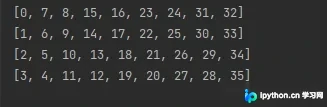
需求代码:
from openpyxl import Workbook
from openpyxl.styles import PatternFill, Side, Border

# 仿照excel格式
# excel文件路径
file_path = 'C:/Users/Lenovo/Desktop/工作簿2.xlsx'

colors = ['000000', '44546A', 'CC00FF', '00008B']
colorsLen = len(colors)
fills = [PatternFill("solid", fgColor=color) for color in colors]
workbook = Workbook()
sheet = workbook.create_sheet("Sheet1", 0)
rows, cols = 19, 9
colorIndex = -1
block_height = 5

# 按行
for i in range(int(rows / block_height)):
    for j in range(cols):
        colorIndex = (colorIndex + 1) % colorsLen
        for p in range(block_height):
            row = block_height * i + p
            col = j
            cell = sheet.cell(column=col + 1, row=row + 1)
            cell.fill = fills[colorIndex]
            cell.border = Border(left=Side(style='thin'),
                                 right=Side(style='thin'),
                                 top=Side(style='thin'),
                                 bottom=Side(style='thin'))

# 按列
if rows % block_height != 0:
    newRows = rows % block_height
    preRows = rows - rows % newRows - 1
    newCols = cols
    i, j = 0, 0
    t = 0
    while t < newCols * newRows:
        if i % newRows == 0 and i > 0:
            j += 1
            i -= 1
        if i < 0:
            j += 1
            i += 1
        if t % block_height == 0:
            colorIndex = (colorIndex + 1) % colorsLen
        cell = sheet.cell(column=j + 1, row=preRows + i + 1)
        cell.fill = fills[colorIndex]
        cell.border = Border(left=Side(style='thin'),
                             right=Side(style='thin'),
                             top=Side(style='thin'),
                             bottom=Side(style='thin'))
        if j % 2 == 0:  # 0,2,..2n 下
            i += 1
        else:  # 1,3, 2n+1 上
            i -= 1
        t += 1

workbook.save(file_path)

# 下面是学习读取的部分代码
# wb = openpyxl.load_workbook(file_path)
# sheet_name = 'Sheet1'
# sheet = wb.get_sheet_by_name(sheet_name)
# for r in range(1, sheet.max_row + 1):
#     for c in range(1, sheet.max_column + 1):
#         item = sheet.cell(row=r, column=c)
#         print(item, end=' ')
#     print()
# wb.save(file_path)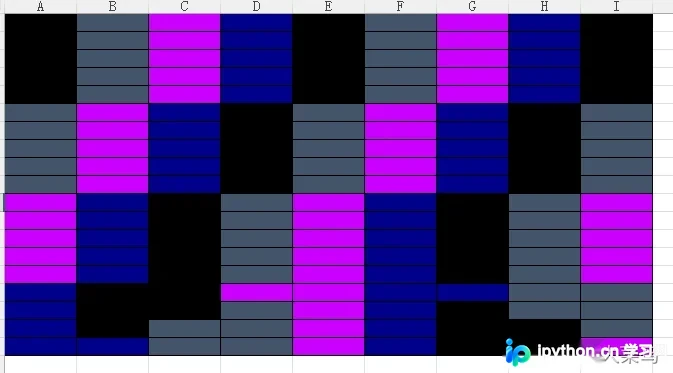
颜色对应可能不完全一致,但整体逻辑和效果大致相符即可。
总结
到此这篇关于用python如何绘制表格不同颜色excel的文章就介绍到这了,更多相关python绘制不同颜色excel内容请搜索本站以前的文章或继续浏览下面的相关文章希望大家以后多多支持本站!
免责声明:本文内容仅供参考,不代表本站观点。转载或引用请注明出处。









