

Python 带你快速上手 Apache APISIX 插件开发

本文详细介绍如何使用 Python 语言为 Apache APISIX 网关开发插件。内容涵盖项目架构原理、Python Runner 的安装部署与配置、以及插件开发的具体规范与示例。通过实战演示,帮助开发者快速掌握基于 Python 的 API 网关扩展能力,实现灵活的流量控制与业务逻辑处理。
前言:
熟悉 Apache APISIX 的开发者应该了解,此前社区已支持 Java 和 Go 语言的 Runner。如今,Apache APISIX Python Runner 正式加入,为社区中开发 Apache APISIX 插件的开发者提供了新的语言选择。
Python 是一种解释型高级编程语言,其语法简洁、代码可读性强,在跨平台兼容、可移植性及开发效率方面表现优异。作为高级语言,它通过较高的封装抽象屏蔽了底层细节(如垃圾回收机制 GC),使开发者能更专注于应用逻辑的实现。
此外,作为拥有 30 年历史的老牌语言, 的生态系统和模块库已非常完善。在大多数开发和应用场景中,均可从社区找到成熟的模块或解决方案。
Python 的其他优势此处不再赘述,但其缺点也较为明显:作为解释型语言, 在性能上相较于 C++ 和 Go 等编译型语言仍存在一定差距。
一、了解:项目架构
apache-apisix-python-runner 项目可视为 为 Apache APISIX 和 Python 之间的桥梁。通过 Python Runner ,可以将 Python 直接应用于 Apache APISIX 的插件开发中。此举旨在让更多对 Apache APISIX 和 API 网关感兴趣的 Python 开发者通过本项目,更深入地了解和使用 Apache APISIX。以下是 Apache APISIX 多语言支持的架构图。
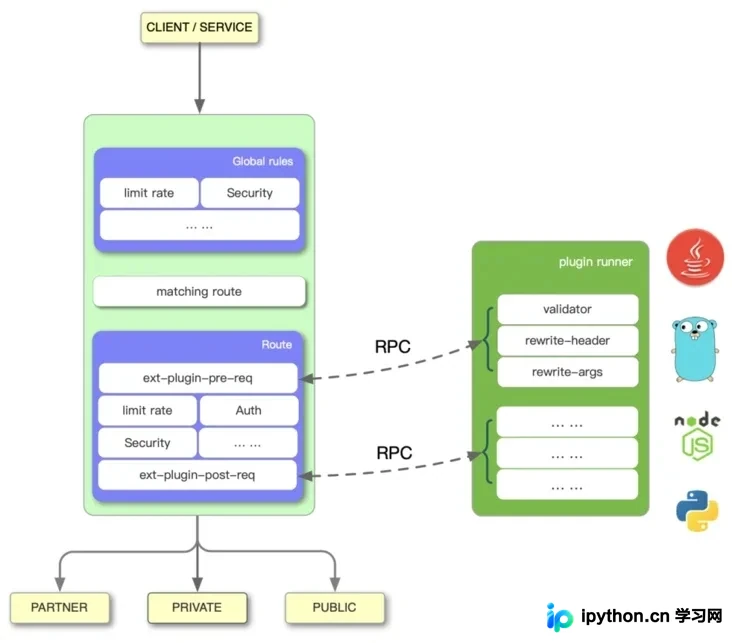
上图左侧展示了 Apache APISIX 的工作流程,右侧的 Plugin Runner 则是各语言的插件运行器。本文介绍的 apisix-python-plugin-runner 正是支持 Python 语言的 Plugin Runner。
在 Apache APISIX 中配置一个 Plugin Runner 时,Apache APISIX 会启动一个子进程来运行 Plugin Runner。该子进程与 Apache APISIX 进程属于同一用户,当重启或重新加载 Apache APISIX 时,Plugin Runner 也将随之重启。
若为特定路由配置了 ext-plugin-* 插件,当请求命中该路由时,将触发 Apache APISIX 通过 Unix Socket 向 Plugin Runner 发起 RPC 调用。该调用分为两个阶段:
- ext-plugin-pre-req:在执行
Apache APISIX内置插件(Lua 语言插件)之前 - ext-plugin-post-req:在执行
Apache APISIX内置插件(Lua 语言插件)之后
用户可根据实际需求选择并配置 Plugin Runner 的执行时机。Plugin Runner 负责处理 RPC 调用,其内部会创建一个模拟请求,运行由多语言编写的插件,并将结果返回给 Apache APISIX。
多语言插件的执行顺序在 ext-plugin-* 插件配置项中定义。与其他插件类似,它们可以被启用,并在运行过程中重新定义。
二、安装:部署测试
基础运行环境:Apache APISIX 2.7、Python 3.6+
Apache APISIX 的安装部署可参考 Apache APISIX 官方文档:如何构建 Apache APISIX (https://github.com/apache/api...) 进行部署。
1. 下载安装 Python Runner
$ git clone https://github.com/apache/apisix-python-plugin-runner.git
$ cd apisix-python-plugin-runner
$ make install
2. 配置 Python Runner
- 开发模式配置
运行 Python Runner:
- 生产模式配置
$ cd /path/to/apisix-python-plugin-runner
$ APISIX_LISTEN_ADDRESS=unix:/tmp/runner.sock python3 apisix/main.py start
修改 Apache APISIX 配置文件
$ vim /path/to/apisix/conf/config.yaml
apisix:
  admin_key:
    - name: "admin"
      key: edd1c9f034335f136f87ad84b625c8f1
      role: admin
ext-plugin:
  path_for_test: /tmp/runner.sock
修改 Apache APISIX 配置文件
- Python Runner 配置(可选)
$ vim /path/to/apisix/conf/config.yaml
apisix:
  admin_key:
    - name: "admin"
      key: edd1c9f034335f136f87ad84b625c8f1
      role: admin
ext-plugin:
  cmd: [ "python3", "/path/to/apisix-python-plugin-runner/apisix/main.py", "start" ]
如需调整 Log Level 或 Unix Domain Socket 环境变量,可修改 Runner 的配置文件。
$ vim /path/to/apisix-python-plugin-runner/apisix/config.yaml
socket:
  file: $env.APISIX_LISTEN_ADDRESS # Environment variable or absolute path

logging:
  level: debug # error warn info debug
3. 启动 Python Runner
$ cd /path/to/apisix
# Start or Restart
$ ./bin/apisix [ start | restart ]
启动或重启 Apache APISIX 即可,此时 Apache APISIX 和 Python Runner 已完成配置并启动。
4. 测试 Python Runner
配置 Apache APISIX 路由及插件信息:
# 使用默认demo插件进行测试
$ curl http://127.0.0.1:9080/apisix/admin/routes/1 -H 'X-API-KEY: edd1c9f034335f136f87ad84b625c8f1' -X PUT -d '
{
  "uri": "/get",
  "plugins": {
    "ext-plugin-pre-req": {
      "conf": [
        { "name": "stop", "value":"{\"body\":\"hello\"}"}
      ]
    }
  },
  "upstream": {
        "type": "roundrobin",
        "nodes": {
            "127.0.0.1:1980": 1
        }
    }
}'
plugins.ext-plugin-pre-req.conf为Runner插件配置,conf为数组格式,可同时设置多个插件。- 插件配置对象中
name为插件名称,该名称需与插件代码文件和对象名称保持一致。 - 插件配置对象中
value为插件配置,可为JSON字符串。
访问验证:
$ curl http://127.0.0.1:9080/get -i
HTTP/1.1 200 OK
Date: Fri, 13 Aug 2021 13:39:18 GMT
Content-Type: text/plain; charset=utf-8
Transfer-Encoding: chunked
Connection: keep-alive
host: 127.0.0.1:9080
accept: */*
user-agent: curl/7.64.1
X-Resp-A6-Runner: Python
Server: APISIX/2.7

Hello, Python Runner of APISIX
三、实践:插件开发
1. 插件目录
/path/to/apisix-python-plugin-runner/apisix/plugins
此目录中的 .py 文件将被自动加载。
2. 插件示例
/path/to/apisix-python-plugin-runner/apisix/plugins/stop.py
/path/to/apisix-python-plugin-runner/apisix/plugins/rewrite.py
3. 插件格式
from apisix.runner.plugin.base import Base
from apisix.runner.http.request import Request
from apisix.runner.http.response import Response


class Stop(Base):
    def __init__(self):
        """
        Example of `stop` type plugin, features:
            This type of plugin can customize response `body`, `header`, `http_code`
            This type of plugin will interrupt the request
        """
        super(Stop, self).__init__(self.__class__.__name__)

    def filter(self, request: Request, response: Response):
        """
        The plugin executes the main function
        :param request:
            request parameters and information
        :param response:
            response parameters and information
        :return:
        """
        # 在插件中可以通过 `self.config` 获取配置信息,如果插件配置为JSON将自动转换为字典结构
        # print(self.config)

        # 设置响应头信息
        headers = request.headers
        headers["X-Resp-A6-Runner"] = "Python"
        response.headers = headers

        # 设置响应体信息
        response.body = "Hello, Python Runner of APISIX"

        # 设置响应状态码
        response.status_code = 201

        # 通过调用 `self.stop()` 中断请求流程,此时将立即响应请求给客户端
        # 如果未显示调用 `self.stop()` 或 显示调用 `self.rewrite()`将继续将请求
        # 默认为 `self.rewrite()`
        self.stop()
4. 插件规范及注意事项
- 实现插件对象必须继承
Base类 - 插件必须实现 filter 函数
filter函数参数只能包含Request和Response类对象作为参数Request对象参数可用于获取请求信息Response对象参数可用于设置响应信息self.config可以获取插件配置信息filter函数中调用self.stop()时将立即中断请求,并响应数据。filter函数中调用self.rewrite()时,请求将继续处理。
到此这篇关于 Python 带你快速上手 Apache APISIX 插件开发的文章就介绍到这了,更多相关 Python Apache APISIX 插件开发内容请搜索本站以前的文章或继续浏览下面的相关文章,希望大家以后多多支持本站!
免责声明:本文内容仅供参考,不代表本站观点。转载或引用请注明出处。









