

Python实现简易自习室座位预约系统:从界面到命令行交互

发布时间:2026-10-14| 4人浏览过
本文介绍使用Python和PySide2构建的简易自习室座位预约系统。系统通过seatInf.json配置桌椅布局,利用orderList.json和occupied.json管理预约与占用状态。支持命令行模拟刷卡进出及预约暂离,包含完整的界面代码与测试用例,适合Python初学者参考学习GUI开发与数据交互逻辑。
本项目为Python初学者的实践练习,代码中可能存在不足,欢迎指正。
0 效果
系统界面包含座位选择区域,用户可直观查看可用座位。
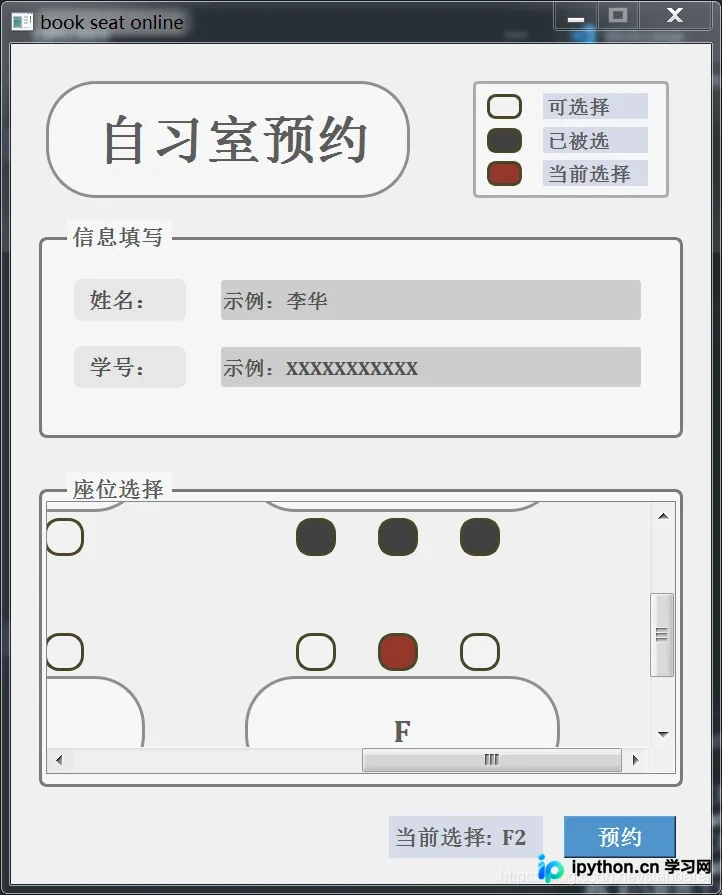
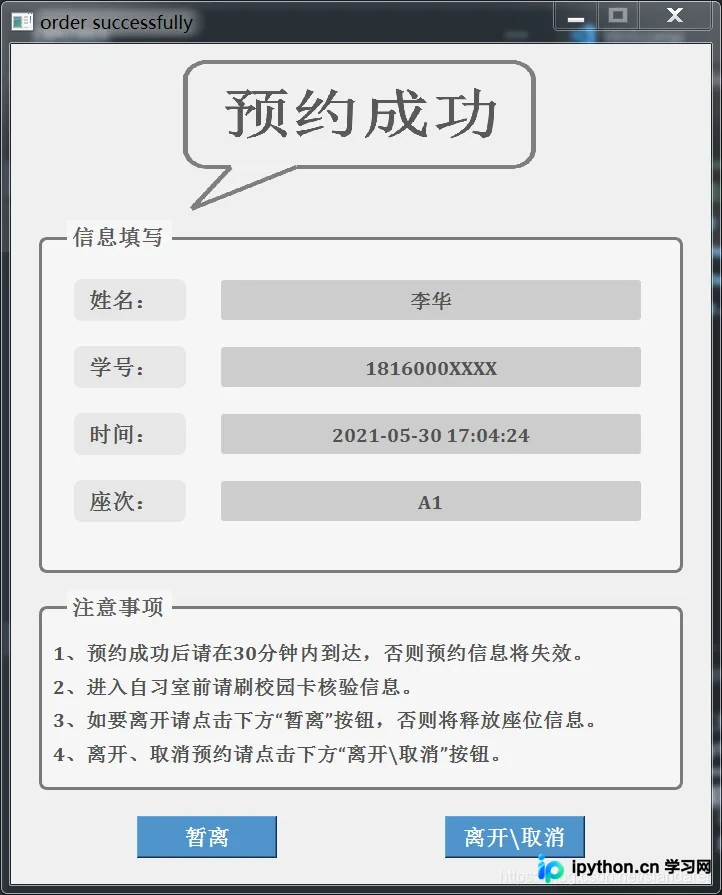
1 关于所需库
运行该Python环境需预先安装以下依赖包:
- PySide2
- datetime
- json
- argparse
2 关于座位选择框
座位选择框内的桌子数量、尺寸、样式及椅子位置均可自定义配置。例如,可以通过修改参数来调整桌子颜色及是否启用圆角效果。
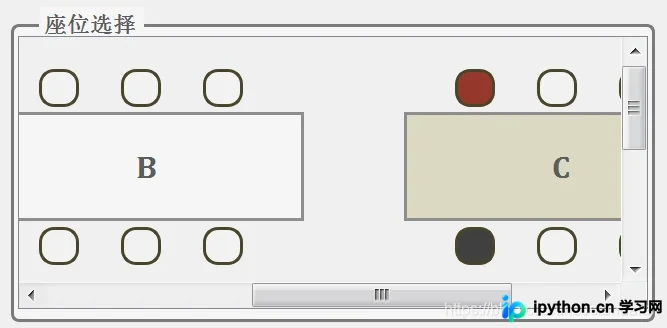
该配置主要依赖seatInf.json文件,其结构示例如下:
{
    "tableNum": 6,
    "tablePos": [
        [0.02,0.15],
        [0.35,0.15],
        [0.68,0.15],
        [0.02,0.65],
        [0.35,0.65],
        [0.68,0.65]
    ],
    "tableSize": [
        [0.25,0.2],
        [0.25,0.2],
        [0.25,0.2],
        [0.25,0.2],
        [0.25,0.2],
        [0.25,0.2]
    ],
    "tableType": [
        0,1,2,0,0,0
    ],
    "tableSS": [
        "QLabel{background: rgb(245,245,245);color:rgb(92,92,92);border-radius:50px;border: 3px solid rgb(142,142,142)}",
        "QLabel{background: rgb(245,245,245);color:rgb(92,92,92);border: 3px solid rgb(142,142,142)}",
        "QLabel{background: rgb(221,217,195);color:rgb(92,92,92);border: 3px solid rgb(142,142,142)}"
    ],
    "tableId": [
        "A","B","C","D","E","F"
    ],
    "chairNum": [
        6,6,6,6,6,6
    ],
    "chairPos": [
        [
            [0.04,-0.08],
            [0.105,-0.08],
            [0.17,-0.08],
            [0.04,0.21],
            [0.105,0.21],
            [0.17,0.21]
        ],
        [
            [0.04,-0.08],
            [0.105,-0.08],
            [0.17,-0.08],
            [0.04,0.21],
            [0.105,0.21],
            [0.17,0.21]
        ],[
            [0.04,-0.08],
            [0.105,-0.08],
            [0.17,-0.08],
            [0.04,0.21],
            [0.105,0.21],
            [0.17,0.21]
        ],[
            [0.04,-0.08],
            [0.105,-0.08],
            [0.17,-0.08],
            [0.04,0.21],
            [0.105,0.21],
            [0.17,0.21]
        ],[
            [0.04,-0.08],
            [0.105,-0.08],
            [0.17,-0.08],
            [0.04,0.21],
            [0.105,0.21],
            [0.17,0.21]
        ],[
            [0.04,-0.08],
            [0.105,-0.08],
            [0.17,-0.08],
            [0.04,0.21],
            [0.105,0.21],
            [0.17,0.21]
        ]
    ],
    "chairSize": [
        0.032,0.07
    ],
    "chairSS_W": "background: rgb(242,242,242);border-radius:15px;border: 3px solid rgb(74,69,42)",
    "chairSS_K": "background: rgb(64,64,64);border-radius:15px;border: 3px solid rgb(74,69,42)",
    "chairSS_R": "background: rgb(149,55,43);border-radius:15px;border: 3px solid rgb(74,69,42)",
    "mapSize": [
        2,2
    ]
}
3 关于申请表和座位被占情况
为简化模拟流程,预约记录与座位占用状态分别持久化存储于orderList.json和occupied.json文件中。
3.1 orderList.json:
"[[\"A1\", \"A2\", \"A3\", \"A4\", \"A5\", \"A6\", \"B1\", \"B2\", \"B3\", \"B4\", \"B5\", \"B6\", \"C1\", \"C2\", \"C3\", \"C4\", \"C5\", \"C6\", \"D1\", \"D2\", \"D3\", \"D4\", \"D5\", \"D6\", \"E1\", \"E2\", \"E3\", \"E4\", \"E5\", \"E6\", \"F1\", \"F2\", \"F3\", \"F4\", \"F5\", \"F6\"], [\"\", \"\", \"\", \"\", \"\", \"\", \"\", \"\", \"\", \"\", \"\", \"\", \"\", \"\", \"\", \"1816000XXXX\", \"\", \"\", \"\", \"\", \"\", \"\", \"\", \"\", \"\", \"\", \"\", \"\", \"\", \"\", \"\", \"\", \"\", \"\", \"\", \"\"], [\"\", \"\", \"\", \"\", \"\", \"\", \"\", \"\", \"\", \"\", \"\", \"\", \"\", \"\", \"\", \"temp\", \"\", \"\", \"\", \"\", \"\", \"\", \"\", \"\", \"\", \"\", \"\", \"\", \"\", \"\", \"\", \"\", \"\", \"\", \"\", \"\"]]"
3.2 occupied.json:
"{\"A1\": false, \"A2\": false, \"A3\": false, \"A4\": false, \"A5\": false, \"A6\": false, \"B1\": false, \"B2\": false, \"B3\": false, \"B4\": false, \"B5\": false, \"B6\": false, \"C1\": false, \"C2\": false, \"C3\": false, \"C4\": true, \"C5\": false, \"C6\": false, \"D1\": false, \"D2\": false, \"D3\": false, \"D4\": false, \"D5\": false, \"D6\": false, \"E1\": false, \"E2\": false, \"E3\": false, \"E4\": false, \"E5\": false, \"E6\": false, \"F1\": false, \"F2\": false, \"F3\": false, \"F4\": false, \"F5\": false, \"F6\": false}"
4 关于命令行参数
系统通过命令行模拟实体刷卡流程,同时提供了预约和申请暂离的指令接口。
4.1 slotCard_in
Python slotCard_in.py -i="XXXXXXXXXXX"
Python slotCard_in.py --student-id="XXXXXXXXXXX"
4.2 slotCard_out
Python slotCard_out.py -i="XXXXXXXXXXX"
Python slotCard_out.py --student-id="XXXXXXXXXXX"
4.3 cmd_order
'''
TEST CODE:
--------------------------------
see Map:
Python cmd_order.py
--------------------------------
order seat:
Python cmd_order.py -i="XXXXXXXXXXX" -n="xxx" -s="A1"

-h   --help         show the help message and exit
-i   --student-id   student id
-n   --student-name student name
-s   --seatPos      seat id
'''
4.4 cmd_leave
'''
TEST CODE:
----------------------------------------------
leave for temp
Python cmd_leave.py -i="XXXXXXXXXXX" -t="temp"
----------------------------------------------
leave
Python cmd_leave.py -i="XXXXXXXXXXX" -t="free"
[or]
Python cmd_leave.py -i="XXXXXXXXXXX"

-h   --help         show the help message and exit
-i   --student-id   student id
-t   --leave-type   temp/free
'''
5 关于命令行输出
5.1 cmd_order 预约
> Python cmd_order.py
[seat]============================
可预约座位:

 ▇ A2 A3 A4 A5 A6
 B1 B2 B3 B4 B5 B6
 C1 C2 C3 C4 C5 C6
 D1 D2 D3 D4 D5 D6
 E1 E2 E3 E4 E5 E6
 F1 F2 F3 F4 F5 F6

> Python cmd_order.py -i="18160000000" -n="xxx" -s="A1"
[book error]========================
座位已被占,请选择其他位置申请

> Python cmd_order.py -i="18160000000" -n="xxx" -s="A100"
[book error]========================
座位编号格式不正确

> Python cmd_order.py -i="18160000000" -n="xxx" -s="A2"
[book]===========================================
2021-05-31 18:04:35
姓名:xxx
学号:18160000000
座次:A2
预约成功!
-------------------------------------------------
注意事项:
1、预约成功后请在30分钟内到达,否则预约信息将失效。
2、进入自习室前请刷校园卡核验信息。
3、如要暂离请cmd运行如下代码:
   Python cmd_leave.py -i='XXXXXXXXXXX' -t='temp'
4、离开、取消预约请cmd运行如下代码:
   Python cmd_leave.py -i='XXXXXXXXXXX' -t='free'

> Python cmd_order.py -i="18160000000" -n="xxx" -s="A3"
[book error]========================
请勿重复预约
5.2 slotCard_in 刷卡进入
> Python slotCard_in.py -i="1816000XXXX"
[in error]==========================
非本校校园卡或已超时

> Python slotCard_in.py -i="18160000000"
[in]================================
预约时间:2021-05-31 18:04:35
校园卡号:18160000000
座次:A2
5.3 cmd_leave 申请离开或暂离
> Python cmd_leave.py -i="1816000XXXX" -t="temp"
[out error]=========================
可能输入了错误的校园卡号

> Python cmd_leave.py -i="18160000000" -t="temp"
[out]===============================
已进行暂离申请

> Python cmd_leave.py -i="18160000000" -t="free"
[out]===============================
已释放位置
5.4 slotCard_out 刷卡离开或暂离
> Python slotCard_out.py -i="18160000000"
[out]===============================
暂离时间:2021-05-31 18:23:09
校园卡号:18160000000
座次:A1

> Python slotCard_out.py -i="1816000XXXX"
[out error]=========================
请更换卡片再次尝试
6 关于界面代码
6.1 orderSystem.py
from PySide2.QtWidgets import QApplication, QWidget,QScrollArea
from PySide2.QtWidgets import QLabel,QPushButton,QLineEdit
from PySide2.QtGui import QIcon,QFont
from PySide2.QtCore import Qt
import sys
sys.path.append("...")
import json
import datetime
from orderDataDisplay import orderDisplay
from InfOperate import occupySeat,order,timeoutDetection,alreadyOreder


class Window_main(QWidget):
    def __init__(self,Width=700,Height=840):
        super().__init__()
        self.setWindowTitle("book seat online")
        timeoutDetection()

        self.Width=Width
        self.Height=Height
        self.selectedId=""
        self.selectedBtn=[]
        self.icoPath="./gallery/icon.ico"

        # 字体标签
        title_qf=QFont()
        title_qf.setPointSize(11)
        title_qf.setBold(True)
        title_qf.setFamily("Cambria")
        main_qf=QFont()
        main_qf.setPointSize(27)
        main_qf.setBold(True)
        main_qf.setFamily("Cambria")
        Inf_qf=QFont()
        Inf_qf.setPointSize(10)
        Inf_qf.setBold(True)
        Inf_qf.setFamily("Cambria")
        table_qf=QFont()
        table_qf.setPointSize(16)
        table_qf.setBold(True)
        table_qf.setFamily("Cambria")
        # ---
        self.QF_part_title=title_qf         # 框标题字体标签
        self.QF_main_title=main_qf          # 主标题字体标签
        self.QF_state_explain=Inf_qf        # 状态标签解释文本字体标签
        self.QF_Inf_title=title_qf          # 信息标题字体标签
        self.QF_Inf_text=Inf_qf             # 信息文本字体标签
        self.QF_table_name=table_qf         # 桌子编号信息标签

        # 样式表
        self.SS_part_frame="QLabel{background: rgb(245,245,245);color:rgb(92,92,92);border-radius:8px;border: 2.5px solid rgb(122,122,122)}"
        self.SS_part_title="QLabel{background: rgb(245,245,245);color:rgb(92,92,92)}"
        self.SS_main_title="QLabel{background: rgb(245,245,245);color:rgb(92,92,92);border-radius:50px;border: 3px solid rgb(142,142,142)}"
        self.SS_state_frame="QLabel{background: rgb(245,245,245);border-radius:5px;border: 3px solid rgb(172,172,172)}"
        self.SS_W="QLabel{background: rgb(242,242,242);border-radius:9px;border: 3px solid rgb(74,69,42)}"
        self.SS_K="QLabel{background: rgb(64,64,64);border-radius:9px;border: 3px solid rgb(74,69,42)}"
        self.SS_R="QLabel{background: rgb(149,55,43);border-radius:9px;border: 3px solid rgb(74,69,42)}"
        self.SS_state_explain="QLabel{background: rgb(214,219,233);color:rgb(92,92,92)}"
        self.SS_Inf_title="QLabel{background: rgb(230,230,230);color:rgb(82,82,82);border-radius:8px}"
        self.SS_text_Line="QLineEdit{border-radius:3px;background: rgb(205,205,205);color:rgb(82,82,82)}"
        self.SS_book_btn="color:rgb(255,255,255);background: rgb(79,148,204)"

        # path=sys.argv[0]
        # path=path[0:path.rfind("/")]
        f=open("./config/seatInf.json","r")
        seatInf=json.load(f)
        f=open("./config/occupied.json","r")
        seatOccupied=json.load(f)
        self.seatInf=seatInf
        self.seatOccupied=json.loads(seatOccupied)

        self.setSize()
        self.setIcon()
        self.partition()
        self.setStateExp()
        self.setInfBox()
        self.setMap()
        self.setBookBtn()
    # ================================================================================================
    # 回调函数部分:
    def selectedPos(self):# 座位选择回调
        btn=self.sender()
        tempSelectedId=btn.property("chairId")
        if not self.seatOccupied[tempSelectedId]:
            if len(self.selectedId)==0:
                self.selectedId=tempSelectedId
                self.selectedBtn=btn
                btn.setStyleSheet(self.seatInf["chairSS_R"])
                self.selectedBox.setText(" 当前选择:  "+tempSelectedId)
            else:
                self.selectedBtn.setStyleSheet(self.seatInf["chairSS_W"])
                self.selectedBtn=btn
                btn.setStyleSheet(self.seatInf["chairSS_R"])
                self.selectedId=tempSelectedId
                self.selectedBox.setText(" 当前选择:  "+tempSelectedId)

    def bookSeat(self):
        if not len(self.selectedId)==0:
            if alreadyOreder(self.InfBox_Id.text()):
                print("================================")
                print("请勿重复预约")
                print(" ")
            else:
                nowDate=datetime.datetime.now()
                nowDateStr=nowDate.strftime('%Y-%m-%d %H:%M:%S')
                print("================================")
                print(nowDateStr)
                print("姓名:"+self.InfBox_Name.text())
                print("学号:"+self.InfBox_Id.text())
                print("座次:"+self.selectedId)
                print(" ")
                # myapp.exit()
                # app = QApplication.instance()
                # if app is None:
                #     app = QApplication(sys.argv)
                self.window_disp= orderDisplay(self.InfBox_Name.text(),
                            self.InfBox_Id.text(),
                            nowDateStr,
                            self.selectedId,700,840)
                self.window_disp.show()
                self.close()

                occupySeat(self.selectedId)
                order(self.InfBox_Id.text(),nowDateStr,self.selectedId)


    # ================================================================================================
    # 框架构造函数部分:
    def setSize(self):# 调整框架大小
        self.setGeometry(80,80,self.Width,self.Height)
        self.setMaximumSize(self.Width,self.Height)
        self.setMinimumSize(self.Width,self.Height)

    def setIcon(self):# 设置图标
        appIcon=QIcon(self.icoPath)
        self.setWindowIcon(appIcon)

    def setStateExp(self):# 绘制状态解释框
        Width=self.Width
        Height=self.Height
        self.part0=QLabel(self)
        self.part0.setGeometry(0.66*Width,0.045*Height,
                               0.28*Width,0.14*Height)
        self.part0.setStyleSheet(self.SS_state_frame)

        # ---Color Bar--------------------------------------------------------------------
        self.CB1=QLabel(self)
        self.CB1.setGeometry(0.68*Width,0.06*Height,0.05*Width,0.03*Height)
        self.CB1.setStyleSheet(self.SS_W)
        self.CB2=QLabel(self)
        self.CB2.setGeometry(0.68*Width,(0.06+0.04)*Height,0.05*Width,0.03*Height)
        self.CB2.setStyleSheet(self.SS_K)
        self.CB3=QLabel(self)
        self.CB3.setGeometry(0.68*Width,(0.06+0.08)*Height,0.05*Width,0.03*Height)
        self.CB3.setStyleSheet(self.SS_R)

        # ---Color Bar 解释文本-------------------------------------------------------------
        self.plaintext1=QLabel(self)
        self.plaintext1.setGeometry(0.76*Width,(0.059)*Height,0.15*Width,0.032*Height)
        self.plaintext1.setStyleSheet(self.SS_state_explain)
        self.plaintext1.setText(" 可选择")
        self.plaintext1.setFont(self.QF_state_explain)
        self.plaintext2=QLabel(self)
        self.plaintext2.setGeometry(0.76*Width,(0.059+0.04)*Height,0.15*Width,0.032*Height)
        self.plaintext2.setStyleSheet(self.SS_state_explain)
        self.plaintext2.setText(" 已被选")
        self.plaintext2.setFont(self.QF_state_explain)
        self.plaintext3=QLabel(self)
        self.plaintext3.setGeometry(0.76*Width,(0.059+0.08)*Height,0.15*Width,0.032*Height)
        self.plaintext3.setStyleSheet(self.SS_state_explain)
        self.plaintext3.setText(" 当前选择")
        self.plaintext3.setFont(self.QF_state_explain)

    def setInfBox(self):
        Width=self.Width
        Height=self.Height
        # ---信息标题------------------------------------------
        self.InfTitle_Name=QLabel(self)
        self.InfTitle_Name.setGeometry(0.09*Width,0.28*Height,
                                       0.16*Width,0.05*Height)
        self.InfTitle_Name.setStyleSheet(self.SS_Inf_title)
        self.InfTitle_Name.setText("   姓名:")
        self.InfTitle_Name.setFont(self.QF_Inf_title)
        # ---
        self.InfTitle_Id=QLabel(self)
        self.InfTitle_Id.setGeometry(0.09*Width,0.36*Height,
                                     0.16*Width,0.05*Height)
        self.InfTitle_Id.setStyleSheet(self.SS_Inf_title)
        self.InfTitle_Id.setText("   学号:")
        self.InfTitle_Id.setFont(self.QF_Inf_title)

        # ---信息文本框------------------------------------------
        self.InfBox_Name=QLineEdit(self)
        self.InfBox_Name.setText("示例:李华")
        self.InfBox_Name.move(0.3*Width,0.281*Height)
        self.InfBox_Name.resize(0.6*Width,0.048*Height)
        self.InfBox_Name.setFont(self.QF_Inf_text)
        self.InfBox_Name.setStyleSheet(self.SS_text_Line)
        #self.InfBox_Name.textChanged.connect(self.colorCheckFunc)

        self.InfBox_Id=QLineEdit(self)
        self.InfBox_Id.setText("示例:XXXXXXXXXXX")
        self.InfBox_Id.move(0.3*Width,0.361*Height)
        self.InfBox_Id.resize(0.6*Width,0.048*Height)
        self.InfBox_Id.setFont(self.QF_Inf_text)
        self.InfBox_Id.setStyleSheet(self.SS_text_Line)
        #self.InfBox_ID.textChanged.connect(self.colorCheckFunc)

    def partition(self):# 绘制框线分布
        Width=self.Width
        Height=self.Height
        # ---标题框---------------------------------------------------
        self.part0=QLabel(self)
        self.part0.setGeometry(0.05*Width,0.045*Height,
                               0.52*Width,0.14*Height)
        self.part0.setStyleSheet(self.SS_main_title)
        self.part0.setAlignment(Qt.AlignCenter)
        self.part0.setText(" 自习室预约")
        self.part0.setFont(self.QF_main_title)
        # self.part0title=QLabel(self)
        # self.part0title.setGeometry(0.098*Width,0.06*Height,
        #                             0.43*Width,0.11*Height)
        # self.part0title.setStyleSheet(self.SS_part_title)
        # self.part0title.setText(" 自习室预约")
        # self.part0title.setFont(self.QF_main_title)

        # ---信息填写框-----------------------------------------------
        self.part1=QLabel(self)
        self.part1.setGeometry(0.04*Width,0.23*Height,
                               0.92*Width,0.24*Height)
        self.part1.setStyleSheet(self.SS_part_frame)
        self.part1title=QLabel(self)
        self.part1title.setGeometry(0.08*Width,0.21*Height,
                                    0.15*Width,0.04*Height)
        self.part1title.setStyleSheet(self.SS_part_title)
        self.part1title.setText(" 信息填写")
        self.part1title.setFont(self.QF_part_title)

        # ---座位选择框------------------------------------------------
        self.part2=QLabel(self)
        self.part2.setGeometry(0.04*Width,0.53*Height,
                               0.92*Width,0.355*Height)
        self.part2.setStyleSheet(self.SS_part_frame)
        self.part1title=QLabel(self)
        self.part1title.setGeometry(0.08*Width,0.51*Height,
                                    0.15*Width,0.04*Height)
        self.part1title.setStyleSheet(self.SS_part_title)
        self.part1title.setText(" 座位选择")
        self.part1title.setFont(self.QF_part_title)
        # ================================================================================================
        # 可滑动区域部分:
    def setMap(self):
        Width=self.Width
        Height=self.Height
        self.map=QScrollArea(self)
        self.map.setGeometry(0.05*Width,0.545*Height,
                             0.9*Width,0.325*Height)
        self.drawMap()
        self.map.setWidget(self.mapContent)


    def drawMap(self):# 绘制座位地图
        self.mapContent=QWidget(self)
        boxWidth=0.9*self.Width
        boxHeight=0.325*self.Height

        seatInf=self.seatInf
        seatOccupied=self.seatOccupied


        mapWidth=boxWidth*seatInf["mapSize"][0]
        mapHeight=boxHeight*seatInf["mapSize"][1]
        tableSize=seatInf["tableSize"]
        tablePos=seatInf["tablePos"]
        chairSize=seatInf["chairSize"]
        chairPos=seatInf["chairPos"]

        self.mapContent.setGeometry(0,0,mapWidth,mapHeight)
        self.mapContent.setMaximumSize(mapWidth,mapHeight)
        self.mapContent.setMinimumSize(mapWidth,mapHeight)

        for i in range(0,seatInf["tableNum"]):
            table=QLabel(self.mapContent)
            table.setGeometry(tablePos[i][0]*mapWidth,tablePos[i][1]*mapHeight,
                              tableSize[i][0]*mapWidth,tableSize[i][1]*mapHeight)
            table.setText(seatInf["tableId"][i])
            table.setFont(self.QF_table_name)
            table.setAlignment(Qt.AlignCenter)
            table.setStyleSheet(seatInf["tableSS"][seatInf["tableType"][i]])
            for j in range(0,seatInf["chairNum"][i]):
                chairBnt=QPushButton(self.mapContent)
                chairBnt.setGeometry((tablePos[i][0]+chairPos[i][j][0])*mapWidth,
                                     (tablePos[i][1]+chairPos[i][j][1])*mapHeight,
                                     chairSize[0]*mapWidth,
                                     chairSize[1]*mapHeight)

                chairId=seatInf["tableId"][i]+str(j+1)
                if seatOccupied[chairId]:
                    chairBnt.setStyleSheet(seatInf["chairSS_K"])
                else:
                    chairBnt.setStyleSheet(seatInf["chairSS_W"])

                chairBnt.setProperty("chairId",chairId)
                chairBnt.clicked.connect(self.selectedPos)

    def setBookBtn(self):
        Width=self.Width
        Height=self.Height
        self.selectedBox=QLabel(self)
        self.selectedBox.setGeometry(0.54*Width,(0.92)*Height,0.22*Width,0.05*Height)
        self.selectedBox.setStyleSheet(self.SS_state_explain)
        self.selectedBox.setText(" 当前选择:")
        self.selectedBox.setFont(self.QF_Inf_title)

        self.bookBtn=QPushButton(self)
        self.bookBtn.setGeometry(0.79*Width,(0.92)*Height,0.16*Width,0.05*Height)
        self.bookBtn.setStyleSheet(self.SS_book_btn)
        self.bookBtn.setText("预约")
        self.bookBtn.setFont(self.QF_Inf_title)
        self.bookBtn.clicked.connect(self.bookSeat)
# ===========================================================================================
# 函数调用:
myapp = QApplication(sys.argv)
window_main = Window_main(700,840)
window_main.show()
sys.exit(myapp.exec_())
6.2 orderDataDisplay.py
from PySide2.QtWidgets import QApplication, QWidget
from PySide2.QtWidgets import QLabel,QPushButton
from PySide2.QtGui import QIcon,QFont,QPixmap
from PySide2.QtCore import Qt
import sys
sys.path.append("...")
import datetime
from InfOperate import freeSeat,setString

class Window_disp(QWidget):
    def __init__(self,studentName,studentId,bookTime,seatId,Width=700,Height=840):
        super().__init__()
        self.setWindowTitle("order successfully")


        self.studentName=studentName
        self.studentId=studentId
        self.bookTime=bookTime
        self.seatId=seatId
        self.Width=Width
        self.Height=Height

        # path=sys.argv[0]
        # path=path[0:path.rfind("/")]
        self.orderSuccTitlePath="./gallery/order_succ_title.png"
        self.icoPath="./gallery/icon.ico"

        # 字体标签
        title_qf=QFont()
        title_qf.setPointSize(11)
        title_qf.setBold(True)
        title_qf.setFamily("Cambria")
        Inf_qf=QFont()
        Inf_qf.setPointSize(10)
        Inf_qf.setBold(True)
        Inf_qf.setFamily("Cambria")
        matters_qf=QFont()
        matters_qf.setPointSize(10.5)
        matters_qf.setBold(True)
        matters_qf.setFamily("Cambria")
        # ---
        self.QF_part_title=title_qf         # 框标题字体标签
        self.QF_Inf_title=title_qf          # 信息标题字体标签
        self.QF_Inf_text=Inf_qf             # 信息文本字体标签
        self.QF_matters=matters_qf          # 注意事项字体标签

        # 样式表
        self.SS_part_frame="QLabel{background: rgb(245,245,245);color:rgb(92,92,92);border-radius:8px;border: 2.5px solid rgb(122,122,122)}"
        self.SS_part_title="QLabel{background: rgb(245,245,245);color:rgb(92,92,92)}"
        self.SS_Inf_title="QLabel{background: rgb(230,230,230);color:rgb(82,82,82);border-radius:8px}"
        self.SS_text_Line="QLabel{border-radius:3px;background: rgb(205,205,205);color:rgb(82,82,82)}"
        self.SS_book_btn="color:rgb(255,255,255);background: rgb(79,148,204)"

        self.setSize()
        self.setIcon()
        self.setTitle()
        self.partition()
        self.InfDisplay()
        self.mattersDisplay()
        self.setBtn()
    # ================================================================================================
    # 回调函数部分:
    def tempLeave(self):
        if self.tleaveBtn.text()=="暂离":
            setString(self.seatId,"temp")
            nowDate=datetime.datetime.now()
            nowDateStr=nowDate.strftime('%Y-%m-%d %H:%M:%S')
            self.InfBox_Time.setText(nowDateStr)
            self.tleaveBtn.setText("暂离中")

    def leave(self):
        freeSeat(self.seatId)
        self.close()


    # ================================================================================================
    # 框架构造函数部分:
    def setSize(self):# 调整框架大小
        self.setGeometry(80,80,self.Width,self.Height)
        self.setMaximumSize(self.Width,self.Height)
        self.setMinimumSize(self.Width,self.Height)

    def setIcon(self):# 设置图标
        appIcon=QIcon(self.icoPath)
        self.setWindowIcon(appIcon)

    def setTitle(self):
        Width=self.Width
        Height=self.Height
        self.Imgbox=QLabel(self)
        self.Imgbox.setGeometry(0.24*Width,0.02*Height,
                                0.52*Width,0.18*Height)
        self.Imgpic=QPixmap(self.orderSuccTitlePath)
        self.Imgpic=self.Imgpic.scaled(0.52*Width,0.18*Height)
        self.Imgbox.setPixmap(self.Imgpic)

    def partition(self):# 绘制框线分布
        Width=self.Width
        Height=self.Height
        # ---信息展示框-----------------------------------------------
        self.part1=QLabel(self)
        self.part1.setGeometry(0.04*Width,0.23*Height,
                               0.92*Width,0.40*Height)
        self.part1.setStyleSheet(self.SS_part_frame)
        self.part1title=QLabel(self)
        self.part1title.setGeometry(0.08*Width,0.21*Height,
                                    0.15*Width,0.04*Height)
        self.part1title.setStyleSheet(self.SS_part_title)
        self.part1title.setText(" 个人信息 ")
        self.part1title.setFont(self.QF_part_title)
        # ---注意事项框-----------------------------------------------
        self.part2=QLabel(self)
        self.part2.setGeometry(0.04*Width,0.67*Height,
                               0.92*Width,0.22*Height)
        self.part2.setStyleSheet(self.SS_part_frame)
        self.part2title=QLabel(self)
        self.part2title.setGeometry(0.08*Width,0.65*Height,
                                    0.15*Width,0.04*Height)
        self.part2title.setStyleSheet(self.SS_part_title)
        self.part2title.setText(" 注意事项")
        self.part2title.setFont(self.QF_part_title)

    def InfDisplay(self):
        Width=self.Width
        Height=self.Height
        # ---信息标题------------------------------------------
        self.InfTitle_Name=QLabel(self)
        self.InfTitle_Name.setGeometry(0.09*Width,0.28*Height,
                                       0.16*Width,0.05*Height)
        self.InfTitle_Name.setStyleSheet(self.SS_Inf_title)
        self.InfTitle_Name.setText("   姓名:")
        self.InfTitle_Name.setFont(self.QF_Inf_title)
        # ---
        self.InfTitle_Id=QLabel(self)
        self.InfTitle_Id.setGeometry(0.09*Width,0.36*Height,
                                     0.16*Width,0.05*Height)
        self.InfTitle_Id.setStyleSheet(self.SS_Inf_title)
        self.InfTitle_Id.setText("   学号:")
        self.InfTitle_Id.setFont(self.QF_Inf_title)
        # ---
        self.InfTitle_Time=QLabel(self)
        self.InfTitle_Time.setGeometry(0.09*Width,0.44*Height,
                                     0.16*Width,0.05*Height)
        self.InfTitle_Time.setStyleSheet(self.SS_Inf_title)
        self.InfTitle_Time.setText("   时间:")
        self.InfTitle_Time.setFont(self.QF_Inf_title)
        # ---
        self.InfTitle_Seat=QLabel(self)
        self.InfTitle_Seat.setGeometry(0.09*Width,0.52*Height,
                                     0.16*Width,0.05*Height)
        self.InfTitle_Seat.setStyleSheet(self.SS_Inf_title)
        self.InfTitle_Seat.setText("   座次:")
        self.InfTitle_Seat.setFont(self.QF_Inf_title)

        # ---信息文本框------------------------------------------
        self.InfBox_Name=QLabel(self)
        self.InfBox_Name.setText(self.studentName)
        self.InfBox_Name.move(0.3*Width,0.281*Height)
        self.InfBox_Name.resize(0.6*Width,0.048*Height)
        self.InfBox_Name.setFont(self.QF_Inf_text)
        self.InfBox_Name.setStyleSheet(self.SS_text_Line)
        self.InfBox_Name.setAlignment(Qt.AlignCenter)
        # ---
        self.InfBox_Id=QLabel(self)
        self.InfBox_Id.setText(self.studentId)
        self.InfBox_Id.move(0.3*Width,0.361*Height)
        self.InfBox_Id.resize(0.6*Width,0.048*Height)
        self.InfBox_Id.setFont(self.QF_Inf_text)
        self.InfBox_Id.setStyleSheet(self.SS_text_Line)
        self.InfBox_Id.setAlignment(Qt.AlignCenter)
        # ---
        self.InfBox_Time=QLabel(self)
        self.InfBox_Time.setText(self.bookTime)
        self.InfBox_Time.move(0.3*Width,0.441*Height)
        self.InfBox_Time.resize(0.6*Width,0.048*Height)
        self.InfBox_Time.setFont(self.QF_Inf_text)
        self.InfBox_Time.setStyleSheet(self.SS_text_Line)
        self.InfBox_Time.setAlignment(Qt.AlignCenter)
        # ---
        self.InfBox_Seat=QLabel(self)
        self.InfBox_Seat.setText(self.seatId)
        self.InfBox_Seat.move(0.3*Width,0.521*Height)
        self.InfBox_Seat.resize(0.6*Width,0.048*Height)
        self.InfBox_Seat.setFont(self.QF_Inf_text)
        self.InfBox_Seat.setStyleSheet(self.SS_text_Line)
        self.InfBox_Seat.setAlignment(Qt.AlignCenter)

    def mattersDisplay(self):
        Width=self.Width
        Height=self.Height
        self.m1=QLabel(self)
        self.m1.setText("1、预约成功后请在30分钟内到达,否则预约信息将失效。")
        self.m1.setGeometry(0.06*Width,0.71*Height,
                            0.87*Width,0.03*Height)
        self.m1.setStyleSheet("QLabel{color:rgb(82,82,82)}")
        self.m1.setFont(self.QF_matters)

        self.m2=QLabel(self)
        self.m2.setText("2、进入自习室前请刷校园卡核验信息。")
        self.m2.setGeometry(0.06*Width,0.75*Height,
                            0.87*Width,0.03*Height)
        self.m2.setStyleSheet("QLabel{color:rgb(82,82,82)}")
        self.m2.setFont(self.QF_matters)

        self.m3=QLabel(self)
        self.m3.setText("3、如要离开请点击下方“暂离”按钮,否则将释放座位信息。")
        self.m3.setGeometry(0.06*Width,0.79*Height,
                            0.87*Width,0.03*Height)
        self.m3.setStyleSheet("QLabel{color:rgb(82,82,82)}")
        self.m3.setFont(self.QF_matters)

        self.m4=QLabel(self)
        self.m4.setText("4、离开、取消预约请点击下方“离开\取消”按钮。")
        self.m4.setGeometry(0.06*Width,0.83*Height,
                            0.87*Width,0.03*Height)
        self.m4.setStyleSheet("QLabel{color:rgb(82,82,82)}")
        self.m4.setFont(self.QF_matters)

    def setBtn(self):
        Width=self.Width
        Height=self.Height
        self.tleaveBtn=QPushButton(self)
        self.tleaveBtn.setGeometry(0.18*Width,(0.92)*Height,0.2*Width,0.05*Height)
        self.tleaveBtn.setStyleSheet(self.SS_book_btn)
        self.tleaveBtn.setText("暂离")
        self.tleaveBtn.setFont(self.QF_Inf_title)
        self.tleaveBtn.clicked.connect(self.tempLeave)

        Width=self.Width
        Height=self.Height
        self.leaveBtn=QPushButton(self)
        self.leaveBtn.setGeometry((1-0.2-0.18)*Width,(0.92)*Height,0.2*Width,0.05*Height)
        self.leaveBtn.setStyleSheet(self.SS_book_btn)
        self.leaveBtn.setText("离开\取消")
        self.leaveBtn.setFont(self.QF_Inf_title)
        self.leaveBtn.clicked.connect(self.leave)

# ===========================================================================================
# 函数调用:
# myapp = QApplication(sys.argv)
# window_disp = Window_disp("李华","1816000XXXX","2021-05-30 17:04:24","A1",700,840)
# window_disp.show()
# myapp.exec_()


def orderDisplay(studentName,studentId,bookTime,seatId,Width=700,Height=840):
    window_disp = Window_disp(studentName,studentId,bookTime,seatId,Width,Height)
    return window_disp
-1 后注
完整代码、JSON配置文件、图片素材及Markdown文档的下载链接为:more-table_jb51.rar。详细使用说明请参阅README.md文件。
至此,关于Python实现简易自习室座位预约系统的介绍完毕。如需了解更多相关Python自习室预约系统的内容,建议搜索本站历史文章或继续浏览后续教程,感谢支持。
免责声明:本文内容仅供参考,不代表本站观点。转载或引用请注明出处。









