

Python利用Appium自动检测微信非好友名单

本文介绍如何使用Python结合Appium自动化框架,通过触发微信转账界面来识别被删除的好友。该方法无需实际发送消息或转账,仅通过点击转账按钮观察系统提示即可判断好友关系。文章提供了环境搭建、操作流程及核心代码示例,帮助技术用户批量筛选微信好友状态。
前言
近期在整理微信好友时,发现部分老友已被删除,而我也可能处于他人的黑名单中。由于好友数量庞大,手动逐一排查效率极低。虽然可以通过发送消息来验证,但这会打扰对方。经过研究,发现点击微信转账功能时,系统会提示“你不是收款方好友”,这提供了一种不打扰对方的检测方式。注意,这里仅点击转账按钮,并不进行实际转账操作。作为技术人员,我希望以低调且高效的方式完成这一任务。此前我已使用Appium进行过自动化操作,因此这次尝试将较为顺利。
准备
1. 搭建Appium运行环境 环境配置的具体步骤此处略过,如需了解可参考往期文章或查阅相关资料。 2. 将手动操作流程转化为自动化流程图
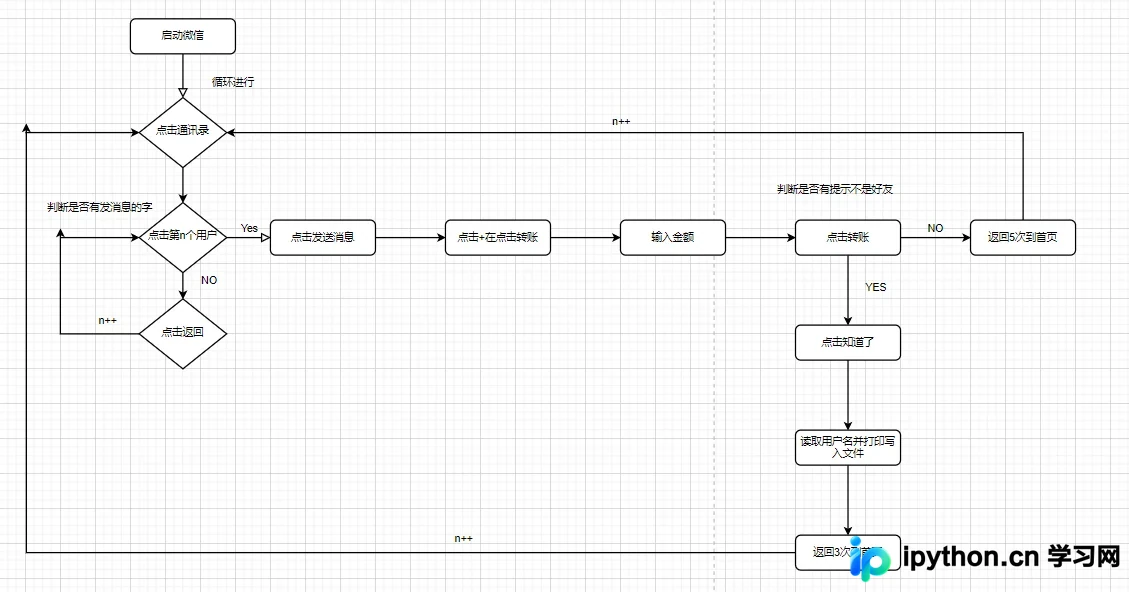
首先绘制手动操作的流程图,并据此编写自动化脚本。在初步实现后进行了调试,期间修正了多处逻辑漏洞及框架固有缺陷,最终实现了单次扫描功能。不过,仍存在个别需手动干预的情况,暂作记录,后续视情况优化。 若程序运行中出现暂停,通常是因为聊天窗口识别失败,此时可手动上滑屏幕,使程序识别下一个聊天窗口。使用前需确保微信已登录。
代码实现
from appium import webdriver
from selenium.webdriver.common.by import By
from selenium.webdriver.support.ui import WebDriverWait
from selenium.webdriver.support import expected_conditions as EC
import time
from selenium.common.exceptions import StaleElementReferenceException

# platformVersion = input('系统版本号(platformVersion): ')
# deviceName = input('设备名称(deviceName):')


desired_caps = {
    "platformName": "Android",  # 系统
    "platformVersion": '10.0',  # 系统版本号
    # "platformVersion": platformVersion,  # 系统版本号
    "deviceName": 'b68548ed',  # 设备名
    # "deviceName": deviceName,  # 设备名
    "appPackage": "com.tencent.mm",  # 包名
    "appActivity": ".ui.LauncherUI",  # app 启动时主 Activity
    'unicodeKeyboard': True,  # 使用自带输入法
    'noReset': True  # 保留 session 信息,可以避免重新登录
}


def is_element_exist(driver, by, value):
    """判断元素是否存在"""
    try:
        driver.find_element(by=by, value=value)
    except Exception as e:
        return False
    else:
        return True


def break_key(n):
    """点击返回按钮"""
    for i in range(n):
        el1 =  wait.until(EC.element_to_be_clickable((By.ACCESSIBILITY_ID,"返回")))
        el1.click()

def swipe_up():
    """向上滑动屏幕"""
    # 获取屏幕的size
    size = driver.get_window_size()
    # 获取屏幕宽度 width
    width = size['width']
    # 获取屏幕高度 height
    height = size['height']
    x1 = width*0.5
    y1 = height*0.45
    y2 = height*0.3
    driver.swipe(x1,y1,x1,y2,3000)
    print("向上滑动")


if __name__ == '__main__':
    driver = webdriver.Remote("http://localhost:4723/wd/hub", desired_caps)
    # 设置等待
    wait = WebDriverWait(driver, 300)
    status = True
    n = 2
    count = 1
    while status:
        try:
            # 点击通讯录
            a1 = wait.until(EC.element_to_be_clickable(
                (By.XPATH, "//android.widget.FrameLayout[@content-desc=\"当前所在页面,与的聊天\"]/android.widget.FrameLayout/android.widget.LinearLayout/android.widget.FrameLayout/android.widget.FrameLayout[2]/android.view.ViewGroup/android.widget.FrameLayout[1]/android.widget.FrameLayout/android.widget.FrameLayout/android.widget.RelativeLayout/android.widget.LinearLayout/android.widget.RelativeLayout[2]/android.widget.LinearLayout/android.widget.RelativeLayout/android.widget.ImageView")))
            a1.click()
            #向上滑动
            swipe_up()
            if n < 13:
                # 进入第一个聊天窗口,公众号为1,用户元素定位从2开始,一页最多12,每滑动屏幕从新开始到12.
                g73 = wait.until(EC.element_to_be_clickable(
                    (By.XPATH, "//android.widget.FrameLayout[@content-desc='当前所在页面,与的聊天']/android.widget.FrameLayout/android.widget.LinearLayout/android.widget.FrameLayout/android.widget.FrameLayout[2]/android.view.ViewGroup/android.widget.FrameLayout[1]/android.widget.FrameLayout/android.widget.FrameLayout/com.tencent.mm.ui.mogic.WxViewPager/android.widget.FrameLayout/android.widget.LinearLayout/android.widget.FrameLayout/android.widget.ListView/android.widget.LinearLayout[%d]/android.widget.LinearLayout/android.widget.RelativeLayout/android.widget.LinearLayout/android.view.View"%(n))))
                g73.click()
                print("进入了第%d个好友聊天窗口"%(count))
                count += 1
            else:
                n -= 1
                g73 = wait.until(EC.element_to_be_clickable(
                    (By.XPATH, "//android.widget.FrameLayout[@content-desc='当前所在页面,与的聊天']/android.widget.FrameLayout/android.widget.LinearLayout/android.widget.FrameLayout/android.widget.FrameLayout[2]/android.view.ViewGroup/android.widget.FrameLayout[1]/android.widget.FrameLayout/android.widget.FrameLayout/com.tencent.mm.ui.mogic.WxViewPager/android.widget.FrameLayout/android.widget.LinearLayout/android.widget.FrameLayout/android.widget.ListView/android.widget.LinearLayout[%d]/android.widget.LinearLayout/android.widget.RelativeLayout/android.widget.LinearLayout/android.view.View"%(n))))
                g73.click()
                print("进入了第%d个好友聊天窗口"%(count))
                count += 1
            # 判断聊天窗是否有发送消息的元素
            is_weichat = is_element_exist(driver, "id", "com.tencent.mm:id/ijq")
            if is_weichat == True:
                while True:
            #     # 有发消息则点击
                    wait.until(EC.element_to_be_clickable(
                    (By.ID, "com.tencent.mm:id/ijq"))).click()
                    print("点击了发消息")
                    #点击+号
                    is_jia = is_element_exist(driver, 'id', 'com.tencent.mm:id/ay7')
                    #判断是否有加号
                    if is_jia == True:
                        el4 = wait.until(EC.element_to_be_clickable((By.ID, "com.tencent.mm:id/ay7")))
                        el4.click()
                        print('点击+号')
                        #判断是否为转账
                        is_zhuanzhang = wait.until(EC.element_to_be_clickable((By.XPATH,"//android.widget.FrameLayout/android.widget.LinearLayout/android.widget.FrameLayout/android.view.ViewGroup/android.widget.FrameLayout[1]/android.widget.LinearLayout/android.widget.FrameLayout/android.widget.LinearLayout/android.widget.FrameLayout/android.widget.LinearLayout/android.widget.FrameLayout[2]/android.widget.RelativeLayout/android.widget.LinearLayout/android.widget.FrameLayout/android.widget.LinearLayout/android.widget.LinearLayout/android.widget.LinearLayout/android.view.ViewGroup/android.widget.GridView/android.widget.LinearLayout[6]/android.widget.FrameLayout/android.widget.LinearLayout/android.widget.TextView")))
                        if is_zhuanzhang.text == "转账":
                        # is_zhuanzhang = is_element_exist(driver, 'xpath', '//android.widget.FrameLayout/android.widget.LinearLayout/android.widget.FrameLayout/android.view.ViewGroup/android.widget.FrameLayout[1]/android.widget.LinearLayout/android.widget.FrameLayout/android.widget.LinearLayout/android.widget.FrameLayout/android.widget.LinearLayout/android.widget.FrameLayout[2]/android.widget.RelativeLayout/android.widget.LinearLayout/android.widget.FrameLayout/android.widget.LinearLayout/android.widget.LinearLayout/android.widget.LinearLayout/android.view.ViewGroup/android.widget.GridView/android.widget.LinearLayout[6]/android.widget.FrameLayout/android.widget.LinearLayout/android.widget.TextView')
                        # if is_zhuanzhang == True:
                            #点击转账
                            el5 =  wait.until(EC.element_to_be_clickable((By.XPATH,"//android.widget.FrameLayout/android.widget.LinearLayout/android.widget.FrameLayout/android.view.ViewGroup/android.widget.FrameLayout[1]/android.widget.LinearLayout/android.widget.FrameLayout/android.widget.LinearLayout/android.widget.FrameLayout/android.widget.LinearLayout/android.widget.FrameLayout[2]/android.widget.RelativeLayout/android.widget.LinearLayout/android.widget.FrameLayout/android.widget.LinearLayout/android.widget.LinearLayout/android.widget.LinearLayout/android.view.ViewGroup/android.widget.GridView/android.widget.LinearLayout[6]/android.widget.FrameLayout/android.widget.LinearLayout/android.widget.RelativeLayout/android.widget.ImageView[2]")))
                            el5.click()
                            print('点击转账')
                            #输入金额0.01
                            el6 = wait.until(EC.element_to_be_clickable((By.ID,"com.tencent.mm:id/jf4")))
                            el6.send_keys("0.01")
                            print('输入金额')
                            #点击确认转账
                            el7 =  wait.until(EC.element_to_be_clickable((By.ID,"com.tencent.mm:id/e6c")))
                            el7.click()
                            print('点击确认转账')
                            time.sleep(2)
                            #判断是否有知道了
                            is_not_friend = is_element_exist(driver,'id','com.tencent.mm:id/ffp')
                            if is_not_friend == True:
                            #点击知道了
                                el8 =  wait.until(EC.element_to_be_clickable((By.ID,"com.tencent.mm:id/ffp")))
                                el8.click()
                                print('点击知道了')
                                #获取用户名称并打印
                                el9 =  wait.until(EC.element_to_be_clickable((By.ID,"com.tencent.mm:id/h2k")))
                                print('不是好友的微信名称为:',el9.text)
                                with open('weixin.txt','a+')as f:
                                    f.write('不是好友的微信名称:' + el9.text + '\n')
                                driver.keyevent(4)
                                driver.keyevent(4)
                                driver.keyevent(4)
                                driver.keyevent(4)
                                print('返回')
                                n += 1
                                break
                            else:
                                #没有知道则返回
                                driver.keyevent(4)
                                break_key(2)
                                n += 1
                                print('返回')
                                break
                        else:
                            #没有转账则返回到首页
                            driver.keyevent(4)
                            driver.keyevent(4)
                            print('返回')
                            n += 1
                            break

                    else:
                        #没有+号则返回到首页
                        driver.keyevent(4)
                        driver.keyevent(4)
                        print('返回')
                        n += 1
                        break
        except StaleElementReferenceException:
            print('捕获StaleElementReferenceException异常')
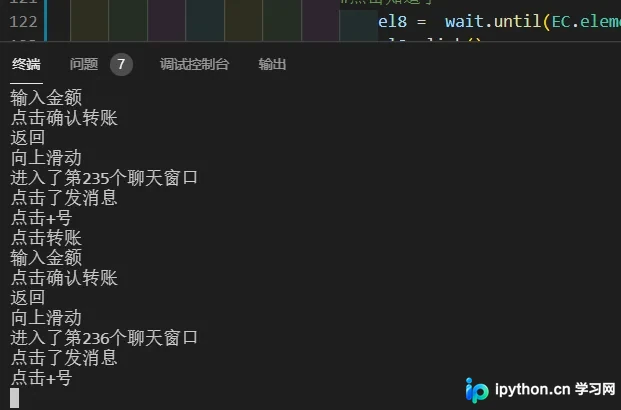
当前已扫描超过200位好友,过程中可能需要手动辅助上滑操作。
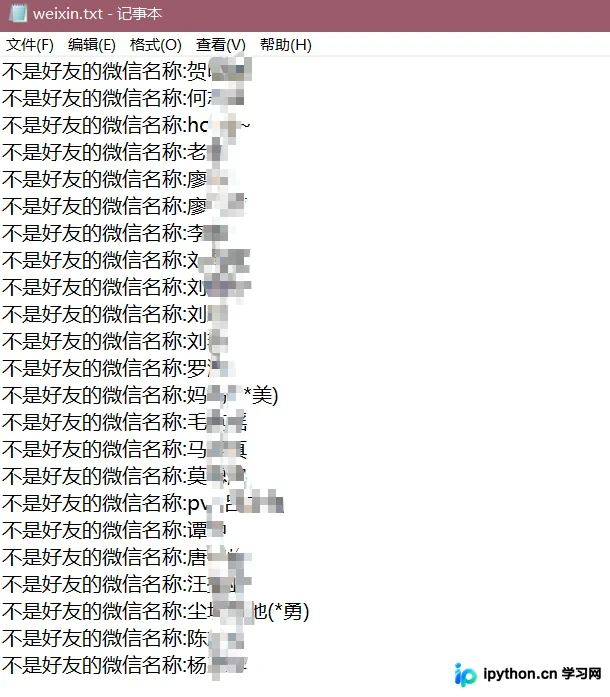
检测结果显示,非好友名单将保存为当前目录下的txt文件。
运行过程中偶尔出现异常,具体原因尚不明确。

总体而言,主要功能已基本实现,细节问题将在后续视情况优化。
本文介绍了利用Python自动扫描微信非好友名单的方法,更多Python相关技巧请查阅本站往期文章或继续浏览后续内容,感谢支持!
免责声明:本文内容仅供参考,不代表本站观点。转载或引用请注明出处。









