

Python文件读写与字符串处理常用模块解析

发布时间:2026-10-15| 6人浏览过
本文详解Python中文件流的读写操作,涵盖使用try-except进行异常捕获、while循环检测文件末尾以及for循环遍历行的多种读取方式。同时深入解析字符串处理模块,包括strip()去除首尾字符、replace()替换指定子串及re.sub()结合正则表达式批量删除字符的实用技巧,帮助开发者高效处理文本数据。
文件流的读写是Python编程中的基础操作,涉及对文本文件的打开、读取、写入及关闭等完整生命周期管理。
在读取保存为数组格式的txt文件时,通常需要将文件内容解析为列表或数组结构以便后续处理。
为了确保程序健壮性,应使用try语句捕获文件打开或读取时的潜在异常,并通过while循环检测文件是否到达末尾来持续读取内容。
file_to_read = raw_input("Enter file name of tests (empty string to end program):")
try:
    infile = open(file_to_read, 'r')
    while file_to_read != " ":
        file_to_write = raw_input("Enter output file name (.csv will be appended to it):")
        file_to_write = file_to_write + ".csv"
        outfile = open(file_to_write, "w")
        readings = (infile.readline())
        print readings
        while readings != 0:
            global count
            readings = int(readings)
            minimum = (infile.readline())
            maximum = (infile.readline())
利用for循环遍历文件对象可直接逐行读取,这是一种简洁且高效的一次性读取与输入处理方式。
上述调用程序所读取的数据具体格式如下所示,通常包含特定的分隔符或结构。
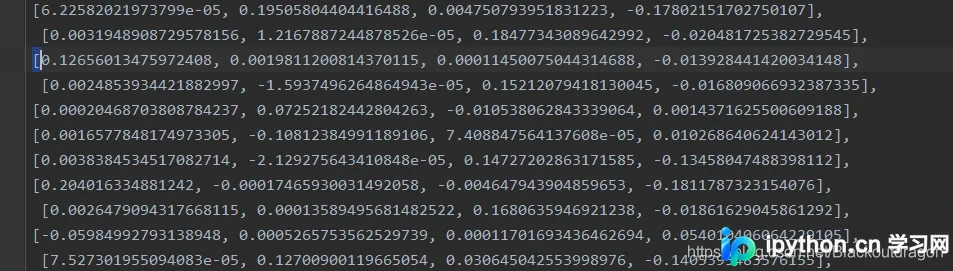
result = list()
    with open('../test/parameter.txt') as  f:
        for line in f.readlines():
            temp = list()
            # 逐个遍历对应每一行元素,将之转为对应的数据
            b = line.strip(",][").split(',')
            if(len(b) >= 5):
                b.pop()
            for a in b:
                a = a.replace('[','').replace(']','')
                temp.append(float(a))
            result.append(temp)
            #print("中途打印的temp是",temp)
            #print("加入到result中的结果是",result)
在字符串处理中,删除str中的特定字符是常见需求,可通过多种方法实现。
使用strip()函数可以删除字符串首尾指定的多余字符,若未指定参数则默认去除空白字符。
# 删除字符串中多余字符
def string_remove():
   str1 = ' abc     \n'
   print str1.strip()   # abc

   str2 = '----abcdf++++'
   print str2.strip('-+')  # abcdf
replace函数用于删除或替换字符串中某一个特定的所有子串,通过指定替换目标和新字符串(或空字符串)来实现。
ss = 'old old string'
ret = ss.replace('old', 'new', 1)
print(ret)
sub函数结合正则表达式可同时删除多个符合特定模式的字符串,提供更灵活的批量处理方案。
str2 = '\nabc\nwrt22\t666\t'  # 删除字符串中的所有\n,\t
import re
print(re.sub('[\n\t]','',str2))   # abcwrt22666
以上就是关于Python常用编程模块中文件读写与字符串处理的详细内容,更多关于Python编程模块的资料请关注本站其它相关文章!
免责声明:本文内容仅供参考,不代表本站观点。转载或引用请注明出处。









