

Python调用百度AI接口实现人脸对比的完整流程

发布时间:2026-10-14| 5人浏览过
本文详细介绍如何在Python中调用百度智能云的人脸对比接口。内容涵盖注册账号获取凭证、安装baidu-aip库、编写API调用代码以及结合OpenCV实现实时摄像头人脸比对。通过完整示例代码,帮助开发者快速掌握人脸相似度检测的实现方法。
注册百度云账号
首先需要注册百度智能云账号,并提交相关应用申请。
在控制台创建应用,获取对应的AppID、API Key以及Secret Key。
安装baidu python api
参考人脸对比 API 文档进行开发。
pip install baidu-aip
具体调用方式如下:
import base64
from aip import AipFace

APP_ID = '你的 App ID'
API_KEY = '你的 Api Key'
SECRET_KEY = '你的 Secret Key'

client = AipFace(APP_ID, API_KEY, SECRET_KEY)

result = client.match([
  {
   'image': str(base64.b64encode(open('D:/chenjy/1.png', 'rb').read()), 'utf-8'),
   'image_type': 'BASE64',
  },
  {
   'image': str(base64.b64encode(open('D:/chenjy/2.png', 'rb').read()), 'utf-8'),
   'image_type': 'BASE64',
  }
 ])

print(result)
接口返回的数据结构如下:
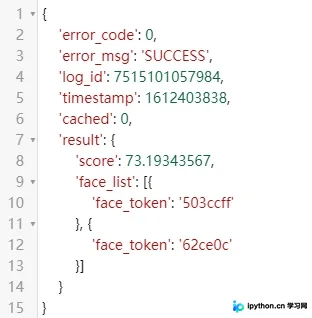
对返回的主要参数进行说明:
| 参数名 | 必选 | 类型 | 说明 |
|---|---|---|---|
| score | 是 | float | 人脸相似度得分,推荐阈值80分 |
| face_list | 是 | array | 人脸信息列表 |
| face_token | 是 | string | 人脸的唯一标志 |
调用摄像头
import cv2

cap = cv2.VideoCapture(0) # 打开摄像头

while True:
 ret, frame = cap.read()
 frame = cv2.flip(frame, 1)

 cv2.imshow('window', frame)
 cv2.imwrite('D:/chenjy/2.png', frame) # 保存路径

 cv2.waitKey(2000)

cap.release()
cv2.destroyAllWindows()
完整的测试程序代码如下:
import cv2
import base64
from aip import AipFace

APP_ID = '你的 App ID'
API_KEY = '你的 Api Key'
SECRET_KEY = '你的 Secret Key'


client = AipFace(APP_ID, API_KEY, SECRET_KEY)


def get_result():
 result = client.match([
  {
   'image': str(base64.b64encode(open('D:/chenjy/1.png', 'rb').read()), 'utf-8'),
   'image_type': 'BASE64',
  },
  {
   'image': str(base64.b64encode(open('D:/chenjy/2.png', 'rb').read()), 'utf-8'),
   'image_type': 'BASE64',
  }
 ])

 if result['error_msg'] == 'SUCCESS':
  score = result['result']['score']
  print(result)
  print('相似度:'+str(score))
 else:
  print('服务器错误')


cap = cv2.VideoCapture(0) # 打开摄像头

while True:
 ret, frame = cap.read()
 frame = cv2.flip(frame, 1)

 cv2.imshow('window', frame)
 cv2.imwrite('D:/chenjy/2.png', frame) # 保存路径

 cv2.waitKey(2000)

 get_result()

cap.release()
cv2.destroyAllWindows()
运行结果如下:
注意:展示的照片已进行模糊处理。
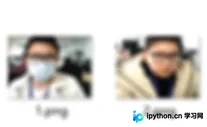
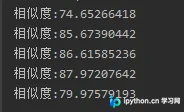
以上就是python 使用百度AI接口进行人脸对比的步骤的详细内容,更多关于python 人脸对比的资料请关注本站其它相关文章!
免责声明:本文内容仅供参考,不代表本站观点。转载或引用请注明出处。









