

matplotlib bar()实现百分比堆积柱状图

发布时间:2026-10-14| 2人浏览过
本文介绍如何使用matplotlib的bar函数绘制百分比堆积柱状图。核心思路是先计算每组数据总和,再将各部分数值转换为百分比。文章提供了基于原生Python列表和numpy数组两种实现方案,对比了手动构造与批量计算的优劣,适用于不同规模数据的可视化需求。
利用matplotlib库绘制百分比堆积柱状图的基本逻辑与常规堆积柱状图一致,区别在于bottom参数累加的是比例而非原始数值。因此,绘图前需先计算每一组数据的总和,随后将各分项数值除以总和以获取对应的百分比值。
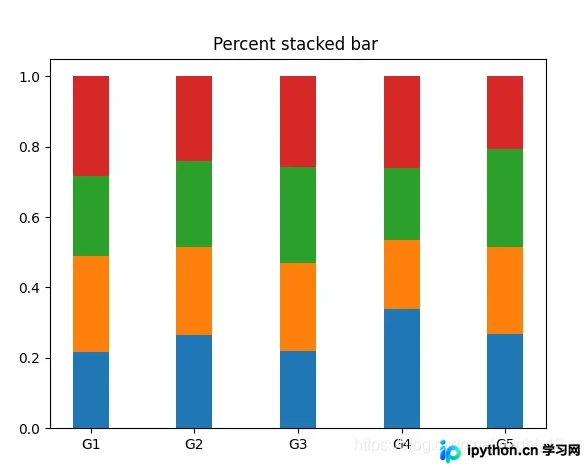
未使用numpy版本
该方法适用于数据量较小的场景,但数据结构需要手动构建。
import matplotlib.pyplot as plt

labels = ['G1', 'G2', 'G3', 'G4', 'G5']
first = [20, 34, 30, 35, 27]
second = [25, 32, 34, 20, 25]
third = [21, 31, 37, 21, 28]
fourth = [26, 31, 35, 27, 21]
data = [first, second, third, fourth]

x = range(len(labels))
width = 0.35

# 将bottom_y元素都初始化为0
bottom_y = [0] * len(labels)
# 计算每组柱子的总和,为计算百分比做准备
sums = [sum(i) for i in zip(first, second, third, fourth)]
for i in data:
 # 计算每个柱子的高度,即百分比
 y = [a/b for a, b in zip(i, sums)]
 plt.bar(x, y, width, bottom=bottom_y)
 # 计算bottom参数的位置
 bottom_y = [(a+b) for a, b in zip(y, bottom_y)]

plt.xticks(x, labels)
plt.title('Percent stacked bar ')
plt.show()
使用numpy版本
前一版本的局限性在于需手动构造数据结构且计算过程相对繁琐。 引入numpy库可更高效地处理规模较大且已存储于文件中的数据,使计算流程更为简便。
import numpy as np
import matplotlib.pyplot as plt

labels = ['G1', 'G2', 'G3', 'G4', 'G5']
first = [20, 34, 30, 35, 27]
second = [25, 32, 34, 20, 25]
third = [21, 31, 37, 21, 28]
fourth = [26, 31, 35, 27, 21]
data = [first, second, third, fourth]

x = range(len(labels))
width = 0.35

# 将bottom_y元素都初始化为0
bottom_y = np.zeros(len(labels))
data = np.array(data)
# 按列计算计算每组柱子的总和,为计算百分比做准备
sums = np.sum(data, axis=0)
for i in data:
 # 计算每个柱子的高度,即百分比
 y = i / sums
 plt.bar(x, y, width, bottom=bottom_y)
 # 计算bottom参数的位置
 bottom_y = y + bottom_y

plt.xticks(x, labels)
plt.title('Percent stacked bar ')
plt.show()
至此,关于利用matplotlib bar()函数实现百分比堆积柱状图的讲解结束。如需了解更多matplotlib百分比堆积柱状图相关内容,建议查阅本站过往文章或继续浏览后续相关文章,感谢大家的支持!
免责声明:本文内容仅供参考,不代表本站观点。转载或引用请注明出处。









