

Python通过pybind11调用Eigen库加速矩阵运算实战指南

本文详细介绍如何在Windows环境下,利用pybind11将C++的Eigen库集成到Python项目中,以解决Python循环计算性能瓶颈。内容涵盖从环境准备、虚拟环境配置、依赖库安装到C++代码编写、Python接口定义及最终编译测试的完整步骤,帮助开发者实现高效的矩阵运算加速。
Python性能加速背景与方案概述
Python语言以其易上手著称,但在处理密集循环(如while和for循环)时,其运行速度往往难以满足高性能计算的需求。为了突破这一性能瓶颈,通常需要借助C++等编译型语言来加速核心代码。本文将简要介绍如何通过pybind11调用C++的Eigen库,从而实现Python代码的性能加速。
环境准备与依赖配置
第一步:准备系统和IDE:
Windows 10 vs2015 (用于调试c++代码) vscode (调试python代码)
第二步:python虚拟环境:
1.创建虚拟python虚拟环境: 在vscode的terminal中执行
python -m venv env2.下载 Eigen: 将Eigen解压到当前目录命名为 eigen-3.3.8 3.在vscode的terminal中激活虚拟环境:
./env/Scripts/Activate.ps1
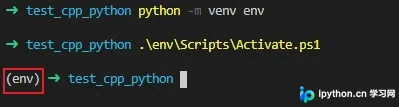
4.安装pybind11:
pip install pybind115.安装numpy==1.19.3(使用1.19.4可能会有问题)
pip install numpy==1.19.3 C++代码编写与Python接口定义
第三步:使用vs2015编写cpp_python.cpp, 并保证没有bug
#include <Eigen/Dense>
using namespace std
using namespace Eigen
MatrixXd add_mat(MatrixXd A_mat, MatrixXd B_mat)
{
  return A_mat + B_mat;
}
第四步:使用pybind11为cpp_python.cpp添加python接口
// cpp_python.cpp : 此文件包含 "main" 函数。程序执行将在此处开始并结束。
//
#include <pybind11/pybind11.h>
#include <pybind11/eigen.h>
#include<pybind11/numpy.h>
#include<fstream>
#include<iostream>
#include <Eigen/Dense>
using namespace std;
using namespace Eigen;

MatrixXd add_mat(MatrixXd A_mat, MatrixXd B_mat)
{
    return A_mat + B_mat;
}

namespace py = pybind11;
PYBIND11_MODULE(add_mat_moudle, m)
{
    m.doc() = "Matrix add";//解释说明
    m.def("mat_add_py"/*在pyhon中使用的函数名*/, &add_mat);
}
编译构建与测试验证
第五步:设置setup.py用来编译c++代码
from setuptools import setup
from setuptools import Extension

add_mat_module = Extension(name='add_mat_moudle', # 模块名称
              sources=['cpp_python.cpp'],  # 源码
              include_dirs=[r'.\eigen-3.3.8',
                    r'.\env\Scripts',   # 依赖的第三方库的头文件
                     r'.\env\Lib\site-packages\pybind11\include']
              )

setup(ext_modules=[add_mat_module])
第六步:编译测试
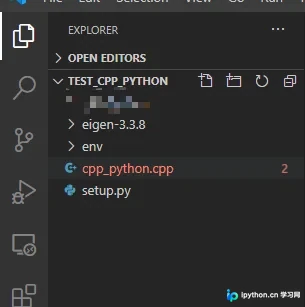
注意:我的cpp_python.cpp和setup.py是在同一个文件夹下。
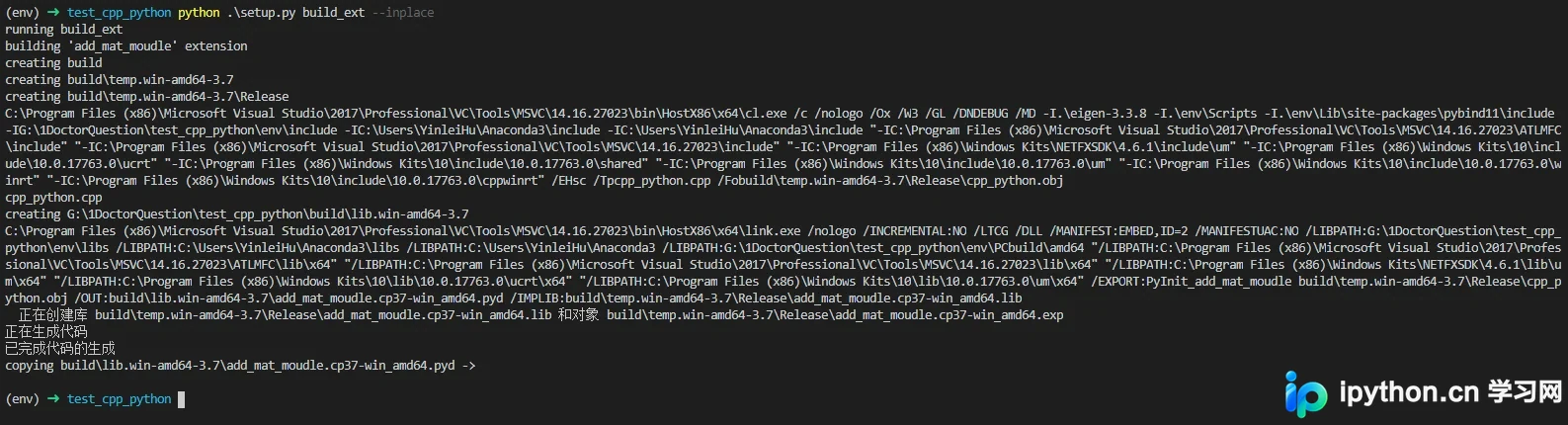
执行: "python .\setup.py build_ext --inplace"就会得下面的结果,生成.pyd文件表明我们已经编译成功。
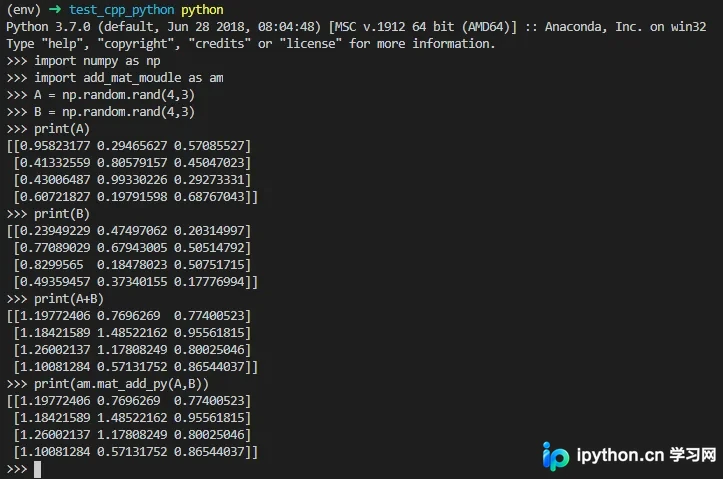
运行测试:
以上就是python 通过 pybind11 使用Eigen加速代码的步骤的详细内容,更多关于python 加速代码的资料请关注本站其它相关文章!
免责声明:本文内容仅供参考,不代表本站观点。转载或引用请注明出处。









