

Python使用Requests库爬取拉勾网招聘信息的完整实现与防封策略

发布时间:2026-10-14| 5人浏览过
本文详细解析使用Python Requests库爬取拉勾网招聘信息的完整流程。重点解决接口返回操作频繁错误的问题,通过获取并动态刷新Cookies解决反爬限制。代码包含分页请求、字段提取及CSV保存功能,每十次请求自动更新Cookie,确保数据抓取的稳定性与有效性。
抓包定位拉勾网招聘接口
首先,按F12打开浏览器开发者工具进行抓包分析,从而定位到获取招聘信息的后端接口地址。
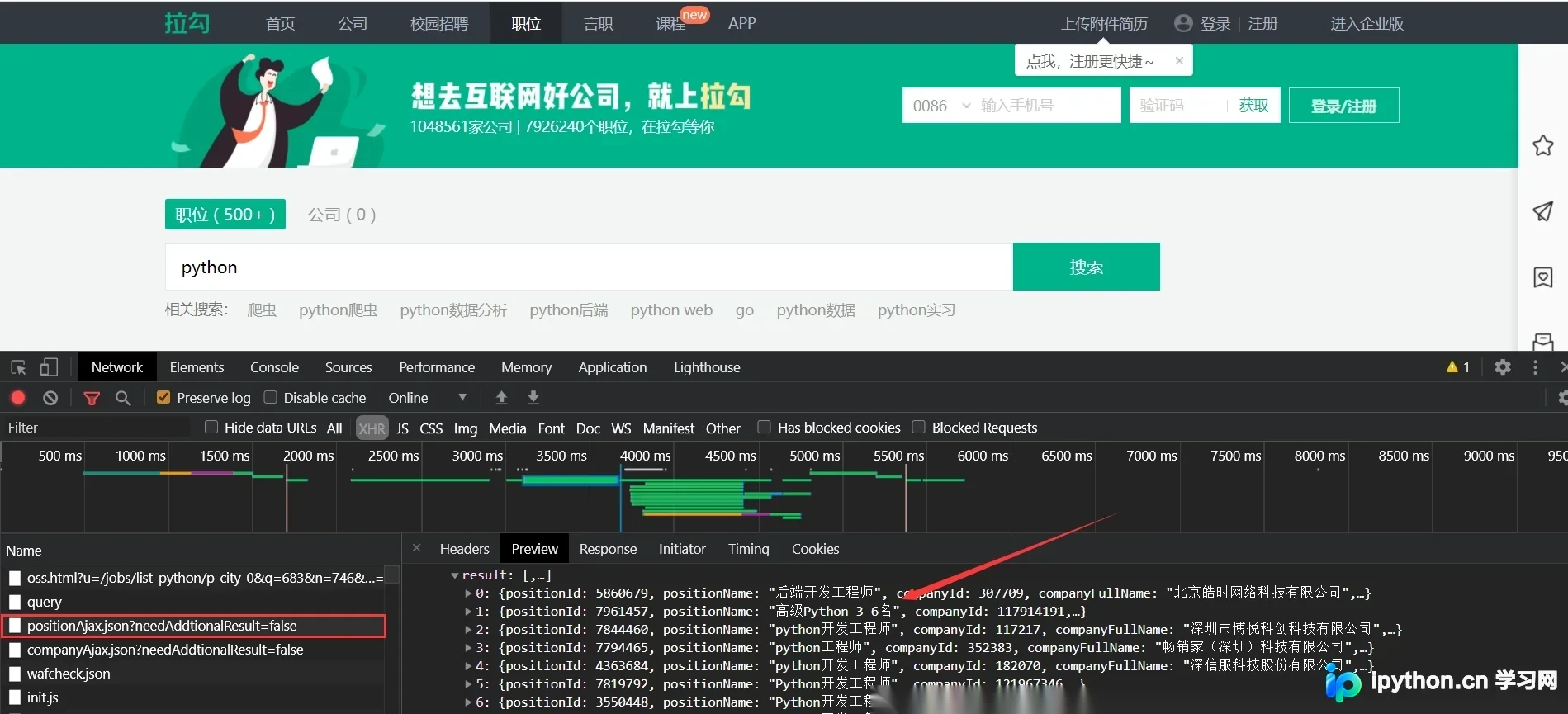
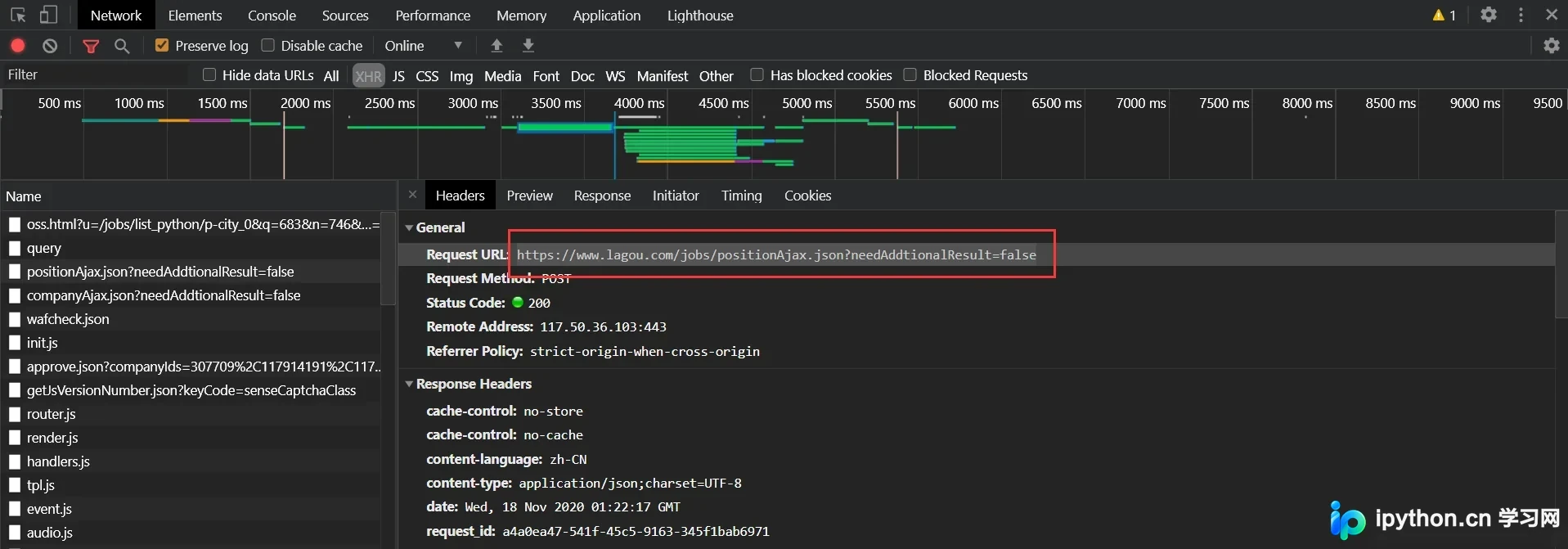
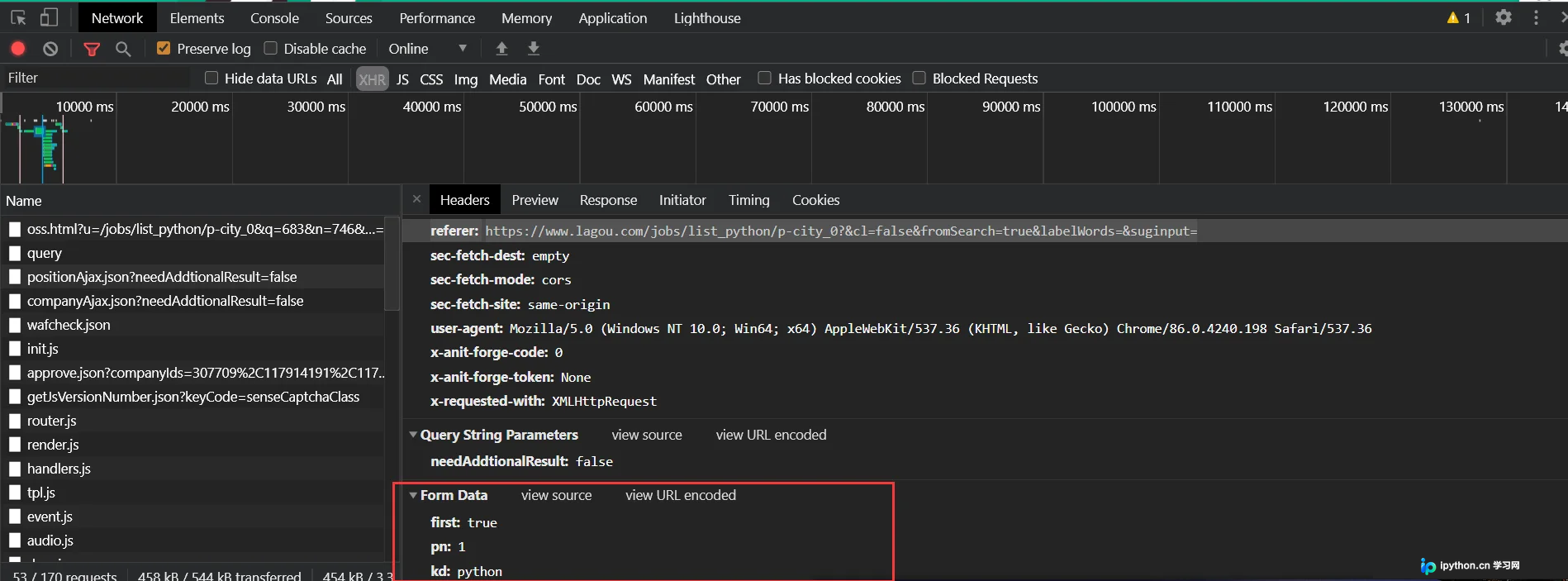
在抓包请求中,可以明确获取到接口的URL以及Form Data表单参数。其中,pn参数代表当前请求的页码,而kd参数则对应用户想要查询的职位关键字。
构建Python POST请求与问题分析
接下来,使用Python构建POST请求来尝试获取数据。初始代码中设置了包含页码和关键字的数据字典,以及包含User-Agent和Referer的Headers。
data = {
  'first': 'true',
  'pn': '1',
  'kd': 'python'
}

headers = {
  'referer': 'https://www.lagou.com/jobs/list_python/p-city_0?&cl=false&fromSearch=true&labelWords=&suginput=',
  'user-agent': 'Mozilla/5.0 (Windows NT 10.0; Win64; x64) AppleWebKit/537.36 (KHTML, like Gecko) Chrome/86.0.4240.198 Safari/537.36'
}

res = requests.post("https://www.lagou.com/jobs/positionAjax.json?needAddtionalResult=false", data=data,headers=headers)
print(res.text)
然而,执行后发现并未从接口成功获取到预期的招聘数据,请求返回结果异常。

动态Cookies处理与反爬策略
即使更换网络环境,接口依然返回“操作频繁”的错误提示。经过仔细排查,发现该接口要求请求中必须携带动态生成的Cookies,否则服务器会一直拒绝服务并返回错误信息。
data = {
  'first': 'true',
  'pn': '1',
  'kd': 'python'
}

#头部中必须有user-agent和referer不然不会返回cookies
headers = {
  'referer': 'https://www.lagou.com/jobs/list_python/p-city_0?&cl=false&fromSearch=true&labelWords=&suginput=',
  'user-agent': 'Mozilla/5.0 (Windows NT 10.0; Win64; x64) AppleWebKit/537.36 (KHTML, like Gecko) Chrome/86.0.4240.198 Safari/537.36'
}

#通过访问主页获取cookies
r1= requests.get("https://www.lagou.com/jobs/list_python/p-city_0?&cl=false&fromSearch=true&labelWords=&suginput='",headers=headers)

#再post请求中传入cookies
r2 = requests.post("https://www.lagou.com/jobs/positionAjax.json?needAddtionalResult=false", data=data,headers=headers, cookies=r2.cookies)
print(r2.text)
需要注意的是,拉勾网的反爬机制会在每请求十次接口后刷新一次Cookies。因此,完整的爬虫代码需要包含获取主页Cookies并在后续POST请求中携带该Cookies的逻辑,下面附上完整的实现代码。
完整爬虫代码实现
import json
import logging

import requests

#获取cookie
def getCookie():
  res = requests.get("https://www.lagou.com/jobs/list_python/p-city_0?&cl=false&fromSearch=true&labelWords=&suginput=",
        headers=headers)
  return res.cookies

#获取json数据
def getPage(i, cookies, kw):
  data = {
    'first': 'true',
    'pn': i,
    'kd': kw
  }
  res = requests.post("https://www.lagou.com/jobs/positionAjax.json?needAddtionalResult=false", data=data,
             headers=headers, cookies=cookies)
  return json.loads(res.text)

#合并列表
def reduceList(l):
  text = ""
  for i in l:
    text += i + " "
  return text.strip()

#提取字段并保存到文件中
def saveInCsv(f, data):
  js = data["content"]["positionResult"]["result"]
  for node in js:

    # 对空值进行处理
    district = node["district"]
    if district != None:
      district = "-" + district
    else:
      district = ""

    f.write(
      node["positionName"] + "·" + node["city"] + district + "·" + node[
        "salary"] + "·" +
      node["workYear"] + "·" + node["education"] + "·" + reduceList(node["skillLables"]) + "·" +
      node["companyShortName"] + "·" + node["companySize"] + "·" + node["positionAdvantage"] + "\n")

if __name__ == '__main__':
  #定义头部
  headers = {
    'referer': 'https://www.lagou.com/jobs/list_python/p-city_0?&cl=false&fromSearch=true&labelWords=&suginput=',
    'user-agent': 'Mozilla/5.0 (Windows NT 10.0; Win64; x64) AppleWebKit/537.36 (KHTML, like Gecko) Chrome/86.0.4240.198 Safari/537.36'
  }

  #初始化cookie
  cookies = getCookie()

  with open("file.csv", "w", encoding="utf-8") as f:
    for i in range(1, 31):
      #每十个请求重新获取cookie
      if (i % 10 == 0):
        cookies = getCookie()

      #解析字段并存储
      data = getPage(i, cookies, "python")
      saveInCsv(f, data)
至此,关于使用Python Requests库爬取拉勾网招聘信息的实现方案介绍完毕。如需了解更多相关Python爬虫技巧或拉勾网数据抓取内容,建议搜索本站历史文章或继续浏览后续教程,感谢大家的支持。
免责声明:本文内容仅供参考,不代表本站观点。转载或引用请注明出处。









