

Python根据URL地址下载文件并保存至对应目录的实现

本文介绍如何使用Python脚本根据TXT文档中的URL列表批量下载文件,并按原始目录结构自动创建文件夹进行存储。通过递归遍历子目录、读取URL列表、创建对应分类文件夹及调用urllib下载,实现自动化数据收集。代码包含断点续传逻辑,可跳过已存在文件,适用于数据集预处理场景。
引言
Python批量下载URL文件并分类存储
在编程实践中,常需处理以URL形式存储的图片等数据集。为便于后续分析,通常需要将远程资源下载至本地,并按类别分类存储。本文以GitHub上Alexander Kim提供的图片分类数据集为例,演示如何下载其提供的图片样本并按类别保存至本地目录。
运行环境要求:Python 3.6.5,Anaconda,VSCode
准备工作与数据集获取
1. 下载数据集文件
首先建立项目文件夹,从上述GitHub项目中下载raw_data文件夹,并将其保存至项目目录中。
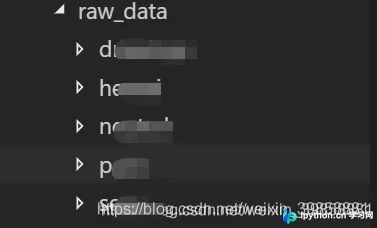
获取样本文件位置
2. 获取样本文件位置
编写get_doc_path.py,根据根目录位置,获取目录及其子目录所有数据集文件
import os


def get_file(root_path, all_files={}):
  '''
  递归函数,遍历该文档目录和子目录下的所有文件,获取其path
  '''
  files = os.listdir(root_path)
  for file in files:
    if not os.path.isdir(root_path + '/' + file):  # not a dir
      all_files[file] = root_path + '/' + file
    else: # is a dir
      get_file((root_path+'/'+file), all_files)
  return all_files


if __name__ == '__main__':
  path = './raw_data'
  print(get_file(path))
下载文件流程
3. 下载文件
3.1 读取url列表并
for filename, path in paths.items():
    print('reading file: {}'.format(filename))
    with open(path, 'r') as f:
      lines = f.readlines()
      url_list = []
      for line in lines:
        url_list.append(line.strip('\n'))
      print(url_list)
3.2 创建文件夹
foldername = "./picture_get_by_url/pic_download/{}".format(filename.split('.')[0])
if not os.path.exists(folder_path):
    print("Selected folder not exist, try to create it.")
    os.makedirs(folder_path)
3.3 下载图片
def get_pic_by_url(folder_path, lists):
  if not os.path.exists(folder_path):
    print("Selected folder not exist, try to create it.")
    os.makedirs(folder_path)
  for url in lists:
    print("Try downloading file: {}".format(url))
    filename = url.split('/')[-1]
    filepath = folder_path + '/' + filename
    if os.path.exists(filepath):
      print("File have already exist. skip")
    else:
      try:
        urllib.request.urlretrieve(url, filename=filepath)
      except Exception as e:
        print("Error occurred when downloading file, error message:")
        print(e)
完整源码与运行结果
4. 完整源码
4.1 get_doc_path.py
import os


def get_file(root_path, all_files={}):
  '''
  递归函数,遍历该文档目录和子目录下的所有文件,获取其path
  '''
  files = os.listdir(root_path)
  for file in files:
    if not os.path.isdir(root_path + '/' + file):  # not a dir
      all_files[file] = root_path + '/' + file
    else: # is a dir
      get_file((root_path+'/'+file), all_files)
  return all_files


if __name__ == '__main__':
  path = './raw_data'
  print(get_file(path))
4.2 get_pic.py
import get_doc_path
import os
import urllib.request


def get_pic_by_url(folder_path, lists):
  if not os.path.exists(folder_path):
    print("Selected folder not exist, try to create it.")
    os.makedirs(folder_path)
  for url in lists:
    print("Try downloading file: {}".format(url))
    filename = url.split('/')[-1]
    filepath = folder_path + '/' + filename
    if os.path.exists(filepath):
      print("File have already exist. skip")
    else:
      try:
        urllib.request.urlretrieve(url, filename=filepath)
      except Exception as e:
        print("Error occurred when downloading file, error message:")
        print(e)


if __name__ == "__main__":
  root_path = './picture_get_by_url/raw_data'
  paths = get_doc_path.get_file(root_path)
  print(paths)
  for filename, path in paths.items():
    print('reading file: {}'.format(filename))
    with open(path, 'r') as f:
      lines = f.readlines()
      url_list = []
      for line in lines:
        url_list.append(line.strip('\n'))
      foldername = "./picture_get_by_url/pic_download/{}".format(filename.split('.')[0])
      get_pic_by_url(foldername, url_list)
4.3 运行结果
执行get_pic.py
当程序意外停止或再次执行时,程序会自动跳过文件夹中已下载的文件,继续下载未下载的内容
{‘urls_drawings.txt': ‘./picture_get_by_url/raw_data/drawings/urls_drawings.txt', ‘urls_hentai.txt': ‘./picture_get_by_url/raw_data/hentai/urls_hentai.txt', ‘urls_neutral.txt': ‘./picture_get_by_url/raw_data/neutral/urls_neutral.txt', ‘urls_porn.txt': ‘./picture_get_by_url/raw_data/porn/urls_porn.txt', ‘urls_sexy.txt': ‘./picture_get_by_url/raw_data/sexy/urls_sexy.txt'} reading file: urls_drawings.txt Try downloading file: http://41.media.tumblr.com/xxxxxx.jpg Try downloading file: http://41.media.tumblr.com/xxxxxx.jpg Try downloading file: http://ak1.polyvoreimg.com/cgi/img-thing/size/l/tid/xxxxxx.jpg Error occurred when downloading file, error message: HTTP Error 502: No data received from server or forwarder Try downloading file: http://akicocotte.weblike.jp/gaugau/xxxxxx.jpg Try downloading file: http://animewriter.files.wordpress.com/2009/01/nagisa-xxxxxx-xxxxxx.jpg Try downloading file: http://cdn.awwni.me/xxxxxx.jpg Try downloading file: http://cdn.awwni.me/xxxxxx.jpg Try downloading file: http://cdn.awwni.me/xxxxxx.jpg Try downloading file: http://cdn.awwni.me/xxxxxx.jpg Try downloading file: http://cdn.awwni.me/xxxxxx.jpg Try downloading file: http://cdn.awwni.me/xxxxxx.jpg Try downloading file: http://cdn.awwni.me/xxxxxx.jpg Try downloading file: http://cdn.awwni.me/xxxxxx.jpg Try downloading file: http://cdn.awwni.me/xxxxxx.jpg Try downloading file: http://cdn.awwni.me/xxxxxx.jpg Try downloading file: http://cdn.awwni.me/xxxxxx.jpg Try downloading file: http://cdn.awwni.me/xxxxxx.jpg Try downloading file: http://cdn.awwni.me/xxxxxx.jpg Try downloading file: http://cdn.awwni.me/xxxxxx.jpg
后注:由于样本数据集内容的问题,上述地址以xxxxx代替具体地址,案例项目也已经失效,但是方法仍然可以借鉴
20.9.23更新:数据集地址:https://github.com/ZQ-Qi/nsfw_data_scrapper,单纯为了学习和实践本文代码的可以下载该数据集进行尝试
到此这篇关于Python根据URL地址下载文件并保存至对应目录的实现的文章就介绍到这了,更多相关Python URL下载文件内容请搜索本站以前的文章或继续浏览下面的相关文章希望大家以后多多支持本站!
免责声明:本文内容仅供参考,不代表本站观点。转载或引用请注明出处。









